Amazon Timestream Integration Guide
Connect to Amazon Timestream for LiveAnalytics to write telemetry from a pipeline and query it back with Timestream SQL. This guide covers connection setup, function configuration, and pipeline integration.
Overview
Timestream for LiveAnalytics is a serverless time-series database. Recent data sits in a fast memory store and ages automatically into cheaper magnetic storage, so you size retention rather than servers. The connector provides:
- Writes — single-measure and multi-measure records with dimensions, batched to the 100-record
WriteRecordsquota - Queries — Timestream SQL, which adds interpolation, binning and per-series latest-value functions on top of standard SQL
- Discovery — list databases, list tables, and read a table's retention windows
- Flexible authentication — IAM role, instance profile or IRSA through the AWS SDK default credential chain, or static access keys
- Endpoint override — point both APIs at a VPC endpoint or a local emulator
This connector targets Timestream for LiveAnalytics (the original Amazon Timestream), which speaks the WriteRecords and Query APIs. It does not target Timestream for InfluxDB; for that, use the InfluxDB connector.
Connection Configuration
Creating an Amazon Timestream Connection
Navigate to Connections → New Connection → Amazon Timestream and configure the following:
1. Profile Information
| Field | Default | Description |
|---|---|---|
| Profile Name | - | A descriptive name for this connection profile (required, max 100 characters) |
| Description | - | Optional description for this Timestream connection |
2. Connection
| Field | Default | Description |
|---|---|---|
| AWS Region | us-east-1 | The AWS region hosting the Timestream database, e.g. eu-central-1 (required) |
| Default Database | - | Database used by functions that do not name one. Optional if every function sets its own |
| Default Table | - | Table used by functions that do not name one. Optional if every function sets its own |
3. Authentication
| Field | Default | Description |
|---|---|---|
| Access Key ID | - | AWS Access Key ID. Masked on edit. Leave empty to use the AWS SDK default credential chain (env vars, shared config, IAM role, IRSA) |
| Secret Access Key | - | AWS Secret Access Key. Masked on edit; leave empty to use the default credential chain |
| Session Token | - | Session token for temporary STS credentials (optional). Masked on edit |
On EC2/ECS/EKS, leave the key fields empty and attach an IAM role (or IRSA) — the connector picks up credentials from the AWS SDK default chain, so no secrets are stored in MaestroHub. Use static access keys only when a role is not available.
The identity needs timestream:DescribeEndpoints and timestream:ListDatabases (Test Connection uses the latter), plus timestream:WriteRecords for writes and timestream:Select for queries. timestream:ListTables and timestream:DescribeTable cover the discovery functions.
Access Key ID and Secret Access Key must be filled in together. Filling only one is rejected at save time, because the connection would silently fall back to the default credential chain and run as an identity you did not choose.
4. Advanced
| Field | Default | Description |
|---|---|---|
| Request Timeout | 1m | How long a single Timestream API call may take before it is abandoned (1s–1h) |
| Max Result Rows | 1000 | Maximum rows a query returns before truncating (1–100000) |
| Custom Endpoint | - | Endpoint URL for both the ingest and query APIs. Leave empty for AWS |
Timestream normally asks DescribeEndpoints which cell to talk to and routes each call there. Setting a Custom Endpoint disables that discovery so every request goes to the URL you gave — which is exactly what a VPC endpoint or a local emulator needs, and exactly wrong against a plain AWS account. Leave the field empty unless you are pointing at a specific endpoint on purpose.
- Required fields: Profile Name and AWS Region. Everything else has a default or falls back to the credential chain.
- Database and table: a write or describe needs both. Set them on the connection, on the function, or split them — the function value wins.
- Row cap: result sets larger than Max Result Rows are truncated, and the call reports
_metadata.truncated: true. - Security: the access key, secret key and session token are encrypted at rest and masked on edit. Leave a secret empty to keep the stored value.
Function Builder
Creating Timestream Functions
Once a connection exists, create reusable write, query and discovery functions:
- Open the connection and go to its Functions tab → New Function
- Choose a Timestream function type
- Configure the function parameters
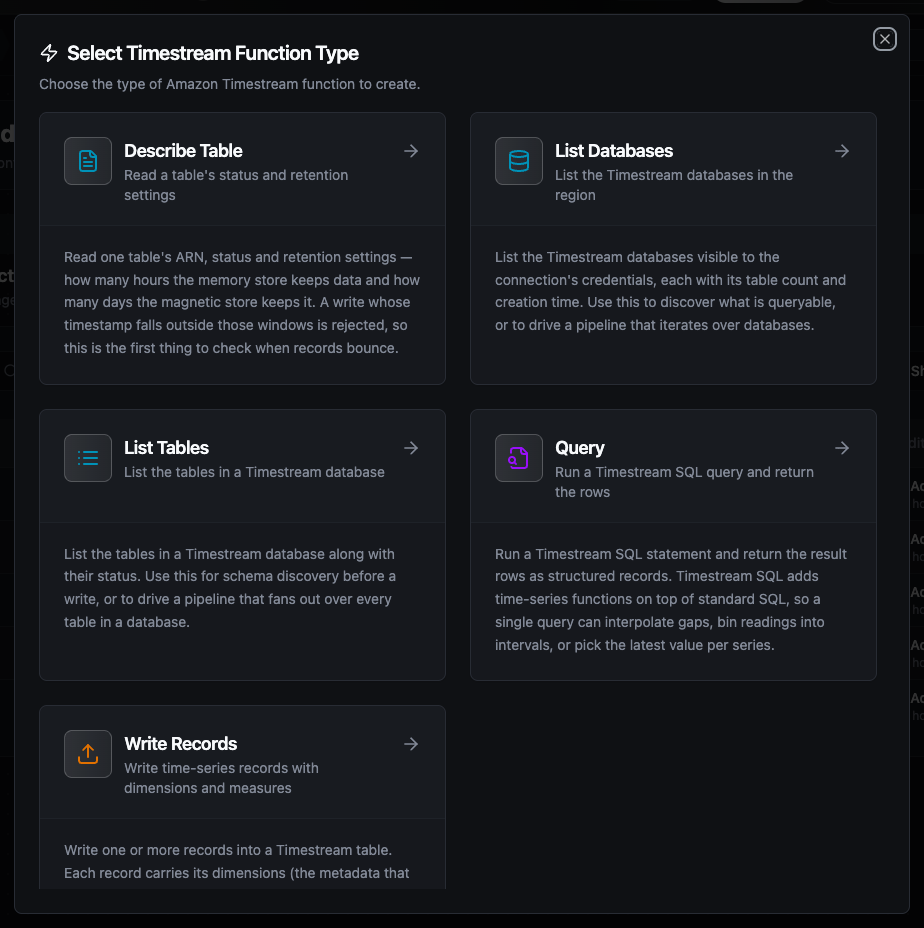
Choose from Write Records, Query, List Databases, List Tables and Describe Table function types
Write Records Function
Purpose: write one or more records into a Timestream table. Each record carries its dimensions (the metadata that identifies the series), one or more measures, and a timestamp.
Configuration Fields
| Field | Type | Required | Default | Description |
|---|---|---|---|---|
| Records | JSON | Yes | - | A record object or an array of them. Supports ((param)) templating — ((records)) takes the whole upstream batch |
| Database | String | No | connection default | Override the connection's default database |
| Table | String | No | connection default | Override the connection's default table |
| Multi-measure Name | String | No | metrics | Measure name given to multi-measure records that do not set their own |
| Time Unit | Enum | No | MILLISECONDS | Unit for numeric timestamps: MILLISECONDS, SECONDS, MICROSECONDS, NANOSECONDS |
| Common Dimensions | JSON | No | - | Dimensions merged into every record in the batch |
| Timeout | Duration | No | 30m | Bound on this single operation |
Record shape
A record is single-measure or multi-measure. Single-measure writes one value per row:
{
  "dimensions": { "machine_id": "press-02", "site": "ankara" },
  "measureName": "temperature",
  "measureValue": 42.5,
  "time": "2026-03-01T10:00:00Z"
}
Multi-measure writes several values in one row, which is cheaper to store and faster to query:
{
  "dimensions": { "machine_id": "press-02" },
  "measures": { "temperature": 42.5, "rpm": 1200, "state": "running" },
  "time": "2026-03-01T10:00:00Z"
}
Rules the connector applies:
timeis optional. An RFC 3339 string or a real timestamp is exact and sent in milliseconds; a bare number is interpreted in the op's Time Unit. A record with notimeis stamped with the moment the write was produced — the same on every store-and-forward replay.- Measure types are inferred. A JSON number becomes
DOUBLE, a stringVARCHAR, a booleanBOOLEAN. Whole numbers stayDOUBLEon purpose: a column's type is fixed by its first write, so a series that starts at0and later reads0.5would be rejected forever if the first row had chosenBIGINT. - Dimensions are strings. Numbers and booleans are rendered; a
nulldimension is dropped rather than written as text. snake_casealso works.measure_name,measure_value,tags,fieldsandtimestampare read as aliases, so a row from a SQL or MQTT node usually needs no reshaping.- Batching is automatic.
WriteRecordsaccepts at most 100 records per call, so a larger payload is split._metadata.batchesreports how many calls went out.
Example Configuration
{
  "records": "((records))",
  "database": "ot_telemetry",
  "table": "readings",
  "commonDimensions": { "site": "ankara" }
}
Response Format
{
  "recordsWritten": 120,
  "memoryStore": 118,
  "magneticStore": 2,
  "batches": 2
}
Timestream refuses a record whose timestamp falls outside the table's memory-store or magnetic-store retention, whose type disagrees with an established column, or that duplicates an existing record at the same version. Retrying sends the identical rows and gets the identical refusal, so the connector classifies RejectedRecordsException as permanent and the batch goes to the dead-letter queue rather than burning the retry budget. The error names the offending record index and reason; Describe Table shows the retention windows.
If a later batch fails after earlier ones succeeded, the earlier records are already durable — there is no rollback. The error says how far the write got (batch 2 of 3, 100 already written) and _metadata.recordsWritten carries the same number, so a replay can skip what landed.
Query Function
Purpose: run a Timestream SQL statement and return the result rows as structured records.
Configuration Fields
| Field | Type | Required | Default | Description |
|---|---|---|---|---|
| SQL Query | String | Yes | - | Timestream SQL statement. Supports ((param)) templating |
| Max Rows | Number | No | connection default | Maximum rows to return (1–100000) |
| Timeout | Duration | No | 30m | Bound on this single operation |
Table names are quoted as "database"."table".
Example Configuration
{
  "sql": "SELECT BIN(time, 5m) AS t, AVG(measure_value::double) AS avg_temp FROM \"ot_telemetry\".\"readings\" WHERE machine_id = '((machine))' AND time > ago(1h) GROUP BY BIN(time, 5m) ORDER BY t",
  "maxRows": 500
}
Response Format
{
  "rows": [
    { "t": "2026-03-01 10:00:00.000000000", "avg_temp": "42.7" }
  ],
  "columns": [
    { "name": "t", "type": "TIMESTAMP" },
    { "name": "avg_temp", "type": "DOUBLE" }
  ],
  "rowCount": 1
}
Timestream returns scalars as strings with no type tag on the value itself, so the rows carry strings and columns carries the type. Arrays, rows and time-series columns unwrap into nested JSON.
List Databases Function
Purpose: list the Timestream databases visible to the connection's credentials.
Takes no configuration beyond an optional timeout.
Response Format
{
  "databases": [
    { "name": "ot_telemetry", "tableCount": 4 }
  ],
  "count": 1
}
List Tables Function
Purpose: list the tables in a Timestream database along with their status.
| Field | Type | Required | Default | Description |
|---|---|---|---|---|
| Database | String | No | connection default | Database whose tables to list. Supports ((param)) templating |
| Timeout | Duration | No | 30m | Bound on this single operation |
Response Format
{
  "tables": [
    { "name": "readings", "status": "ACTIVE" }
  ],
  "count": 1
}
Describe Table Function
Purpose: read one table's status and retention settings. This is the first thing to check when writes are being rejected.
| Field | Type | Required | Default | Description |
|---|---|---|---|---|
| Database | String | No | connection default | Database holding the table. Supports ((param)) templating |
| Table | String | No | connection default | Table to describe. Supports ((param)) templating |
| Timeout | Duration | No | 30m | Bound on this single operation |
Response Format
{
  "name": "readings",
  "status": "ACTIVE",
  "arn": "arn:aws:timestream:eu-central-1:123456789012:database/ot_telemetry/table/readings",
  "memoryStoreRetentionHours": 12,
  "magneticStoreRetentionDays": 365
}
A write whose timestamp is older than memoryStoreRetentionHours (and not covered by magnetic-store writes) is rejected. A write further back than magneticStoreRetentionDays is rejected outright.
Using Parameters
The ((parameterName)) syntax turns a function into a dynamic, reusable building block. Parameters are auto-detected from the SQL, the records payload and the other templated fields, and can be configured with:
| Configuration | Description | Example |
|---|---|---|
| Type | Data type validation | string, number, boolean, datetime, json, buffer |
| Required | Make the parameter mandatory or optional | Required / Optional |
| Default Value | Fallback value if not provided | readings, 2026-03-01, 1000 |
| Description | Help text for users | "Machine identifier", "Target table" |
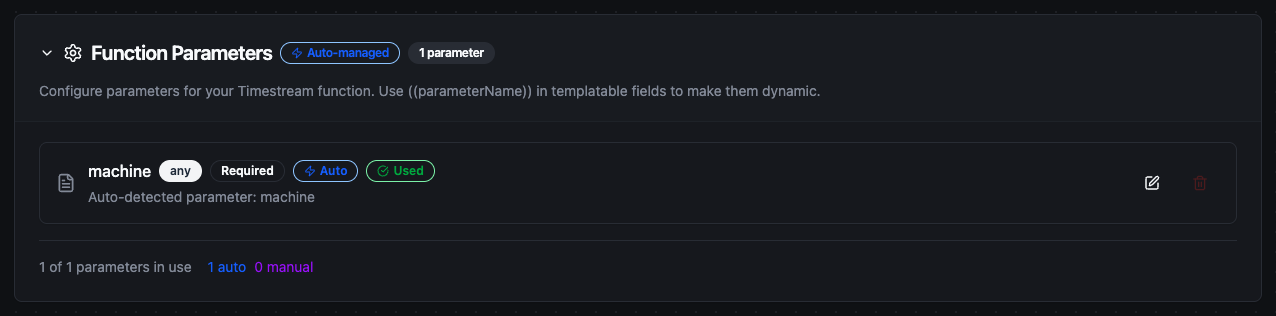
Parameters detected from the records payload and other templated fields are configured with type, requiredness, and defaults
Write Records, Query, List Tables and Describe Table accept ((parameter)) templating. List Databases has no templatable field and therefore takes no parameters.
Pipeline Integration
Use the Timestream functions you create here as nodes inside the Pipeline Designer. Drop a write or query node onto the canvas, bind its parameters to upstream outputs or constants, and configure error handling as needed.
Common patterns:
- Trigger → Transform → Write: take readings off MQTT or OPC UA, reshape them into records, and persist them with a Write Records node
- Schedule → Query → Act: recompute a KPI on a schedule and push the series into a dashboard or a notification
- Describe → Branch: read the retention window before a backfill, and route rows that are too old somewhere else
For broader orchestration patterns, see the Connector Nodes page and the Amazon Timestream node reference.
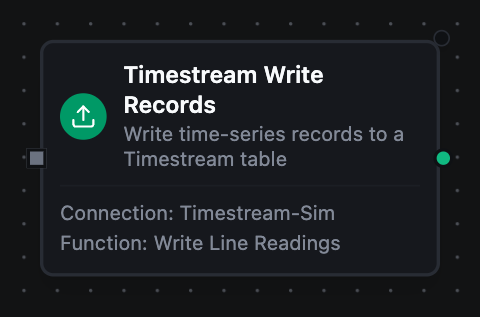
Timestream write node with connection, function, and parameter bindings
Common Use Cases
Persisting line telemetry
Scenario: readings arrive on MQTT and need to land in Timestream for dashboards.
Write Records Configuration:
{
  "records": "((records))",
  "commonDimensions": { "site": "ankara", "line": "A" }
}
Pipeline Integration: MQTT trigger → a transform that maps each message to {dimensions, measures, time} → Write Records. Records batch automatically at 100 per call.
Downsampling for a dashboard
Scenario: a dashboard needs five-minute averages, not raw samples.
Query Configuration:
{
  "sql": "SELECT machine_id, BIN(time, 5m) AS t, AVG(measure_value::double) AS avg_temp FROM \"ot_telemetry\".\"readings\" WHERE time > ago(6h) GROUP BY machine_id, BIN(time, 5m) ORDER BY t"
}
Diagnosing rejected writes
Scenario: a backfill is bouncing and nobody knows why.
Run Describe Table, read memoryStoreRetentionHours and magneticStoreRetentionDays, and compare them against the oldest timestamp in the batch. Records older than both windows can never be accepted; widen the retention or drop them upstream.
Troubleshooting
| Symptom | Likely cause | What to do |
|---|---|---|
Test Connection fails with AccessDeniedException | The identity lacks timestream:ListDatabases | Grant it, or attach a role that has it |
| Test Connection hangs, then times out | Custom Endpoint points somewhere unreachable | Clear the field for AWS, or fix the URL |
The table does not exist on write | Database or table resolved to the wrong value | Check both the connection defaults and the function overrides — the function wins |
RejectedRecordsException naming a timestamp | The record is outside the retention window | Run Describe Table and compare; widen retention or filter upstream |
RejectedRecordsException naming a type | The column's type was fixed by an earlier write | Query the column, then either match the type or write to a new measure name |
| Query returns fewer rows than expected | The result hit Max Result Rows | Raise the cap, or check _metadata.truncated |