ODBC Integration Guide
The ODBC connector is MaestroHub's universal database fallback. It reaches any database that exposes an ODBC driver — IBM Db2, Sybase / SAP ASE, Teradata, Informix, Progress OpenEdge, Vertica, Firebird, Excel/Access, and other proprietary or legacy engines — through the MaestroHub ODBC Adapter.
Overview
The ODBC connector provides:
- SQL query execution — run
SELECTstatements and stream rows back into pipelines - DML/DDL execution —
INSERT/UPDATE/DELETE/CREATE/ALTER/DROPand stored procedures - Bulk table writes — load pipeline data into a table, with optional dialect-aware auto-create
- Schema browsing — list tables and columns from the Query Board
- DSN-based and DSN-less (driver) connection modes
- Secure WebSocket (TLS) transport to the adapter, with bearer-token auth
The connector does not talk to your database directly. The MaestroHub ODBC Adapter must be installed and running on a host that has the native ODBC driver for your database. MaestroHub connects to that adapter over a secure WebSocket; the adapter opens the actual database connection.
Set up the adapter first: see the ODBC Adapter Setup Guide. You will need the adapter's host/port, its API token, and (for self-signed TLS) its certificate before you can create a connection.
If MaestroHub already ships a native connector for your database — PostgreSQL, MySQL, SQL Server, Oracle, ClickHouse, Snowflake, and others — use that instead. Those need no adapter and no driver install. Reach for ODBC only for databases with no native connector.
How it works — the two hops
 ┌─────────────┐   Hop 1: wss:// (TLS)   ┌──────────────────────┐   Hop 2: ODBC    ┌────────────┐
 │  MaestroHub │ ──────────────────────► │  MaestroHub ODBC     │ ───────────────► │  Database  │
 │  connection │   bearer-token auth     │  Adapter             │  driver manager  │            │
 └─────────────┘                         └──────────────────────┘                  └────────────┘
       │                                          │
   you configure                            you configure
   adapter host, port,                      driver/DSN, server,
   API token, TLS                           database, DB user/password
Each hop has its own configuration in the connection form: the Connection tab covers hop 1 (reaching the adapter), and the ODBC tab covers hop 2 (the database the adapter opens). Errors are reported per hop so you always know which one failed (see Error Handling).
Connection Configuration
Creating an ODBC Connection
Navigate to Connections → New Connection → ODBC and configure the tabs below.
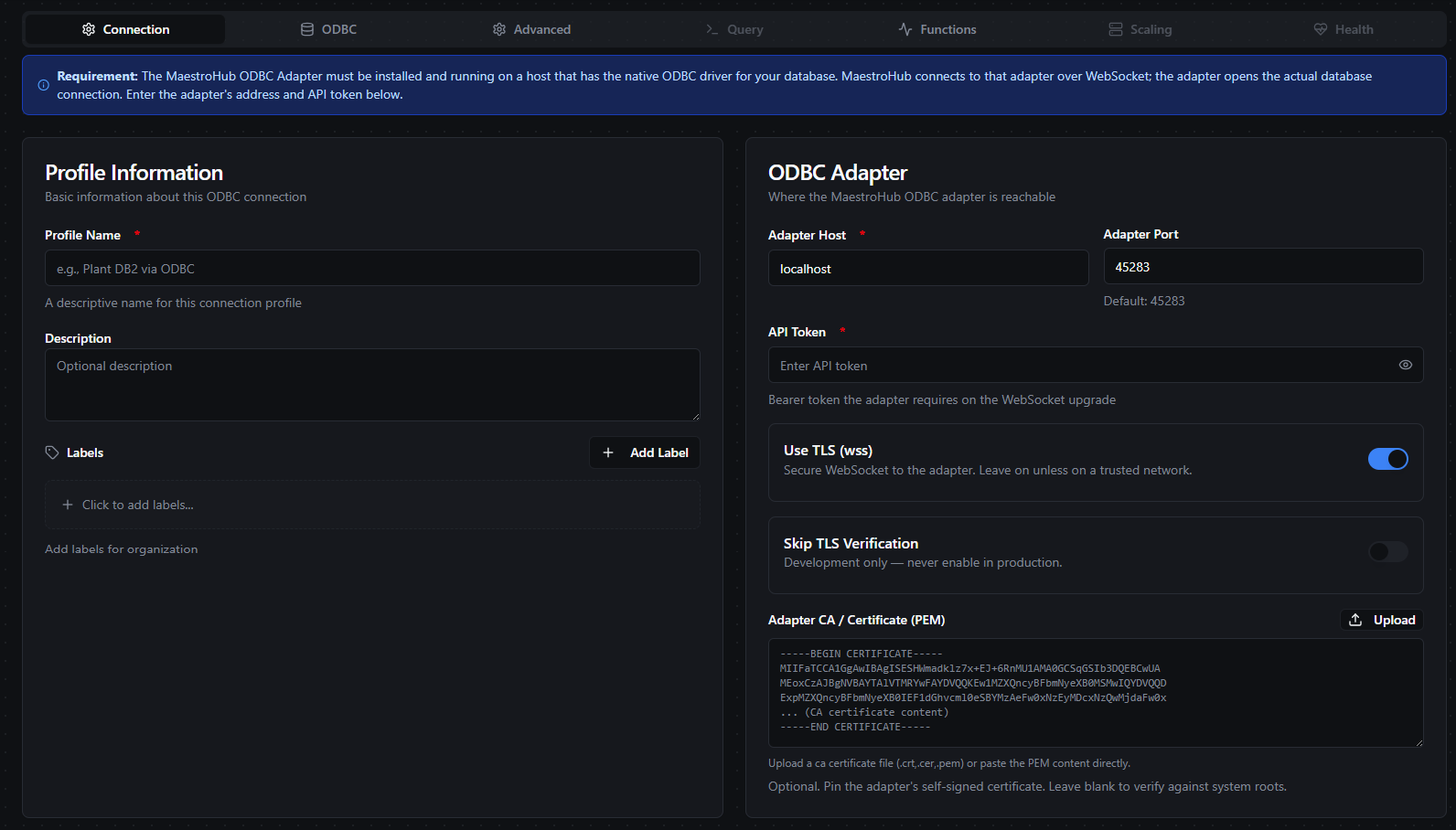
Connection tab — how MaestroHub reaches the adapter (hop 1)
1. Profile Information (Connection tab)
| Field | Type | Required | Default | Description |
|---|---|---|---|---|
| Profile Name | Text | Yes | - | A unique, descriptive name for this connection (1–100 characters) |
| Description | Text | No | - | Optional description |
| Labels | Key-Value Pairs | No | - | Key-value pairs to categorize this connection (max 10 labels) |
2. ODBC Adapter — transport (Connection tab, hop 1)
| Field | Type | Required | Default | Validation | Description |
|---|---|---|---|---|---|
| Adapter Host | Text | Yes | localhost | Non-empty | Hostname or IP of the machine running the ODBC adapter |
| Adapter Port | Number | No | 45283 | 1 – 65535 | Adapter listen port |
| API Token | Password | Yes | - | Non-empty | Bearer token the adapter requires on the WebSocket upgrade. This is the token the adapter printed on first run. Stored encrypted, masked in responses. |
| Use TLS (wss) | Boolean | No | true | - | Connect over a secure WebSocket. Leave on unless on a trusted network. |
| Skip TLS Verification | Boolean | No | false | - | (only when TLS is on) Do not verify the adapter's certificate. Development only — never enable in production. |
| Adapter CA / Certificate (PEM) | Password | No | - | - | (only when TLS is on) PEM certificate that pins the adapter's self-signed cert. Leave blank to verify against the system trust store. Stored encrypted. |
Adapter URL format
The WebSocket URL is built automatically: wss://{host}:{port}/ws (or ws://… when Use TLS is off).
Example: wss://10.20.0.5:45283/ws
The adapter generates a self-signed certificate on first run. In production, paste that certificate (PEM) into Adapter CA / Certificate so MaestroHub can verify it — this is the secure alternative to Skip TLS Verification. Supply a CA-signed cert on the adapter (--tls-cert/--tls-key) and you can leave both blank to verify against system roots.
3. Database Target (ODBC tab, hop 2)
The adapter forwards these fields verbatim to open the ODBC connection.
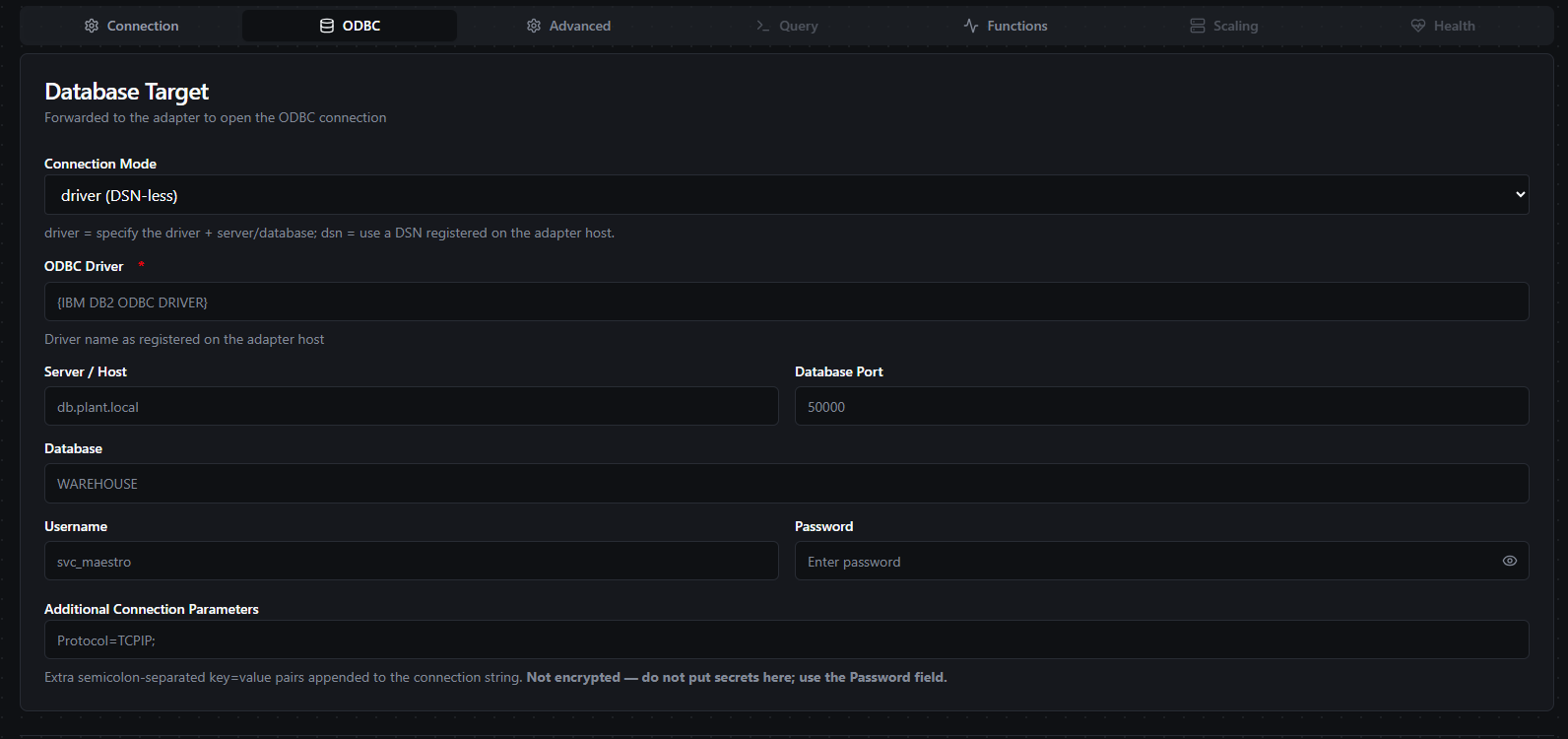
ODBC tab — the database the adapter connects to (hop 2)
| Field | Type | Required | Default | Description |
|---|---|---|---|---|
| Connection Mode | Select (driver / dsn) | Yes | driver | driver = DSN-less (give the driver + server/database); dsn = use a DSN pre-registered on the adapter host |
| ODBC Driver | Text | Yes (driver mode) | - | Driver name exactly as registered on the adapter host, e.g. IBM DB2 ODBC DRIVER. Run the adapter's --print-drivers to see valid names. Braces are optional — the adapter quotes the name. |
| DSN Name | Text | Yes (dsn mode) | - | Pre-registered ODBC DSN on the adapter host |
| Server / Host | Text | No | - | Database server hostname or IP (driver mode) |
| Database Port | Number | No | - | Database server port, 1 – 65535 (driver mode) |
| Database | Text | No | - | Database / catalog name (driver mode) |
| Username | Text | No | - | Database username |
| Password | Password | No | - | Database password (stored encrypted, masked in responses) |
| Additional Connection Parameters | Text | No | - | Extra ;-separated key=value pairs appended to the connection string, e.g. Protocol=TCPIP;. Not encrypted — never put secrets here; use the Password field. |
connectionMode is enforcedIn driver mode, ODBC Driver is required. In dsn mode, DSN Name is required. Saving without the matching identifier fails validation. Database credentials are supplied here, in MaestroHub — the adapter never stores them.
4. Timeouts & Pooling (Advanced tab)
| Field | Type | Required | Default | Validation | Description |
|---|---|---|---|---|---|
| Connect Timeout (sec) | Number | No | 30 | 1 – 300 | Timeout for the adapter dial and CONNECT handshake |
| Request Timeout (sec) | Number | No | 30 | 1 – 3600 | Per-operation response timeout |
| Pool Max Open | Number | No | 10 | 1 – 1000 | Maximum open ODBC connections in the adapter's pool |
| Pool Max Idle | Number | No | 5 | 0 – 100 | Maximum idle ODBC connections in the adapter's pool |
- Adapter required: the connection will not connect until the adapter is reachable at the configured host/port and accepts the API token.
- Default port: the standard adapter port is
45283. - Driver name precision: the ODBC Driver string must match an installed driver on the adapter host exactly. Use
--print-driverson the adapter to confirm. - Secret fields:
apiToken,password, andtlsCaCertare encrypted at rest and masked in API responses.extraParamsis not encrypted. - One session per connection: the connector holds one WebSocket = one ODBC session, so it runs in Exclusive scaling mode (see Scaling).
Testing the connection
Use Test Connection on the form to validate both hops end to end: MaestroHub dials the adapter, authenticates, opens the ODBC connection (CONNECT), and issues a PING to confirm the database is alive. A failure names the hop that broke (adapter unreachable, auth rejected, or DB connect failed).
Function Builder
Once the connection is saved, create reusable functions under the Functions tab. Three function types are available:
| Function Type ID | Name | Testable | Category | Description |
|---|---|---|---|---|
odbc.query | Query | Yes | Read | Execute SELECT statements and return structured rows |
odbc.execute | Execute | Yes | Write | Execute DML/DDL statements and return rowsAffected |
odbc.write | Write | Yes | Write | Load pipeline data into a table with automatic schema detection |
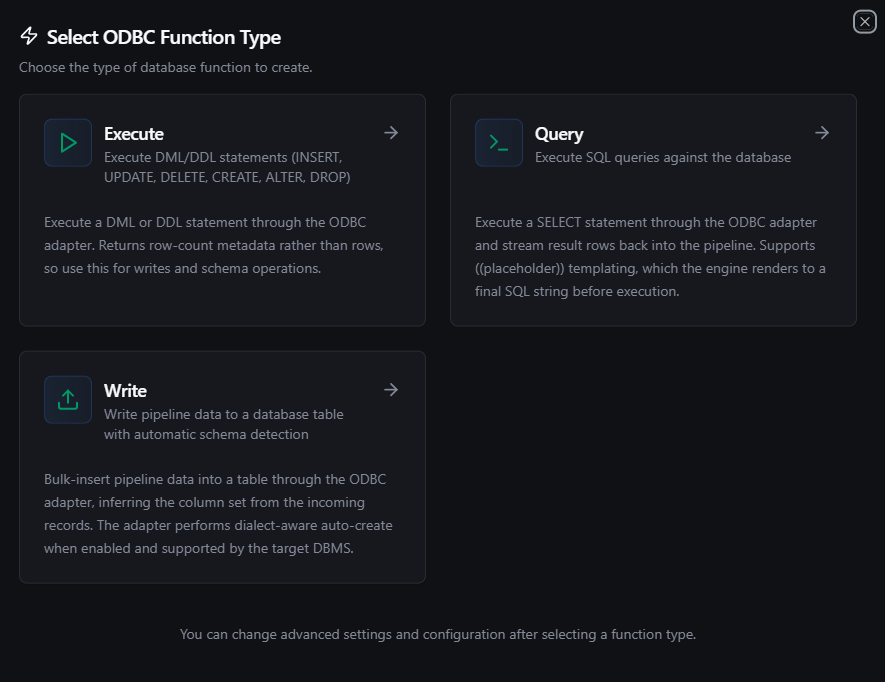
Creating an ODBC function — choose Query, Execute, or Write
(( )), not $1The ODBC connector renders ((placeholder)) templates to a final SQL string before execution. Use ((startDate)), ((orderId)), etc. in your Query and Execute SQL — the engine substitutes pipeline values before the statement reaches the adapter.
Query
Function Type ID: odbc.query · Testable: Yes
Execute a SELECT through the adapter and stream result rows back into the pipeline.
Configuration fields
| Field | Type | Required | Default | Description |
|---|---|---|---|---|
| SQL Query | Text | Yes | - | SELECT statement to execute. Supports ((placeholder)) templating. |
| Timeout (seconds) | Number | No | 1800 | Per-execution timeout (1–3600). The connection's Request Timeout (30s default) still applies and the shorter one wins. |
Result shape — mirrors the native SQL connectors, so the same Query Board and pipeline consumers work unchanged:
| Key | Location | Description |
|---|---|---|
rows | Data | Array of row objects (column name → value) |
driver | Metadata | Always odbc |
query | Metadata | The executed SQL |
rowCount | Data | Number of rows returned — the adapter's count when it reports one |
truncated | Metadata | true if results hit a result limit — the row cap (the adapter's maxRows) or the size budget |
truncatedBy | Metadata | rows or bytes — which limit; present only when truncated is true |
dialect | Metadata | Resolved SQL dialect (e.g. postgresql, db2, or unknown) |
Examples
SELECT * FROM users WHERE id = ((userId))
SELECT COUNT(*) FROM orders
SELECT table_name FROM information_schema.tables
Execute
Function Type ID: odbc.execute · Testable: Yes
Execute a DML or DDL statement. Returns row-count metadata rather than rows — use it for writes and schema operations.
Configuration fields
| Field | Type | Required | Default | Description |
|---|---|---|---|---|
| SQL Statement | Text | Yes | - | DML/DDL statement to execute. Supports ((placeholder)) templating. |
| Timeout (seconds) | Number | No | 1800 | Per-execution timeout (1–3600). The connection's Request Timeout (30s default) still applies and the shorter one wins. |
Result shape
| Key | Location | Description |
|---|---|---|
rowsAffected | Data | Rows affected by the statement |
driver | Metadata | Always odbc |
query | Metadata | The executed SQL |
rowsAffected | Metadata | Same value, in metadata for convenience |
Examples
INSERT INTO sensors (name, value) VALUES (((name)), ((value)))
UPDATE orders SET status = 'shipped' WHERE id = ((orderId))
CREATE TABLE events (id INTEGER PRIMARY KEY, name VARCHAR(255))
Write
Function Type ID: odbc.write · Testable: Yes
Bulk-insert pipeline data into a table. The column set is inferred from the incoming records; the adapter runs the whole write in one transaction (commit at end, rollback on failure) and can auto-create the table when enabled and the dialect is recognized.
This is not a SQL editor — it loads structured data (rows/objects) from your pipeline into a target table.
Configuration fields
| Field | Type | Required | Default | Description |
|---|---|---|---|---|
| Table Name | Text | Yes | - | Target table. Supports ((placeholder)) templating. |
| Data | Any | No | (upstream input) | Row data to write — an array of objects or a single object. Bound from upstream nodes in a pipeline. |
| Schema Hints | Object | No | - | Type hints for table creation (field → type, e.g. {"temp":"Float64"}). See Type hints. |
| Create Table If Not Exists | Boolean | No | false | Auto-create the table if absent. The adapter infers types and fails loudly for dialects it cannot generate DDL for. |
| Batch Size | Number | No | 500 | Rows per INSERT batch (1 – 10,000). |
| Timeout (seconds) | Number | No | 1800 | Per-execution timeout (1–3600). The connection's Request Timeout (30s default) still applies and the shorter one wins. |
Result shape
| Key | Location | Description |
|---|---|---|
rowsInserted | Data | Total rows successfully inserted |
driver | Metadata | Always odbc |
table | Metadata | Target table |
tableCreated | Metadata | true if the table was created during this call |
batches | Metadata | Number of INSERT batches executed |
totalRows | Metadata | Total input rows |
How Write behaves
- Column set — the first-seen union of keys across the incoming rows. Rows missing a key bind that column as
NULL. - One transaction — all batches run inside a single transaction. A failure rolls the whole write back; identifiers are dialect-quoted.
- Batching — rows are inserted in batches of Batch Size (default 500). A 1,300-row input at batch size 500 runs as 3 batches (500 + 500 + 300).
- Auto-create gating — with Create Table If Not Exists on, an absent table is created first using dialect-aware DDL (types from Schema Hints, else inferred from sampled values). If the connection's dialect resolved to
unknown, auto-create refuses with a permanentHYC00before any DDL runs — it will not guess a schema. Pre-create the table and write without auto-create instead.
Write type hints
When auto-creating a table, Schema Hints tell the adapter what column types to generate. MaestroHub translates its hint vocabulary to the adapter's logical types, so a hint like Int64 becomes a real integer column (not a VARCHAR):
| MaestroHub hint | Adapter column type |
|---|---|
Boolean | boolean |
Int8 / Int16 / Int32 / Int64 | int64 |
UInt8 / UInt16 / UInt32 | int64 |
UInt64 | decimal (exceeds int64 range) |
Float32 / Float64 | float64 |
DateTime | datetime |
String | string |
Any | json |
Native DB type names from the Visual Editor are also recognized (INTEGER, BIGINT, DOUBLE PRECISION, NUMERIC, BOOLEAN, TIMESTAMP, DATE, TIME, TEXT, VARCHAR, JSON, BYTEA, …). A hint that isn't recognized is mapped to string, and the connector logs a warning so the downgrade is visible rather than silent.
Schema Browsing — the Query Board
Saved ODBC connections expose a Query tab (the Query Board) for ad-hoc SQL and schema exploration. It lists the database's tables and columns so you can build queries without leaving MaestroHub.
ODBC's column metadata carries no cheap primary-key signal, so the schema browser shows column name, type, and nullability but reports no primary key — this is a documented limitation of ODBC catalog metadata, not a bug.
Error Handling
Errors name which hop failed, and the adapter classifies every database failure as transient (safe to retry) or permanent (do not auto-retry). MaestroHub trusts the adapter's classification rather than re-guessing.
Connection-level error prefixes (hop names)
These appear in the connection's status / last-error cell:
| Prefix | Hop | Meaning |
|---|---|---|
[ODBC_ADAPTER_UNREACHABLE] | 1 | Cannot reach the adapter (network/port/process down) |
[ODBC_AUTH_ERROR] | 1 | Adapter rejected the API token |
[ODBC_DB_ERROR] | 2 | Adapter reached, but the database connect failed |
[ODBC_DB_DOWN] | 2 | Adapter up, but the database connection dropped |
[ODBC_PROTOCOL_ERROR] | — | Protocol / version mismatch (the MH00x class below) |
Outcome classification (retry behavior)
| Outcome | SQLSTATE classes | Behavior |
|---|---|---|
| transient (retried) | 08* (connection), 40* (deadlock / rollback), HYT00 / HYT01 (timeout) | Safe to retry; the runtime may reconnect and re-run |
| permanent (not retried) | everything else, including unknown/empty SQLSTATE (fails safe) | Fix the cause before retrying |
Adapter-level (MH) errors — always permanent
| Code | Meaning | Fix |
|---|---|---|
MH001 | Protocol version incompatible | Upgrade the adapter so it serves the protocol version MaestroHub requests |
MH002 | Inbound message too large | Raise the adapter's --max-msg, or split the write into smaller batches |
MH003 | Protocol-sequence / malformed message | Internal — usually self-resolves on reconnect |
MH500 | Unexpected internal adapter error | Check the adapter logs |
Write data-fit hints
When a Write fails, the connector derives a human hint from the SQLSTATE (not from message text):
| SQLSTATE | Hint |
|---|---|
22001 / 01004 | String / data truncation — a value is too long for its column |
22003 | Numeric value out of range |
22007 / 22018 | Datetime / cast conversion failure |
23xxx | Integrity-constraint violation (primary key, unique, foreign key, or not-null) |
Scaling
The ODBC connector runs in Exclusive mode with a single replica. One WebSocket binds one ODBC session on the adapter, so the connection holds a persistent, stateful per-connection session that cannot be shared across replicas. This is managed automatically by MaestroHub and requires no user configuration.
Store & Forward
The Write function is store-and-forward eligible (sink, unordered, tolerant of staleness) with a preferred batch size of 500, matching the adapter's batch ceiling. Because the adapter performs a plain INSERT with no idempotency key, replays can duplicate rows — operators accept this trade-off when enabling Store & Forward for writes. The Execute function (arbitrary SQL) is intentionally not store-and-forward eligible: replaying arbitrary statements is too risky.
Common Use Cases
Query: read KPIs from a legacy DB2 table
SELECT
    line_id,
    COUNT(*)        AS event_count,
    AVG(efficiency) AS avg_efficiency
FROM PROD.LINE_EVENTS
WHERE event_ts >= ((startDate)) AND event_ts < ((endDate))
GROUP BY line_id
ORDER BY line_id;
Execute: update work-order status in a Sybase / Informix DB
UPDATE work_orders
SET status = ((newStatus)), updated_at = CURRENT_TIMESTAMP
WHERE order_id = ((orderId));
Write: bulk-load sensor data into a legacy warehouse
Configure a Write function with:
- Table Name:
SENSOR_READINGS - Create Table If Not Exists: enabled (only if the connection's dialect is recognized)
- Batch Size:
500
Connect it after your data-collection nodes (MQTT, OPC UA, Modbus, …). The Write function maps incoming fields (sensor_id, temperature, pressure) to columns and inserts them in batches.
Next steps
- Haven't set up the adapter yet? Start with the ODBC Adapter Setup Guide.
- Use your ODBC functions in pipelines — see the ODBC Nodes reference.