Azure Service Bus Nodes
Azure Service Bus is Microsoft's managed message broker for reliable delivery between enterprise systems. MaestroHub's Service Bus nodes send messages to queues and topics, take or read messages from queues and subscriptions, and list a namespace's entities, as steps in a running pipeline.
Configuration Quick Reference
| Field | What you choose | Details |
|---|---|---|
| Parameters | Connection, Function, Function Parameters, Timeout Override | Select the connection profile, function, configure function parameters with expression support, and optionally override timeout. |
| Settings | Description, Timeout (seconds), Retry on Timeout, Retry on Fail, On Error | Node description, maximum execution time, retry behavior on timeout or failure, and error handling strategy. All execution settings default to pipeline-level values. |
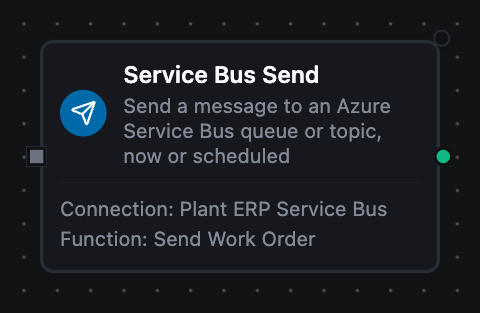
Service Bus Send Node
Azure Service Bus Connector Nodes
Service Bus connector nodes run a function you defined on a Service Bus connection as a step in an already-running pipeline.
Supported Function Types:
| Function Name | Purpose | Common Use Cases |
|---|---|---|
| Send Message | Send one message to a queue or topic, now or scheduled | Hand work orders to ERP, publish line events, schedule reminders |
| Send Batch | Send an array of messages in as few batches as the size limit allows | Forward collected readings, fan out work items |
| Receive Messages | Take up to N messages from a queue or subscription, removing them | Drain a queue on a schedule, clear a dead-letter queue |
| Peek Messages | Read messages without locking or removing them | Inspect a dead-letter queue, check a producer |
| List Entities | List the namespace's queues, topics and subscriptions | Find entity names, check which require sessions |
How It Works
When the pipeline executes, a Send node:
- Uses the selected connection's AMQP link to the namespace
- Resolves the function's
((parameters))from the node's inputs - Sends the message (or schedules it) to the queue or topic
- Returns what Service Bus confirmed: the message ID, and for a scheduled message its sequence number
A Receive node locks messages, returns them, and completes them. If the node fails or is cancelled after locking, the messages are abandoned and delivered again, so a receive never loses a message the pipeline did not get.
Configuration
| Field | What you choose | Details |
|---|---|---|
| Connection | Azure Service Bus connection profile | Select a pre-configured Service Bus connection from your connection library |
| Function | Send Message / Send Batch / Receive Messages / Peek Messages / List Entities function | Choose the function that defines the operation and its parameters |
| Function Parameters | Message values | Dynamic values for the queue, payload, message ID, session ID and properties, from expressions or constants |
For every field of each function, see the Azure Service Bus Functions documentation.
To start a pipeline whenever a message arrives on a queue or subscription, use the Azure Service Bus Trigger Node instead.
Output
Every Service Bus node delivers its data under result, and execution facts (success, functionId, durationMs, timestamp) under _metadata:
| Node | Expression | Description |
|---|---|---|
| Send Message | $node["Name"].result.entity, $node["Name"].result.messageId, $node["Name"].result.messageSize | The queue or topic, the message ID (the one set, or one generated for the send), and the payload size in bytes |
$node["Name"].result.scheduled | Whether the message was scheduled rather than sent now | |
$node["Name"].result.sequenceNumber, $node["Name"].result.scheduledEnqueueTime | Only for a scheduled message: the sequence number Service Bus gave it and when it becomes visible, RFC 3339 UTC | |
| Send Batch | $node["Name"].result.sent, $node["Name"].result.batches | How many messages were sent, and in how many batches the size limit split them |
| Receive / Peek | $node["Name"].result.count, $node["Name"].result.messages | How many messages, and one object per message: payload, messageId, sequenceNumber, enqueuedTime, deliveryCount always; contentType, subject, correlationId, sessionId, partitionKey, replyTo, to, scheduledEnqueueTime, applicationProperties when the sender set them; deadLetterReason, deadLetterErrorDescription, deadLetterSource on a dead-lettered message. Numbers arrive as text, as the trigger carries them |
$node["Name"].result.subQueue | none, deadLetter or transferDeadLetter | |
$node["Name"].result.subscription, $node["Name"].result.sessionId | The subscription or session read, when there was one | |
| Receive | $node["Name"].result.notCompleted | Present only when a message's lock was lost before it could be completed: that many of the returned messages will be delivered again |
| Peek | $node["Name"].result.peeked | Always true: the messages were read without being locked or removed |
| List Entities | $node["Name"].result.queues, $node["Name"].result.topics | One object per queue (name, requiresSession, status, maxDeliveryCount, lockDuration) and per topic (name, status, subscriptions shaped like queues) |
$node["Name"].result.queueCount, $node["Name"].result.topicCount, $node["Name"].result.truncated | How many were listed, and whether Max Items stopped the listing early |
An empty queue is not an error: Receive and Peek return count 0 and an empty messages array.