SOAP Nodes
Call SOAP / WSDL web services — SAP, IBM Maximo, MES, OSIsoft PI Web Services — from a pipeline using the functions you built on the connection's SOAP connector page.
Configuration Quick Reference
| Field | What you choose | Details |
|---|---|---|
| Parameters | Connection, Function, Function Parameters, Delivery Mode, Timeout Override | Select the SOAP connection profile, the function to invoke (soap.invoke or soap.raw), configure its ((parameter)) values with expression support, and optionally override timeout. |
| Settings | Description, Timeout (seconds), Retry on Timeout, Retry on Fail, On Error | Node description, maximum execution time, retry behavior on timeout or failure, and error handling strategy. All execution settings default to pipeline-level values. |
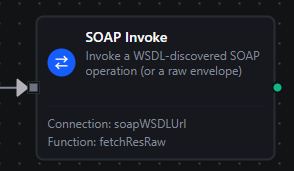
SOAP Invoke Node
SOAP Invoke Node
Run a saved SOAP function — an Invoke Operation or Raw Envelope call — from a single node. The node type is connected.soap.invoke; it simply executes whichever SOAP function you select on the connection, so a single node type covers both WSDL-driven calls and raw envelopes.
Supported Function Types:
| Function Type | Purpose | Common Use Cases |
|---|---|---|
soap.invoke | Call a WSDL-discovered operation with a templated body | Fetch a work order, post a production order, query MES/historian data |
soap.raw | POST a hand-written envelope verbatim | Call a service with no reachable WSDL, or one that needs full envelope control |
The picker only offers functions of these two types (plus any legacy soap.ping function you created before it was hidden from the function-create picker) — soap.listOperations is a WSDL-discovery helper used only when authoring functions on the Connect page, and never appears as something to invoke mid-pipeline.
Node Configuration
| Field | Type | Required | Description |
|---|---|---|---|
| Connection | Select | Yes | The SOAP connection profile to use |
| Function | Select | Yes | The saved soap.invoke / soap.raw (/ legacy soap.ping) function to call |
| Function Parameters | Expression fields | Depends on function | One field per ((placeholder)) the function declares — see Parameter templating tips below |
| Delivery Mode | Select | No | Only shown for write-shaped operations: On Failure (default — try immediately, buffer only if the destination is unreachable), Always (every call goes through the store-and-forward buffer), Off (synchronous only; failures surface directly to the pipeline, no buffering) |
| Timeout Override (seconds) | Number | No | Overrides the function's own timeout for this node |
Output
The node delivers the SOAP response under result, and execution facts (success, functionId, durationMs, timestamp) under _metadata. All three functions — Invoke, Raw and the legacy Ping — land in the same shape:
| Expression | Description |
|---|---|
$node["Name"].result.statusCode | The HTTP status of the SOAP call |
$node["Name"].result.body | The response payload as XML text — present when the response parsed as a SOAP envelope |
$node["Name"].result.bodyJSON | The same payload converted to JSON — read fields off this, e.g. $node["Name"].result.bodyJSON.GetWorkOrderResult.Status |
$node["Name"].result.raw | The response bytes verbatim — present instead of body when the reply was not a parseable envelope |
$node["Name"].result.attachments | One object per MTOM binary part (contentId, contentType, sizeBytes, and data base64-encoded) — present only when the server answered with a multipart/related package |
// $node["Get Work Order"].result on success
{
  "statusCode": 200,
  "body": "<GetWorkOrderResult xmlns=\"http://tempuri.org/\"><WorkOrderId>WO-1042</WorkOrderId><Status>Open</Status></GetWorkOrderResult>",
  "bodyJSON": { "WorkOrderId": "WO-1042", "Status": "Open" }
}
A <soap:Fault> — and any non-2xx status — fails the node, and a failed node writes no result for downstream nodes to read. The connector does classify the fault (code, reason, detail) and records it in Execution History, but there is no result.fault you can branch on. See Error Handling below.
Parameter templating tips
SOAP Invoke parameters can be populated dynamically before the call runs:
((token))placeholders inside the function's body/envelope are replaced with the values you set on the node — this is the same((paramName))syntax used when authoring the function.{{ ... }}expressions let you use JavaScript plus the context objects injected by the pipeline engine ($input,$node,$trigger,$execution, etc.) to compute the value passed into each((parameter)).- Outside of
{{ }}, a value that starts with$is treated as a shorthand lookup into the upstream data packet — e.g.$.payload.workOrderIdpullsworkOrderIdfrom the previous node without writing JavaScript.
MaestroHub resolves expressions in that order — {{ }} first, then the $ shorthand — before substituting the result into the function's ((placeholder)).
Like every pipeline node, $input here resolves to an array of the immediate upstream node(s)' outputs, not a single object — use $input[0].<field>, or reference an upstream node by name with $node["Upstream Node"].result.<field> to avoid depending on edge order.
Error Handling
The node's Settings tab provides the same Timeout / Retry on Timeout / Retry on Fail / On Error controls documented on the Nodes page, and they apply fully to transport-level failures — the SOAP endpoint is unreachable, the request times out, a TLS handshake fails, or authentication is rejected before a response body exists. In those cases, retries run per your configuration and On Error (Stop Pipeline / Continue Execution) decides what happens once retries are exhausted, exactly as for any other node.
A SOAP Fault — a <soap:Fault> returned inside a normal HTTP response — is a different case. The function call itself succeeds at the transport level; the fault is detected and classified by the SOAP connector, and the step is recorded as failed in the pipeline's execution history. However, this kind of failure currently does not honor the node's On Error/retry settings, and the node writes no output for downstream nodes in that run — so there is no fault object to branch on within the same pipeline execution.
Until this is addressed, treat Execution History as the source of truth for SOAP faults, and validate fault-handling behavior for a given operation using the Test Function dialog on the Connect page before relying on it in production pipelines.
No SOAP Trigger
SOAP is request/response only — there is no SOAP trigger node, and none of the SOAP functions can start a pipeline. To react to conditions on a SOAP-backed system, poll it from a Schedule Trigger pipeline that calls a SOAP Invoke node, rather than expecting the SOAP side to push events to MaestroHub.