 ClickHouse Integration Guide
Connect MaestroHub pipelines to ClickHouse for high-throughput columnar analytics, time-series rollups, and bulk ingestion. This guide covers connection setup, TLS / mutual TLS configuration, and the three function types (Query, Execute, Write) tailored for ClickHouse workloads.
Overview
The ClickHouse connector brings columnar OLAP capabilities to your MaestroHub pipelines:
- Read data with SELECT queries — aggregations, joins, window functions, top-K with
LIMIT BY - Execute DML/DDL —
ALTER TABLE,OPTIMIZE … FINAL,INSERT … SELECT,TRUNCATE - Bulk-write pipeline rows — batched VALUES inserts with optional MergeTree auto-create
- Native column types —
Map(K, V),Array(T),DateTime64,UUID,IPv4/IPv6bound directly without JSON round-tripping - Secure connections — system trust store by default, custom CA bundle, or mutual TLS with client cert + key
- Wire compression — LZ4 (fast) or ZSTD (smaller) over the native TCP protocol
ClickHouse exposes a native TCP protocol on port 9000 (plaintext) or 9440 (TLS). MaestroHub connects over the native protocol for full type fidelity and pipelined batch writes — the HTTP interface on port 8123 is not used.
Connection Configuration
Creating a ClickHouse Connection
Navigate to Connections → New Connection → ClickHouse and configure the following:
ClickHouse Connection Creation Fields
1. Profile Information
| Field | Default | Description |
|---|---|---|
| Profile Name | - | A descriptive name for this connection profile (required, max 100 characters) |
| Description | - | Optional description for this ClickHouse connection |
2. Database Configuration
| Field | Default | Description |
|---|---|---|
| Host | localhost | ClickHouse server hostname or IP address (required) |
| Port | 9000 | ClickHouse native TCP port — 9000 plaintext, 9440 TLS (1-65535, required) |
| Database | default | Database name to connect to (required) |
| Connect Timeout (sec) | 30 | Maximum time to wait for connection establishment (1-300 seconds) |
ClickHouse uses port 9000 for the native protocol, not the HTTP port 8123. When you enable TLS, switch to 9440 (the standard ClickHouse TLS port) — the form shows a reminder banner.
3. Basic Authentication
| Field | Default | Description |
|---|---|---|
| Username | default | ClickHouse username (optional) |
| Password | - | ClickHouse user password (optional) |
Stock ClickHouse ships with a default user that has no password. Both Username and Password are optional in MaestroHub — leave both empty for an anonymous connection to the default user, or fill them to authenticate as another role. Most managed ClickHouse offerings (ClickHouse Cloud, Altinity) require credentials.
4. TLS Settings
4a. Enable TLS
| Field | Default | Description |
|---|---|---|
| Enable TLS | false | Use encrypted native protocol (typically on port 9440) |
4b. Skip TLS Verification
(Only displayed when TLS is enabled)
| Field | Default | Description |
|---|---|---|
| Skip TLS Verification | false | Do not verify the server certificate. Development only — disables both hostname and CA validation |
4c. Certificate Configuration
(Only displayed when TLS is enabled)
| Field | Default | Description |
|---|---|---|
| Server CA Certificate | - | PEM-encoded CA bundle that signed the ClickHouse server certificate. Required for self-signed or internal CAs not in the system trust store; leave empty for public CAs (Let's Encrypt, etc.) |
| Client Certificate | - | PEM-encoded client certificate for mutual TLS (mTLS) — fill both Client Certificate and Private Key together |
| Client Private Key | - | PEM-encoded private key matching the client certificate. Stored encrypted at rest |
Each certificate field has an Upload button that reads a .pem file from disk and validates the format inline. The Private Key field is masked by default — toggle the eye icon to reveal during paste, then re-hide.
| Configuration | Behavior |
|---|---|
| TLS off | Plain TCP — no encryption |
| TLS on, Skip Verify off, no CA | Encryption + system trust store + hostname validation (recommended for public-CA servers) |
| TLS on, Skip Verify off, custom CA | Encryption + custom CA validation + hostname check (self-signed / internal CA) |
| TLS on, Skip Verify on | Encryption only — no server validation. Disables the Server CA field |
| TLS on, Client Cert + Key set | Adds mutual TLS authentication on top of any of the above |
5. Wire Protocol
| Field | Default | Description |
|---|---|---|
| Compression | lz4 | Wire compression for the native protocol (none / lz4 / zstd). LZ4 is the speed/size sweet spot; ZSTD trades CPU for smaller payloads |
| Request Timeout | 60s | Upper bound on every query and statement on this connection, 1s-1h. A function's own Timeout can shorten it, not extend it. A write with several batches is one call, so the bound covers all its batches together. |
| Dial Timeout (sec) | 10 | TCP dial timeout in seconds (1-300) |
6. Connection Pool Settings
| Field | Default | Description |
|---|---|---|
| Max Open Connections | 10 | Maximum number of simultaneous database connections (1-1000) |
| Max Idle Connections | 5 | Idle connections kept ready for reuse (0-100, 0 = let the driver use its built-in default) |
| Connection Max Lifetime (sec) | 900 | Maximum age of a connection before it is recycled (0-86400 seconds, 0 = use driver default) |
| Connection Max Idle Time (sec) | 300 | How long an idle connection may remain unused before being closed (0-86400 seconds, 0 = use driver default) |
Connection pool settings help optimize ClickHouse performance by balancing concurrency, resource usage, and latency across workloads.
7. Retry Configuration
| Field | Default | Description |
|---|---|---|
| Retries | 3 | Retries after the first connection attempt fails (0-10, 0 = no retries). Each retry waits the Retry Delay first; the delay grows by the Backoff Multiplier after every retry |
| Retry Delay (ms) | 100 | Initial delay between retry attempts in milliseconds (0-60000 ms) |
| Retry Backoff Multiplier | 2 | Exponential factor for retry delay growth (1-10, e.g., 2 means delay doubles each retry) |
Retry Behavior Example
- 1st retry: wait 100ms
- 2nd retry: wait 200ms (100 × 2)
- 3rd retry: wait 400ms (200 × 2)
8. Connection Labels
| Field | Default | Description |
|---|---|---|
| Labels | - | Key-value pairs to categorize and organize this ClickHouse connection (max 10 labels) |
Example Labels
env: prod— Environmentteam: analytics— Responsible teamcluster: warehouse-eu— Cluster identity
- Required Fields: All fields described as "required" must be filled.
- Optional Auth: Stock ClickHouse allows the
defaultuser to connect without a password. Make Username/Password mandatory in your own deployment viausers.xml. - TLS / mTLS: A custom CA bundle is only consulted when Skip TLS Verification is off. Client certificates are still sent to the server even with Skip Verify on, but the server is no longer authenticated to you — only enable in dev/test environments.
- Connection Pooling: Manages concurrency with
Max Open Connections, reduces latency withMax Idle Connections, mitigates stale connections viaConnection Max Lifetime, and frees resources usingConnection Max Idle Time. - Retry Logic: Implements exponential backoff — initial connection attempts use the base delay and each retry multiplies the delay by the backoff factor; ideal for transient network issues or rolling restarts of a ClickHouse cluster.
- Timeout Values:
Connect Timeoutapplies to initial connection establishment;Request Timeoutbounds every call on the connection, and the shorter of it and a function's own Timeout applies. All timeout values are in seconds unless noted (Retry Delay uses milliseconds).
Function Builder
Creating ClickHouse Functions
Once you have a connection established, you can create reusable functions for different operation types:
- Open the connection and go to its Functions tab → New Function
- Select one of the ClickHouse function types: Query, Execute, or Write
- Configure the function parameters
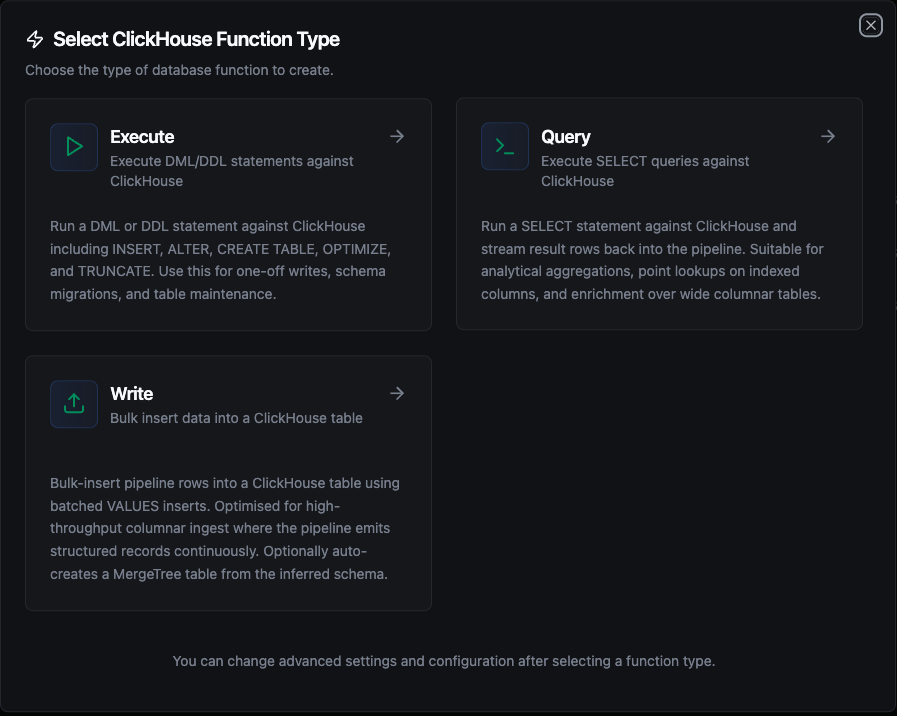
ClickHouse function creation interface showing the three function types: Query, Execute, and Write
Query Function
Purpose: Execute SELECT queries against ClickHouse and return rows as structured data.
Configuration Fields
| Field | Type | Required | Default | Description |
|---|---|---|---|---|
| SQL Query | String | Yes | - | SQL SELECT statement to execute. Supports parameterized queries with ((param)) syntax. |
| Timeout (seconds) | Number | No | 1800 | Per-execution timeout in seconds (1-3600). |
Use Cases:
- Aggregate metrics with
GROUP BYover wide MergeTree tables - Join fact tables with dictionaries for enrichment
- Window functions over ordered event streams
- Top-K analytics using
LIMIT BY - Time-series rollups with
toStartOfInterval()/toStartOfHour()
Execute Function
Purpose: Execute DML/DDL statements (INSERT, ALTER, CREATE, OPTIMIZE, TRUNCATE, etc.) on ClickHouse. Use for ad-hoc writes, schema migrations, and table maintenance.
Configuration Fields
| Field | Type | Required | Default | Description |
|---|---|---|---|---|
| SQL Statement | String | Yes | - | DML/DDL SQL statement to execute. Supports parameterized queries with ((param)) syntax. |
| Timeout (seconds) | Number | No | 1800 | Per-execution timeout in seconds (1-3600). |
Use Cases:
INSERT INTO … SELECTto materialize an aggregation into a new tableALTER TABLE … ADD COLUMNfor schema evolutionOPTIMIZE TABLE … FINALto merge MergeTree parts on demandTRUNCATE TABLEfor fast purgesCREATE MATERIALIZED VIEWto maintain a continuously-updated rollup
Write Function
Purpose: Bulk-insert pipeline data into a ClickHouse table. This is not a SQL editor — it loads structured rows from your pipeline into the target table.
Load data into ClickHouse with two paths: an existing table (auto-detected schema mapping) or an auto-created MergeTree table with operator-specified ORDER BY. Supports batching for efficient bulk loading.
Configuration Fields
| Field | Type | Required | Default | Description |
|---|---|---|---|---|
| Table Name | String | Yes | - | Target table to insert data into. |
| Data | Any | Yes | - | Row payload — array of objects, single object, or ((data)) template pulling from upstream pipeline output. |
| Schema Hints | Object | No | - | Type hints for table creation ({ "field": "Type" }). Also used for the types of columns added by schema evolution. |
| Create Table If Not Exists | Boolean | No | false | Auto-create the table if it does not exist (MergeTree engine). When disabled, missing tables produce a clear error instead of inserting. |
| Allow Schema Evolution | Boolean | No | false | Add a column to an existing table when the data carries a field the table has no column for. When off, such a batch fails instead of dropping the field. See step 4 below. |
| ORDER BY (for auto-create) | String | No | - | Comma-separated columns for the MergeTree ORDER BY clause when auto-creating the table. Leave empty for tuple() (no sort key — allowed, but disables ClickHouse's primary-index optimisation). |
| Batch Size | Number | No | 1000 | Number of rows per INSERT batch (1-100000). |
| Timeout (seconds) | Number | No | 1800 | Per-execution timeout in seconds (1-3600). |
Use Cases:
- Stream pipeline events into an auto-created MergeTree table
- Bulk-load telemetry from MQTT / OPC UA / Modbus collectors with batched VALUES
- Append rows to a Distributed table fronting a cluster
- Land enrichment results from upstream transform nodes into an analytics table
How Write Works Step by Step
1. Batching
Each batch generates a single INSERT INTO `table` (`col1`, `col2`) VALUES (?, ?), (?, ?) statement with multiple value tuples. If your pipeline sends 2,500 rows and Batch Size is 1,000, exactly 3 INSERT statements are executed (1000 + 1000 + 500).
2. Column Matching
Write uses case-insensitive matching between incoming data field names and table column names. For example, a data field named sensorId will match a table column SensorId or sensorid. The original column casing from the database is preserved in the generated INSERT statement.
3. Native Typed Binding for Map / Array / DateTime
ClickHouse's native protocol expects typed Go values for composite columns — not JSON strings. The Write function converts pipeline data accordingly:
| Pipeline Value | Bound As | Target Column Type |
|---|---|---|
{"unit": "celsius", "loc": "line1"} | map[string]string | Map(String, String) |
["temperature", "critical"] | []string | Array(String) |
"2026-05-18T12:30:00Z" | time.Time | DateTime / DateTime64 |
| Scalars (number, bool, string, UUID-shaped string) | Native Go | Int* / Float* / Bool / String / UUID |
Nested array of objects ([{...}, {...}]) | JSON string | String / JSON (fallback) |
The Write function emits map[string]string and []string regardless of input element type — non-string values are %v-stringified to fit. For numeric-element columns like Array(Int64) or Map(String, Float64), send already-typed elements from upstream, or define those columns as String and parse on read.
4. Table Exists — Normal Flow
- The function queries
system.tablesto check if the target table exists in the current database - If the table exists, it fetches all column metadata (name, type) from
system.columns - If the data carries fields that have no column in the table, Allow Schema Evolution decides (see below)
- It matches incoming data fields to table columns (case-insensitive)
- Batch INSERT statements are generated and executed using the matched columns
Allow Schema Evolution on: each missing field gets an ALTER TABLE … ADD COLUMN, typed from Schema Hints or inferred from the batch with the Nullable rules below. Column metadata is then re-fetched and all rows are inserted. Schema evolution only adds columns — it never changes an existing column's type, because MODIFY COLUMN rewrites MergeTree parts in the background. To change or drop a column, run ALTER TABLE yourself with the Execute function.
Allow Schema Evolution off: the write fails before anything is inserted, with an error that names the fields:
"write batch carries field(s) [pressure] with no matching column in table "sensor_readings" and schema evolution is disabled — enable 'Allow schema evolution' on this function, or add the column(s) manually"
Turn the switch on, add the column with the Execute function, or remove the field upstream. The error is marked permanent because the same batch would fail again: with Store & Forward on, the batch is not retried and goes to Failed messages.
Functions saved before the switch existed have no Allow Schema Evolution value. For them, Create Table If Not Exists decides: when on, missing columns are added; when off, fields that have no column are skipped and listed in skippedFields. When you open such a function in the editor, the switch starts in the same position as Create Table If Not Exists, and saving stores it. Once it is saved as off, a batch with an unknown field fails instead of being skipped.
5. Table Does Not Exist
| Create Table If Not Exists | Behavior |
|---|---|
| Disabled (default) | Returns an error immediately: "table 'X' does not exist. Enable 'Create table if not exists' or create it manually". No insert is attempted. |
| Enabled, no schema provided | Types are inferred from all rows in the batch using the rules below. A CREATE TABLE … ENGINE = MergeTree ORDER BY … statement is executed, then all rows are inserted. |
| Enabled, with schema | The Schema Hints object is used for column types. The MergeTree ORDER BY comes from the dedicated field, defaulting to tuple(). |
Data Type Inference — When no schema is provided, Write infers Nullable column types from all rows in the batch. For each field it uses the first row where the field has a non-null value, except that a whole number gives way to a later number with a fractional part (38 then 38.5 gives Nullable(Float64)). A field that is null in every row gets Nullable(String).
| Data Value | Inferred Type | Notes |
|---|---|---|
true / false | Nullable(Bool) | JSON boolean values |
42, -7, 1000 | Nullable(Int64) | Whole numbers (no fractional part) |
3.14, 0.5 | Nullable(Float64) | Numbers with fractional part |
"2024-01-15T10:30:00Z" | Nullable(DateTime64(3)) | Strings matching ISO 8601 / RFC 3339 |
"hello", "sensor-01" | Nullable(String) | All other strings |
null | Nullable(String) | Null values default to nullable string |
{"k": "v"}, [1, 2] | Nullable(String) | Complex objects/arrays land as nullable string — define explicit Map(String, String) / Array(String) columns in Schema Hints for native typed storage |
ClickHouse MergeTree rejects Nullable columns in ORDER BY (without the allow_nullable_key=1 setting). When you specify ORDER BY for auto-create, the Write function automatically strips the Nullable(…) wrapper from those columns. Make sure the rows you send always populate those fields — missing values for sort-key columns will fail.
6. Engine Clause
Auto-created tables always use ENGINE = MergeTree with the operator-supplied ORDER BY (or tuple() if unspecified). To use ReplacingMergeTree, SummingMergeTree, a Distributed table, or any other engine, create the table manually via the Execute function first and leave Create Table If Not Exists disabled.
7. Partial Failure
Each batch executes independently — there is no transaction wrapping all batches. If batch 3 of 5 fails, batches 1 and 2 have already been committed. The error response still includes rowsInserted showing how many rows succeeded before the failure.
Response Metadata
On success, the response includes:
| Field | Description |
|---|---|
rowsInserted | Total number of rows successfully inserted |
matchedColumns | Column names that had matching data fields (when the table already existed) |
skippedFields | Data fields that had no matching column and were skipped — only for functions saved before Allow Schema Evolution existed (if any) |
schemaEvolution | Columns added by schema evolution, each with its type (if any) |
tableCreated | true if the table was created during this call |
columns | Columns written to (when the table was created during this call) |
batchSize | Batch size used |
totalRows | Total number of input rows |
Using Parameters
MaestroHub detects the ((parameterName)) syntax and exposes each parameter for validation and runtime binding for Query and Execute functions.
| Configuration | Description | Example |
|---|---|---|
| Type | Enforce data types for incoming values | string, number, boolean, date, array |
| Required | Mark parameters as mandatory or optional | Required / Optional |
| Default Value | Fallback value applied when callers omit a parameter | now(), 0, 'active' |
| Description | Add guidance for downstream users | "Start date for the report" |
Pipeline Integration
Use the ClickHouse functions you create here as nodes inside the Pipeline Designer to integrate your ClickHouse warehouse with the rest of your operations stack. Drag the appropriate node type onto the canvas, bind its parameters to upstream outputs or constants, and configure connection-level options without leaving the designer.
Each function type maps to a dedicated pipeline node — Query, Execute, and Write — so you can clearly separate read, write, and bulk-loading operations in your flows.
For node-level configuration details — input shape, output shape, and per-op behavior — see the ClickHouse Nodes reference.
Common Use Cases
Query: Hourly Sensor Rollups
Scenario: Generate per-sensor hourly averages over the last day for a real-time dashboard.
SELECT
    sensor_id,
    toStartOfHour(timestamp) AS hour,
    round(avg(temperature), 2) AS avg_temp,
    round(avg(humidity), 2)    AS avg_humidity,
    count() AS sample_count
FROM sensors
WHERE timestamp > now() - INTERVAL 24 HOUR
  AND sensor_id IN ((sensorIds))
GROUP BY sensor_id, hour
ORDER BY sensor_id, hour;
Pipeline Integration: Feed the result into a dashboard widget, an alert node, or a downstream transform that joins with metadata.
Query: Latest Reading per Device with Join
Scenario: Combine the latest sensor reading with static device metadata.
SELECT
    s.sensor_id,
    m.model,
    m.site,
    argMax(s.temperature, s.timestamp) AS latest_temp,
    max(s.timestamp)                   AS latest_ts
FROM sensors s
INNER JOIN sensor_metadata m USING (sensor_id)
GROUP BY s.sensor_id, m.model, m.site;
Pipeline Integration: Use the result to populate a device-status table or feed a state-change detector.
Execute: Materialise a Daily Rollup
Scenario: Persist an aggregated daily table from raw events, run once per day.
INSERT INTO events_daily
SELECT
    toDate(timestamp) AS day,
    event_type,
    country,
    count()           AS events,
    uniq(session_id)  AS sessions
FROM events
WHERE timestamp >= ((startDate)) AND timestamp < ((endDate))
GROUP BY day, event_type, country;
Pipeline Integration: Schedule with a Cron Trigger node; the result table powers BI dashboards without rescanning raw events.
Execute: Maintenance — Force Merge
Scenario: Trigger a background merge before a heavy reporting window for tables with frequent inserts.
OPTIMIZE TABLE metrics_daily FINAL;
Pipeline Integration: Run via a manual trigger or schedule it ahead of a BI refresh job.
Write: Bulk Loading Telemetry
Scenario: Land high-throughput sensor data from MQTT/OPC UA collectors into a MergeTree table.
Configure a Write function with:
- Table Name:
sensors - Create Table If Not Exists: enabled
- ORDER BY:
sensor_id, timestamp - Batch Size:
1000
Connect it after data-collection nodes (MQTT, OPC UA, Modbus, etc.) in your pipeline. The Write function automatically maps incoming fields (sensor_id, timestamp, temperature, humidity, tags, metadata) to columns. Native Map(String, String) and Array(String) columns are bound directly without JSON encoding — a metadata field of {"unit": "celsius"} lands as a queryable Map, not a JSON-string blob.