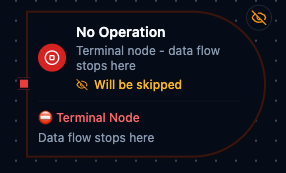
No Operation node
No Operation Node
Overview
The No Operation Node provides an explicit, documented way to terminate a pipeline branch once its work is complete. It accepts inbound packets, performs no transformation, and signals to every collaborator that execution is meant to stop at that point.
Treat it as a visual checkpoint for intentional ends: close alternate condition paths, halt work queues after error remediation, or document manual review steps without wiring additional logic.
Core Functionality
1. Terminal Behavior
- Single
inputport with no outputs—anything arriving is considered handled. - Prevents unintentional fall-through by signaling the pipeline branch is complete.
2. Standard Settings Support
- Inherits the platform's standard settings for retries, error handling, and documentation.
Retry on FailandOn Errorremain available for consistency, even though failure is rare.- Documentation settings let you annotate why the branch stops, improving readability in shared environments.
Configuration Reference
Parameters
This node has no configurable parameters. It is a terminal node that cannot connect to downstream nodes.
Settings
| Setting | Options | Default | Description |
|---|---|---|---|
| Timeout (seconds) | number | Pipeline default | Maximum execution time for this node (1--600). |
| Retry on Timeout | Pipeline Default / Enabled / Disabled | Pipeline Default | Whether to retry on timeout. |
| Retry on Fail | Pipeline Default / Enabled / Disabled | Pipeline Default | Whether to retry on failure. When Enabled, shows Advanced Retry Configuration. |
| On Error | Pipeline Default / Stop Pipeline / Continue Execution | Pipeline Default | Behavior when node fails after all retries. |
Advanced Retry Configuration (only visible when Retry on Fail = Enabled):
| Field | Type | Default | Range | Description |
|---|---|---|---|---|
| Max Attempts | number | 3 | 1--10 | Maximum retry attempts. |
| Initial Delay (ms) | number | 1000 | 100--30,000 | Wait before first retry. |
| Max Delay (ms) | number | 120000 | 1,000--300,000 | Upper bound for backoff delay. |
| Multiplier | number | 2.0 | 1.0--5.0 | Exponential backoff multiplier. |
| Jitter Factor | number | 0.1 | 0--0.5 | Random jitter. |
Usage Examples
Example 1: End Scrap Handling Branch
| Field | Value |
|---|---|
| Parameters | {} |
| On Error | Stop Pipeline |
| Description | Terminate branch after scrap classification. |
Place a No Operation node after the “scrap” path of a quality check. The empty parameters confirm nothing else runs, while the description tells operators that the part leaves the flow here.
Example 2: Halt After Error Notification
| Field | Value |
|---|---|
| Parameters | {} |
| Retry on Fail | Disabled |
| On Error | Continue Execution |
| Description | Stop after dispatching alert. |
Use this configuration at the end of an alerting branch. Once the upstream node sends a production-floor notification, the No Operation node cleanly terminates the branch without bubbling errors back into the main line.
Example 3: Close the False Branch of a Condition
| Field | Value |
|---|---|
| Parameters | {} |
| Description | Readings within limits need no action. |
Connect a Condition node's False output to a No Operation node when only the True path does work. The branch now ends visibly on the canvas, and the description records why nothing happens there.
Configuration reference
The fields below are generated from the node's config contract, so they match what the pipeline validator enforces and what the designer's form offers.
action.noOp
| Field | Type | Required | Default | Values | Description |
|---|