 Amazon SQS Integration Guide
Connect to Amazon Simple Queue Service (SQS) to send and consume messages on Standard and FIFO queues. Use it to forward telemetry into worker queues, drain queues on demand, or stream queue messages into pipelines as triggers.
Overview
The Amazon SQS connector provides bidirectional integration with AWS's fully managed message queueing service. It supports both producer (send) and consumer (receive / trigger.sqs subscription) workflows:
- Send messages to Standard and FIFO queues with support for message attributes, delays (Standard), and group/dedup IDs (FIFO)
- Receive messages on demand, returning up to 10 messages per call with long-polling support
- Delete acknowledged messages by receipt handle
- List Queues for discovery and inventory
- Trigger pipelines via a long-running consumer that long-polls the queue and fires the pipeline once per message
- Flexible queue addressing — pass either a full Queue URL or a bare queue name; bare names are resolved to URLs via
GetQueueUrland cached for the connection's lifetime - FIFO queue support with
MessageGroupIdfor ordered delivery andMessageDeduplicationIdfor exactly-once semantics within 5 minutes - Flexible authentication with IAM access keys or the AWS SDK default credential chain (environment variables, shared config, IRSA, instance profile)
- Custom endpoint support for LocalStack and other AWS-compatible services
- Per-call timeout override so individual operations can deviate from the connection-level default
- SQS is a queue: each message is consumed by exactly one consumer in a competing-consumer pool. Use it for work-distribution and pipeline triggers that need at-least-once delivery with explicit acknowledgement.
- SNS is a fan-out topic: each subscriber receives a copy. Use it for one-to-many event broadcast.
The two work well together: SNS topics can fan out to SQS queues, and a MaestroHub SQS trigger can drive a pipeline off those queue messages — getting fan-out and pipeline triggering at the same time.
Connection Configuration
Amazon SQS Connection Creation Fields
1. Profile Information
| Field | Default | Description |
|---|---|---|
| Profile Name | - | A descriptive name for this connection profile (required, max 100 characters) |
| Description | - | Optional description for this SQS connection |
2. AWS Region
| Field | Default | Description |
|---|---|---|
| AWS Region | us-east-1 | AWS region where the SQS queues live (e.g., us-east-1, eu-central-1). Must match the region of the target queues — SQS is regional. |
A Queue URL encodes its region (e.g., https://sqs.eu-central-1.amazonaws.com/...). Calls to a queue in a different region than the connection's AWS Region will fail. Create a separate connection per region if you operate across regions.
3. Authentication
| Field | Default | Description |
|---|---|---|
| Access Key ID | - | AWS Access Key ID. Leave empty to use the AWS SDK default credential chain. |
| Secret Access Key | - | AWS Secret Access Key. Required when Access Key ID is set. |
| Session Token | - | Session token for temporary credentials (optional, used with AWS STS). |
You can authenticate the connector in one of two ways:
Option A — Static IAM access keys (explicit)
Provide an Access Key ID and Secret Access Key (and optionally a Session Token for STS-based temporary credentials). Best for self-hosted deployments where the host has no AWS identity of its own.
Option B — AWS SDK default credential chain (implicit)
Leave both Access Key ID and Secret Access Key empty. The connector resolves credentials in the standard AWS SDK order:
- Environment variables (
AWS_ACCESS_KEY_ID,AWS_SECRET_ACCESS_KEY,AWS_SESSION_TOKEN) - Shared credentials file (
~/.aws/credentials) - IAM Roles for Service Accounts (IRSA) when running on EKS
- EC2 instance profile / ECS task role
The Access Key ID and Secret Access Key must be set together. Setting only one is rejected at validation time.
The IAM principal used by the connector must have:
| Operation | Required IAM Action | Scope |
|---|---|---|
| Connect / health probe | sqs:ListQueues | Region-level |
| Send | sqs:SendMessage | The specific queue(s) you send to |
| Receive (ad-hoc or subscriber) | sqs:ReceiveMessage | The specific queue(s) you consume from |
| Delete (ad-hoc or subscriber autoDelete) | sqs:DeleteMessage | The same queue(s) |
| List Queues function | sqs:ListQueues | Region-level |
| Address-by-name resolution | sqs:GetQueueUrl | Region-level |
A minimal least-privilege policy scopes each action to the specific queue ARNs the connection touches. The sqs:ListQueues permission is needed for the connection's startup health probe.
4. Custom Endpoint
| Field | Default | Description |
|---|---|---|
| Custom Endpoint | - | Custom SQS endpoint URL for LocalStack or other AWS-compatible services. Leave empty for AWS SQS. |
For local development with LocalStack, set the custom endpoint to http://localhost:4566 (or wherever LocalStack is running). When using LocalStack you must still supply an AWS Region and credentials — any non-empty values are accepted.
5. Advanced
| Field | Default | Description |
|---|---|---|
| Request Timeout (seconds) | 30 | Default timeout for SQS API calls (1–300 seconds). Receive functions with waitTimeSeconds > 0 auto-extend the timeout internally to cover the long-poll. |
| Max Retries | 3 | Maximum SDK retry attempts for transient failures (0–10). |
Function Builder
Creating Amazon SQS Functions
Once a connection is established, create reusable functions:
- Navigate to Functions → New Function
- Select the function type (Send, Receive, Delete, or List Queues)
- Choose your SQS connection
- Configure the function parameters
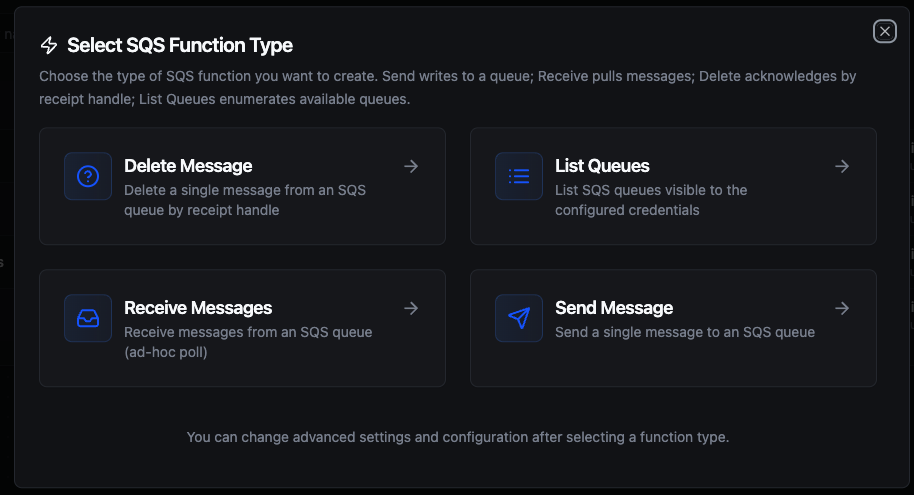
Select from four Amazon SQS function types: Send to write messages, Receive to pull messages, Delete to acknowledge by receipt handle, and List Queues for discovery
Send Function
Purpose: Send a single message to an SQS queue. Use this for work distribution, telemetry forwarding, or bridging upstream events into a downstream consumer.
Configuration Fields
| Field | Type | Required | Default | Description |
|---|---|---|---|---|
| Queue (URL or Name) | String | Yes | - | Full Queue URL or just the queue name (resolved + cached). FIFO queue names end in .fifo. Supports ((parameter)). |
| Message Body | String | Yes | - | Message payload. Max 256 KB. Supports ((parameter)) and {{ expression }} templating. |
| Delay Seconds | Number | No | - | Standard queues only (0–900). Delays initial visibility. Ignored on FIFO. |
| Message Attributes (JSON) | String | No | - | JSON object of attributes (name → {dataType, stringValue} or shorthand {name: "value"}). |
| Message Group ID | String | No* | - | Required for FIFO queues. Messages with the same group ID are delivered in strict order. |
| Message Deduplication ID | String | No | - | FIFO only. 5-minute deduplication. Omit when the queue has content-based deduplication enabled. |
| Timeout Override (seconds) | Number | No | - | Overrides the connection-level request timeout (0–300). |
* Required when sending to a FIFO queue (queue name ending in .fifo).
FIFO queue names always end in .fifo. When sending to a FIFO queue:
- Message Group ID is required — messages within the same group are delivered to consumers in send order.
- Message Deduplication ID provides 5-minute exactly-once semantics. Omit it when the queue has content-based deduplication enabled.
Standard queues ignore both fields. The Delay Seconds field is also ignored on FIFO (FIFO uses queue-level delay only).
The messageAttributes field accepts either a shorthand string-value object or the typed AWS shape:
{
  "severity":  "critical",
  "score":     { "dataType": "Number", "stringValue": "87" },
  "blob_data": { "dataType": "Binary", "binaryValue": "<base64>" }
}
The shorthand "name": "value" form defaults to dataType=String. SQS supports String, String.Array, Number, and Binary data types.
Receive Function
Purpose: Receive up to 10 messages from an SQS queue in one call. Acts as both a pipeline action (ad-hoc poll) and as the configuration source for the trigger.sqs node (long-running subscriber).
Configuration Fields
| Field | Type | Required | Default | Description |
|---|---|---|---|---|
| Queue (URL or Name) | String | Yes | - | Full Queue URL or queue name. |
| Max Messages | Number | No | 1 | 1–10 messages per call. AWS may return fewer. |
| Wait Time (Long-Poll Seconds) | Number | No | 0 | Above 0 enables long-polling: the call blocks up to N seconds waiting for messages (0–20). |
| Visibility Timeout (seconds) | Number | No | - | Per-call override of the queue's default visibility timeout (0–43200 / 12h). |
| Message Attribute Names | String | No | - | Comma-separated names, or All. Empty returns no message attributes. |
| Timeout Override (seconds) | Number | No | - | Per-call request timeout (0–300). Auto-extended to cover waitTimeSeconds + 5s. |
| Auto-Delete (subscriber) | Boolean | No | true | Only used when this function powers a trigger.sqs node. When true, the subscriber deletes the message after the pipeline handler succeeds. |
Return Shape
Receive returns a list of messages, each with the receipt handle needed for a follow-up Delete:
{
  "messages": [
    {
      "messageId": "abc-123",
      "body": "<message body>",
      "receiptHandle": "AQEB...",
      "md5OfBody": "...",
      "messageAttributes": { "env": { "dataType": "String", "stringValue": "prod" } }
    }
  ],
  "count": 1
}
Setting waitTimeSeconds above 0 changes the call from a short-poll (returns immediately, often with no messages) to a long-poll (blocks until a message arrives or the timeout expires). For most workloads waitTimeSeconds=20 is the right default — it cuts empty receives to near zero while keeping the connection responsive to shutdown signals.
After Receive, the returned messages stay invisible to other consumers for the queue's VisibilityTimeout (default 30s, configurable per queue or per call). If you don't call Delete before that timeout expires, the message becomes visible again and another consumer will receive it — at-least-once delivery in action.
For pipeline triggers, the Auto-Delete (subscriber) flag on the Receive function handles this: messages are deleted on pipeline success, left for redrive on failure.
Delete Function
Purpose: Acknowledge a single message by deleting it from the queue using its receipt handle. Receipt handles are returned by Receive and are tied to a specific receive call — they expire when the visibility timeout passes.
Configuration Fields
| Field | Type | Required | Default | Description |
|---|---|---|---|---|
| Queue (URL or Name) | String | Yes | - | Full Queue URL or queue name. |
| Receipt Handle | String | Yes | - | Returned by a previous Receive. Usually wired via a pipeline parameter like ((receiptHandle)). |
| Timeout Override (seconds) | Number | No | - | Per-call request timeout (0–300). |
Delete is a per-element operation. Calling it in a pipeline forEach over a batch of 10 received messages produces 10 round-trips. SQS supports DeleteMessageBatch (up to 10 receipts per call) — the bulk variant is not exposed yet; the v1 connector ships sqs.delete only.
If you need to acknowledge many messages at once, file a follow-up to add sqs.delete_batch before adopting a loop pattern. The subscriber's built-in auto-delete is safe because it acks one message per pipeline fire, not one per loop iteration.
List Queues Function
Purpose: List SQS queues visible to the connection's IAM principal in the configured region. Useful for queue discovery, inventory audits, and pre-send validation.
Configuration Fields
| Field | Type | Required | Default | Description |
|---|---|---|---|---|
| Name Prefix | String | No | - | Only return queues whose names start with this prefix. |
| Max Items | Number | No | 1000 | Maximum queues to return (1–10000). The connector paginates AWS responses internally up to the budget. |
Using Parameters
The ((parameterName)) syntax creates dynamic, reusable functions. Parameters are auto-detected from your configuration fields and can be configured with type, requirement, default value, and description.
For Send, parameters are typically wired through: Queue, Message Body, Message Attributes, Message Group ID, Message Deduplication ID. For Delete, the Receipt Handle is almost always parameterized — Receive's receiptHandle output is bound into the Delete call's ((receiptHandle)) slot.
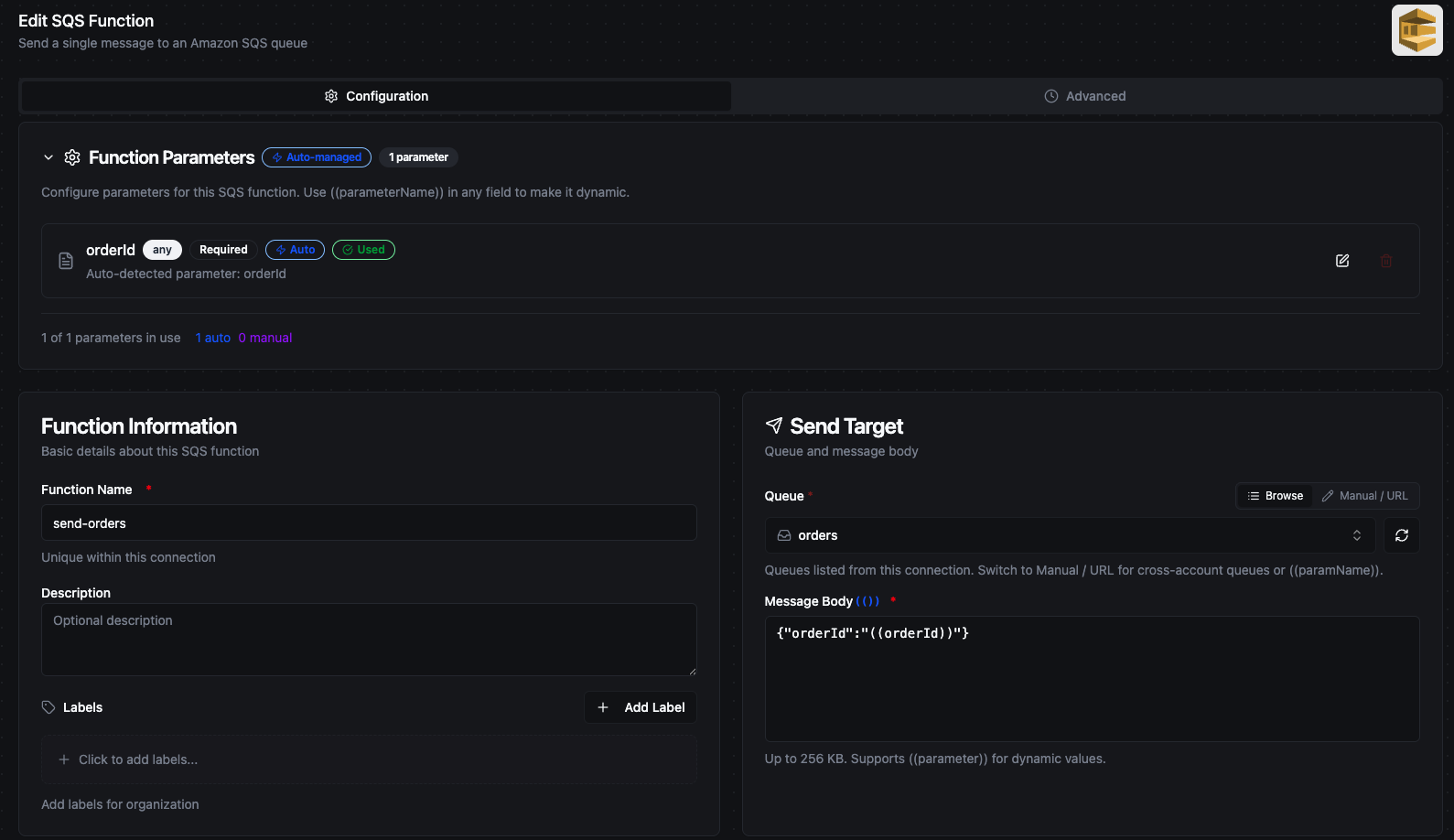
Function Parameters panel sits at the top of the function form. Parameters detected from ((parameter)) placeholders are auto-managed; the form shows a side-by-side Profile + per-type configuration card below.
Pipeline Integration
Use the Amazon SQS functions you create here as nodes inside the Pipeline Designer.
- Amazon SQS Send / Receive / Delete / List — pipeline action nodes
- Amazon SQS Trigger — long-running subscriber that fires a pipeline once per queue message
For broader orchestration patterns that combine SQS with databases, REST, MQTT, or other connector steps, see the Connector Nodes page.
Common Use Cases
Pipeline-Triggered Queue Worker
Scenario: Telemetry events land in an SQS queue from an upstream producer (a Lambda, another pipeline, an SNS topic with an SQS subscription). MaestroHub should run a pipeline once per message, transform the payload, and write to a downstream system. The message is acknowledged only after the pipeline succeeds; failures should redrive.
Setup:
- Create a Receive function with
Auto-Delete (subscriber): true,waitTimeSeconds: 20,maxMessages: 10. - Drop a
trigger.sqsnode onto the pipeline canvas; bind it to the connection + the Receive function. - Wire the trigger's
payloadoutput to downstream nodes.
The subscriber long-polls in the background, fires the pipeline per message, and auto-deletes on success. Failures are left in flight; after the queue's visibility timeout they redrive — exactly the at-least-once shape SQS is built for.
Forwarding Telemetry Into a Work Queue (FIFO)
Scenario: Equipment events from MQTT must be ordered per-machine but parallelized across machines, then consumed by a downstream Lambda fleet that needs strict per-machine order.
Setup:
- Send Configuration: queue
arn:aws:sqs:us-east-1:123456789012:equipment-events.fifo,messageGroupId: ((machineId)),messageDeduplicationId: ((eventId)), body templated from MQTT payload. - Pipeline shape:
trigger.mqtt→ transform →connected.sqs.send.
The same group ID guarantees per-machine ordering downstream; different machines fan out in parallel through SQS's group concurrency.
Ad-Hoc Drain on a Schedule
Scenario: A low-volume queue accumulates over the day; you want a once-an-hour pipeline that processes up to 50 messages per run and acknowledges each.
Setup:
trigger.schedule(cron0 * * * *) →connected.sqs.receive(maxMessages: 10) →forEach→ transform →connected.sqs.deletebound to((receiptHandle)).
For higher volume, switch to the subscriber pattern above — the schedule trigger only sees one batch per run.
Queue Inventory Audit
Scenario: Compliance requires a periodic inventory of all SQS queues in each region, with environment tags for review.
Function: List Queues with Max Items: 5000, optionally Name Prefix: prod-.
Troubleshooting
| Symptom | Likely Cause | Fix |
|---|---|---|
| Connection test fails with "could not reach" | Endpoint URL unreachable, LocalStack not running, network outage | Verify the endpoint URL; check LocalStack is up; verify network reachability to sqs.<region>.amazonaws.com:443 |
| "AWS rejected the provided credentials" | Wrong Access Key / Secret combination | Re-paste credentials; rotate the key if compromised |
| "Not authorized to call sqs:ListQueues" | IAM principal missing sqs:ListQueues on the region | Add the action to the IAM policy (needed for the health probe) |
Send fails with QueueDoesNotExist | Wrong URL, wrong region, or queue lives in another account | Verify the URL; create a separate connection per region; use the full URL for cross-account queues |
| Subscriber receives nothing | Wrong queue, waitTimeSeconds too low, queue is empty, IAM missing sqs:ReceiveMessage | Check the queue has messages; raise waitTimeSeconds to 20; verify IAM permission |
| Subscriber receives the same message repeatedly | Pipeline handler returns failure; autoDelete disabled; visibility timeout too short | Check pipeline failures in run history; ensure autoDelete: true if you want at-least-once-with-ack; raise the queue's visibility timeout if the pipeline takes longer than 30s |
| FIFO Send rejected with "messageGroupId is required" | Sending to a .fifo queue without a group ID | Set Message Group ID — usually a stable per-entity value like ((machineId)) |