 MQTT Integration Guide
Use MaestroHub's MQTT connector to exchange real-time messages with PLC gateways, IoT devices, and event-driven services. This guide explains how to configure connections, design publish/subscribe functions, and orchestrate pipelines.
Overview
The MQTT connector delivers:
- MQTT v3.1, v3.1.1 and v5.0 support with QoS 0/1/2 and retained message control
- Publish and subscribe functions for bidirectional communication
- Security options including TLS, mutual authentication, and username/password logins
- Payload templating for JSON, binary buffers, or delimited text
Connection Configuration
Creating an MQTT Connection
Navigate to Connections → New Connection → MQTT and fill in these details:
MQTT Connection Creation Fields
1. Profile Information
| Field | Default | Description |
|---|---|---|
| Profile Name | - | A descriptive name for this connection profile (required, max 100 characters) |
| Description | - | Optional description for this MQTT connection |
2. MQTT Broker Configuration
| Field | Default | Description |
|---|---|---|
| Broker URL | - | MQTT broker endpoint (e.g., mqtt://broker.example.com:1883) – required, must be a valid URL |
| MQTT Version | 3.1.1 | MQTT protocol version (3.1 / 3.1.1 / 5.0) – required |
| Client ID | - | Unique client identifier (max 65535 characters). Server generates if not specified |
| Keep Alive (sec) | 60 | Keep alive interval in seconds (0-65535) |
| Connect Timeout (sec) | 30 | Connection timeout in seconds (1-300) |
Protocol Options
3.1: Legacy MQTT version3.1.1: Recommended – most widely supported5.0: Latest – enhanced features and performance
3. Session Management
3a. For MQTT v3.1 and v3.1.1
| Field | Default | Description |
|---|---|---|
| Clean Session | true | Start with a clean session on connect |
3b. For MQTT v5.0
| Field | Default | Description |
|---|---|---|
| Clean Start | - | Start with a clean session on initial connection |
4. Basic Authentication
| Field | Default | Description |
|---|---|---|
| Username | - | MQTT broker username (optional) |
| Password | - | MQTT broker password (optional, but username is required if password is provided) |
5. TLS/SSL Settings
5a. TLS Configuration
| Field | Default | Description |
|---|---|---|
| Enable TLS/SSL | false | Use encrypted connection to the MQTT broker |
| Skip Certificate Verification | false | Skip SSL certificate verification (not recommended for production) |
5b. Certificate Verification Settings
(Only displayed when TLS is enabled and Certificate Verification is NOT skipped)
| Field | Default | Description |
|---|---|---|
| Server Name (SNI) | - | Server name for SNI verification (e.g., broker.example.com) |
| TLS Version | - | Minimum TLS version (1.0 / 1.1 / 1.2 / 1.3) |
5c. Client Certificates
(Only displayed when TLS is enabled and Certificate Verification is NOT skipped)
| Field | Default | Description |
|---|---|---|
| Client Certificate | - | Client certificate for mutual TLS authentication (PEM format) |
| Private Key | - | Private key for client certificate (PEM format) |
| CA Certificate | - | CA certificate for server verification (PEM format) |
6. Last Will and Testament (LWT)
| Field | Default | Description |
|---|---|---|
| Will Topic | - | Topic to publish the will message (e.g., clients/disconnected) |
| Will QoS | 0 | Quality of Service for will message (0 / 1 / 2) |
| Will Message | - | Message to publish on unexpected disconnect |
| Retain Will Message | false | Broker retains the last will message |
QoS Levels
- QoS 0: At most once – no confirmation
- QoS 1: At least once – confirmed delivery
- QoS 2: Exactly once – guaranteed single delivery
7. MQTT v3.1.1 Advanced Options
(Only displayed when MQTT Version = 3.1 or 3.1.1)
7a. Connection Timing
| Field | Default | Description |
|---|---|---|
| Ping Timeout (seconds) | - | Timeout for ping requests (1-300, leave empty for library default) |
| Write Timeout (seconds) | - | Timeout for write operations (1-300, leave empty for library default) |
| Max Reconnect Interval (seconds) | - | Maximum interval between reconnect attempts (1-3600, leave empty for library default) |
7b. Connection Behavior
| Field | Default | Description |
|---|---|---|
| Auto Reconnect | false | Automatically reconnect when connection is lost |
| Connect Retry | false | Retry connection attempts on failure |
| Resume Subscriptions | false | Automatically resume subscriptions on reconnect |
| Order Matters | false | Preserve message ordering |
| Disable Auto ACK | false | Disable automatic message acknowledgment |
7c. Message Handling
| Field | Default | Description |
|---|---|---|
| Connect Retry Interval (seconds) | - | Interval between connection retry attempts (1-300, leave empty for library default) |
| Max Resume Pub In Flight | - | Maximum publish messages in flight during resume (0-65535, leave empty for library default) |
8. MQTT v5.0 Enhanced Properties
(Only displayed when MQTT Version = 5.0)
8a. Session & Flow Control
| Field | Default | Description |
|---|---|---|
| Session Expiry Interval (seconds) | - | How long session state persists after disconnect (0-4294967295, 0 = immediately expire) |
| Receive Maximum | - | Maximum number of QoS 1 and QoS 2 messages that can be outstanding (1-65535, 65535 = unlimited) |
| Maximum Packet Size (bytes) | - | Maximum size of MQTT packets that can be received (1-268435455, 268435455 = 256MB) |
8b. Topic Aliases & Information
| Field | Default | Description |
|---|---|---|
| Topic Alias Maximum | - | Maximum topic aliases for reducing topic name overhead (0-65535, 0 = no aliases) |
| Request Response Information | false | Request enhanced response information from broker |
| Request Problem Information | false | Request detailed error information from broker |
| Packet Timeout (seconds) | - | Timeout for packet operations (1-300, leave empty for library default) |
8c. Manual Acknowledgment
| Field | Default | Description |
|---|---|---|
| Enable Manual Acknowledgment | false | Manually control message acknowledgments |
| Send ACKs Interval (ms) | - | Interval between sending acknowledgments (1-10000 ms, leave empty for library default) |
8d. User Properties
| Field | Default | Description |
|---|---|---|
| User Properties | - | Custom key-value pairs for application-specific metadata (JSON format) |
Example User Properties
{"correlationId":"12345","origin":"edge-gateway"}– Identify related transactions{"tenant":"alpha","priority":"high"}– Route messages by tenant or priority
9. Connection Labels
| Field | Default | Description |
|---|---|---|
| Labels | - | Key-value pairs to categorize and organize this MQTT connection (max 10 labels) |
Example Labels
environment: production– Deployment environmentteam: iot– Responsible teamprotocol: mqtt– Connection protocolregion: us-east-1– Geographical region
- MQTT Version compatibility: Sections 7 (v3.1.1 Advanced Options) and 8 (v5.0 Enhanced Properties) appear based on the selected MQTT version.
- Broker URL protocol detection automatically enables TLS when using
mqtts://,ssl://, orwss://schemes. - Authentication requires a username when a password is provided.
- TLS certificate fields are available only when TLS is enabled and certificate verification is not skipped.
- Clean Session and Clean Start represent the same behavior in v3.1.1 and v5.0, respectively.
- Fields marked as "leave empty for library default" fall back to the MQTT library defaults.
- Timeout values are in seconds unless noted (Send ACKs Interval uses milliseconds).
Function Builder
Creating MQTT Functions
After the connection is configured:
- Go to Functions → New Function
- Choose MQTT Publish or MQTT Subscribe as the function type
- Select the MQTT connection profile
- Define topic filters, QoS, retained settings, and payload templates
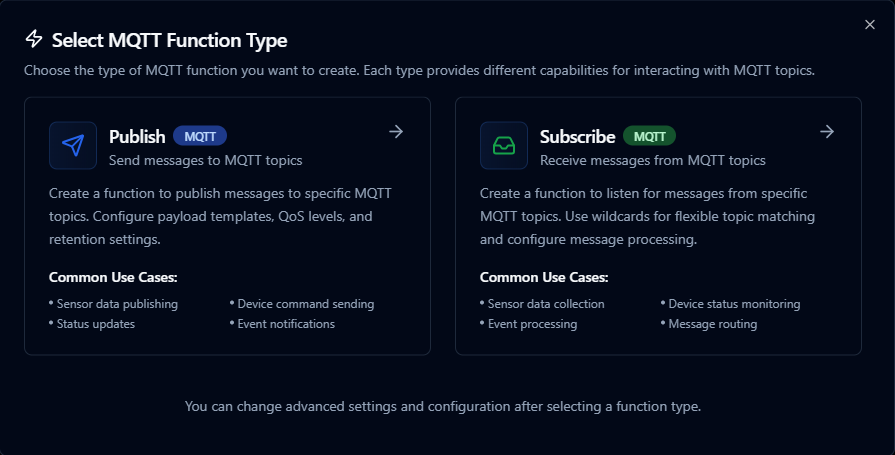
Design MQTT publish or subscribe functions with topic templates and payload mappings
Publish Function
Purpose: Send messages to MQTT topics. Create a function to publish messages to specific MQTT topics with configurable payload templates, QoS levels, and retention settings.
Configuration Fields
| Field | Type | Required | Default | Description |
|---|---|---|---|---|
| Topic Template | String | Yes | - | MQTT topic to publish to (supports parameters). Example: sensors/((deviceId))/temperature |
| Payload Template | String | Yes | - | Message payload template (supports parameters). Example: {"temperature": ((value)), "timestamp": "((now))"} |
| QoS Level | Number | No | 0 | Quality of Service level for published messages (0, 1, or 2) |
| Retained | Boolean | No | false | Whether messages should be retained by the broker |
| Wait for Acknowledgment (v3.1.1) | Boolean | No | true | Wait for publish acknowledgment from broker (MQTT v3.1.1) |
| Duplicate Detection (v3.1.1) | Boolean | No | false | Enable duplicate message detection (MQTT v3.1.1) |
| Content Type (v5.0) | String | No | - | MIME type of the message payload (MQTT v5.0). Example: application/json |
| Message Expiry (v5.0) | Number | No | - | Message expiry interval in seconds (1-4294967295) (MQTT v5.0) |
| Payload Format (v5.0) | Number | No | - | Payload format indicator: 0=bytes, 1=UTF-8 (MQTT v5.0) |
| Response Topic (v5.0) | String | No | - | Topic for response messages (MQTT v5.0) |
| Correlation Data (v5.0) | String | No | - | Request correlation identifier (MQTT v5.0) |
| Topic Alias (v5.0) | Number | No | - | Topic alias for compression (1-65535) (MQTT v5.0) |
| User Properties (v5.0) | Object | No | - | Custom key-value properties for the message (MQTT v5.0) |
Use Cases: Sensor data publishing, device command sending, status updates, event notifications
Subscribe Function
Purpose: Receive messages from MQTT topics. Create a function to listen for messages from specific MQTT topics with wildcard support for flexible topic matching.
Configuration Fields
| Field | Type | Required | Default | Description |
|---|---|---|---|---|
| Topic Filters | Array | Yes | ["sensors/+/data"] | MQTT topic patterns to subscribe to (supports wildcards + and #). Example: ["sensors/+/temperature", "devices/+/status"] |
| Single Topic Filter | String | No | - | Single MQTT topic pattern (alternative to topics array) |
| QoS Level | Number | No | 0 | Quality of Service level for subscription (0, 1, or 2) |
| No Local (v5.0) | Boolean | No | false | Don't receive messages published by this client (MQTT v5.0) |
| Retain as Published (v5.0) | Boolean | No | false | Preserve the original retain flag of messages (MQTT v5.0) |
| Retain Handling (v5.0) | Number | No | 0 | How to handle retained messages: 0=send, 1=send if new, 2=don't send (MQTT v5.0) |
| Subscription Identifier (v5.0) | Number | No | - | Unique identifier for this subscription (1-268435455) (MQTT v5.0) |
| Shared Subscription Group (v5.0) | String | No | - | Name for shared subscription group (generates $share/group/topic syntax) (MQTT v5.0) |
| User Properties (v5.0) | Object | No | - | Custom key-value properties for the subscription (MQTT v5.0) |
Use Cases: Sensor data collection, device status monitoring, event processing, message routing
Using Parameters
MQTT functions support parameterized topics and payload values via the ((parameterName)) syntax.
| Configuration | Description | Example |
|---|---|---|
| Type | Validate incoming pipeline data | string, number, boolean, datetime, json, buffer |
| Required | Force topic fragments or payload fields | Required / Optional |
| Default Value | Provide fallback values | 'line-01', 0, '{}' |
| Description | Document intent for other authors | "Line identifier appended to the topic path" |
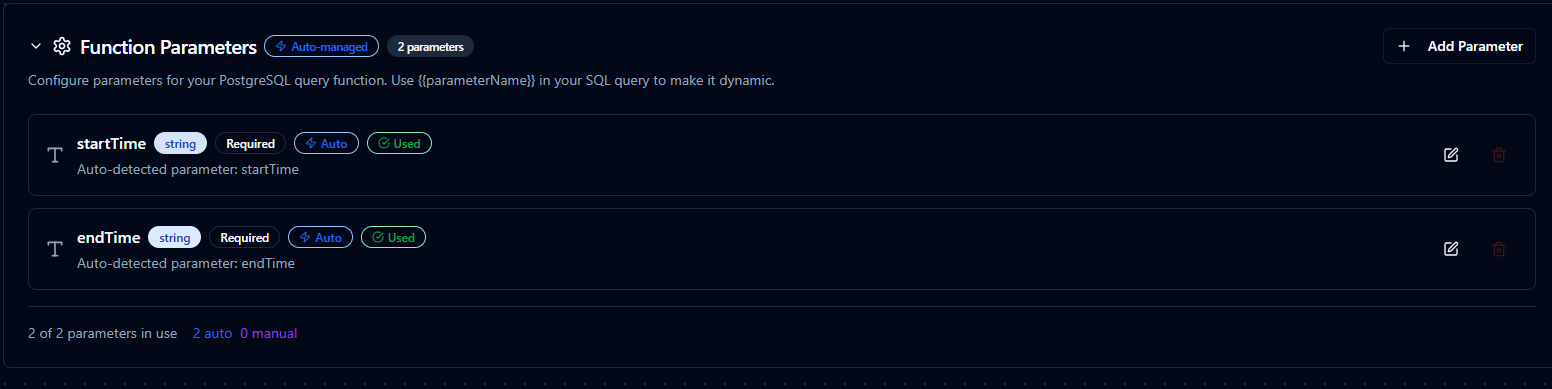
Configure parameter validation, defaults, and descriptions for MQTT topics and payloads
Pipeline Integration
Use the MQTT connection functions you create here as nodes inside the Pipeline Designer to synchronize production data with the rest of your stack. Drag in the publish or subscribe node, bind its parameters to upstream node outputs or constants, and shape event-driven flows without leaving the designer.
If you are planning more complex orchestration, review the Connector Nodes page for patterns on where MQTT nodes fit best within broader orchestration strategies.
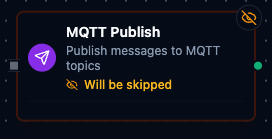
MQTT node with connection, function, and parameter mappings
Common Use Cases
Telemetry Distribution
Publish normalized sensor data to MQTT topics consumed by SCADA dashboards, analytics platforms, or digital twins.
Command Handling
Subscribe to command topics from enterprise systems and invoke PLC writes, REST calls, or script nodes in response.
Edge-to-Cloud Bridging
Bridge legacy PLC data into cloud IoT platforms by combining OPC UA/Modbus reads with MQTT publish steps.