 PostgreSQL Integration Guide
Connect to PostgreSQL databases to read and write industrial data in your pipelines. This comprehensive guide walks you through everything from basic setup to advanced configurations.
Overview
The PostgreSQL connector is your gateway to relational database operations in MaestroHub. It enables you to:
- Read data from tables, views, or custom queries
- Write data with insert, update, or delete operations
- Use parameterized queries for dynamic, reusable data operations
- Secure connections with SSL/TLS encryption
The PostgreSQL connector also supports TimescaleDB connections for time-series data.
Connection Configuration
Creating a PostgreSQL Connection
Navigate to Connections → New Connection → PostgreSQL and configure the following:
PostgreSQL Connection Creation Fields
1. Profile Information
| Field | Default | Description |
|---|---|---|
| Profile Name | - | A descriptive name for this connection profile (required, max 100 characters) |
| Description | - | Optional description for this PostgreSQL connection |
2. Database Configuration
| Field | Default | Description |
|---|---|---|
| Host | localhost | PostgreSQL server hostname or IP address - required |
| Port | 5432 | PostgreSQL server port (1-65535) - required |
| Connect Timeout (sec) | 30 | Maximum time to wait for connection establishment (0-600 seconds) - required |
| Schema | public | Database schema to use - required |
| Database | - | Database name to connect to (e.g., mydb) - required |
Note: Supported PostgreSQL versions: 9.6+
3. Basic Authentication
| Field | Default | Description |
|---|---|---|
| Username | - | PostgreSQL database user (required) |
| Password | - | PostgreSQL user password (required) |
4. SSL Settings
4a. SSL Configuration
| Field | Default | Description |
|---|---|---|
| Enable SSL | true | Use encrypted connection to PostgreSQL server |
4b. SSL Mode and Certificates
(Only displayed when SSL is enabled)
| Field | Default | Description |
|---|---|---|
| SSL Mode | require | TLS/SSL connection mode used by the driver (require / verify-ca / verify-full) |
| CA Certificate | - | Trusted CA certificate (sslrootcert) in PEM format |
| Client Certificate | - | Optional client certificate (sslcert) in PEM format |
| Private Key | - | Private key for client certificate (sslkey) in PEM format |
SSL Mode Options
require: Requires SSL connection but does not verify server certificateverify-ca: Requires SSL and verifies that the server certificate is issued by a trusted CAverify-full: Requires SSL and verifies both the CA and that the server hostname matches the certificate
5. Connection Pool Settings
| Field | Default | Description |
|---|---|---|
| Max Open Connections | 100 | Maximum number of simultaneous database connections (0-1000). Higher values increase concurrency but add DB load |
| Max Idle Connections | 25 | Idle connections kept ready for reuse to reduce latency (0-1000, 0 = close idle connections immediately) |
| Connection Max Lifetime (sec) | 900 | Maximum age of a connection before it is recycled (0-86400 seconds, 0 = keep connections indefinitely). Helpful to avoid server-side timeouts |
| Connection Max Idle Time (sec) | 300 | How long an idle connection may remain unused before being closed (0-86400 seconds, 0 = disable idle timeout) |
Connection pool settings help optimize database performance by balancing concurrency, resource usage, and latency across workloads.
6. Retry Configuration
| Field | Default | Description |
|---|---|---|
| Retries | 3 | Number of connection attempts (0-10, 0 = no retry) |
| Retry Delay (ms) | 100 | Delay between retry attempts in milliseconds (0-3600000 ms) |
| Retry Backoff Multiplier | 2 | Exponential factor for retry delay growth (1-10, e.g., 2.0 means each retry waits twice as long) |
Example Retry Behavior
- With
Retry Delay = 100msandRetry Backoff Multiplier = 2:- 1st retry: wait 100ms
- 2nd retry: wait 200ms
- 3rd retry: wait 400ms
7. Advanced Features
| Field | Default | Description |
|---|---|---|
| Use TimescaleDB | false | Enable TimescaleDB-specific optimizations (no DSN change required) |
8. Connection Labels
| Field | Default | Description |
|---|---|---|
| Labels | - | Key-value pairs to categorize and organize this PostgreSQL connection (max 10 labels) |
Example Labels
env: prod– Environmentteam: data– Responsible team
- Required Fields: All fields described as "required" must be filled.
- SSL/TLS: When SSL is disabled, SSL Mode is automatically set to disable.
- Connection Pooling: Manages concurrency with
Max Open Connections, reduces latency withMax Idle Connections, mitigates stale connections viaConnection Max Lifetime, and frees resources usingConnection Max Idle Time. - Retry Logic: Implements exponential backoff—initial connection attempts use the base delay and each retry multiplies the delay by the backoff factor; ideal for transient network issues or database restarts.
- TimescaleDB: When enabled, provides optimizations for time-series workloads.
- Timeout Values:
Connect Timeoutapplies to initial connection establishment; all timeout values are in seconds unless noted (Retry Delay uses milliseconds). - Security Best Practices: Always enable SSL for production, prefer
verify-full, supply CA certificates forverify-caorverify-full, and include client certificates for mutual TLS when possible.
Function Builder
Creating PostgreSQL Functions
Once you have a connection established, you can create reusable functions for different operation types:
- Navigate to Functions → New Function
- Select one of the PostgreSQL function types: Query, Execute, or Write
- Choose your PostgreSQL connection
- Configure the function parameters
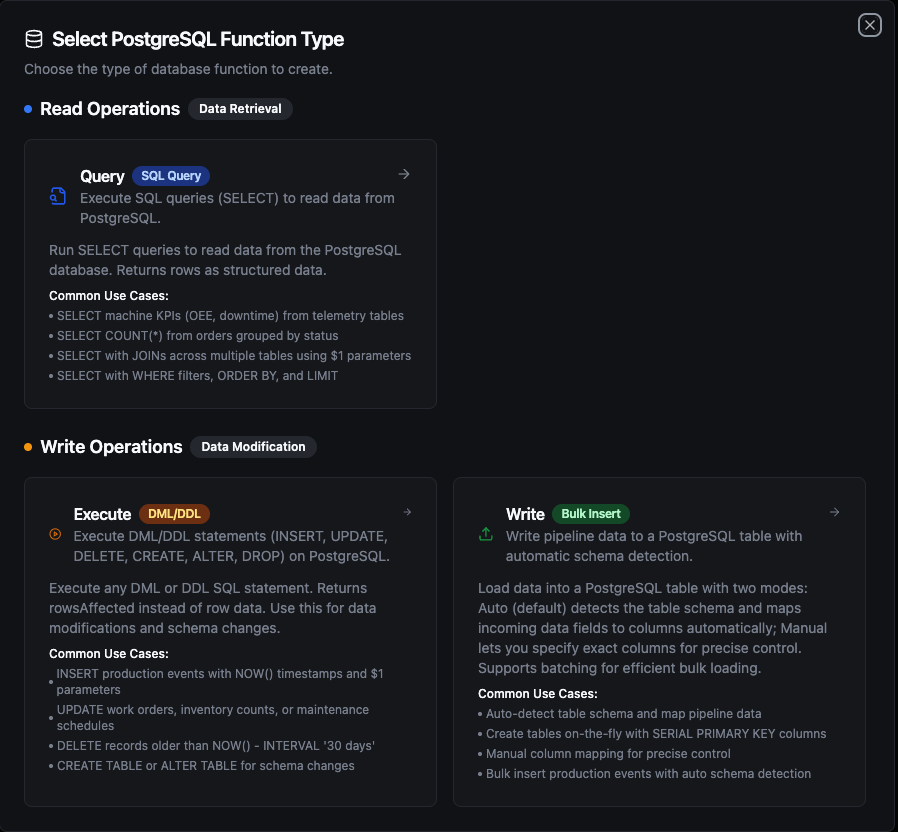
PostgreSQL function creation interface showing available function types: Query, Execute, and Write
Query Function
Purpose: Execute SQL queries (SELECT) to read data from PostgreSQL. Returns rows as structured data.
Configuration Fields
| Field | Type | Required | Default | Description |
|---|---|---|---|---|
| SQL Query | String | Yes | - | SQL SELECT statement to execute. Supports parameterized queries with ((param)) syntax. |
| Timeout (seconds) | Number | No | 0 | Per-execution timeout in seconds (0 = no limit). |
Use Cases:
- SELECT machine KPIs (OEE, downtime) from telemetry tables
- SELECT COUNT(*) from orders grouped by status
- SELECT with JOINs across multiple tables using
$1parameters - SELECT with WHERE filters, ORDER BY, and LIMIT
Execute Function
Purpose: Execute DML/DDL statements (INSERT, UPDATE, DELETE, CREATE, ALTER, DROP) on PostgreSQL. Returns rowsAffected instead of row data. Use this for data modifications and schema changes.
Configuration Fields
| Field | Type | Required | Default | Description |
|---|---|---|---|---|
| SQL Statement | String | Yes | - | DML/DDL SQL statement to execute. Supports parameterized queries with ((param)) syntax. |
| Timeout (seconds) | Number | No | 0 | Per-execution timeout in seconds (0 = no limit). |
Use Cases:
- INSERT production events with
NOW()timestamps and$1parameters - UPDATE work orders, inventory counts, or maintenance schedules
- DELETE records older than
NOW() - INTERVAL '30 days' - CREATE TABLE or ALTER TABLE for schema changes
Write Function
Purpose: Write pipeline data to a PostgreSQL table with automatic schema detection. This is not a SQL editor — it loads structured data (rows/objects) from your pipeline into a target table.
Load data into a PostgreSQL table with two modes: Auto (default) detects the table schema and maps incoming data fields to columns automatically; Manual lets you specify exact columns for precise control. Supports batching for efficient bulk loading.
Configuration Fields
| Field | Type | Required | Default | Description |
|---|---|---|---|---|
| Table Name | String | Yes | - | Target table to insert data into. |
| Write Mode | String | No | auto | auto = detect schema and map fields automatically, manual = specify exact columns. |
| Columns | Array | No | - | Column names to insert into (manual mode only). |
| Create Table If Not Exists | Boolean | No | false | Auto-create the table if it does not exist (auto mode only). When enabled, also performs schema evolution — adds missing columns and widens types as needed. |
| Batch Size | Number | No | 100 | Number of rows per INSERT batch (1–10,000). |
| Timeout (seconds) | Number | No | 0 | Per-execution timeout in seconds (0 = no limit). |
Use Cases:
- Auto-detect table schema and map pipeline data
- Create tables on-the-fly with
SERIAL PRIMARY KEYcolumns - Manual column mapping for precise control
- Bulk insert production events with auto schema detection
How Write Works Step by Step
1. Batching
Each batch generates a single INSERT INTO ... VALUES (...), (...), (...) statement with multiple value tuples. If your pipeline sends 10 rows and Batch Size is 5, exactly 2 INSERT statements are executed (2 batches of 5 rows). If it sends 13 rows, 3 INSERT statements are executed (5 + 5 + 3).
PostgreSQL has a per-query parameter limit (65,535). If your configured batch size combined with the number of columns would exceed this limit, batches are automatically split into smaller chunks. This is handled transparently — the total number of inserted rows remains the same.
2. Column Matching
Write uses case-insensitive matching between incoming data field names and table column names. For example, a data field named deviceId will match a table column DEVICEID or deviceid. The original column casing from the database is preserved in the generated INSERT statement.
3. Table Exists — Normal Flow
- The function first queries
information_schemato check if the target table exists - If the table exists, it fetches all column metadata (name, type, nullability)
- It matches incoming data fields to table columns (case-insensitive)
- Fields in data that don't match any column are silently skipped — they are tracked and returned in the response metadata as
skippedFields - Batch INSERT statements are generated and executed using only the matched columns
4. Table Does Not Exist
| Create Table If Not Exists | Behavior |
|---|---|
| Disabled (default) | Returns an error immediately: "table 'X' does not exist. Enable 'Create table if not exists' or create it manually". No insert is attempted. |
| Enabled, no schema provided | Types are inferred from the first row of data using the rules below. A CREATE TABLE is executed, then all rows (including the first) are inserted — no data loss. |
| Enabled, with schema | The provided schema is used for CREATE TABLE with full column definitions (types, primary keys, indexes). After creation, all rows are inserted. |
Data Type Inference — When no schema is provided, the Write function infers column types from the first row of data:
| Data Value | Inferred Type | Notes |
|---|---|---|
true / false | BOOLEAN | JSON boolean values |
42, -7, 1000 | BIGINT | Whole numbers (no fractional part) |
3.14, 0.5 | DOUBLE PRECISION | Numbers with fractional part |
"2024-01-15T10:30:00Z" | TIMESTAMPTZ | Strings matching ISO 8601 / RFC 3339 and other common timestamp formats are automatically detected |
"hello", "sensor-01" | TEXT | All other strings |
null | TEXT | Null values default to text |
{"key": "val"}, [1,2] | JSONB | Complex objects and arrays |
Integer vs. decimal distinction is based on whether the number has a fractional part: 55 → BIGINT, 55.0 → DOUBLE PRECISION. If you need a specific numeric type (e.g., NUMERIC, SMALLINT), define it in the schema using the Visual Editor.
5. Schema Evolution (Table Exists + Create Table If Not Exists Enabled)
When Create Table If Not Exists is enabled and the table already exists, the function performs schema evolution before inserting:
- New columns: If data contains fields not present in the table,
ALTER TABLE ADD COLUMNis executed for each missing field. If a schema is defined in the Visual Editor, the specified type is used; otherwise, the type is inferred from the first row of data values. - Type widening: If an existing column's type is too narrow for the incoming data, it is safely widened using the rules below.
- After schema evolution completes, column metadata is re-fetched from the database to ensure accuracy, then all rows are inserted with the updated column set.
Schema evolution only widens types — it never narrows or changes types across incompatible categories. The following rules apply:
| Rule | Direction | Examples |
|---|---|---|
| Same category, higher rank | SMALLINT → INTEGER → BIGINT | Integer grows to hold larger values |
| Same category, higher rank | REAL → DOUBLE PRECISION | Float gains precision |
| Same category, higher rank | VARCHAR → TEXT → JSONB | String grows to hold larger content |
| Cross-category (boolean → integer) | BOOLEAN → INTEGER | Boolean promoted to integer |
| Cross-category (integer → float) | BIGINT → DOUBLE PRECISION | Integer promoted to float |
The following changes are not supported by schema evolution and require manual ALTER TABLE statements:
- Narrowing types (e.g.,
BIGINT→SMALLINT,TEXT→VARCHAR) - Incompatible category changes (e.g.,
TEXT→NUMERIC,DOUBLE PRECISION→BOOLEAN,TIMESTAMPTZ→INTEGER) - Changing an already-created column's type by updating the Visual Editor schema alone — the schema definition only affects new columns being added
- Dropping columns — removing a column from the Visual Editor schema does not delete it from the database table. The column remains in the table and receives
NULL(or its default value) for new inserts.
If you need to change an existing column's type or drop a column, use the Execute function to run ALTER TABLE ... ALTER COLUMN ... TYPE ... or ALTER TABLE ... DROP COLUMN ... manually.
If Create Table If Not Exists is disabled and data has extra columns, those fields are silently skipped — no error, no schema change.
6. Partial Failure
Each batch executes independently — there is no transaction wrapping all batches. If batch 3 of 5 fails, batches 1 and 2 have already been committed. The error response still includes rowsInserted showing how many rows succeeded before the failure.
Response Metadata
On success, the response includes:
| Field | Description |
|---|---|
rowsInserted | Total number of rows successfully inserted |
matchedColumns | Column names that had matching data fields |
skippedFields | Data fields that didn't match any table column (if any) |
schemaEvolution | ALTER TABLE actions performed — add or widen (if any) |
tableCreated | true if the table was created during this call |
batchSize | Batch size used |
totalRows | Total number of input rows |
Using Parameters
The ((parameterName)) syntax creates dynamic, reusable queries for Query and Execute functions. Parameters are automatically detected and can be configured with:
| Configuration | Description | Example |
|---|---|---|
| Type | Data type validation | string, number, boolean, date, array |
| Required | Make parameters mandatory or optional | Required / Optional |
| Default Value | Fallback value if not provided | NOW(), 0, active |
| Description | Help text for users | "Start date for the report" |
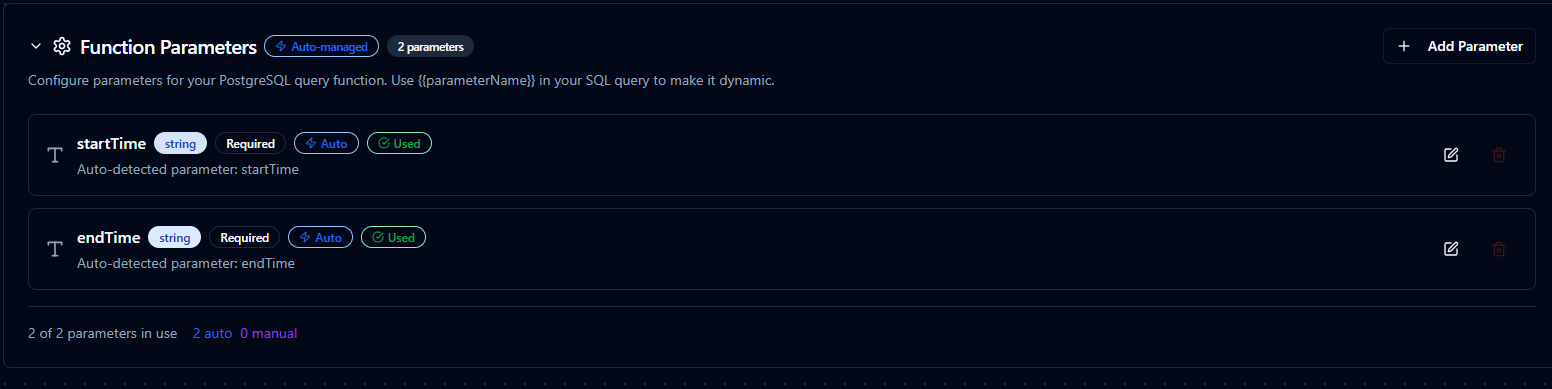
Parameter configuration interface showing type validation, required flags, default values, and descriptions
Pipeline Integration
Use the PostgreSQL functions you create here as nodes inside the Pipeline Designer to move data in and out of your database alongside the rest of your operations stack. Drag the appropriate node type onto the canvas, bind its parameters to upstream outputs or constants, and configure connection-level options without leaving the designer.
Each function type maps to a dedicated pipeline node — Query, Execute, and Write — so you can clearly separate read, write, and data-loading operations in your flows.
For end-to-end orchestration ideas, such as combining database reads with MQTT, REST, or analytics steps, explore the Connector Nodes page to see how SQL nodes complement other automation patterns.
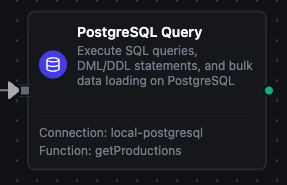
PostgreSQL Query node in the pipeline designer
Common Use Cases
Query: Reading Production Metrics
Scenario: Generate hourly production reports with efficiency metrics.
SELECT
    DATE_TRUNC('hour', timestamp) as hour,
    machine_id,
    COUNT(*) as event_count,
    AVG(efficiency) as avg_efficiency,
    MIN(efficiency) as min_efficiency,
    MAX(efficiency) as max_efficiency
FROM production_events
WHERE timestamp >= ((startDate)) AND timestamp < ((endDate))
GROUP BY hour, machine_id
ORDER BY hour DESC;
Pipeline Integration: Use in a pipeline to feed data to visualization dashboards, BI tools, or reporting nodes.
Execute: Updating Work Order Status
Scenario: Track manufacturing progress by updating work order status in real-time.
UPDATE work_orders
SET
    status = ((newStatus)),
    completed_units = ((completedUnits)),
    completion_percentage = ROUND((((completedUnits))::numeric / total_units * 100), 2),
    updated_at = NOW(),
    updated_by = ((userId))
WHERE order_id = ((orderId))
RETURNING order_id, status, completion_percentage;
Pipeline Integration: Trigger this function based on production events, barcode scans, or manual workflows.
Execute: Data Retention and Cleanup
Scenario: Maintain database performance by archiving or deleting old data.
WITH archived AS (
    INSERT INTO sensor_readings_archive
    SELECT * FROM sensor_readings
    WHERE timestamp < NOW() - INTERVAL '((retentionDays)) days'
      AND archived = false
    RETURNING id
)
DELETE FROM sensor_readings
WHERE id IN (SELECT id FROM archived);
Pipeline Integration: Schedule this function to run daily or weekly via pipeline triggers (cron jobs).
Write: Bulk Loading Sensor Data
Scenario: Load real-time sensor readings from IoT devices into a PostgreSQL table.
Configure a Write function with:
- Table Name:
sensor_readings - Write Mode:
auto - Create Table If Not Exists: enabled
Connect it after data collection nodes (MQTT, OPC UA, Modbus, etc.) in your pipeline. The Write function automatically maps incoming fields (sensor_id, temperature, pressure, vibration) to table columns and inserts them in batches. If the table doesn't exist, it is created automatically with inferred types.