 Azure IoT Hub Integration Guide
Connect MaestroHub to Azure IoT Hub for device-to-cloud (D2C) telemetry, cloud-to-device (C2D) messaging, and Device Twin property management. This guide covers connection setup, function configuration, and pipeline integration.
Overview
The Azure IoT Hub connector provides:
- Device-to-Cloud (D2C) telemetry with message routing properties and configurable QoS
- Cloud-to-Device (C2D) message reception for receiving commands from the cloud
- Device Twin reported property updates to push device state to Azure IoT Hub
- Device Twin desired property subscriptions to react to cloud-side configuration changes
- Three authentication methods: SAS device key, shared access policy, and X.509 certificate
- Store & Forward resilience to buffer D2C messages during network outages and retry when connectivity is restored
- Automatic SAS token renewal at 75% of the configured TTL for uninterrupted connectivity
Combine Azure IoT Hub D2C writes with OPC UA reads, Modbus polling, or MQTT triggers to bridge shop-floor data into the Azure cloud IoT platform.
Connection Configuration
Creating an Azure IoT Hub Connection
Navigate to Connections -> New Connection -> Azure IoT Hub and configure the fields below.
Azure IoT Hub Connection Creation Fields
1. Profile Information
| Field | Default | Description |
|---|---|---|
| Profile Name | - | A descriptive name for this connection profile (required, max 100 characters) |
| Description | - | Optional description for this Azure IoT Hub connection |
2. Connection Settings
| Field | Default | Description |
|---|---|---|
| IoT Hub Hostname | - | Azure IoT Hub hostname (e.g., myhub.azure-devices.net) - required, minimum 5 characters |
| Device ID | - | Device identity registered in Azure IoT Hub (required, max 128 characters) |
3. Authentication
| Field | Default | Description |
|---|---|---|
| Authentication Method | SAS Key | Authentication method to use: SAS Key, Shared Access Policy, or X.509 Certificate |
The connector supports three authentication methods. The required fields change based on the selected method:
SAS Key (Device Symmetric Key)
| Field | Default | Description |
|---|---|---|
| Device Key | - | Base64-encoded device symmetric key from the Azure IoT Hub device identity (required). Stored securely and masked on edit. |
Shared Access Policy
| Field | Default | Description |
|---|---|---|
| Policy Name | - | Shared access policy name (e.g., iothubowner, device) - required |
| Policy Key | - | Base64-encoded policy key (required). Stored securely and masked on edit. |
X.509 Certificate
| Field | Default | Description |
|---|---|---|
| Client Certificate (PEM) | - | PEM-encoded X.509 device certificate. The certificate CN must match the Device ID (required). Stored securely and masked on edit. |
| Client Private Key (PEM) | - | PEM-encoded private key for the device certificate (required). Stored securely and masked on edit. |
Credentials are encrypted and stored securely. They are never logged or displayed in plain text. When editing an existing connection, leave credential fields empty to keep the stored values, or enter new values to update them.
For production deployments, X.509 certificate authentication provides the strongest security. SAS Key is the simplest to set up for testing and development. Shared Access Policy is useful when multiple devices share a policy.
4. Advanced Settings
| Field | Default | Description |
|---|---|---|
| CA Certificate (PEM) | - | Optional CA certificate for server verification (PEM format). Uses the system CA store if not provided. |
| SAS Token TTL (seconds) | 3600 | SAS token validity period (300-86400 seconds). The token is automatically renewed at 75% of its TTL. Not applicable for X.509 authentication. |
| Keep Alive (seconds) | 230 | MQTT keep-alive interval (30-1177 seconds). Azure IoT Hub enforces a maximum of 1177 seconds. |
| Connection Timeout (seconds) | 30 | Timeout for establishing the MQTT connection (5-300 seconds) |
5. Store & Forward
| Field | Default | Description |
|---|---|---|
| Store & Forward | Enabled | Buffer D2C telemetry locally during network outages. Failed messages are automatically retried when connectivity is restored. |
| Store & Forward Max Items | 10,000 | Maximum messages to buffer in the Store & Forward queue (100-100,000). Oldest messages are evicted when the limit is reached. |
6. Device Twin
| Field | Default | Description |
|---|---|---|
| Fetch Twin on Connect | Enabled | Request the full Device Twin document on connect and reconnect. Useful for synchronizing initial state. |
7. Connection Labels
| Field | Default | Description |
|---|---|---|
| Labels | - | Key-value pairs to categorize and organize this connection (max 10 labels) |
Example Labels
environment: production- Deployment environmentsite: factory-1- Physical locationdevice-type: edge-gateway- Device classification
- The connector uses MQTT 3.1.1 over TLS (port 8883) to communicate with Azure IoT Hub.
- Azure IoT Hub supports QoS 0 and QoS 1 only. QoS 2 is not supported.
- D2C message payload maximum size is 256 KB. Device Twin reported properties maximum size is 32 KB.
- SAS Token TTL is hidden when X.509 authentication is selected, since X.509 does not use SAS tokens.
- Store & Forward Max Items is only visible when Store & Forward is enabled.
Function Builder
Creating Azure IoT Hub Functions
After the connection is configured:
- Go to Functions -> New Function
- Choose a function type from the selection dialog
- Configure function-specific settings
Azure IoT Hub supports four function types organized into two categories:
Device-to-Cloud (Write) Operations:
| Function Type | Description | Testable |
|---|---|---|
| D2C Send | Send device telemetry to Azure IoT Hub | Yes |
| Twin Report | Update Device Twin reported properties | Yes |
Cloud-to-Device (Read/Subscribe) Operations:
| Function Type | Description | Testable |
|---|---|---|
| C2D Receive | Receive cloud-to-device messages | No |
| Twin Desired | Subscribe to Device Twin desired property changes | No |
D2C Send Function
Purpose: Send device-to-cloud telemetry messages to Azure IoT Hub with message routing properties, content type metadata, and configurable QoS.
Configuration Fields
| Field | Type | Required | Default | Description |
|---|---|---|---|---|
| Function Name | String | Yes | - | Unique name for this function (max 100 characters) |
| Description | String | No | - | Optional description |
| Data Payload | String (JSON) | Yes | - | JSON payload to send as D2C telemetry. Supports ((paramName)) parameter templates for dynamic values. Example: {"temperature": ((temperature)), "humidity": ((humidity))} |
| Content Type | String | No | application/json | MIME type of the payload. Set to application/json for JSON message routing in Azure IoT Hub. |
| Content Encoding | String | No | utf-8 | Character encoding. Required for JSON message body routing. |
| QoS Level | Number | No | 1 | MQTT QoS level: 0 (at most once) or 1 (at least once). Azure IoT Hub does not support QoS 2. |
| Message Routing Properties | Key-Value | No | - | Key-value pairs appended as MQTT topic properties for Azure message routing (max 20 items). Values support ((paramName)) templates. |
| Labels | Key-Value | No | - | Key-value pairs for organizing this function (max 10 labels) |
Parameters: The function automatically detects ((paramName)) templates from the Data Payload and Message Routing Properties. Each detected parameter can be configured with a type, required flag, default value, and description.
Use Cases: Sensor telemetry publishing, device status reporting, event forwarding, periodic data uploads
Twin Report Function
Purpose: Update Device Twin reported properties to reflect the device's current state, capabilities, or metadata in Azure IoT Hub. Uses merge-patch semantics — only the provided properties are updated.
Configuration Fields
| Field | Type | Required | Default | Description |
|---|---|---|---|---|
| Function Name | String | Yes | - | Unique name for this function (max 100 characters) |
| Description | String | No | - | Optional description |
| Reported Properties (JSON) | String (JSON) | Yes | - | JSON object of properties to report. Merge-patch semantics: only provided keys are updated. Supports ((paramName)) parameter templates. Example: {"firmwareVersion": "2.1.0", "operatingMode": "((mode))"} |
| Timeout (ms) | Number | No | 10000 | Maximum time to wait for IoT Hub confirmation (1000-60000 ms) |
| Labels | Key-Value | No | - | Key-value pairs for organizing this function (max 10 labels) |
Use Cases: Device firmware version reporting, operating mode updates, capability declarations, configuration acknowledgments
C2D Receive Function
Purpose: Receive cloud-to-device messages sent from Azure IoT Hub. This function type creates a subscription — it listens continuously for incoming C2D commands and passes them to connected pipelines.
Configuration Fields
| Field | Type | Required | Default | Description |
|---|---|---|---|---|
| Function Name | String | Yes | - | Unique name for this function (max 100 characters) |
| Description | String | No | - | Optional description |
| Output Format | Select | No | json | How to format the received message body: json (parse as JSON object), text (raw string), or base64 (binary as base64) |
| Labels | Key-Value | No | - | Key-value pairs for organizing this function (max 10 labels) |
C2D Receive is a subscription-based function and cannot be tested from the function builder. Use it with a C2D Trigger Node or an Azure IoT Hub Receive Node in the Pipeline Designer to receive messages.
Use Cases: Remote command execution, firmware update triggers, configuration pushes, device reboot commands
Twin Desired Function
Purpose: Subscribe to Device Twin desired property changes from Azure IoT Hub. Fires when cloud-side desired properties are updated, enabling the device to react to configuration changes.
Configuration Fields
| Field | Type | Required | Default | Description |
|---|---|---|---|---|
| Function Name | String | Yes | - | Unique name for this function (max 100 characters) |
| Description | String | No | - | Optional description |
| Fetch Full Twin on Subscribe | Boolean | No | false | Request the full Device Twin document when subscribing, to establish initial state |
| Property Filter | Array of Strings | No | - | Specific JSON keys to listen for (e.g., targetTemperature, reportInterval). If empty, triggers on any desired property change. |
| Labels | Key-Value | No | - | Key-value pairs for organizing this function (max 10 labels) |
Twin Desired is a subscription-based function and cannot be tested from the function builder. Use it with a Twin Desired Trigger Node in the Pipeline Designer to receive desired property changes.
Use Cases: Remote configuration management, set-point adjustments, operating mode changes, feature flag updates
Using Parameters
Azure IoT Hub functions (D2C Send and Twin Report) support parameterized values via the ((parameterName)) syntax. Parameters are automatically detected from JSON payloads and routing properties.
| Configuration | Description | Example |
|---|---|---|
| Type | Validate incoming pipeline data | string, number, boolean, datetime, json, buffer |
| Required | Enforce mandatory fields | Required / Optional |
| Default Value | Provide fallback values | "line-01", 0, "{}" |
| Description | Document intent for other authors | "Temperature reading in Celsius" |
Pipeline Integration
Use the Azure IoT Hub functions you create here as nodes inside the Pipeline Designer. The D2C Send and Twin Report functions appear as action nodes, while C2D Receive and Twin Desired functions power trigger nodes for event-driven pipelines.
If you are planning more complex orchestration, review the Connector Nodes page for patterns on where Azure IoT Hub nodes fit best within broader orchestration strategies.
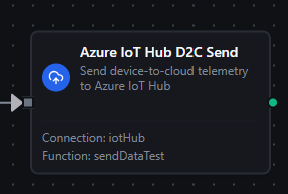
Azure IoT Hub D2C Send node with connection, function, and parameter mappings
Common Use Cases
Edge-to-Cloud Telemetry Pipeline
Publish normalized sensor data from shop-floor PLCs to Azure IoT Hub for cloud analytics, dashboards, and digital twins.
Typical flow: OPC UA/Modbus read -> Transform node -> Azure IoT Hub D2C Send node
Configure a D2C Send function with routing properties like messageType: telemetry and source: ((plantId)) to enable Azure IoT Hub message routing to downstream services (Event Hubs, Service Bus, Storage).
Remote Device Configuration
Subscribe to Device Twin desired property changes to dynamically reconfigure edge devices from the Azure portal or cloud applications.
Typical flow: Azure IoT Hub Twin Desired Trigger -> Condition node -> PLC Write / Configuration update -> Azure IoT Hub Twin Report (acknowledge configuration)
Cloud Command Execution
Listen for C2D commands from Azure IoT Hub and execute them as pipeline actions — write to PLCs, restart services, or trigger local operations.
Typical flow: Azure IoT Hub C2D Trigger -> JavaScript node (parse command) -> Conditional routing -> Action nodes
Device State Synchronization
Keep Azure IoT Hub in sync with the device's actual state by periodically reporting twin properties.
Typical flow: Schedule Trigger -> Read current state (OPC UA, Modbus, etc.) -> Transform -> Azure IoT Hub Twin Report node