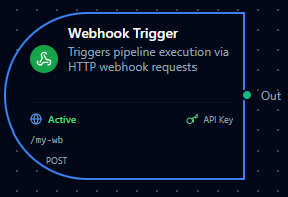
Webhook trigger node
Webhook Trigger Node
Overview
The Webhook Trigger Node starts a pipeline execution when an HTTP request is received at a unique webhook URL. It supports custom authentication headers, optional IP allowlists, CORS controls, and a raw-body mode for signature verification (e.g., Stripe). Use it to connect external systems and SaaS apps to MaestroHub pipelines.
Core Functionality
What It Does
1. Event Ingestion via HTTP Start pipelines from any system capable of sending HTTP requests to a secure URL.
2. Custom Header Authentication Require one or more custom authentication headers (key-value pairs) for all webhook calls to prevent unauthorized access.
3. Network and Origin Controls Restrict access by source IP/CIDR and enable fine-grained CORS origins where needed.
4. Structured Output with Metadata Pass request metadata (method, headers, query parameters, client IP) and the parsed body to downstream nodes for routing, filtering, and processing.
5. Raw Body Preservation Optionally preserve the exact raw request body to support third-party signature verification flows.
Endpoint Format
- Node type:
trigger.webhook - Manual execution: Not supported (
supportsExecution: false) - URL format:
{CORE_API_URL}/scheduler/webhooks/{path}CORE_API_URLincludes the API version prefix (e.g.,http://localhost:8080/api/v1)- Example: if
CORE_API_URL = https://api.example.com/api/v1, the webhook URL becomeshttps://api.example.com/api/v1/scheduler/webhooks/{path}
Configuration Options
Basic Information
| Field | Type | Description |
|---|---|---|
| Node Label | String (Required) | Display name for the node in your pipeline. Must be non-empty (trimmed). |
| Description | String (Optional) | Explains how/why this webhook starts the workflow. |
Parameters
The webhook configuration is organized across six tabs in the UI: Basic, Authentication, Security, Response, Advanced, and Settings.
| Parameter | Tab | Type | Default | Required | Constraints | Description |
|---|---|---|---|---|---|---|
| Enabled | Basic | boolean | true | Yes | -- | Enable/disable the webhook. |
| Path | Basic | string | Auto-generated | Yes | ^[a-zA-Z0-9_-]+$ | URL path segment for the webhook endpoint. |
| HTTP Methods | Basic | string[] | ["POST"] | Yes | GET, POST, PUT, PATCH, DELETE | HTTP methods accepted by the webhook. |
| Auth Headers | Authentication | object | {} | Yes | At least 1 non-empty key-value pair | Custom authentication headers required in every request. |
| IP Whitelist | Security | string[] | [] | No | Valid IPv4/IPv6 or CIDR notation | Restrict access to specific IPs. Empty = allow all. |
| CORS Allow Origins | Security | string[] | [] | No | Valid origin URLs or * | CORS allowed origins. Empty = CORS disabled. |
| Success Status Code | Response | number | 200 | -- | Read-only in UI | HTTP status code returned on success (200 OK). |
| Success Message | Response | string | "Pipeline execution started" | No | -- | Response body message on success. |
| Include Request ID | Response | boolean | true | No | -- | Include unique request ID in the response. |
| Raw Body Mode | Advanced | boolean | false | No | -- | Preserve the raw request body in _metadata.raw_body for signature verification. |
| Request Timeout | Advanced | number | 30 | Yes | 0--300 seconds (slider, step 5) | Max time to process the request. 0 = no timeout. |
Webhooks with identical path and authentication headers will trigger all matching pipelines.
Settings
Description
A free-text area for documenting the node's purpose and behavior. Notes entered here are saved with the pipeline and visible to all team members.
Execution Settings
| Setting | Options | Default | Description |
|---|---|---|---|
| Timeout (seconds) | number | Pipeline default | Maximum execution time for this node (1--600). Leave empty for pipeline default. |
| Retry on Timeout | Pipeline Default / Enabled / Disabled | Pipeline Default | Whether to retry the node if it times out. |
| Retry on Fail | Pipeline Default / Enabled / Disabled | Pipeline Default | Whether to retry on failure. When Enabled, shows Advanced Retry Configuration. |
| On Error | Pipeline Default / Stop Pipeline / Continue Execution | Pipeline Default | Behavior when node fails after all retries. |
Advanced Retry Configuration (visible when Retry on Fail = Enabled)
| Field | Type | Default | Range | Description |
|---|---|---|---|---|
| Max Attempts | number | 3 | 1--10 | Maximum retry attempts. |
| Initial Delay (ms) | number | 1000 | 100--30,000 | Wait before first retry. |
| Max Delay (ms) | number | 120000 | 1,000--300,000 | Upper bound for backoff delay. |
| Multiplier | number | 2.0 | 1.0--5.0 | Exponential backoff multiplier. |
| Jitter Factor | number | 0.1 | 0--0.5 | Random jitter (+-percentage). |
Output Data Structure
When a webhook fires, the trigger node produces a structured output with two top-level keys: _metadata and payload.
_metadata Object
| Field | Type | Description |
|---|---|---|
type | string | Always "webhook_trigger". |
method | string | HTTP method of the incoming request (e.g., "POST"). |
path | string | Full request URL path (e.g., "/api/v1/scheduler/webhooks/abc123"). |
headers | object | All request headers (first value per key). |
query | object | Query string parameters (first value per key). |
remote_ip | string | Client IP address. |
request_id | string | Auto-generated UUID for traceability. |
raw_body | string | (Only when Raw Body Mode is enabled) The original unparsed request body. |
payload Object
The parsed request body. If the body is valid JSON it is parsed into an object. If it is not valid JSON, it is stored as {"raw": "<original string>"}. If no body is sent, this is an empty object {}.
Example Output
{
  "_metadata": {
    "type": "webhook_trigger",
    "method": "POST",
    "path": "/api/v1/scheduler/webhooks/abc123",
    "headers": {
      "Content-Type": "application/json",
      "Authorization": "Bearer my-secret-token",
      "User-Agent": "MyApp/1.0"
    },
    "query": {
      "source": "erp"
    },
    "remote_ip": "203.0.113.42",
    "request_id": "a1b2c3d4-e5f6-7890-abcd-ef1234567890"
  },
  "payload": {
    "orderId": "PO-9921",
    "status": "approved",
    "items": [
      { "sku": "WIDGET-A", "qty": 100 }
    ]
  }
}
Referencing in Downstream Nodes
Use expressions to access webhook data in subsequent nodes:
$trigger._metadata.method-- HTTP method$trigger._metadata.headers.Authorization-- a specific request header$trigger._metadata.query.source-- a query parameter$trigger._metadata.request_id-- the auto-generated request ID$trigger.payload.orderId-- a field from the parsed request body
Validation Rules
Node Configuration Validation
Label Requirements
- Must not be empty
- Must not consist only of whitespace
- Error: "Node name is required."
HTTP Methods
- Must include at least one method
- Each value must be one of:
GET,POST,PUT,PATCH,DELETE - Errors: "At least one HTTP method must be specified"; "Invalid HTTP method: {value}"
Path
- If provided, must match
^[a-zA-Z0-9_-]+$ - Error: "Path must contain only alphanumeric characters, hyphens, and underscores."
Auth Headers
- At least one header with a non-empty key and non-empty value is required
- Error: "At least one authentication header is required"
Request Timeout
- Number in
0–300(where0= no timeout) - Errors: "Request timeout cannot be negative"; "Request timeout cannot exceed 300 seconds"
IP Whitelist
- Each entry must be a valid IPv4/IPv6 address or CIDR notation (IPv4/0-32, IPv6/0-128)
- Error: "Invalid IP address or CIDR notation"
CORS Origins
- Each entry must be a valid absolute URL
- Error: "Invalid URL format"
Calling the Webhook
- Method: Any of the methods selected in the node configuration (default
POST) - URL:
{CORE_API_URL}/scheduler/webhooks/{path} - Headers: Include all configured authentication headers as-is (exact key-value match required)
- Body: Free-form (JSON recommended). If
rawBodyModeis enabled, the raw body is preserved in_metadata.raw_bodyfor signature verification.
Example curl Command
curl -X POST \
  https://api.example.com/api/v1/scheduler/webhooks/abc123 \
  -H "Content-Type: application/json" \
  -H "Authorization: Bearer my-secret-token" \
  -d '{
    "orderId": "PO-9921",
    "status": "approved",
    "items": [{"sku": "WIDGET-A", "qty": 100}]
  }'
Example Response
{
  "status": "triggered",
  "message": "Pipeline execution started",
  "request_id": "a1b2c3d4-e5f6-7890-abcd-ef1234567890"
}
The response status code is 200 OK. The request_id field is included when Include Request ID is enabled (default: on). The message field contains the configured Success Message.
Usage Examples
IoT Device Telemetry Ingestion
Key configuration
- Label: IoT Telemetry Receiver
- Description: Receives sensor readings from edge gateways
- Parameters: path
iot-telemetry, methodsPOST, auth headerX-Device-Key: gw-secret-2024 - Security: IP whitelist
10.0.0.0/8(factory network only) - Advanced: raw body mode off, timeout 30s
- Settings: retry enabled, on error
stop
Downstream usage: $trigger.payload.temperature to read sensor value, $trigger._metadata.remote_ip to identify the gateway.
Third-Party Webhook Relay (Stripe)
Key configuration
- Label: Stripe Payment Webhook
- Description: Receives Stripe payment events with signature verification
- Parameters: path
stripe-payments, methodsPOST, auth headerStripe-Signature: whsec_... - Security: IP whitelist with Stripe IP ranges
- Advanced: raw body mode on (required for
Stripe-SignatureHMAC verification), timeout 60s - Settings: retry enabled, on error
stop
Downstream usage: $trigger._metadata.raw_body for signature verification, $trigger.payload.type to route by event type (e.g., payment_intent.succeeded).
Multi-Method REST API Gateway
Key configuration
- Label: Order API Gateway
- Description: Accepts GET (status check) and POST (new order) requests
- Parameters: path
orders, methodsGETandPOST, auth headerX-API-Key: orders-secret - Security: CORS allowed origins
https://dashboard.example.com - Advanced: timeout 60s
- Settings: retry disabled, on error
continue
Downstream usage: Branch on $trigger._metadata.method — route GET requests to a lookup node and POST requests to an order-creation flow.
CI/CD Pipeline Trigger
Key configuration
- Label: GitHub Deploy Hook
- Description: Triggers deployment pipeline on push to main
- Parameters: path
github-deploy, methodsPOST, auth headerX-Hub-Signature-256: sha256=... - Advanced: raw body mode on (for GitHub signature verification), timeout 30s
- Settings: retry enabled, on error
stop
Downstream usage: $trigger.payload.ref to verify the branch, $trigger.payload.head_commit.message for commit info.
Best Practices
Authentication
- Always configure at least one authentication header — webhooks without auth are rejected by validation
- Use strong, random header values (e.g.,
X-Webhook-Secret: <random 64-char hex>) - Rotate secrets periodically and update both the sender and the webhook configuration
- For services that sign payloads (Stripe, GitHub), enable Raw Body Mode and verify signatures in a downstream node
Security
- Use IP Whitelist when the caller's IP range is known (e.g., cloud provider CIDR blocks, internal networks)
- Keep the whitelist empty only when callers are behind unpredictable NAT or CDN IPs
- Enable CORS Allowed Origins only when the webhook is called from browser-based applications
Path Design
- Use descriptive, stable paths (e.g.,
stripe-payments,iot-telemetry) rather than auto-generated ones - Paths are globally unique across pipelines — avoid collisions by including a service or domain prefix
- Paths support alphanumeric characters, hyphens, and underscores only
Response and Timeouts
- Keep the default Success Message or customize it to help callers confirm which pipeline was triggered
- Enable Include Request ID to correlate webhook calls with pipeline executions in logs
- Set Request Timeout based on how long the caller is willing to wait — use
0for fire-and-forget patterns
Raw Body Mode
- Enable only when you need the original request body for signature verification
- When enabled, the raw body string is available at
$trigger._metadata.raw_body - JSON parsing still occurs normally — raw body mode adds the original string alongside the parsed payload