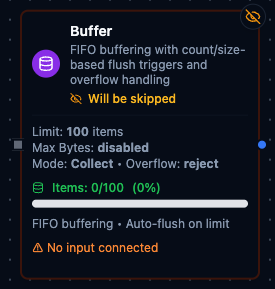
Buffer node configuration
Buffer Node
Overview
The Buffer Node accumulates incoming payloads in a FIFO queue and automatically flushes them when either the item count or the serialized byte footprint crosses a configured threshold. Because the node persists its state between executions, it is well suited for batch processing, load smoothing, and integrating with downstream systems that expect grouped payloads instead of single records.
Core Functionality
What It Does
Buffer brings structure and resiliency to high-throughput pipelines by enabling:
1. Dual Flush Thresholds
Define Max Count and Max Bytes limits. When either capacity is reached, the node emits the buffered collection through the out output port and resets its internal state.
2. Smart Overflow Handling
Choose how to respond when a single item exceeds Max Bytes: reject it, emit it immediately as a single-item batch, or use the Emit Solo alias for Passthrough behavior.
3. Automatic Item Normalization
Scalar values are wrapped into batches of one, while arrays are flattened into individual entries. Each item is serialized to JSON to determine its byte cost, ensuring predictable sizing regardless of the original payload shape.
4. Stateful Execution
Buffer contents (buffer) and byte totals (total_bytes) persist between runs. Internal locking protects the queue during concurrent executions so multiple workers can interact safely.
Configuration Reference
Parameters
| Parameter | Type | Default | Required | Constraints | Description |
|---|---|---|---|---|---|
| Max Count | number | 100 | No | 1--10,000 | Item count threshold for auto-flush. |
| Max Bytes | number | 0 | No | 0--25 MB (0 = disabled) | Size threshold in bytes. |
| Overflow | select | "reject" | No | reject / passthrough / emitSolo | What happens when a single item exceeds maxBytes. |
| Mode | select | "collect" | No | collect / sliding | collect: Flush and start fresh. sliding: Sliding window. |
| Size Field | string | "" | No | Expression that returns a number | Dynamic batch size from input data. |
| Max Size | number | 500 | No | 1--500 | Safety cap for dynamic size. |
Settings
| Setting | Options | Default | Description |
|---|---|---|---|
| Timeout (seconds) | number | Pipeline default | Maximum execution time for this node (1--600). |
| Retry on Timeout | Pipeline Default / Enabled / Disabled | Pipeline Default | Whether to retry on timeout. |
| Retry on Fail | Pipeline Default / Enabled / Disabled | Pipeline Default | Whether to retry on failure. When Enabled, shows Advanced Retry Configuration. |
| On Error | Pipeline Default / Stop Pipeline / Continue Execution | Pipeline Default | Behavior when node fails after all retries. |
Advanced Retry Configuration
Only visible when Retry on Fail is set to Enabled.
| Field | Type | Default | Range | Description |
|---|---|---|---|---|
| Max Attempts | number | 3 | 1--10 | Maximum retry attempts. |
| Initial Delay (ms) | number | 1000 | 100--30,000 | Wait before first retry. |
| Max Delay (ms) | number | 120000 | 1,000--300,000 | Upper bound for backoff delay. |
| Multiplier | number | 2.0 | 1.0--5.0 | Exponential backoff multiplier. |
| Jitter Factor | number | 0.1 | 0--0.5 | Random jitter. |
Usage Examples
Example 1: Flush 50 Sensor Readings or 256 KB
| Field | Value |
|---|---|
| Max Count | 50 |
| Max Bytes | 262144 |
| Overflow Mode | reject |
| Retry on Fail | Enabled |
| On Error | Continue Execution |
The buffer emits as soon as it holds 50 sensor readings or their serialized size exceeds roughly 256 KB, keeping downstream batch APIs within limits.
Example 2: Pass Through Oversized Alerts
| Field | Value |
|---|---|
| Max Count | 200 |
| Max Bytes | 524288 |
| Overflow Mode | Passthrough |
| Notes | Large alerts must bypass batching. |
Any alert larger than 512 KB is forwarded immediately as a one-item batch, while other payloads continue accumulating until thresholds are met.
Example 3: Inspect Buffer State During a Run
| Field | Value |
|---|---|
| Manual Action | get |
| Example Response | { "bufferCount": 37, "totalBytes": 81234, "overflowMode": "reject" } |
| Display Note in Pipeline | true |
Triggering get lets operators view queued orders (e.g., {"id":"A-100","amount":125.4}) without flushing them, confirming that thresholds are tuned correctly.