Local File Nodes
Local File nodes allow pipelines to interact with files on the local filesystem. All file operations are restricted to a configured base directory for security. Use these nodes to read data files, write output files, and integrate file-based workflows with other pipeline operations.
Configuration Quick Reference
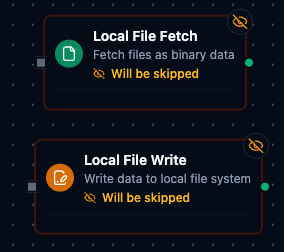
Local File Nodes
| Field | What you choose | Details |
|---|---|---|
| Parameters | Connection, Function, Function Parameters, Timeout Override | Select the connection profile, function, configure function parameters with expression support, and optionally override timeout. |
| Settings | Description, Timeout (seconds), Retry on Timeout, Retry on Fail, On Error | Node description, maximum execution time, retry behavior on timeout or failure, and error handling strategy. All execution settings default to pipeline-level values. |
Local File Fetch Node
Read files from the local filesystem for processing in your pipeline.
Supported Function Types:
| Function Name | Purpose | Common Use Cases |
|---|---|---|
| Fetch Local File | Read file content | CSV data import, configuration files, log analysis |
Node Configuration
| Parameter | Type | Required | Description |
|---|---|---|---|
| Connection | Selection | Yes | Local File connection profile to use |
| Function | Selection | Yes | Fetch function from the selected connection |
| Function Parameters | Dynamic | Varies | Auto-populated from the function schema. See your Local File connection functions for full parameter details. |
| Timeout Override | Number (seconds) | No | Override the default function timeout |
All function parameters support expression syntax ({{ expression }}) for dynamic values from the pipeline context.
Input
The node receives the output of the previous node as input. Input data can be referenced in function parameter expressions using $input.
Output Structure
On success the node produces:
{
  "success": true,
  "functionId": "<function-id>",
  "data": {
    "fileName": "sales_data.csv",
    "filePath": "/data/reports/sales_data.csv",
    "size": 2048,
    "data": "<file content as string or base64>",
    "encoding": "utf-8",
    "mimeType": "text/csv",
    "modifiedAt": "2026-01-15T08:30:00Z"
  },
  "durationMs": 42,
  "timestamp": "2026-01-15T08:30:00Z"
}
| Field | Type | Description |
|---|---|---|
success | boolean | true when the function executed without errors |
functionId | string | ID of the executed function |
data | object | File content and metadata (see below) |
durationMs | number | Execution time in milliseconds |
timestamp | string | ISO 8601 / RFC 3339 UTC timestamp |
File Data Fields
| Field | Type | Description |
|---|---|---|
fileName | string | Name of the file that was read |
filePath | string | Full path to the file (within base path) |
size | number | File size in bytes |
data | string | File content (text or base64-encoded) |
encoding | string | Content encoding used |
mimeType | string | Detected MIME type of the file |
modifiedAt | string | File last modification timestamp |
Local File Write Node
Write content to files on the local filesystem.
Supported Function Types:
| Function Name | Purpose | Common Use Cases |
|---|---|---|
| Write to Local File | Write file content | Export reports, save processed data, create log files |
Node Configuration
| Parameter | Type | Required | Description |
|---|---|---|---|
| Connection | Selection | Yes | Local File connection profile to use |
| Function | Selection | Yes | Write function from the selected connection |
| Function Parameters | Dynamic | Varies | Auto-populated from the function schema (e.g., fileName, data). See your Local File connection functions for full parameter details. |
| Timeout Override | Number (seconds) | No | Override the default function timeout |
All function parameters support expression syntax ({{ expression }}) for dynamic values.
Input
The node receives the output of the previous node as input. Use expressions like {{ $input.payload.content }} to pass dynamic values to write parameters.
Output Structure
The write node uses the same output envelope as the fetch node:
{
  "success": true,
  "functionId": "<function-id>",
  "data": {
    "fileName": "output.csv",
    "filePath": "/data/exports/output.csv",
    "bytesWritten": 1024,
    "created": true,
    "appended": false
  },
  "durationMs": 15,
  "timestamp": "2026-01-15T08:30:00Z"
}
Write Result Fields
| Field | Type | Description |
|---|---|---|
fileName | string | Name of the file that was written |
filePath | string | Full path to the written file |
bytesWritten | number | Number of bytes written |
created | boolean | Whether the file was newly created |
appended | boolean | Whether content was appended to an existing file |
Common Use Cases
Reading CSV Data for Processing
- Configure a Local File connection with base path pointing to your data directory
- Create a Fetch Local File function targeting your CSV file
- Add a Local File Fetch node to your pipeline
- Connect the output to a File Extractor node to parse the CSV into JSON
[Trigger] → [Local File Fetch] → [File Extractor] → [Process Data]
Writing Pipeline Results to File
- Configure a Local File connection with base path pointing to your output directory
- Create a Write to Local File function with parameterized filename and data fields
- Add a Local File Write node after your data processing nodes
- Use expressions to pass the processed data and dynamic filename
[Fetch Data] → [Transform] → [Local File Write]
Parameterized File Operations
Use parameter placeholders in your functions to create dynamic file paths:
| Parameter Pattern | Example | Use Case |
|---|---|---|
((fileName)).csv | sales.csv | Simple parameterized filename |
((date))/report.csv | 2026-01-15/report.csv | Date-based folder structure |
((region))/((year))/data.json | us-west/2026/data.json | Multi-level parameterization |
Pass parameter values using expressions in the node configuration:
fileName: {{ $trigger.payload.filename }}
date: {{ $execution.startedAt | date: 'YYYY-MM-DD' }}
Settings Tab
Both Local File node types share the same Settings tab:
| Setting | Type | Default | Description |
|---|---|---|---|
| Description | Text | — | Optional description displayed on the node |
| Timeout (seconds) | Number | Pipeline default | Maximum time the node may run before timing out |
| Retry on Timeout | Toggle | Pipeline default | Automatically retry the node if it times out |
| Retry on Fail | Toggle | Pipeline default | Automatically retry the node if it fails |
| On Error | Selection | Pipeline default | Error strategy: stop the pipeline, continue to the next node, or follow the error output path |
When left at their defaults, these settings inherit from the pipeline-level execution configuration.
Integration with File Extractor
The Local File Fetch node is commonly used with the File Extractor node to parse CSV and Excel files into structured JSON data:
- Local File Fetch reads the raw file content
- File Extractor parses the content into rows and columns
Ensure the File Extractor's inputField matches the Local File Fetch output path (default: data.data).
Best Practices
- Use specific file paths rather than regex patterns when possible for better performance
- Set appropriate timeouts for large files or slow storage
- Validate file existence before write operations that should not overwrite
- Use parameterized paths to create organized, date-based folder structures
- Configure size limits in the connection to prevent memory issues with large files
All file operations are restricted to the base path configured in the connection. Symlinks are disabled by default to prevent access outside the base directory.
Related Documentation
- Local File Connection Guide — connection configuration, function builder, and detailed parameter reference
- File Extractor Node — parse CSV and Excel files into structured JSON