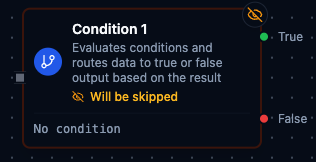
Condition node
Condition Node
Overview
The Condition Node evaluates one or more boolean expressions and routes the incoming payload to either the True or False output. It is the primary branching mechanism for Maestro pipelines, supporting everything from simple comparisons to complex expressions that reference broader pipeline context. Both branches preserve upstream metadata and attach decision details so downstream steps can understand why a particular path was taken.
Core Functionality
1. Multiple Condition Support
- Define any number of conditions in the
conditionsarray. - Each condition can be a literal boolean, a simple comparison, or a full Maestro expression written in JavaScript.
- Combine multiple entries with a logical operator (
ANDorOR) to express compound rules.
2. Expression-Driven Logic
- Conditions execute in the Maestro expression engine with access to
$node,$trigger,$execution, and iteration context ($item,$index). See Expression Variables for the full reference. - Template syntax (
{{ ... }}) enables dynamic branching based on live data, such as{{ $node["Set"].status === "active" }}.
3. Dual Output Ports
True: Receives the original payload when the combined expression evaluates totrue.False: Receives the payload when the expression resolves tofalse.- Both outputs include metadata like
condition_result, the evaluatedconditions, thelogical_operator, andprocessed_by="condition"while preserving upstream fields.
4. Validation & Safety Checks
- Saves are rejected if the conditions list is empty, malformed, or evaluates to non-boolean values.
- The logical operator must resolve to
ANDorOR; expressions are allowed but must produce valid values.
Configuration Reference
Parameters
| Parameter | Type | Default | Required | Constraints | Description |
|---|---|---|---|---|---|
| Conditions | string[] | [""] | Yes | At least 1 non-empty expression | Array of boolean expressions using {{ }} syntax. |
| Logical Operator | select | "AND" | If multiple conditions | AND / OR | How multiple conditions are combined. |
Settings
| Setting | Options | Default | Description |
|---|---|---|---|
| Timeout (seconds) | number | Pipeline default | Maximum execution time for this node (1--600). |
| Retry on Timeout | Pipeline Default / Enabled / Disabled | Pipeline Default | Whether to retry on timeout. |
| Retry on Fail | Pipeline Default / Enabled / Disabled | Pipeline Default | Whether to retry on failure. When Enabled, shows Advanced Retry Configuration. |
| On Error | Pipeline Default / Stop Pipeline / Continue Execution | Pipeline Default | Behavior when node fails after all retries. |
Advanced Retry Configuration (only visible when Retry on Fail = Enabled):
| Field | Type | Default | Range | Description |
|---|---|---|---|---|
| Max Attempts | number | 3 | 1--10 | Maximum retry attempts. |
| Initial Delay (ms) | number | 1000 | 100--30,000 | Wait before first retry. |
| Max Delay (ms) | number | 120000 | 1,000--300,000 | Upper bound for backoff delay. |
| Multiplier | number | 2.0 | 1.0--5.0 | Exponential backoff multiplier. |
| Jitter Factor | number | 0.1 | 0--0.5 | Random jitter. |
Usage Examples
Example 1: Approve Qualified Lots
| Field | Value |
|---|---|
| Conditions | ["lotStatus === 'released'"] |
| Logical Operator | AND |
| Notes | Only released lots proceed to packaging. |
Any lot marked released exits via the trueCondition port; everything else continues down the rejection path.
Example 2: Flag High-Risk Orders
| Field | Value |
|---|---|
| Conditions | ["orderValue > 10000","customerTier === 'new'"] |
| Logical Operator | AND |
| On Error | Continue Execution |
Both rules must pass for the order to be considered high risk. If evaluation fails, the branch defaults to falseCondition so processing continues safely.
Example 3: Prioritize Assembly Line Alerts
| Field | Value |
|---|---|
| Conditions | ["alertLevel >= 3","lineName === 'Line-A'"] |
| Logical Operator | OR |
| Debug Mode | true |
| Timeout (ms) | 1500 |
This configuration escalates whenever a critical alert arrives or the affected line is Line-A. Debug logging captures the evaluated conditions for operators reviewing incidents.