EtherNet/IP Nodes
EtherNet/IP is the industrial Ethernet protocol used by Allen-Bradley PLCs (ControlLogix, CompactLogix, Micro820). MaestroHub provides two node types for EtherNet/IP integration: the standard EtherNet/IP Node for executing individual functions, and the EtherNet/IP Read Group Node for batch read operations.
EtherNet/IP Node
The EtherNet/IP node executes a single function from your EtherNet/IP connection. The function you select determines whether the node performs a read, write, browse, or batch operation.
Configuration
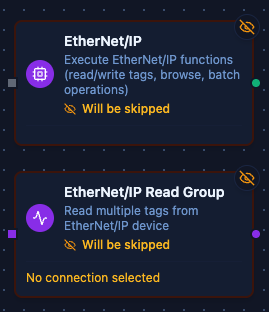
EtherNet/IP and Read Group Nodes
The node configuration has two tabs: Parameters and Settings.
Parameters Tab
| Field | Description |
|---|---|
| Connection | Select the EtherNet/IP connection profile to use |
| Function | Choose a saved function from the connection (read, write, browse, or batch operation) |
| Function Parameters | Fill in any parameters defined in the function. Accepts literal values or Maestro expressions (e.g., $input, $.payload.id) |
| Timeout Override (seconds) | Optional. Override the default function timeout for this node |
Settings Tab
| Field | Description |
|---|---|
| Retry on Fail | Number of retry attempts if the function fails |
| On Error | How to handle errors: stop pipeline or continue to error branch |
| Notes | Operator notes for documentation |
| Display Note In Pipeline | Show notes directly on the canvas |
Supported Function Types
| Function Type | Purpose | Common Use Cases |
|---|---|---|
| Read Tag | Read a single tag value (scalar or array) | Temperature readings, motor status, setpoint verification |
| Write Tag | Write a single value to a tag | Update setpoint, change mode, trigger action |
| Read Multiple Tags | Batch read multiple tags in one operation | Dashboard updates, process snapshots, historian logging |
| Write Multiple Tags | Batch write to multiple tags | Recipe download, coordinated updates, batch configuration |
| Browse Tags | List all available tags with optional filtering | Tag discovery, documentation, setup validation |
Output Examples
Read Tag Output:
{
  "value": 75.5,
  "tagName": "Temperature",
  "dataType": "real"
}
Write Tag Output:
{
  "tagName": "Setpoint",
  "success": true
}
Read Multiple Tags Output:
{
  "results": [
    { "tagName": "Temperature", "value": 75.5, "success": true },
    { "tagName": "Pressure", "value": 14.7, "success": true }
  ]
}
Write Multiple Tags Output:
{
  "results": [
    { "tagName": "Setpoint1", "success": true },
    { "tagName": "Setpoint2", "success": true }
  ]
}
Browse Tags Output:
{
  "tags": [
    { "name": "Temperature", "dataType": "real", "scope": "controller" },
    { "name": "Motor1_Speed", "dataType": "dint", "scope": "controller" },
    { "name": "Program:Main.LocalVar", "dataType": "int", "scope": "program" }
  ]
}
Always implement validation and safety checks before writing to industrial equipment. Consider adding condition nodes to verify values are within safe ranges.
EtherNet/IP Read Group Node
The EtherNet/IP Read Group node is an advanced connector node that allows you to execute multiple EtherNet/IP read operations efficiently within a single node. It provides powerful grouping capabilities and the Read All feature for comprehensive data collection.
When to Use Read Group vs. Standard Node
| Approach | Use Case |
|---|---|
| EtherNet/IP Node | Execute a single function (read, write, browse, or batch operation) |
| Read Group Node | Execute multiple read functions from one or more connections in a single node |
Configuration
Connection and Functions
The Read Group node supports adding multiple function references, where each reference can either:
- Target a specific function from the connection
- Use Read All to execute all read functions associated with a connection
Read All Feature
The Read All toggle changes the behavior of a function reference:
| Mode | Description | Use Case |
|---|---|---|
| Specific Function (default) | Execute a single named function | Selective data collection from specific tags |
| Read All | Execute all read functions from the connection | Complete PLC data snapshot, monitoring dashboards |
How to Enable Read All
- Add a function reference in the EtherNet/IP Read Group node
- Toggle the Read All switch for that reference
- Optionally provide a Group Key (defaults to connection ID if not specified)
When Read All is enabled:
- The function selector is hidden (not needed)
- All read functions (Read Tag, Read Multiple Tags) from the selected connection are executed
- Results are grouped under the specified group key or connection ID
Output Structure
{
  "connectionId_or_groupKey": {
    "function1_name": { /* function result */ },
    "function2_name": { /* function result */ },
    "function3_name": { /* function result */ }
  }
}
Parameters
| Parameter | Description | Options |
|---|---|---|
| Execution Mode | How functions are executed | parallel (default), sequential |
| Continue on Error | Whether to continue if a function fails | true, false (default) |
| Functions | List of function references | Array of connection/function pairs |
Execution Modes
Parallel Execution (Default)
- All functions execute concurrently
- Faster total execution time
- Best for independent read operations
- Use when accessing different tags
Sequential Execution
- Functions execute one after another
- More predictable timing
- Better for PLCs with limited concurrent request handling
- Use when PLC performance is a concern
Error Handling
Continue on Error = false (Default)
- Node fails if any function fails
- Ensures data consistency
- Best for critical operations where partial data is not acceptable
Continue on Error = true
- Node continues even if individual functions fail
- Failed functions return error in their result
- Best for monitoring scenarios where partial data is valuable
- Successful function results are still available in output
Best Practices
When to Use Read All
- Initial PLC commissioning and exploration
- Complete process data backups
- Dashboard views requiring all PLC data
- Diagnostic and troubleshooting scenarios
When to Use Specific Functions
- Production pipelines with known data requirements
- Performance-sensitive operations
- Selective data forwarding to specific systems
- When only a subset of PLC data is needed
Performance Considerations
- Read All executes all defined read functions, which may impact performance on large function sets
- Consider using parallel execution mode for Read All to optimize speed
- Monitor PLC capabilities - some PLCs may have limits on concurrent requests
- Use Continue on Error strategically based on data criticality
Naming Conventions
- Use descriptive Group Keys when using Read All with multiple connections
- Group Keys help organize output data in complex pipelines
- Default connection ID grouping works well for simple scenarios
Supported Data Types
EtherNet/IP nodes support all standard CIP data types:
| Data Type | Description | Example Values |
|---|---|---|
bool | Boolean | true, false |
sint | Signed 8-bit integer | -128 to 127 |
int | Signed 16-bit integer | -32768 to 32767 |
dint | Signed 32-bit integer | -2147483648 to 2147483647 |
lint | Signed 64-bit integer | Full 64-bit range |
usint | Unsigned 8-bit integer | 0 to 255 |
uint | Unsigned 16-bit integer | 0 to 65535 |
udint | Unsigned 32-bit integer | 0 to 4294967295 |
ulint | Unsigned 64-bit integer | Full 64-bit range |
real | 32-bit float | 75.5, -3.14159 |
lreal | 64-bit float | High-precision decimals |
string | Character string | "Hello World" |
Tag Naming Reference
| Tag Type | Format | Example |
|---|---|---|
| Controller-scoped | TagName | Temperature, Motor1_Speed |
| Program-scoped | Program:ProgramName.TagName | Program:Main.LocalVar |
| Array element | TagName[index] | DataArray[0], Temps[5] |
| Structure member | TagName.Member | Motor.Speed, Pump_Data.Pressure |