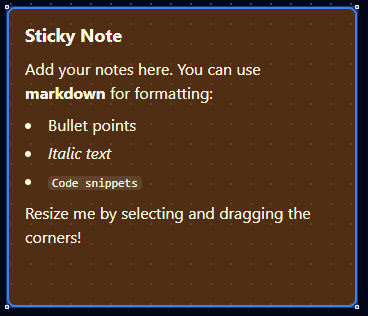
Sticky Note node
Sticky Note Node
Overview
The Sticky Note Node is an informational element you can drop onto the pipeline canvas to leave rich, Markdown-supported documentation. It never runs, has no ports, and exists purely to communicate intent, instructions, or troubleshooting tips to collaborators. Treat it as an in-line knowledge base that travels with the pipeline definition.
Core Functionality
1. Markdown Content
- Author notes using GitHub-flavoured Markdown—headings, emphasis, code blocks, lists, links, and more.
- Markdown renders directly on the canvas with a themed “sticky note” style.
- Store Markdown inside
parameters.content; documentation settings remain separate for system metadata.
2. Color Themes
- Built-in palettes (
yellow,blue,green,pink,purple, etc.) help classify notes (warnings vs. reminders). - Both light and dark UI themes are supported with consistent foreground/background contrast.
3. Resizable Canvas Element
- Configure
widthandheightnumerically or drag the note’s resize handles when selected. - Dimensions persist with the pipeline definition so every viewer sees the same layout.
4. Zero Execution Footprint
- No input or output ports; the node never participates in runtime execution.
- Pipelines validate and deploy regardless of sticky notes—executors ignore them.
Configuration Reference
| Parameter | Type | Default | Required | Constraints | Description |
|---|---|---|---|---|---|
| Content | string | Markdown template | No | -- | Note content with markdown support. |
| Color | select | "yellow" | Yes | yellow / blue / green / pink / purple | Background color. |
| Width | number | 350 | No | 120-800 px | Note width. |
| Height | number | 300 | No | 80-600 px | Note height. |
Sticky Note does not have a Settings tab. It is a purely visual element with no execution behavior.
Usage Examples
Example 1: QA Checklist Reminder
| Field | Value |
|---|---|
| Content | "### QA Checklist\n- [ ] Update staging webhook\n- [ ] Regenerate API tokens\n- [ ] Notify release channel" |
| Color | yellow |
| Width | 380 |
| Height | 220 |
| Notes | Owned by Team Mercury |
Place this note beside QA-related branches so everyone follows the same release checklist.
Example 2: Highlight Pending Connector Swap
| Field | Value |
|---|---|
| Content | "**TODO:** Replace the mock HTTP call with the production connector once credentials arrive." |
| Color | pink |
| Width | 420 |
| Height | 180 |
Use a bright color to flag action items that must be resolved before go-live.
Example 3: Document Shift Handoff
| Field | Value |
|---|---|
| Content | "**Shift Notes (Night):** Review torque anomalies logged at 02:15. See ticket OPS-482." |
| Color | blue |
| Width | 360 |
| Height | 200 |
| Display Note in Pipeline | true |
The visible content guides on-call staff, while the display option shows supplementary metadata directly on the canvas tooltip.