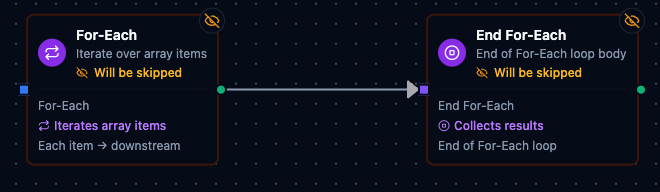
For-Each Loop node
For-Each Loop Node
Overview
The For-Each Loop turns a single array payload into multiple executions of downstream nodes — one run per item. Instead of building manual loops or complex branching, you define a single array expression, and the pipeline engine fans out the flow automatically. A companion End For-Each node marks the boundary of the loop body.
Typical use cases include:
- Iterating over a list of work orders, sensor events, or measurements in a batch.
- Running the same sub-pipeline for each line item in an order.
- Breaking a large API response into per-item processing without writing imperative loop code.
How the Loop Works
The For-Each Loop uses a paired-node model: the For-Each node begins the loop and the End For-Each node marks where it ends. Every node between them is the loop body and executes once per array item, sequentially (item 0 completes fully before item 1 begins).
Execution Flow
              ┌────────────── Loop Body ──────────────┐
              │                                       │
For-Each ──► [Node A] ──► [Node B] ──► End For-Each ──► [After Loop]
   │                                       │
   ├── item 0 ──► A ──► B ──► End ─────────┤
   ├── item 1 ──► A ──► B ──► End ─────────┤
   ├── item 2 ──► A ──► B ──► End ─────────┤
   │                                       │
   └───── LoopResult (results, counts) ────┘
- The For-Each node evaluates the Source Array expression and determines the iteration count.
- For each item in the array, all loop body nodes execute in dependency order — from For-Each through to End For-Each.
- The End For-Each node acts as a pass-through that marks the loop boundary; its output for each iteration becomes that iteration's result.
- After all iterations complete (or the loop stops early due to errors), the For-Each node produces a LoopResult object and execution continues with nodes connected after the End For-Each node.
When you drag a For-Each node onto the canvas, an End For-Each node is automatically created and connected 400 px to the right. You only need to place your processing nodes between them.
Loop Variables
Inside the loop body, the following expression variables are available:
| Variable | Type | Description |
|---|---|---|
$item | any | The current array element being processed (always refers to the innermost loop). |
$index | number | Zero-based index of the current iteration (0, 1, 2, …) for the innermost loop. |
These variables are scoped to the loop body and cleared after the loop completes.
Named Loop Variables (Item Variable Name)
If you set the optional Item Variable Name parameter (e.g., order), two additional variables become available:
| Variable | Type | Description |
|---|---|---|
$order | any | Alias for the current item — identical to $item but named for clarity. |
$orderIndex | number | Alias for the current index — identical to $index but named. |
Named variables are particularly useful for readability and self-documenting pipelines. The generic $item / $index always refer to the innermost loop, while named variables persist by name.
Example — accessing variables in a Set or Code node inside the loop:
{{ $item.name }}         — property of the current item
{{ $item }}              — the entire current item
{{ $index }}             — current iteration index (0-based)
{{ $order.id }}          — same as $item.id (when itemName = "order")
{{ $orderIndex }}        — same as $index (when itemName = "order")
Configuration Reference
For-Each Node Parameters
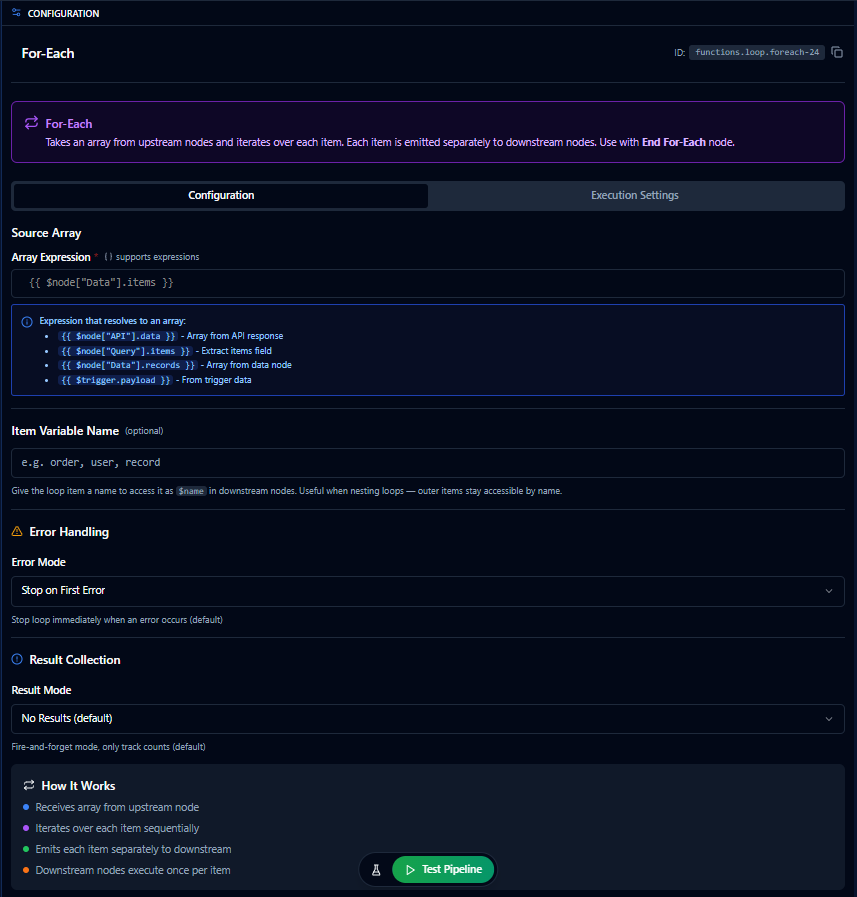
For-Each configuration panel
Source Array (required)
| Type | Expression (string) |
| Default | "" (empty) |
| Placeholder | {{ $node["Data"].items }} |
The expression that resolves to the array to iterate over. This is the only required parameter. If the expression does not resolve to an array, the node will error.
Expression examples:
| Expression | Description |
|---|---|
{{ $node["API"].data }} | Array from an API response node |
{{ $node["Query"].items }} | Extract the items field from a query result |
{{ $node["Data"].records }} | Array from a data node |
{{ $trigger.payload }} | Array from the trigger's payload directly |
{{ filter($node["Orders"].list, #.status == "active") }} | Filtered subset using a built-in function |
Item Variable Name (optional)
| Type | Text (alphanumeric + underscore only) |
| Default | "" (empty — uses $item / $index only) |
| Max Length | 30 characters |
Give the loop item a descriptive name. When set to e.g. order, the variables $order and $orderIndex become available in addition to $item and $index. See Named Loop Variables above.
Error Mode
| Type | Select |
| Default | stopOnFirst |
Controls how the loop handles failures during iteration.
| Value | Label | Behavior |
|---|---|---|
stopOnFirst | Stop on First Error | Stops the loop immediately when any iteration fails. The entire For-Each node is marked as failed. This is the default and safest option. |
continue | Continue on Error | Skips the failed item and continues with the remaining items. Failed items are recorded in the output's errors array. |
continueWithRetry | Continue with Retry | Retries the failed item with exponential backoff before skipping it. If all retries fail, records the error and continues to the next item. See Item Retry Configuration below. |
collectAll | Collect All Errors | Processes every item regardless of failures and collects all errors at the end. Useful for audit or reporting scenarios where you need a full picture. |
Error Thresholds
These fields appear when Error Mode is set to anything other than Stop on First Error:
| Parameter | Type | Default | Range | Description |
|---|---|---|---|---|
| Max Error Count | number | 0 | 0–1,000 | Maximum number of errors before stopping the loop early. 0 means unlimited — the loop will process all items. |
| Error Threshold (%) | number | 0 | 0–100 | Stop the loop if the error percentage exceeds this threshold. For example, 50 means stop if more than half the processed items have failed. 0 disables threshold checking. |
| Partial Results | toggle | true (on) | — | When enabled, the loop outputs all successful results collected so far even if the loop stopped early due to errors. When disabled, early stops produce no result data. |
Result Mode
| Type | Select |
| Default | none |
Controls what iteration results are collected in the output.
| Value | Label | Memory | Description |
|---|---|---|---|
none | No Results | O(1) | Fire-and-forget — only tracks count, successCount, and errorCount. Best for side-effect loops (e.g., sending notifications). This is the default. |
errorsOnly | Errors Only | O(errors) | Only tracks failed items in the errors array. Useful for debugging without the overhead of collecting all results. |
last | Keep Last Only | O(1) | Only keeps the last successful iteration's result. Useful when only the final computation matters. |
all | Collect All Results | O(n) | Stores every iteration's result in the results array. Required when downstream nodes need the full set of processed data. |
Collect All Results stores every iteration's output in memory. For large arrays (1,000+ items), prefer No Results, Errors Only, or Keep Last Only to avoid excessive memory usage.
Item Retry Configuration
When Error Mode is set to Continue with Retry, the loop retries each failed item using exponential backoff before moving on. The retry parameters are:
| Field | Type | Default | Range | Description |
|---|---|---|---|---|
| Max Attempts | number | 3 | 1–10 | Maximum retry attempts per failed item. |
| Initial Delay (ms) | number | 1,000 | 100–30,000 | Wait time before the first retry. |
| Max Delay (ms) | number | 120,000 | 1,000–300,000 | Upper bound for the backoff delay. |
| Multiplier | number | 2.0 | 1.0–5.0 | Exponential backoff multiplier. Each retry waits initialDelay × multiplier^attempt. |
| Jitter Factor | number | 0.1 | 0–0.5 | Adds randomness to avoid thundering-herd retries. |
Only transient errors (network timeouts, connection resets, rate limits, 503/429 responses) are retried. Permanent errors (invalid input, authentication failures, 400/401/403/404 responses) skip remaining retries immediately.
Execution Settings
Both For-Each and End For-Each nodes have an Execution Settings tab with standard options:
| Setting | Options | Default | Description |
|---|---|---|---|
| Timeout (seconds) | number | Pipeline default | Maximum execution time for the node (1–600). |
| Retry on Timeout | Pipeline Default / Enabled / Disabled | Pipeline Default | Whether to retry the node-level execution on timeout. |
| Retry on Fail | Pipeline Default / Enabled / Disabled | Pipeline Default | Whether to retry the node-level execution on failure. When Enabled, shows Advanced Retry Configuration. |
| On Error | Pipeline Default / Stop Pipeline / Continue Execution | Pipeline Default | Behavior when the node fails after all retries. |
The Execution Settings apply to the For-Each node itself (e.g., overall loop timeout), not to individual iterations. For per-item retry behavior, use the Error Mode set to Continue with Retry and configure the item retry parameters in the Configuration tab.
End For-Each Node
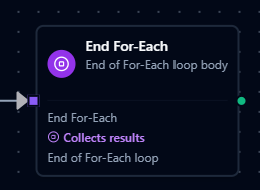
End For-Each node
The End For-Each node marks the end of the loop body. It has no configurable parameters beyond a name and the standard Execution Settings.
Behavior
- Pass-through: The End For-Each node receives output from the last node in the loop body and passes it through unchanged. Its output for each iteration becomes that iteration's result.
- Loop metadata: When executing inside a loop, the End For-Each node adds
_loopmetadata to its output:The{
"_loop": {
"index": 2,
"total": 5
},
"sensorId": "S-3",
"value": 9.8
}_loopmetadata is merged into whatever data the upstream node produced. - Boundary marker: The pipeline engine uses the End For-Each node to determine which nodes belong to the loop body vs. which nodes run after the loop.
How to Set Up
- Add a For-Each node to start the loop (this auto-creates the End For-Each).
- Place your processing nodes between For-Each and End For-Each.
- Connect the last processing node to End For-Each.
- Connect End For-Each's output to any nodes that should run after the entire loop finishes.
For-Each ──► [Process A] ──► [Process B] ──► End For-Each ──► [Post-Loop Node]
Output Structure (LoopResult)
After all iterations complete, the For-Each node produces a LoopResult object that is passed to nodes connected after the End For-Each. This is the data available to downstream nodes via expressions like {{ $node["For-Each"].results }}.
Successful run (no errors, Result Mode = Collect All Results):
{
  "results": [
    {
      "_loop": { "index": 0, "total": 2 },
      "name": "Alice",
      "processed": true
    },
    {
      "_loop": { "index": 1, "total": 2 },
      "name": "Bob",
      "processed": true
    }
  ],
  "count": 2,
  "successCount": 2,
  "errorCount": 0,
  "partial": false
}
Run with errors (Error Mode = Continue, Result Mode = Collect All Results):
{
  "results": [
    {
      "_loop": { "index": 0, "total": 3 },
      "name": "Alice",
      "processed": true
    }
  ],
  "count": 3,
  "successCount": 1,
  "errorCount": 2,
  "errors": [
    {
      "index": 1,
      "item": { "name": "Bob" },
      "error": "Connection timeout",
      "code": "CONN_TIMEOUT",
      "attemptCount": 3
    },
    {
      "index": 2,
      "item": { "name": "Charlie" },
      "error": "Service unavailable",
      "code": "SERVICE_UNAVAILABLE",
      "attemptCount": 1
    }
  ],
  "partial": false
}
Each entry in the results array includes _loop metadata (index and total) added by the End For-Each node. This tells you which iteration produced each result.
Field Reference
| Field | Type | Present | Description |
|---|---|---|---|
results | array | Always | Iteration outputs collected from the End For-Each node. Each entry includes _loop metadata. Contents depend on Result Mode: empty [] for none and errorsOnly, single item for last, all items for all. |
count | number | Always | Total number of items in the source array (attempted iterations). |
successCount | number | Always | Number of iterations that completed successfully. |
errorCount | number | Always | Number of iterations that failed. |
partial | boolean | Always | true if the loop stopped early (due to error thresholds or max error count) before processing all items. |
errors | array | Only when errors occur | Details of each failed iteration. Each entry contains index, error message, error code, attemptCount, and optionally the original item. Omitted entirely when there are no errors. |
stopReason | string | Only on early stop | Reason the loop stopped early (e.g., "max error count reached"). Omitted entirely when the loop completes normally. |
Accessing Results in Downstream Nodes
After the loop, you can reference the results in any downstream node:
{{ $node["For-Each"].results }}              — full results array
{{ $node["For-Each"].results[0].name }}      — first result's name field
{{ $node["For-Each"].results[0]._loop }}     — loop metadata of first result
{{ $node["For-Each"].count }}                — total items attempted
{{ $node["For-Each"].successCount }}         — successful iterations
{{ $node["For-Each"].errorCount }}           — failed iterations
{{ $node["For-Each"].partial }}              — whether results are incomplete
{{ $node["For-Each"].errors }}               — error details (only if errors occurred)
{{ $node["For-Each"].stopReason }}           — early stop reason (only if stopped early)
Restrictions and Validations
Blocked Node Types
The following node types cannot be placed inside a For-Each loop body. The pipeline engine enforces this by auto-disabling the pipeline on save and blocking it from being enabled.
| Node | Type | Why It's Blocked |
|---|---|---|
| Buffer | transform.buffer | Accumulates data until a count or time threshold is reached. Inside a loop, each iteration provides only one item, so the buffer may never flush — causing the loop to hang indefinitely. |
| Aggregator | transform.aggregator | Similar to Buffer — aggregates data across multiple inputs until a window closes. A single loop iteration cannot satisfy the aggregation window, so the loop body would never complete. |
The restriction is enforced at the backend level. You can still drag these nodes into the loop body on the canvas, but:
- A validation warning appears immediately on the node.
- If the pipeline was enabled, it is automatically disabled when you save.
- You cannot re-enable the pipeline until the node is moved outside the loop body.
Nested For-Each Loops Are Not Supported
For-Each loops cannot be nested inside other For-Each loops. The pipeline engine enforces this at multiple levels:
- On the canvas: Attempting to connect a For-Each node inside the body of another For-Each shows an error toast and blocks the connection.
- On save: If nested loops are detected, the pipeline is automatically disabled and a validation error is shown.
- On enable: Pipelines with nested loops cannot be enabled.
If you need nested iteration, consider flattening the data structure first using a Code or Set node, or splitting the work across separate pipelines.
For-Each Must Have a Matching End For-Each
Every For-Each node requires a corresponding End For-Each node connected downstream. If the engine cannot find a matching End For-Each at runtime (via graph traversal), the For-Each node fails with an error. The End For-Each is auto-created when you add a For-Each node, so this only occurs if you manually delete the End For-Each or disconnect it entirely.
Disconnected Loop Body Nodes
If a node is connected to the For-Each node but has no path to the End For-Each node, it is flagged as a warning (not an error). These nodes will not execute during the loop — they are effectively orphaned within the loop body. The pipeline editor shows a visual warning for these nodes.
Source Array Is Required
The Source Array expression is the only required parameter. Saving the pipeline with an empty Source Array produces a validation error on the For-Each node.
What IS Allowed Inside a For-Each Loop
All other node types work normally inside a For-Each loop body, including:
| Node | Notes |
|---|---|
| Condition | Fully supported — branch routing (True/False outputs) works correctly per iteration. If a condition routes to the False branch, only that branch's nodes are skipped for that iteration; the next iteration re-evaluates fresh. |
| Set | Use $item / $index (or named variables) to transform per-item data. |
| JavaScript (Code) | Full access to loop variables. Executes independently per iteration. |
| UNS Publish | Supports dynamic topics using expressions like {{ keys($item)[0] }}. |
| REST / HTTP | Make per-item API calls. Combine with Continue with Retry error mode for resilience. |
| Database nodes (PostgreSQL, MSSQL, Oracle, MongoDB) | Execute per-item queries. |
| Industrial nodes (Modbus, OPC UA, S7, etc.) | Read/write per-item tags. |
| Merge | Can merge branches within the loop body. |
| Wait | Introduces a delay per iteration. |
| Counter | Works inside ForEach but note that counter state persists across iterations within the same execution. |
| Data Serializer | Works inside ForEach. |
| Data Instance | Map per-item data to a data model. |
| Group By | Group per-item fields. |
| No-Op | Pass-through, works normally. |
Usage Examples
Example 1: Process Each User From an API
A REST node named "Get Users" returns:
{
  "users": [
    { "id": "U-1", "name": "Alice", "email": "alice@example.com" },
    { "id": "U-2", "name": "Bob", "email": "bob@example.com" }
  ]
}
For-Each configuration:
| Field | Value |
|---|---|
| Source Array | {{ $node["Get Users"].users }} |
| Error Mode | Stop on First Error |
| Result Mode | No Results |
Inside the loop body, use a Set or Code node to access each user:
{{ $item.name }}    → "Alice" (iteration 0), "Bob" (iteration 1)
{{ $item.email }}   → "alice@example.com", "bob@example.com"
{{ $index }}        → 0, 1
This is a fire-and-forget pattern — each user is processed independently and no results are collected.
Example 2: Transform Each Item With a JavaScript Node
An upstream node returns sensor readings:
{
  "readings": [
    { "sensorId": "S-1", "value": 10.2, "unit": "°C" },
    { "sensorId": "S-2", "value": 11.5, "unit": "°C" },
    { "sensorId": "S-3", "value": 9.8, "unit": "°C" }
  ]
}
Pipeline structure:
[Read Sensors] ──► [For-Each] ──► [Convert Temps] ──► [End For-Each] ──► [Send Report]
For-Each configuration:
| Field | Value |
|---|---|
| Source Array | {{ $node["Read Sensors"].readings }} |
| Item Variable Name | reading |
| Error Mode | Continue on Error |
| Result Mode | Collect All Results |
| Max Error Count | 0 (unlimited) |
| Partial Results | On |
Inside the loop body, a JavaScript node named "Convert Temps" transforms each reading. The code receives $reading (the named loop variable) and returns a new object:
const fahrenheit = $reading.value * 9/5 + 32;
return {
  sensorId: $reading.sensorId,
  celsius: $reading.value,
  fahrenheit: Math.round(fahrenheit * 100) / 100
};
Because Result Mode is set to Collect All Results, every iteration's output from the End For-Each node is collected into the results array. After the loop, a downstream node accesses the converted data:
{{ $node["For-Each"].results }}
→ [
    { "sensorId": "S-1", "celsius": 10.2, "fahrenheit": 50.36 },
    { "sensorId": "S-2", "celsius": 11.5, "fahrenheit": 52.70 },
    { "sensorId": "S-3", "celsius": 9.8,  "fahrenheit": 49.64 }
  ]
Example 3: Resilient Batch Processing with Retry
An order management system returns work orders to process:
{
  "orders": [
    { "id": "WO-101", "type": "maintenance" },
    { "id": "WO-102", "type": "inspection" },
    { "id": "WO-103", "type": "maintenance" },
    { "id": "WO-104", "type": "repair" }
  ]
}
For-Each configuration:
| Field | Value |
|---|---|
| Source Array | {{ $node["Get Orders"].orders }} |
| Item Variable Name | order |
| Error Mode | Continue with Retry |
| Result Mode | Errors Only |
| Max Error Count | 5 |
| Error Threshold (%) | 50 |
| Partial Results | On |
Inside the loop body, each order is sent to an external API. If an API call fails due to a transient error (timeout, rate limit), the loop retries it with exponential backoff. If the retry also fails, the error is recorded and the loop moves to the next order. The loop stops early if more than 5 errors occur or if more than 50% of processed items have failed.
After the loop, the output contains:
{{ $node["For-Each"].errorCount }}    → number of failed orders
{{ $node["For-Each"].errors }}        → details of each failure
{{ $node["For-Each"].partial }}       → true if loop stopped early
Example 4: Filter Before Iteration
You can use expression functions to filter the source array before iterating:
For-Each configuration:
| Field | Value |
|---|---|
| Source Array | {{ filter($node["Get Orders"].orders, #.status == "active") }} |
| Error Mode | Stop on First Error |
| Result Mode | No Results |
Only orders with status == "active" are iterated — closed or pending orders are excluded entirely.
Example 5: Dynamic-Key Objects (e.g., Connector Read Results)
Some upstream nodes — particularly industrial connectors like Modbus, OPC UA, or S7 — return arrays where each item is an object with a single dynamic key (the tag or register name) rather than a fixed property like name or id:
[
  {"Energy_KWh":      {"success": true, "value": 124299, "timestamp": "2026-02-16T08:04:53Z"}},
  {"Coolant_Temp":    {"success": true, "value": 218,    "timestamp": "2026-02-16T08:04:53Z"}},
  {"Spindle_Speed":   {"success": true, "value": 0,      "timestamp": "2026-02-16T08:04:53Z"}}
]
Here, $item.name will not work because there is no name property — the tag name is the object key. Use the keys() and values() built-in functions to extract them.
For-Each configuration:
| Field | Value |
|---|---|
| Source Array | {{ $node["Read Modbus"].data }} |
| Item Variable Name | sensorItem |
| Error Mode | Continue on Error |
| Result Mode | No Results |
Extracting the key and value inside the loop body:
{{ keys($sensorItem)[0] }}           → "Energy_KWh", "Coolant_Temp", "Spindle_Speed"
{{ values($sensorItem)[0] }}         → the full read-result object for each tag
{{ values($sensorItem)[0].value }}   → 124299, 218, 0
{{ values($sensorItem)[0].success }} → true, true, true
Using the tag name in a dynamic UNS topic (in a UNS Publish node inside the loop):
| Field | Expression |
|---|---|
| Topic | enterprise/site1/area1/{{ keys($sensorItem)[0] }} |
| Value | {{ values($sensorItem)[0].value }} |
This publishes each tag to its own UNS topic: enterprise/site1/area1/Energy_KWh, enterprise/site1/area1/Coolant_Temp, etc.
keys() returns keys sorted alphabetically. When each object has only one key (as in the example above), this has no effect. For multi-key objects, use keys(obj)[0] with caution and consider restructuring the data first.
Example 6: Post-Loop Aggregation (Sum, Average, Metrics)
A common pattern is to use For-Each to transform each item, collect all results, and then compute aggregate metrics (totals, averages, counts) in a downstream node after the loop.
Scenario: A production line has multiple stations. An upstream node named "Get Stations" returns:
{
  "stations": [
    { "id": "Station-1", "partsProduced": 150, "partsGood": 145, "partsBad": 5,  "energyKWh": 45.2 },
    { "id": "Station-2", "partsProduced": 200, "partsGood": 198, "partsBad": 2,  "energyKWh": 62.1 },
    { "id": "Station-3", "partsProduced": 180, "partsGood": 170, "partsBad": 10, "energyKWh": 53.8 },
    { "id": "Station-4", "partsProduced": 220, "partsGood": 215, "partsBad": 5,  "energyKWh": 68.4 }
  ]
}
Pipeline structure:
[Get Stations] ──► [For-Each] ──► [Compute Quality] ──► [End For-Each] ──► [Aggregate] ──► [Publish Report]
Step 1 — For-Each configuration:
| Field | Value |
|---|---|
| Source Array | {{ $node["Get Stations"].stations }} |
| Item Variable Name | station |
| Error Mode | Continue on Error |
| Result Mode | Collect All Results |
Step 2 — Inside the loop: JavaScript node "Compute Quality"
This node runs once per station. It calculates the quality rate and energy efficiency for each station:
const qualityRate = ($station.partsGood / $station.partsProduced) * 100;
const energyPerPart = $station.energyKWh / $station.partsProduced;

return {
  id: $station.id,
  partsProduced: $station.partsProduced,
  partsGood: $station.partsGood,
  partsBad: $station.partsBad,
  qualityRate: Math.round(qualityRate * 100) / 100,
  energyKWh: $station.energyKWh,
  energyPerPart: Math.round(energyPerPart * 10000) / 10000
};
After all 4 iterations, the For-Each output results array contains:
[
  { "id": "Station-1", "partsProduced": 150, "partsGood": 145, "partsBad": 5,  "qualityRate": 96.67, "energyKWh": 45.2, "energyPerPart": 0.3013 },
  { "id": "Station-2", "partsProduced": 200, "partsGood": 198, "partsBad": 2,  "qualityRate": 99.00, "energyKWh": 62.1, "energyPerPart": 0.3105 },
  { "id": "Station-3", "partsProduced": 180, "partsGood": 170, "partsBad": 10, "qualityRate": 94.44, "energyKWh": 53.8, "energyPerPart": 0.2989 },
  { "id": "Station-4", "partsProduced": 220, "partsGood": 215, "partsBad": 5,  "qualityRate": 97.73, "energyKWh": 68.4, "energyPerPart": 0.3109 }
]
Step 3 — After the loop: Set node "Aggregate"
A Set node computes summary metrics using expression functions on the collected results. Each field uses the results array from the For-Each node:
| Field | Expression | Result |
|---|---|---|
| totalPartsProduced | {{ sum(pluck($node["For-Each"].results, "partsProduced")) }} | 750 |
| totalPartsGood | {{ sum(pluck($node["For-Each"].results, "partsGood")) }} | 728 |
| totalPartsBad | {{ sum(pluck($node["For-Each"].results, "partsBad")) }} | 22 |
| avgQualityRate | {{ round(avg(pluck($node["For-Each"].results, "qualityRate")), 2) }} | 96.96 |
| totalEnergyKWh | {{ round(sum(pluck($node["For-Each"].results, "energyKWh")), 2) }} | 229.5 |
| stationCount | {{ len($node["For-Each"].results) }} | 4 |
| belowTarget | {{ filter($node["For-Each"].results, #.qualityRate < 95) }} | [{"id": "Station-3", ...}] |
| belowTargetCount | {{ count($node["For-Each"].results, #.qualityRate < 95) }} | 1 |
| bestStation | {{ first(sortDesc(pluck($node["For-Each"].results, "qualityRate"))) }} | 99.00 |
| worstStation | {{ first(sortAsc(pluck($node["For-Each"].results, "qualityRate"))) }} | 94.44 |
The Aggregate node output is a single summary object:
{
  "totalPartsProduced": 750,
  "totalPartsGood": 728,
  "totalPartsBad": 22,
  "avgQualityRate": 96.96,
  "totalEnergyKWh": 229.5,
  "stationCount": 4,
  "belowTarget": [{ "id": "Station-3", "qualityRate": 94.44 }],
  "belowTargetCount": 1,
  "bestStation": 99.00,
  "worstStation": 94.44
}
Key expression patterns used:
| Pattern | What It Does |
|---|---|
pluck(arr, "field") | Extracts a single field from every object in the array, producing a flat array of values. |
sum(pluck(...)) | Combines pluck with sum to total a specific field across all results. |
avg(pluck(...)) | Average of a specific field. |
round(value, decimals) | Rounds the result to avoid floating-point noise. |
filter(arr, #.field < threshold) | Filters results that match a condition (e.g., stations below quality target). |
count(arr, #.field < threshold) | Counts how many results match a condition. |
sortAsc(pluck(...)) / sortDesc(...) | Sorts values to find min/max. Combined with first() to extract the top or bottom value. |
Use Collect All Results + post-loop aggregation when you need summary statistics from the loop. This is the equivalent of a SQL GROUP BY — the loop body transforms/enriches each row, and the downstream node computes the rollup. For very large arrays (10,000+ items), consider using a JavaScript node after the loop instead of many individual Set expressions, to avoid repeated iteration over the results array.
Pipeline Structure Diagram
The following diagram shows a typical For-Each pipeline structure:
Trigger ──► Get Data ──► For-Each ──► Process (per item) ──► End For-Each ──► Send Report
                         │            └── loop body ──────────┘              │
                         │                                                  │
                         └──────── LoopResult (after all iterations) ────────┘
- Trigger → starts the pipeline.
- Get Data → fetches the array (e.g., from an API, database, or connector).
- For-Each → evaluates the Source Array expression and begins iteration.
- Process (per item) → any number of nodes between For-Each and End For-Each (the loop body). These execute once per item.
- End For-Each → marks the end of the loop body; collects each iteration's output.
- Send Report → runs once after all iterations complete, receiving the LoopResult.
When to Use For-Each Loop
Use the For-Each Loop node when:
- You receive arrays from connectors or upstream transforms and want each element to drive a separate execution of downstream logic.
- You need a clear, declarative way to pick which collection to iterate — without hand-rolling loops in Code nodes.
- You want iteration to integrate cleanly with other nodes like Data Instance, Set, and Code, using
$itemand$indexfor per-element access. - You need error resilience — continue processing remaining items even if some fail, with configurable retry and threshold logic.
- Always pair a For-Each node with an End For-Each node. The pipeline engine uses End For-Each to determine which nodes belong to the loop body.
- Use named variables (
itemName) for clarity, especially when the generic$itemcould be ambiguous. - Choose the right Result Mode — avoid
allfor large arrays unless downstream nodes actually need every result. - Set error thresholds when using Continue or Collect All modes to prevent runaway failures from processing thousands of items.