Give your data meaning
Every machine names and measures things its own way. A meaning says what a signal is and which unit it is shown in, once. After that, alarms, charts, MQTT readers and the API all agree.
- Status
- Beta
- Where
- Explore › Libraries, and every topic page
- Editions
- Foundation, Enterprise and the free trial
- Devices
- Nothing changes on them
The semantic layer (libraries, properties and meanings) is in Beta. It works as these pages describe, and names and steps may still change before it leaves Beta.
A pump on one line sends bearing_temp in °C; the same pump from another vendor sends BearingTemp in °F. Side by side the numbers cannot be compared, an alarm written for one line is wrong on the other, and nobody can ask for "every product temperature" without knowing every tag. Giving those signals a meaning writes down once what they are. From then on MaestroHub converts, alarms, checks and labels the values for you, whatever each tag is called.
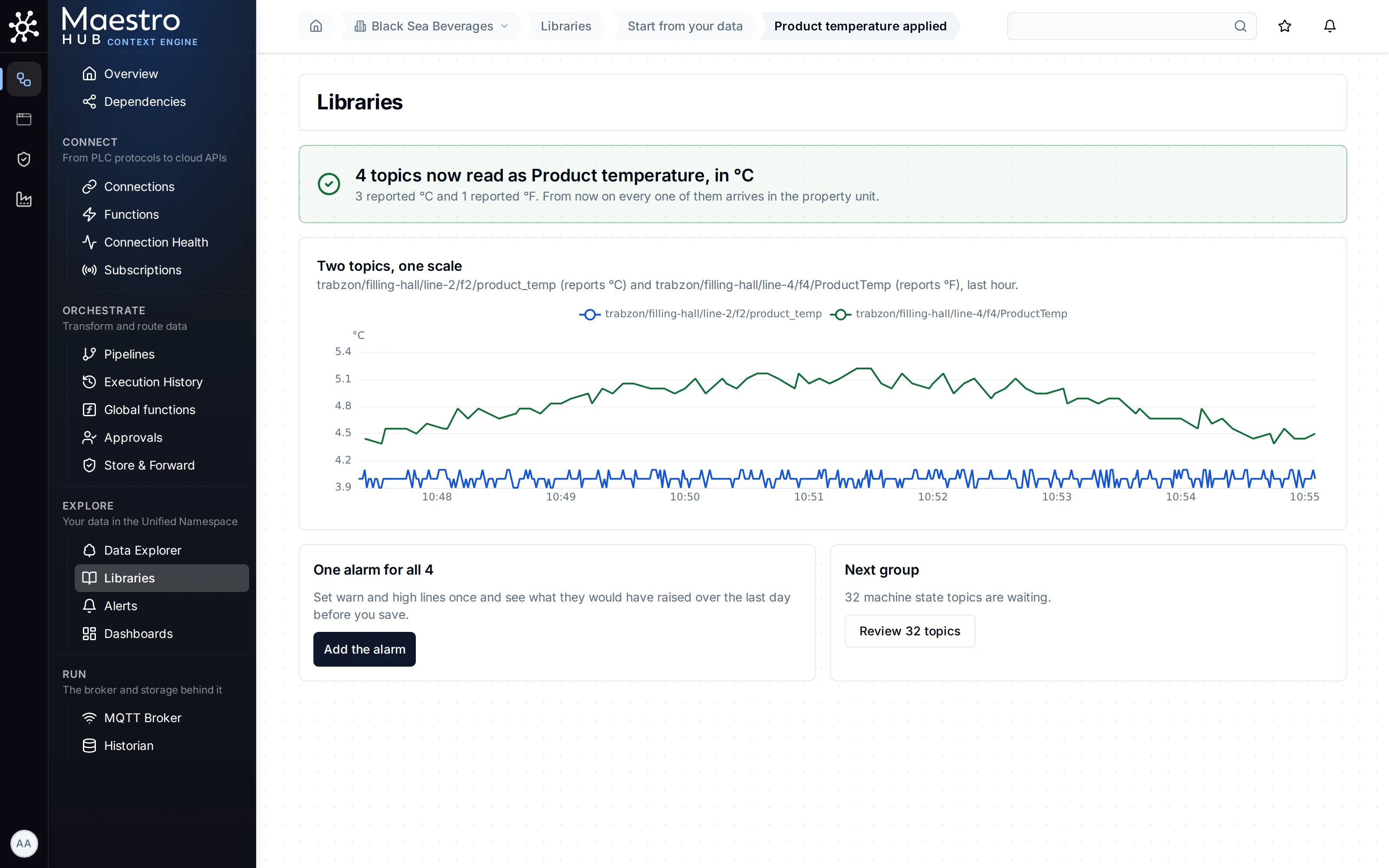
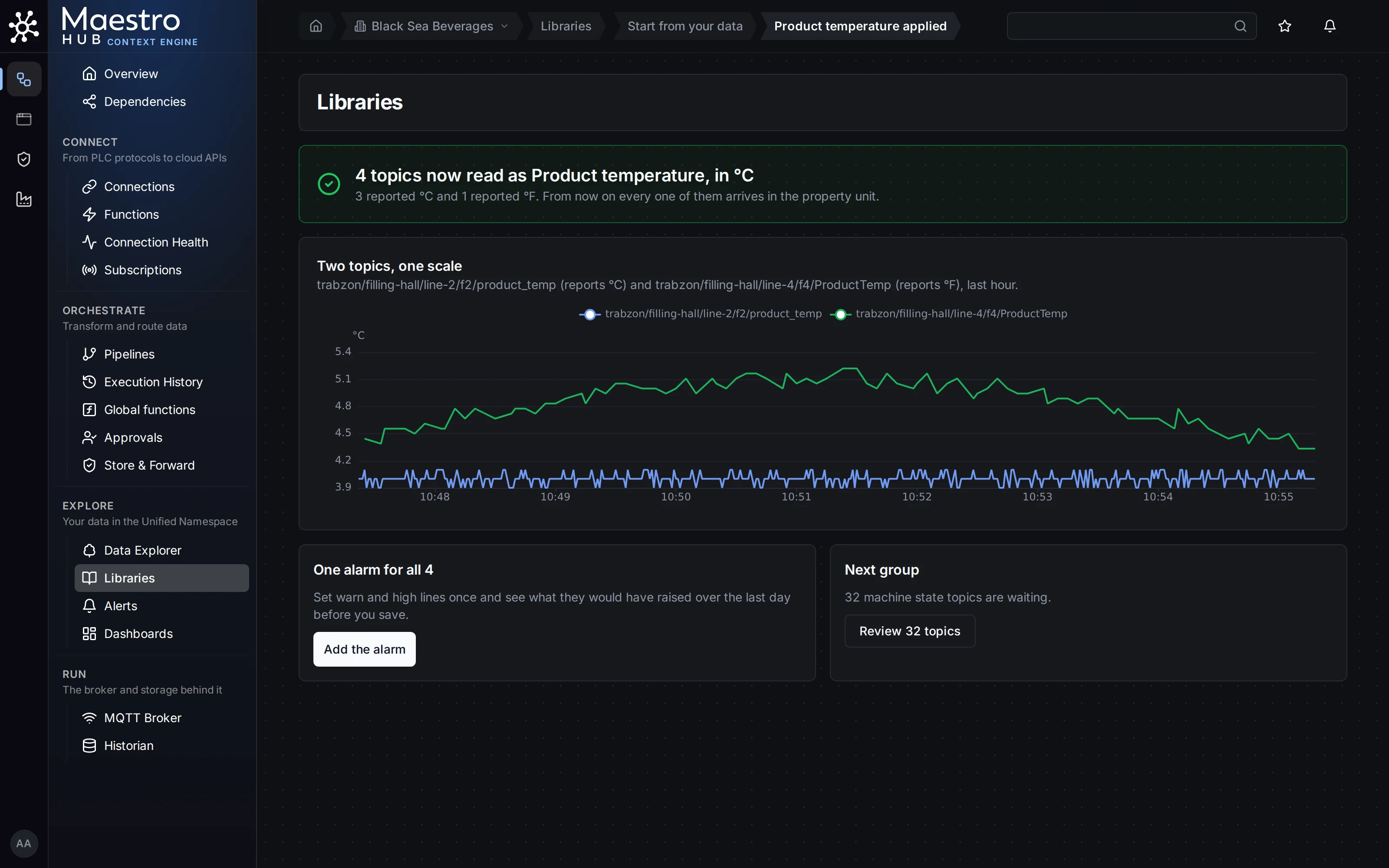
Line 2 (°C) and Line 4 (°F) on one scale, right after giving them the meaning Product temperature.
The pictures in this section show the Demo Plant, a simulated bottling plant, with one line added: Line 4, an older vendor line that sends °F, psi and L/min under its own tag names.
Pick the problem you have
A line sends another unit
Line 4 sends °F, the rest °C. Make every chart, alarm and reader get °C without touching the device.
Learn more →One measurement, many tag names
product_temp, ProductTemp and a third folder on the pasteurizer. Give them one meaning in one step.
Learn more →One alarm for every similar machine
Set a limit once on a meaning. It covers every signal that has it, including ones given it later.
Learn more →Catch stuck and silent sensors
Flag a value that stops moving, and a signal that stops sending, in plain words.
Learn more →What readers receive
The MQTT message and the REST API answer once a meaning is applied, field by field.
Learn more →Who may change meanings
Libraries, versions, publishing, permissions and the audit trail.
Learn more →Start from your data
Read every signal once, answer only the real doubts, apply with one press, and undo if needed.
Learn more →Ask for every signal with one meaning
Every pump's vibration, in one unit, wherever it is and whatever its tag is called: a table, a CSV file or one API call.
Learn more →Begin with Start from your data. It reads every signal you already have, asks only where two units are possible, and gives the rest one name and one unit with one press. You can undo it while you stay on the page.
Machine state codes are not translated: a PLC that sends 3 for running keeps sending 3 to every reader. States a device already sends as words (running, standby) read cleanly as they are.
Where to go next
- Libraries: every part of a library and a property, as a reference.
- Giving a topic a meaning: one topic at a time, from its own page, with suggestions. After one, the machines that look like it are offered the same name, and you confirm (Map one, find the rest).
- Find signals: every signal with one meaning, now or over a window, in one unit.
- Tutorial: one alarm for all your pumps: the same ideas on three pumps, in ten minutes.