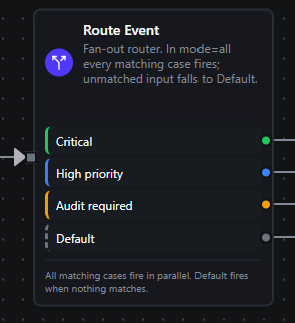
Switch node
Switch Node
Overview
The Switch Node evaluates an ordered list of cases — each a boolean expression — and routes the incoming payload to the branches whose expressions match. It is the multi-way counterpart to the Condition Node: instead of a fixed True/False split, you define up to 10 named branches plus an always-present Default branch. Each branch preserves the original input so downstream steps receive the payload unchanged.
A Match mode controls fan-out. In all mode (the default) every case whose expression is truthy fires its branch in parallel — ideal when conditions are independent and a single event needs more than one kind of handling. In first mode only the first matching case fires, with case order encoding priority. When no case matches, the input always falls through to Default, so an event is never silently dropped.
Core Functionality
1. N User-Defined Cases
- Define up to 10 cases, each evaluated in declaration order.
- Every case has a stable
id(used as the output port name, so wired edges survive label renames), an optional user-facinglabel, and a booleanexpression. - The reserved id
defaultis not allowed for a case — it belongs to the catch-all branch.
2. Match Mode — Fan-Out or Priority
all(default): every case whose expression evaluates truthy fires its branch in parallel. Use when conditions are independent — for example an event that needs both "high-priority" and "audit" handling.first: only the first matching case fires; later cases are short-circuited. Use when cases are mutually exclusive and order encodes priority.
3. Always-Present Default Branch
- The Default branch (port id
default) is a catch-all that receives the input when no case matches. - The engine guarantees at least one active output: an input that matches nothing is routed to
defaultrather than being dropped or fanned out to every edge.
4. Expression-Driven Logic
- Case expressions execute in the Maestro expression engine with access to
$input,$node,$trigger,$execution, and iteration context ($item,$index). See Expression Variables for the full reference. - Template syntax (
{{ ... }}) enables dynamic branching on live data, such as{{ $node["Event Source"].payload.severity > 5 }}or{{ $node["Set"].status === "active" }}. Bare boolean literalstrueandfalseare also accepted.
5. Per-Case Fault Isolation
- If a single case has an empty or invalid expression (syntax error, missing-property access), that case is simply treated as "did not match" — it never fails the whole node.
- The problem is recorded in the node output's
caseIssueslist so you can debug why an expected branch didn't fire. By contrast, structural mistakes (no cases, a case missing itsid, an invalid mode) are hard validation errors that block saving.
Configuration Reference
Parameters
| Parameter | Type | Default | Required | Constraints | Description |
|---|---|---|---|---|---|
| Match mode | select | "all" | No | all / first | all fires every matching case in parallel; first fires only the first match. |
| Cases | array | one empty case | Yes | 1–10 cases | Ordered list of branches. Each case has an id, an optional label, and an expression. |
— Case id | string | auto (UUID) | Yes | Unique; not default | Stable identifier; doubles as the branch's output port name. |
— Case label | string | "" | No | — | User-facing name shown on the branch handle. |
— Case expression | expression | "" | Yes | Must resolve to true/false | Boolean expression using {{ }} syntax, evaluated against the input. |
| Default | (branch) | always present | — | — | Catch-all branch (port default); receives the input when no case matches. Not user-removable. |
Settings
| Setting | Options | Default | Description |
|---|---|---|---|
| Timeout (seconds) | number | Pipeline default | Maximum execution time for this node (1--600). |
| Retry on Timeout | Pipeline Default / Enabled / Disabled | Pipeline Default | Whether to retry on timeout. |
| Retry on Fail | Pipeline Default / Enabled / Disabled | Pipeline Default | Whether to retry on failure. When Enabled, shows Advanced Retry Configuration. |
| On Error | Pipeline Default / Stop Pipeline / Continue Execution | Pipeline Default | Behavior when node fails after all retries. |
Advanced Retry Configuration (only visible when Retry on Fail = Enabled):
| Field | Type | Default | Range | Description |
|---|---|---|---|---|
| Max Attempts | number | 3 | 1--10 | Maximum retry attempts. |
| Initial Delay (ms) | number | 1000 | 100--30,000 | Wait before first retry. |
| Max Delay (ms) | number | 120000 | 1,000--300,000 | Upper bound for backoff delay. |
| Multiplier | number | 2.0 | 1.0--5.0 | Exponential backoff multiplier. |
| Jitter Factor | number | 0.1 | 0--0.5 | Random jitter. |
A case expression failing to evaluate (empty, bad syntax, undefined property) is not a node error — it is recorded in caseIssues and the case is treated as unmatched. The On Error setting only applies to hard failures such as a missing cases list or a node-level timeout.
Output Structure
The branches that fire are determined by which cases match. Alongside routing, the Switch node emits a diagnostic object that downstream nodes can read via expressions like {{ $node["Route Event"].matched }}.
{
  "matched": true,
  "matchedCases": [
    { "id": "case_high",  "label": "High priority" },
    { "id": "case_audit", "label": "Audit required" }
  ],
  "ports": ["case_high", "case_audit"],
  "mode": "all",
  "cases": 3,
  "caseIssues": [],
  "input": [
    {
      "_metadata": { "type": "manual_trigger", "nodeId": "Event Source" },
      "payload": { "site": "Plant-A", "severity": 7, "requiresAudit": true }
    }
  ]
}
Field Reference
| Field | Type | Description |
|---|---|---|
matched | boolean | true if at least one case matched; false when routed to Default. |
matchedCases | array | Ordered { id, label } descriptors for every case that fired. Single entry in first mode; possibly many in all mode. |
ports | string[] | Active output ports — the case ids that fired, or ["default"] when nothing matched. |
mode | string | The mode applied when evaluating cases (all or first). |
cases | number | Total number of cases configured on the node. |
caseIssues | array | Cases whose expression was empty or failed to evaluate. Each entry has index, id, and a human-readable issue. Empty when every case evaluated cleanly. |
input | any | The original input the node received — the array of upstream node outputs — passed through unchanged. |
Write case expressions against the upstream node by name — $node["Previous Node Name"] — which is the reference the rest of the editor uses. A Switch placed right after a node named Event Source reads {{ $node["Event Source"].payload.severity >= 5 }} (a manual trigger stores its event under payload; a transform node exposes its fields directly, e.g. {{ $node["Prepare"].severity }}). Avoid $input — it is the raw array of upstream outputs, so $input.field does not resolve the way you'd expect.
Usage Examples
Example 1: Fan-Out Event Routing (mode = all)
Route a plant event so that severity handling and audit logging happen in parallel. An upstream Manual Trigger named Event Source emits the event as its payload:
{ "site": "Plant-A", "category": "temperature", "severity": 7, "requiresAudit": true }
Switch configuration:
| Field | Value |
|---|---|
| Match mode | All matching cases fire (parallel fan-out) |
Case Critical | {{ $node["Event Source"].payload.severity >= 8 }} |
Case High priority | {{ $node["Event Source"].payload.severity >= 5 }} |
Case Audit required | {{ $node["Event Source"].payload.requiresAudit == true }} |
For the sample event, High priority (7 >= 5) and Audit required (requiresAudit == true) both fire and their downstream branches run in parallel. Critical (7 >= 8) does not match, and because at least one case matched, the Default branch stays quiet. Raising severity to 9 would additionally light up the Critical branch.
This is exactly the wiring used by the bundled Demo_Switch_EventRouter pipeline. Open it in the editor, run the Manual Trigger, and watch the High priority and Audit branches fire together while Critical and Default stay idle.
Example 2: Priority Routing (mode = first)
Send each work order — emitted by an upstream node named Order Event — down a single lane, where case order encodes priority. Only the first matching case wins:
| Field | Value |
|---|---|
| Match mode | First matching case wins (single branch) |
Case Rush | {{ $node["Order Event"].payload.priority === "rush" }} |
Case Expedited | {{ $node["Order Event"].payload.dueInHours <= 24 }} |
Case Standard | true |
A rush order exits via the Rush branch and never reaches the later cases. A non-rush order due within 24 hours takes Expedited. Everything else falls to the catch-all true case Standard. Because a literal true case is present, the Default branch is effectively unreachable here — a common pattern when you want an explicit "everything else" lane instead of the implicit Default.
Example 3: Default Catch-All for Unknown Device Types
Classify incoming telemetry — from an upstream node named Device Event — by device type and let anything unrecognized fall through to Default for quarantine:
| Field | Value |
|---|---|
| Match mode | All matching cases fire (parallel fan-out) |
Case PLC | {{ $node["Device Event"].payload.deviceType === "plc" }} |
Case Sensor | {{ $node["Device Event"].payload.deviceType === "sensor" }} |
Case Gateway | {{ $node["Device Event"].payload.deviceType === "gateway" }} |
A message with deviceType: "drive" matches none of the cases, so it is routed to the Default branch — wire that to a quarantine or alerting node so unmodeled device types are surfaced rather than silently lost. If one case had a typo'd expression, the switch would still route correctly on the remaining cases and record the broken one in caseIssues.
When to Use Switch
Use the Switch node when:
- A single payload needs to drive more than two independent branches — beyond what a Condition node's
True/Falsesplit can express. - You want fan-out: one event triggering several kinds of handling at once (
allmode). - You need priority routing where the first matching rule wins and order matters (
firstmode). - You want an explicit, named catch-all for inputs that match nothing, instead of dropping them.
- Keep case ids stable. Renaming a
labelis safe — edges are wired byid, not label. Deleting a case removes its branch and any connected edges. - Order matters in
firstmode. Put the most specific / highest-priority cases first; a broadtruecase at the end acts as an explicit fallback. - Always wire the Default branch (or add a final
truecase) so unmatched input has somewhere to go. - Check
caseIssueswhen an expected branch doesn't fire — an empty or malformed expression is reported there rather than failing the node. - Chain switches if you need more than 10 branches: route a coarse Switch's Default (or a bucket case) into a second Switch.