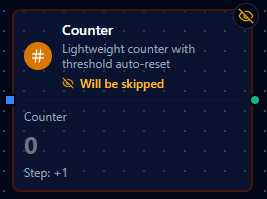
Counter node configuration
Counter Node
Overview
The Counter Node maintains a persistent numeric counter that increments by a configurable step on every execution. The count survives pipeline restarts, making it ideal for tracking production totals, sequencing records, or triggering logic after a fixed number of events. When a threshold is configured, the counter automatically resets to its initial value once reached, enabling batch-cycling workflows without extra nodes.
Core Functionality
What It Does
1. Persistent Count Tracking The counter state is stored per pipeline and node, so the value survives pipeline restarts and redeployments. Each execution atomically reads, increments, and writes back the count.
2. Configurable Step
Set the Step parameter to any non-zero integer. Positive values count up, negative values count down. The step is applied on every normal execution and on manual Increment/Decrement actions.
3. Threshold Auto-Reset
When Threshold is greater than zero and the counter reaches or exceeds it, the node sets threshold_reached to true in the output and resets the counter to Initial Value. If no threshold is configured, an internal safety limit of 1 billion prevents overflow.
4. Concurrent Safety Counter updates use atomic read-modify-write operations at the storage layer, so concurrent pipeline executions or manual actions cannot cause lost updates.
5. Manual Actions Operators can increment, decrement, inspect, or reset the counter at any time through the node's action menu—without triggering a full pipeline execution.
Configuration Reference
Parameters
| Parameter | Type | Default | Required | Constraints | Description |
|---|---|---|---|---|---|
| Initial Value | number | 0 | No | — | Starting value and the value restored after a threshold reset. |
| Step | number | 1 | No | Cannot be zero | Amount added to the counter on each execution. Use a negative number to count down. |
| Threshold | number | 0 | No | Cannot be negative (0 = disabled) | When the counter reaches this value it auto-resets to Initial Value and emits threshold_reached: true. |
Settings
| Setting | Options | Default | Description |
|---|---|---|---|
| Timeout (seconds) | number | Pipeline default | Maximum execution time for this node (1--600). |
| Retry on Timeout | Pipeline Default / Enabled / Disabled | Pipeline Default | Whether to retry on timeout. |
| Retry on Fail | Pipeline Default / Enabled / Disabled | Pipeline Default | Whether to retry on failure. When Enabled, shows Advanced Retry Configuration. |
| On Error | Pipeline Default / Stop Pipeline / Continue Execution | Pipeline Default | Behavior when node fails after all retries. |
Advanced Retry Configuration
Only visible when Retry on Fail is set to Enabled.
| Field | Type | Default | Range | Description |
|---|---|---|---|---|
| Max Attempts | number | 3 | 1--10 | Maximum retry attempts. |
| Initial Delay (ms) | number | 1000 | 100--30,000 | Wait before first retry. |
| Max Delay (ms) | number | 120000 | 1,000--300,000 | Upper bound for backoff delay. |
| Multiplier | number | 2.0 | 1.0--5.0 | Exponential backoff multiplier. |
| Jitter Factor | number | 0.1 | 0--0.5 | Random jitter. |
Input / Output
Input
The Counter Node accepts any payload. The input data is passed through to the output unchanged under the input key.
Output
Every execution produces a JSON object with three fields:
{
  "count": 42,
  "input": { "...original payload..." },
  "threshold_reached": false
}
| Field | Type | Description |
|---|---|---|
count | number | The counter value after the current step is applied. |
input | any | The original input payload, passed through unchanged. |
threshold_reached | boolean | true when the counter reached the threshold and was auto-reset during this execution; false otherwise. |
Manual Actions
Actions can be triggered from the node's context menu without running the pipeline.
| Action | Description |
|---|---|
| Increment | Add the configured step (or a custom value) to the counter. Respects threshold auto-reset. |
| Decrement | Subtract the configured step (or a custom value) from the counter. |
| Get Count | Return the current counter value and threshold status without modifying state. |
| Reset | Set the counter back to the configured Initial Value. |
Increment and Decrement actions accept an optional custom value. When provided, the custom value is used instead of the configured Step.
Usage Examples
Example 1: Production Line Unit Counter
| Field | Value |
|---|---|
| Initial Value | 0 |
| Step | 1 |
| Threshold | 0 (disabled) |
Each sensor event triggers the pipeline. The counter increments by 1 and the output's count field tracks the running total of units produced. Because the threshold is disabled, the counter grows indefinitely (up to the internal safety limit).
Example 2: Batch Counter with Threshold
| Field | Value |
|---|---|
| Initial Value | 0 |
| Step | 1 |
| Threshold | 50 |
Every item passing through increments the counter. On the 50th item, threshold_reached becomes true and the counter resets to 0. Downstream nodes can branch on threshold_reached to trigger batch-completion logic—e.g., sending a summary report or closing a work order.
Example 3: Countdown Timer
| Field | Value |
|---|---|
| Initial Value | 100 |
| Step | -1 |
| Threshold | 0 (disabled) |
The counter starts at 100 and decrements by 1 on each execution, enabling countdown-style logic. A downstream Condition node can check count == 0 to fire an alert when the countdown completes.
- Use threshold auto-reset for batch cycling. Instead of adding a separate Condition + Reset flow, set a threshold to let the counter self-manage.
- Negative steps are useful for countdowns. Pair them with a downstream condition that checks
countreaching zero. - Use Get Count during development to inspect the counter without side effects.
The counter state is scoped to a specific pipeline and node. Cloning a pipeline creates an independent counter that starts from the configured Initial Value.