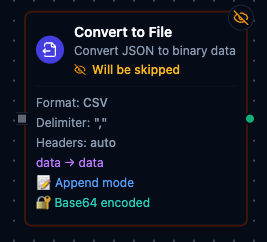
Convert to File node
Convert to File Node
Overview
- Type:
transform.data.serializer - Display Name: Convert to File
- Category: transform
- Execution:
supportsExecution: true - I/O Handles:
- Input:
defaultIn(left) - Outputs:
result(Success),error(Error)
- Input:
Purpose: Convert structured data (arrays of objects or arrays) into CSV or Excel file format. Supports header management, data formatting options, append mode for streaming scenarios, and base64 encoding for safe transport to file writers or connectors.
Format Configuration
| Parameter | Type | Default | Required | Description |
|---|---|---|---|---|
| Format | select | "csv" | Yes | Output format: csv or excel. |
CSV-Specific
| Parameter | Type | Default | Required | Description |
|---|---|---|---|---|
| Delimiter | string | "," | Yes (CSV) | Field separator character. Common values: , ; \t ` |
| Line Ending | select | "LF" | No | Line ending style: LF (Unix/Linux) or CRLF (Windows). |
Excel-Specific
| Parameter | Type | Default | Required | Description |
|---|---|---|---|---|
| Sheet Name | string | "Sheet1" | Yes (Excel) | Worksheet name. Max 31 characters. Cannot contain: / \ ? * [ ]. |
| Auto Filter | boolean | true | No | Add dropdown filter to header row. |
| Freeze Header | boolean | true | No | Freeze the header row for scrolling (freeze panes). |
Header Configuration
| Parameter | Type | Default | Required | Description |
|---|---|---|---|---|
| Header Mode | select | "auto" | Yes | How headers are determined (see below). |
| Headers | string[] | [] | If provided | Custom column header names. |
| Include Headers | boolean | true | No | Write header row to output file. |
| Always Include Headers | boolean | false | No | Force headers on every execution (ignores state). |
| Strict Headers | boolean | false | No | Validate data structure matches established headers. |
Header Mode Options
| Mode | Description |
|---|---|
auto | Automatically detect headers from input data structure (object keys). |
provided | Use the custom headers array configured in the node. |
fromFirstRow | Treat first row/element of input as headers (for array of arrays). |
none | No headers — output data rows only. |
Input / Output Configuration
| Parameter | Type | Default | Required | Description |
|---|---|---|---|---|
| Input Format | select | "auto" | No | Expected input structure: auto, arrayOfArrays, or arrayOfObjects. |
| First Row Is Header | boolean | false | No | Treat first array element as headers (for array of arrays input). |
| Input Field | string | "data" | Yes | Dot-notation path to data in input packet (e.g., data.items.records). |
| Output Field | string | "data" | Yes | Field name for encoded binary output in result packet. |
| Encoding | select | "base64" | No | Output encoding: base64 or utf8. Excel always uses base64. |
| Append Mode | boolean | true | No | Accumulate data across multiple executions. |
Data Processing
| Parameter | Type | Default | Description |
|---|---|---|---|
| Null Value | string | "" | String representation for null/undefined values. |
| Bool Format | select | "true/false" | Boolean formatting: true/false, TRUE/FALSE, or 1/0. |
Settings
| Setting | Options | Default | Description |
|---|---|---|---|
| Timeout (seconds) | number | Pipeline default | Maximum execution time for this node (1–600). |
| Retry on Timeout | Pipeline Default / Enabled / Disabled | Pipeline Default | Whether to retry on timeout. |
| Retry on Fail | Pipeline Default / Enabled / Disabled | Pipeline Default | Whether to retry on failure. When Enabled, shows Advanced Retry Configuration. |
| On Error | Pipeline Default / Stop Pipeline / Continue Execution | Pipeline Default | Behavior when node fails after all retries. |
Advanced Retry Configuration
Only visible when Retry on Fail is set to Enabled.
| Field | Type | Default | Range | Description |
|---|---|---|---|---|
| Max Attempts | number | 3 | 1–10 | Maximum retry attempts. |
| Initial Delay (ms) | number | 1000 | 100–30,000 | Wait before first retry. |
| Max Delay (ms) | number | 120000 | 1,000–300,000 | Upper bound for backoff delay. |
| Multiplier | number | 2.0 | 1.0–5.0 | Exponential backoff multiplier. |
| Jitter Factor | number | 0.1 | 0–0.5 | Random jitter. |
Output Format
Success Packet
{
  "success": true,
  "data": "SGVsbG8sV29ybGQKSm9obiwzMApKYW5lLDI1Cg==",
  "metadata": {
    "format": "csv",
    "rowsProcessed": 2,
    "totalRows": 2,
    "headersIncluded": true,
    "headers": ["Name", "Age"],
    "encoding": "base64",
    "mimeType": "text/csv"
  }
}
| Field | Description |
|---|---|
success | Always true for successful execution. |
data | Encoded file content (field name configurable via outputField). |
metadata.format | Output format (csv or excel). |
metadata.rowsProcessed | Number of rows processed in this execution. |
metadata.totalRows | Cumulative row count across all executions (append mode). |
metadata.headersIncluded | Whether headers were written in this execution. |
metadata.headers | Column headers used. |
metadata.encoding | Encoding used (base64 or utf8). |
metadata.mimeType | MIME type: text/csv or application/vnd.openxmlformats-officedocument.spreadsheetml.sheet. |
Error Packet
{
  "success": false,
  "error": "field 'data.items' not found in input",
  "errorType": "InputError"
}
Common errors:
- Configuration error (invalid format, missing required fields)
- Input field not found
- Header validation failed (strict mode)
- Failed to generate CSV/Excel
Validation Rules
label: required (non-empty)format: required; must becsvorexcel- CSV:
delimiterrequired and non-empty - Excel:
sheetNamerequired; must not contain/ \ ? * [ ]; max 31 characters headerMode: must be one ofauto | provided | fromFirstRow | none- When
headerMode === 'provided':headersmust be a non-empty array inputField: required (non-empty)outputField: required (non-empty)
Manual Actions
This node supports manual actions accessible from the node context menu:
| Action | Description |
|---|---|
| Reset | Clear accumulated data and reset state. Use when switching output files or starting fresh. |
| Get State | View current serializer state including row counts, detected headers, and accumulated data. |