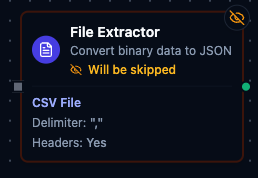
File Extractor node
File Extractor Node
Overview
- Type:
transform.file.extractor - Display Name: File Extractor
- Category: transform
- Execution:
supportsExecution: true - I/O Handles:
- Input:
defaultIn(left) - Outputs:
result(Success),error(Error)
- Input:
Purpose: Convert binary file data to JSON by extracting and parsing data from CSV and Excel files with advanced filtering, column selection/mapping, and row manipulation.
Configuration Reference
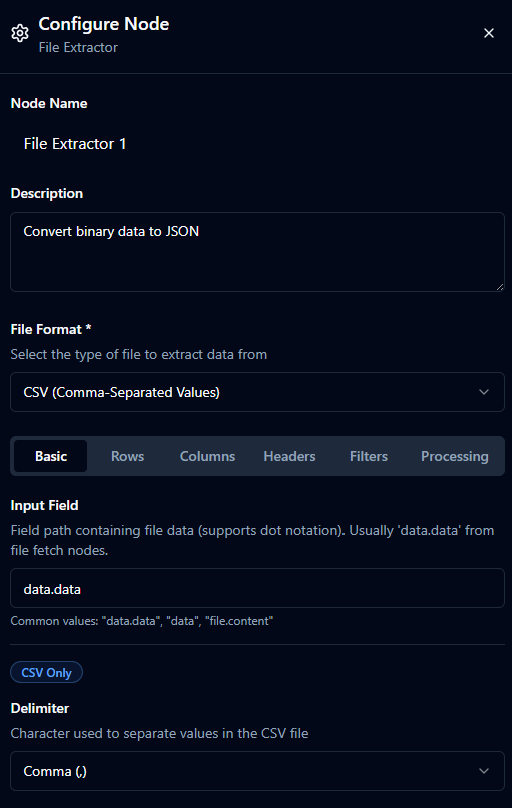
Basic
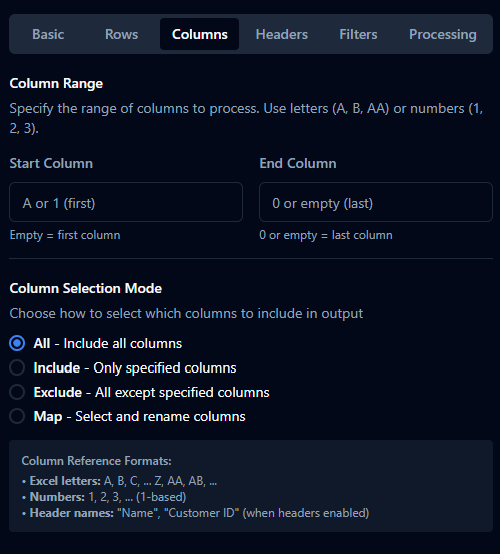
Columns
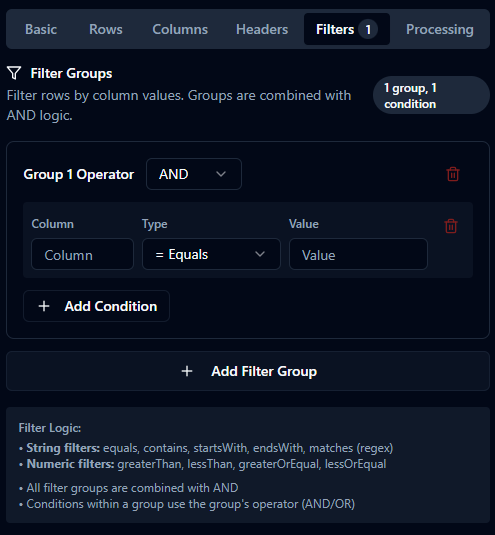
Filters, Rows, Processing
Basic Configuration
| Parameter | Type | Default | Required | Description |
|---|---|---|---|---|
| File Format | select | "CSV" | Yes | CSV / Excel. |
| Input Field | string | "data.data" | Yes | Dot path to binary/encoded file content from the incoming message. |
CSV-Specific
| Parameter | Type | Default | Required | Description |
|---|---|---|---|---|
| Delimiter | string (1 char) | "," | Yes (CSV) | Character to separate values. One of , ; \t ` |
Excel-Specific
| Parameter | Type | Default | Required | Description |
|---|---|---|---|---|
| Sheet Name | string | "" | No | Target sheet; empty = first sheet. |
Row Selection
| Parameter | Type | Default | Visible When | Description |
|---|---|---|---|---|
| Range Mode | select | "auto" | Excel only | auto / manual / headerSearch. |
| Start Row | number (min 1) | 1 | CSV always, Excel manual | 1-based physical row where the table starts. With Has Headers on, this is the header row and data begins on the next row. With Has Headers off, this is the first data row. |
| End Row | number | 0 | CSV always, Excel manual | 1-based physical row of the last row to include. 0 = read to end of file. If non-zero, must be >= startRow. |
| Max Rows | number | 0 | Always | 0 = unlimited. Applied after filters. |
Notes:
- Range Mode
auto: detects data region automatically (Excel). OnlymaxRowsapplies. - Range Mode
manual: enablesstartRow,endRow, and column ranges (Excel). - Range Mode
headerSearch: header row found by text search; see Header Configuration. When used,startRowis ignored for locating the header — the matched row wins. - For files with decorative preamble rows (title banners, metadata lines above the real column header), set Start Row to the row that contains the column header. The node will pick that row as the header and read data from the next row onward.
Column Selection
Column Range (CSV and Excel manual mode)
| Parameter | Type | Default | Description |
|---|---|---|---|
| Start Column | string | "" | A/1/AA or header name; empty = first column. |
| End Column | string | "" | A/1/AA/header name; 0 or empty = last column. |
Column Selection Mode
| Parameter | Type | Default | Description |
|---|---|---|---|
| Column Mode | select | "all" | all / include / exclude / map. |
| Columns | array | [] | Used when columnMode is not all. Each entry: { column: string; rename?: string }. |
- include: only listed columns.
- exclude: all except listed.
- map: select and optionally rename.
Header Configuration
| Parameter | Type | Default | Visible When | Description |
|---|---|---|---|---|
| Has Headers | boolean | true | Always | First row contains header names. |
| Include Headers | boolean | true | Has Headers | Include the header row in output metadata. |
| Normalize Headers | boolean | true | Has Headers | Trim whitespace; handle duplicates with suffix _2, _3, ... |
| Header Search Text | string | "" | Has Headers | Optional for CSV/Excel auto/manual; required for Excel headerSearch. Takes precedence over Start Row when set. |
| Header Search Match | select | "contains" | Has Headers | contains (substring, case-insensitive) or exact (whole cell, case-insensitive, whitespace-trimmed). Use exact when the search term also appears inside a longer title row. |
| Header Search Column | string | "" | When search text set | Optional column limit (A/1/header). |
Filtering
filterGroups: { op: 'AND'|'OR', conditions: FilterCondition[] }[]
FilterCondition: { column: string, type: FilterType, value: string }
- String:
equals|contains|startsWith|endsWith|matches - Numeric:
greaterThan|lessThan|greaterOrEqual|lessOrEqual
Notes:
- All groups combine with AND.
- Column names are case-insensitive.
- Missing columns treated as empty strings.
matchesuses regex; invalid patterns rejected.- Numeric types require numeric
value(commas allowed; stripped).
Processing Options
| Parameter | Type | Default | Visible When | Description |
|---|---|---|---|---|
| Trim Whitespace | boolean | true | Always | Trim surrounding whitespace per value. |
| Skip Empty Rows | boolean | true | Always | Skip rows with no meaningful content. |
| Preserve Types | boolean | true | Excel only | Keep numbers/booleans typed; dates as ISO strings. |
Settings
| Setting | Options | Default | Description |
|---|---|---|---|
| Timeout (seconds) | number | Pipeline default | Maximum execution time for this node (1--600). |
| Retry on Timeout | Pipeline Default / Enabled / Disabled | Pipeline Default | Whether to retry on timeout. |
| Retry on Fail | Pipeline Default / Enabled / Disabled | Pipeline Default | Whether to retry on failure. When Enabled, shows Advanced Retry Configuration. |
| On Error | Pipeline Default / Stop Pipeline / Continue Execution | Pipeline Default | Behavior when node fails after all retries. |
Advanced Retry Configuration
Only visible when Retry on Fail is set to Enabled.
| Field | Type | Default | Range | Description |
|---|---|---|---|---|
| Max Attempts | number | 3 | 1--10 | Maximum retry attempts. |
| Initial Delay (ms) | number | 1000 | 100--30,000 | Wait before first retry. |
| Max Delay (ms) | number | 120000 | 1,000--300,000 | Upper bound for backoff delay. |
| Multiplier | number | 2.0 | 1.0--5.0 | Exponential backoff multiplier. |
| Jitter Factor | number | 0.1 | 0--0.5 | Random jitter. |
Output Format
Example output:
{
  "success": true,
  "rows": [
    { "Name": "John", "Age": 30, "Status": "Active" },
    { "Name": "Jane", "Age": 25, "Status": "Active" }
  ],
  "metadata": {
    "totalRows": 100,
    "filteredRows": 2,
    "returnedRows": 2,
    "headers": ["Name", "Age", "Status"],
    "format": "csv",
    "sheetName": "Sheet1"
  }
}
Error Packet
{
  "success": false,
  "error": "Sheet 'Data' not found in workbook",
  "errorType": "SheetNotFound"
}
Common errors: Invalid format; missing file data; invalid base64; invalid file; sheet not found; invalid column reference; header not found; invalid filter.
Validation Rules
label: required (non-empty)fileFormat: must beCSV|ExcelinputField: required (non-empty)- CSV:
delimiterrequired (exactly 1 char) - Excel:
rangeModeinauto|manual|headerSearch - Excel header search:
headerSearchTextrequired whenrangeMode==='headerSearch' headerSearchMatch: one ofcontains|exact(defaults tocontainswhen unset)startRow: ≥ 1 when provided;endRow: 0 or ≥startRow;maxRows: ≥ 0columnMode: one ofall|include|exclude|map;columnsrequired when mode ≠allfilterGroups: each group hasopinAND|ORand at least one condition; types valid; regex validated; numeric values parseable
Using with Local File "Fetch"
This node consumes file content produced earlier in the pipeline.
- Local File connection → Function: Fetch Local File
- Connect the function node’s
resultoutput to the File Extractor’sdefaultIninput. - Ensure
inputFieldtargets the file content. Defaultdata.datamatches common File Fetch output.
Examples
- CSV:
inputField: 'data.data',fileFormat: 'CSV',delimiter: ',',hasHeaders: true,columnMode: 'include',columns: [{ column: 'Date' }, { column: 'Total' }] - Excel:
inputField: 'data.data',fileFormat: 'Excel',sheetName: 'Summary',rangeMode: 'headerSearch',headerSearchText: 'Customer ID',columnMode: 'map',columns: [{ column: 'A', rename: 'id' }, { column: 'CustomerName', rename: 'name' }]
Common Use Cases
- Simple CSV import with headers (all defaults)
- Excel sheet extraction with mapped columns (use Map mode)
- Filtered data with row limit (combine filters + maxRows)
- Excel with variable header position (use Header Search)
- Files with a decorative preamble above the real column header (set Start Row to the header row — the node treats it as the header when Has Headers is on)
- Title rows that contain the same words as the real header (use Header Search Match = exact so substrings inside the title don't mis-match)
Tips & Troubleshooting
- Use Header Search for variable report layouts.
- For exports with banner/title rows above the column header, set Start Row to the header row — no need to use Header Search.
- If Header Search picks up a title row that contains the same term, switch Header Search Match to
exactfor a whole-cell match. - Enable Trim Whitespace to avoid subtle mismatches.
- Start with small
maxRowsduring testing. - Use Column Mapping to standardize names.
- Enable Skip Empty Rows to clean output.
- Preserve Types (Excel) to maintain numeric/boolean fidelity.
- Test regex patterns before production.
Version History
Version 1.1
- Start Row and End Row are now 1-based physical row positions. With Has Headers on, Start Row is the header row (data starts on the next row); previously the header was always taken from row 1 and Start Row offset the data after it. Files that depend on the previous off-by-header data offset should drop Start Row by 1 when Has Headers is on.
- End Row is now the 1-based physical position of the last row to include (inclusive of the header row when Has Headers is on). Pipelines with
EndRow > 0and Has Headers on will return one fewer row at the tail than before — bump End Row by 1 to preserve the prior row count. - Added Header Search Match (
contains|exact) so a substring likeNamedoesn't match a longer title row containing the same word.
Version 1.0 - Initial unified node release
- CSV and Excel file support
- Advanced filtering
- Column selection and mapping
- Header search capability
- Excel range modes (auto/manual/headerSearch)