Running it
Questions about deploying MaestroHub, from one line to every plant, and keeping it running. All questions
What architecture do you recommend for a plant-wide data foundation?
Available
Collect close to the machines, standardise once in one plant structure, and deliver per use case to the stores and systems that need the data. Where each server goes depends on your network zones and how many plants you run.
- Collect close to the machines. A server at the line or in the plant reads the PLCs and keeps working when the uplink is down.
- Standardise once. Every value gets one address in the namespace, a meaning and a unit, a quality and its origin, before anyone reads it.
- Deliver per use case. One pipeline per target (a time-series store, a data lake, a graph database, a business system), each with its own buffer.
- Keep long history where it belongs. MaestroHub keeps an operational window; your historian or lake keeps the years. See Can we still report on last month or last year?
- Open nothing into the control network. Every connection between layers is opened by the lower layer.
Deployment scenarios has five layouts with drawings, from one server at the line to a three-layer namespace across a group, and what happens in each when a part fails.
We have many plants. Can we manage them centrally and roll one setup out to the next site?
Partly
Each site can be its own workspace in one installation. A site's connections, functions, topics, pipelines and dashboards export as one bundle that imports into the next site, with a preview first and a field for each missing credential. Central push of pipelines to many installations is not available yet.
- One installation, many sites. Give each site a workspace (Enterprise), or run one hub for many sites.
- Roll a setup out. Backup & Migration exports a
.mhub.jsonbundle. Importing shows a preview of exactly what will be written, lets you decide on name collisions, and asks for the credentials the bundle left out. - Many installations. Fleet Manager shows the health of every installation and distributes licences and single sign-on settings. See Independent plants.
- From CI. The bundle is a JSON file and import is an API, so a pipeline in your CI can promote a setup from test to live.
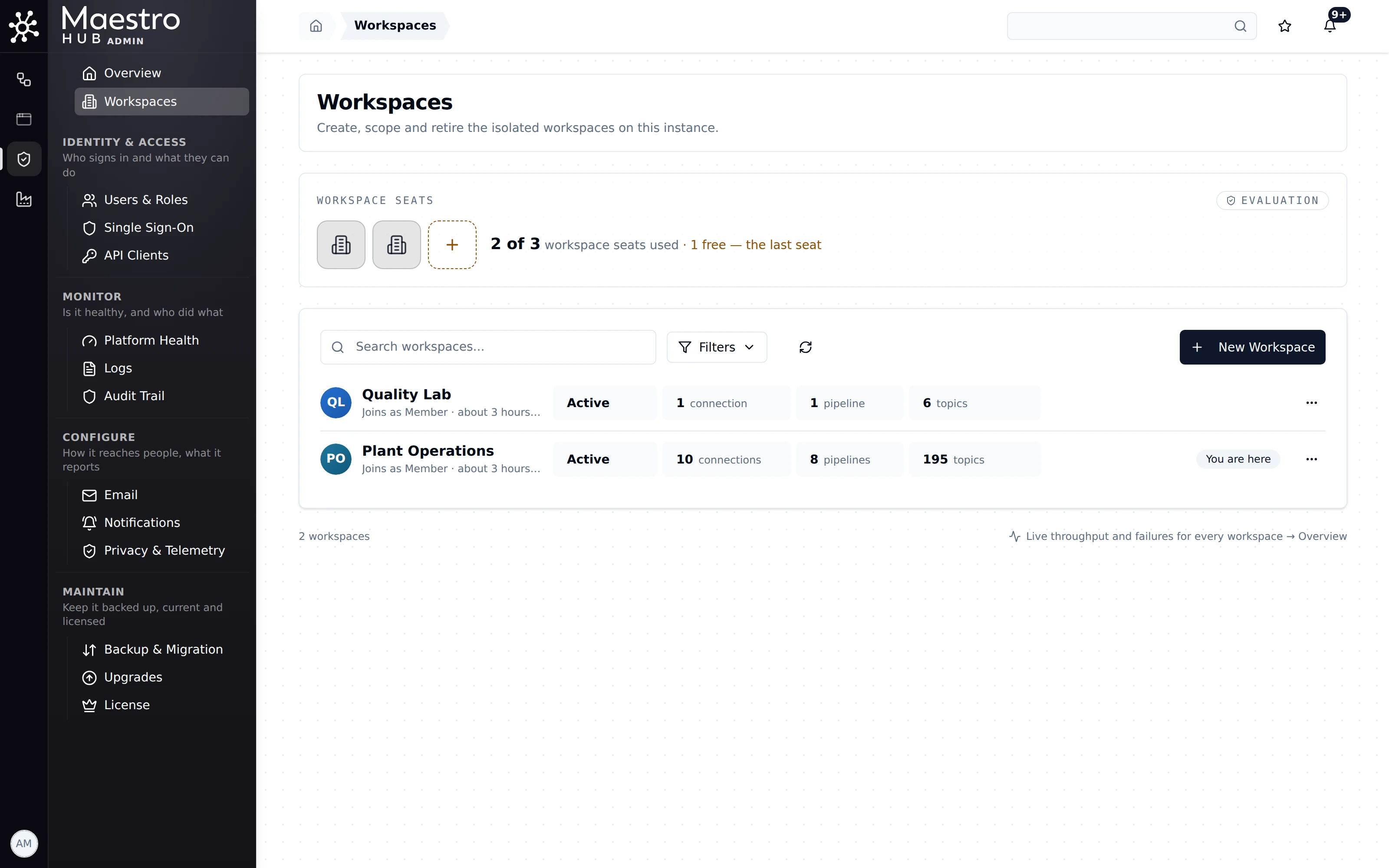
Admin › Workspaces: one workspace per domain or site on one installation.
Pushing pipelines and connections from Fleet Manager to many installations at once. Each installation imports its bundle, by hand or from CI.
What happens if the server dies? Do you offer high availability?
Partly
On Kubernetes (Enterprise), services run as replicas, and a failed node's connections are taken over by another replica. One machine has no redundancy: its buffers protect the destinations, not the machine itself.
- Tier 1: one process on one machine. No redundancy. The service manager restarts MaestroHub 5 seconds after a crash. Store & Forward buffers and the historian are on disk and are still there after the restart. See Line-side edge.
- Tier 2: one process on a one-node K3s cluster. No redundancy. Kubernetes restarts the pod. See One hub, many sites.
- Tier 3: Kubernetes, 2 to 3 replicas per module. High availability at the application tier: modules, NATS, TimescaleDB and Elasticsearch run as replicas. See Deployment scenarios: The servers.
We own high availability of the application. Spreading nodes over racks, power, storage and network stays with your platform team.
The built-in MQTT broker is clustered on Kubernetes (Enterprise): when the chart runs more than one UNS replica, every replica serves MQTT and they act as one broker behind one address. The chart's default is one replica, values-production.yaml runs two, and more than one needs the TimescaleDB historian (storage.type: timescale, the chart's default). The single binary and Docker Compose run one broker with no cluster, and keep its persistent sessions in memory, so a restart ends them. Shared subscriptions ($share/…) are not offered. See How the clustered MQTT broker works.
A standby machine for a single-machine installation. Also, on a single machine with the default settings, the queue of pipeline runs is kept in memory, so queued and running pipeline runs are lost if the machine crashes or loses power; set nats.embedded.streamStorage: file to keep it on disk. Stored values and Store & Forward buffers are on disk either way.
Will it handle our volume?
Available
We publish one measured benchmark, with its method, the machines and what happens above the limit, on Sizing and performance. It covers one-machine deployments. We size with you on your hardware and your message shape during a pilot.
Measured on 19 October 2026 on MaestroHub 3.0, Tier 1 (one machine with the built-in MQTT broker and the built-in historian), on Google Cloud C3 machines. Each value was authorised, checked against its schema, stored and published live, and read back after the run.
| Machine | vCPU | Guaranteed ingest (10-minute hold) |
|---|---|---|
c3-highcpu-4 | 4 | 29,814 values/s |
c3-highcpu-8 | 8 | 74,906 values/s |
c3-highcpu-22 | 22 | 164,242 values/s |
The limit on all three was the processor. Above the limit, devices are slowed and nothing acknowledged is dropped. Pipeline rates, latency, memory and disk are on the Sizing and performance page, with how the limits were found.
Kubernetes deployments (Tier 2 and Tier 3) have not been measured publicly yet. A figure holds for that version, that machine type and that workload: we can run the same test with you on your own hardware.
What hardware and operating system does it need? Does it run on Windows?
Available
Windows (amd64), macOS or Linux (amd64 and arm64), as a binary or in Docker; Kubernetes for Enterprise. A single node needs at least 2 CPU cores, 2 GB of RAM and 20 GB of disk; we recommend 8 cores, 16 GB and 200 GB or more. No special hardware.
- Windows: unpack the release and run
starter.bat. See Install and run. - Linux and macOS: amd64 and arm64 builds, and Docker images for both.
- Kubernetes: 1.26 or later with Helm 3, at least 8 CPU and 16 GB per node. See System requirements.
- On an Azure IoT Edge device: see Azure IoT Edge module.
How big a machine you need for your rate is on Sizing and performance.
Do we need a box in every plant, or can it all run centrally?
Partly
Both work. Run a single machine at the line, a hub in the plant DMZ, or one central site. An edge server keeps working when the uplink is down and forwards later, so lines that need writes or local decisions keep them local.
| Layout | Servers in the plant | Without the WAN |
|---|---|---|
| Line-side edge | One per plant | Keeps running |
| Edge plus DMZ hub | One per line, plus a hub in the DMZ | Keeps running |
| One hub, many sites | None | Stops for that site |
| Independent plants | One per plant, plus Fleet Manager | Keeps running |
| Three-layer namespace | Edges, site hubs and a group hub | Keeps running at every layer |
When an edge cannot reach the hub, its writes to the hub wait in Store & Forward buffers on the edge and are delivered when the link is back.
Automatic replication of a whole namespace from an edge to a central server. The central server has what the edges publish to it, with pipelines or MQTT.
How do upgrades work? Who does them, and can we go back?
Available
A patch release replaces the binary or the image. A release that changes stored data is checked first, applied all or nothing with a backup, and can be restored. Your team runs it, or ours with the access you give us.
upgrade checkshows every change the new version will make to your data, without changing anything.upgrade applybacks up every store and converts it, all or nothing.upgrade restoreputs the backup back so the earlier version can start again. It works until the new version has started on the data.- At every start, MaestroHub refuses data that is older or newer than its own version and names the command to run.
See Upgrade safety and Upgrade commands. From 2.6, follow Upgrade from 2.6 to 3.0.
Who runs it day to day? Which roles do we need, and will you train our team?
Partly
On one machine it is one application to operate; on a cluster it is a normal Kubernetes workload, run by your platform team or ours. Built-in roles separate who connects machines, who builds pipelines and who only reads, and we train your engineers to build use cases themselves.
- Roles. Connect, Automate and Data roles, each as Admin, Editor or Viewer, plus administrators for the workspace, identity and security. See Users and roles.
- Health. Admin › Platform Health and the Overview's needs-attention list show what to look at, and Notifications send it to Teams, Slack or a webhook. See Troubleshooting.
- Training. We train your engineers to connect sources and build use cases on their own plant.
Published support plans with response times. Ask us for the terms that apply to your contract.