Where it fits
Questions about where MaestroHub sits among the systems a plant already runs. Each answer starts short, then gives the detail, a way to try it and its limits. All questions
We already have an MQTT broker. Why would we need another layer on top?
Available
A broker moves messages. It does not know what a value means, whether it is any good, or who wrote it. MaestroHub keeps that on every value, checks permissions per topic, and buffers the value when a destination is down. It is not an MES, a SCADA or a long-term historian: it is the data layer those systems read from and feed.
What MaestroHub adds to each value a broker would only pass on:
- A meaning and a unit. A topic can say what it measures and in which unit, so every reader gets the same unit whatever the device sends. See Give your data meaning (Beta).
- A quality. Every stored value is good, uncertain or bad, with a reason. See How do you measure data quality?
- Its writer and its origin. Every value records who wrote it (a person, an API client, a pipeline or an AI agent) and can be walked back to the machine address it was read from. See Can we trace a value back to the machine?
- Permissions per topic. Who may read or write a branch of the namespace is a permission, for people, devices and agents alike.
- A buffer per destination. When a store or a cloud service is down, its writes wait on disk. See What happens when one of those stores is down?
MaestroHub has its own MQTT broker built in, so devices and readers still use plain MQTT. Your existing broker can stay as a source or a destination: see the next question.
Try it: open a topic in Explore › Data Explorer. Its page shows the meaning, the quality of the last hour and who published it.
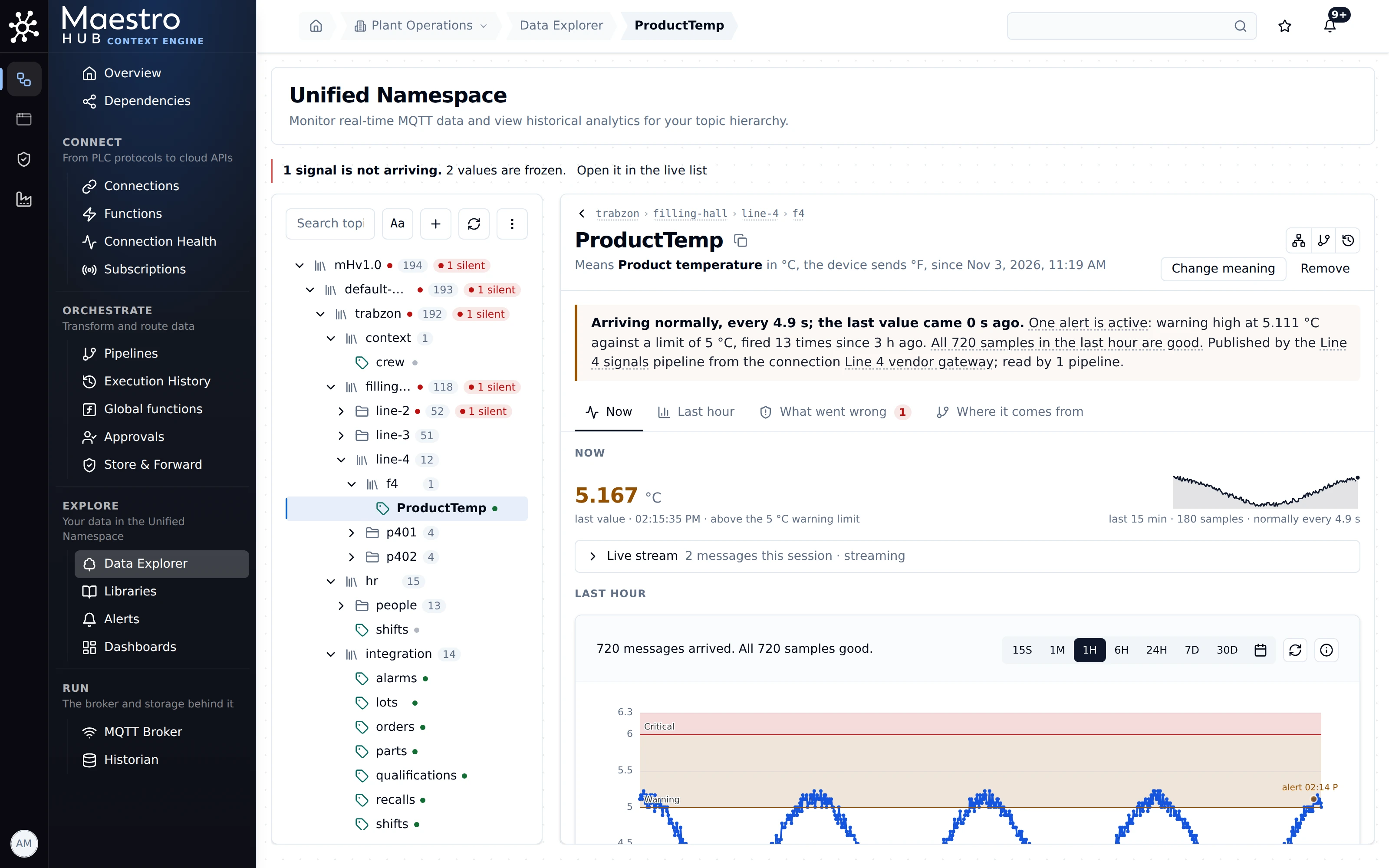
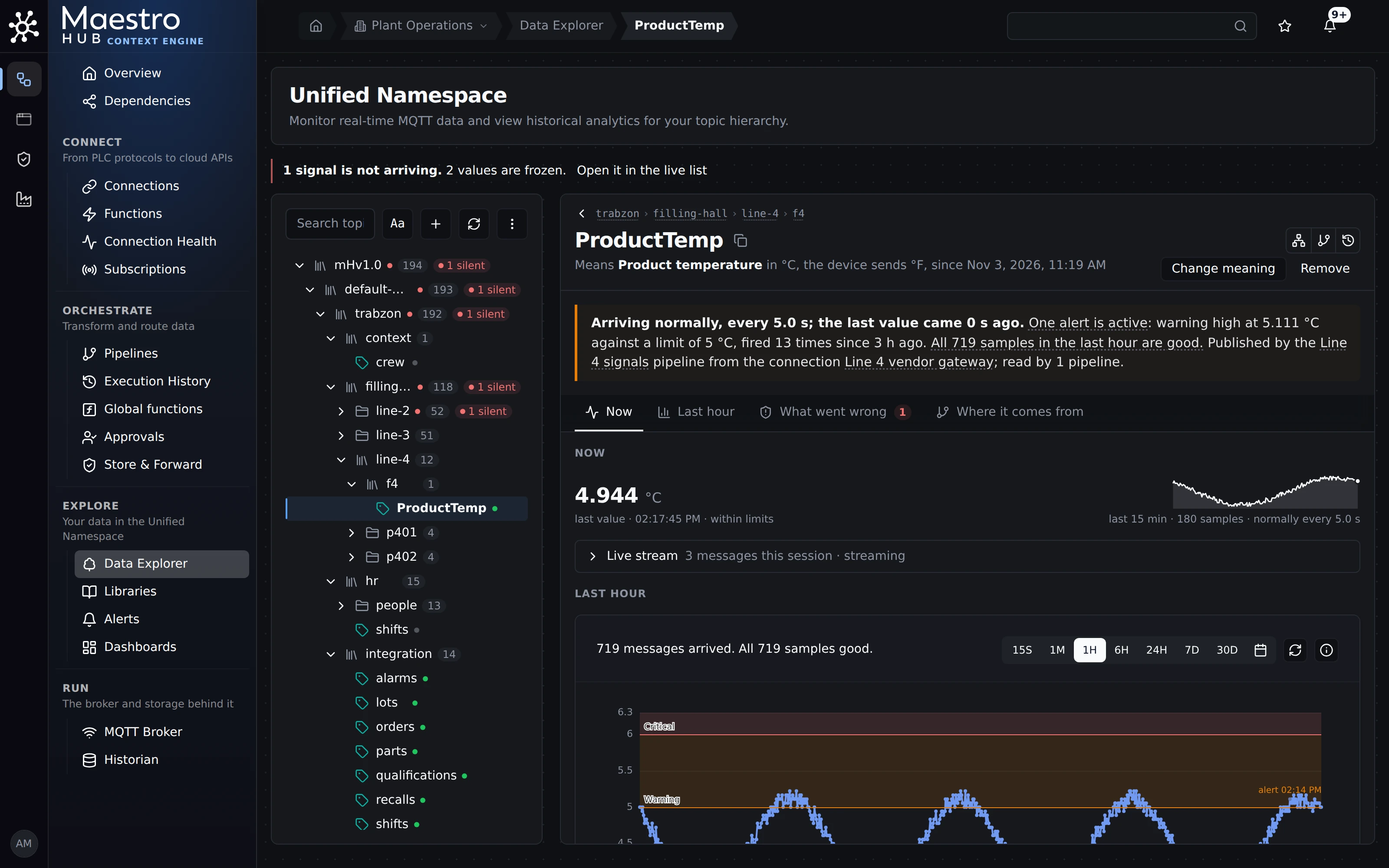
One topic of an older vendor line. The device sends °F; every reader gets °C, the quality of the last hour and who published it.
Do we have to replace our OPC servers, SCADA and broker?
Available
No. MaestroHub reads the OPC servers you already run, connects to SCADA platforms and to other MQTT brokers as sources and destinations, and speaks Sparkplug B. Nothing below it has to move on day one.
- OPC servers: the OPC UA and OPC DA connectors read the servers you run today, including the OPC UA server of a gateway such as Kepware.
- SCADA: an Ignition connector reads and writes Ignition tags. Other SCADA systems usually reach MaestroHub over OPC UA, MQTT or a database.
- Other brokers: the MQTT connector subscribes to and publishes on any broker, and the Sparkplug B connector publishes as an edge node.
One boundary: the namespace itself lives in MaestroHub's built-in broker. Since 3.0 an external broker can feed it or read from it, but cannot take its place (the external EMQX option was removed; see Changes in 3.0).
Try it: Connect › Connections › New Connection lists every connector by kind.
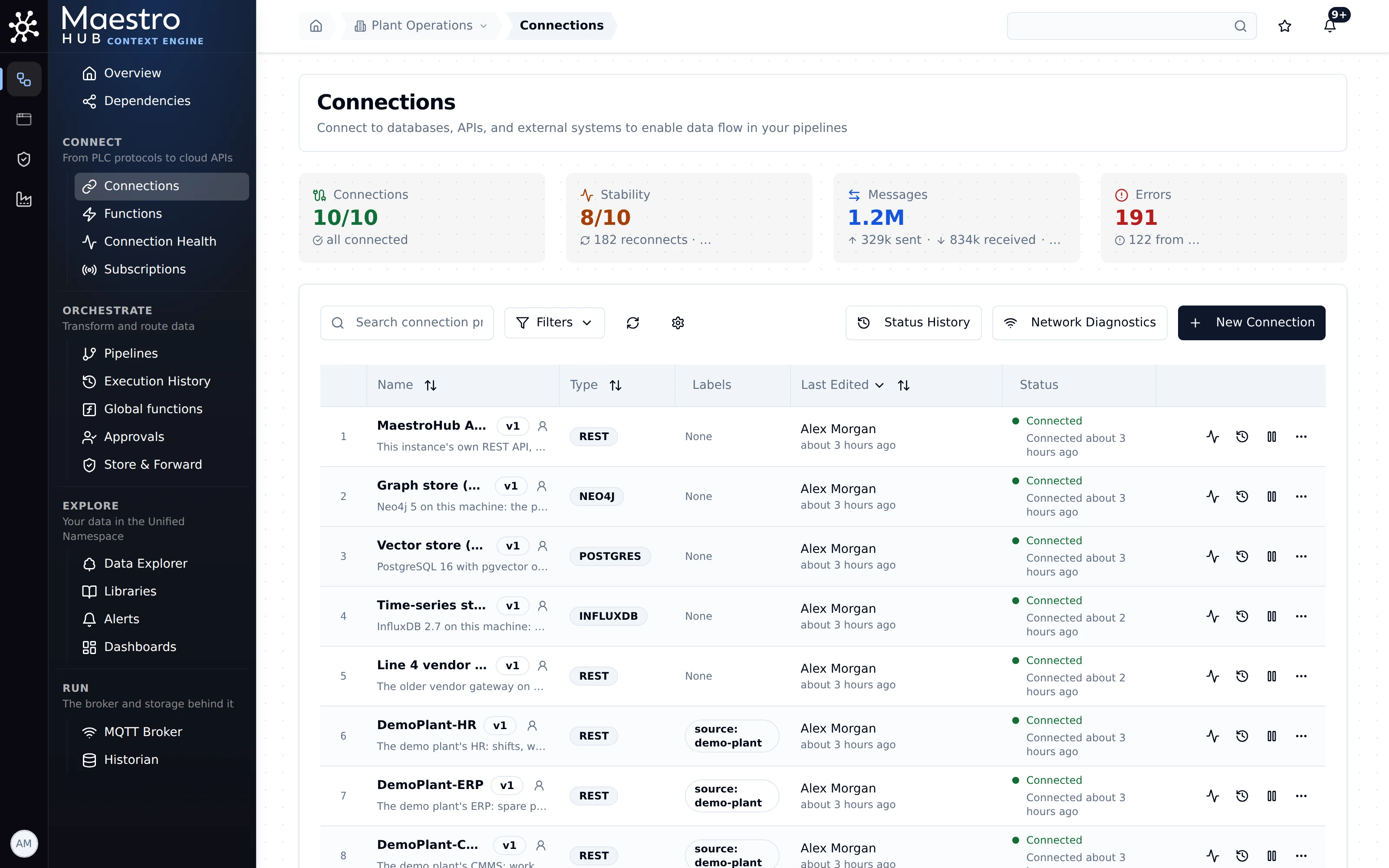
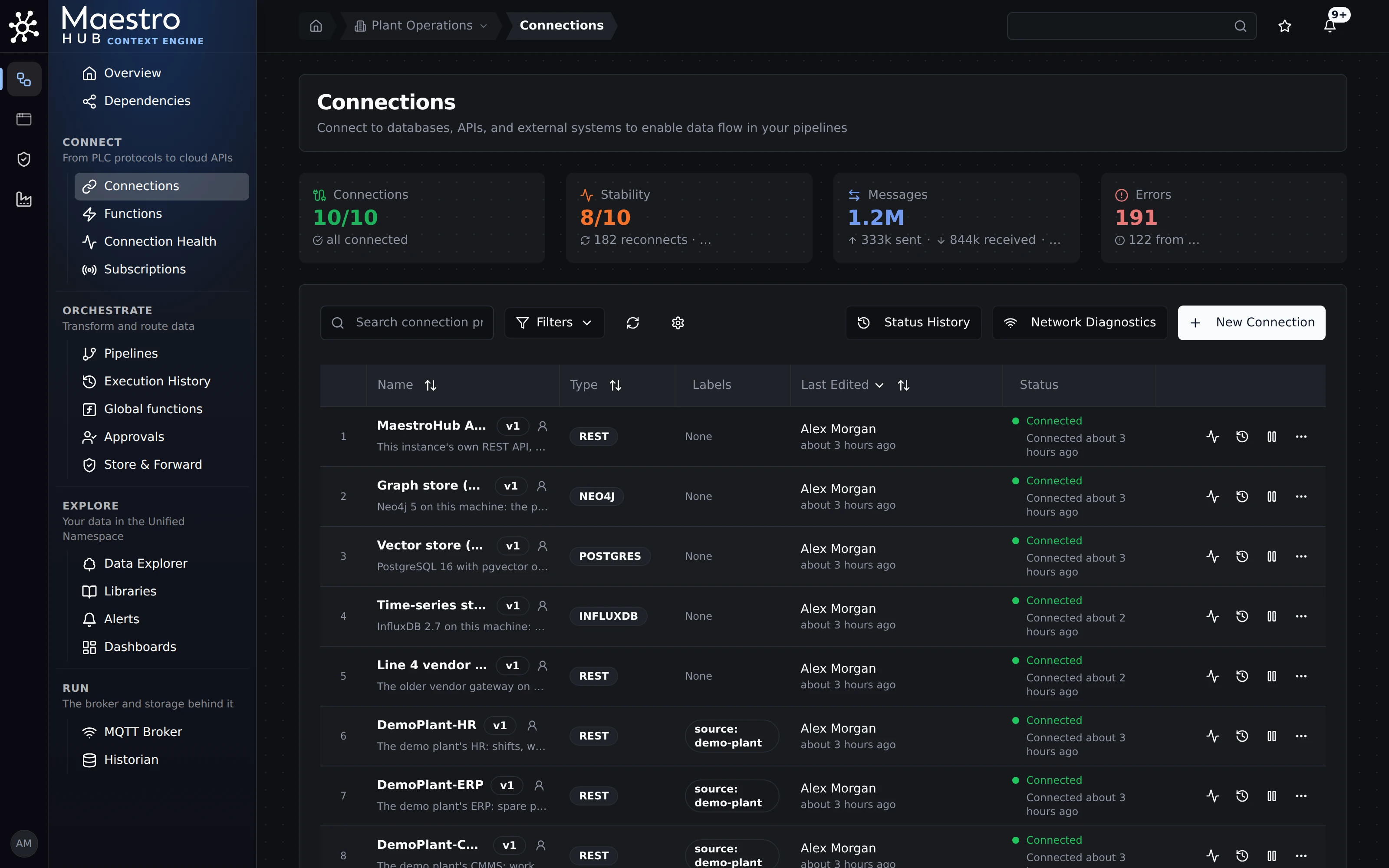
Sources and destinations side by side: business systems over REST, the plant's MQTT broker and three downstream stores.
Can one platform take data from PLCs, MES, maintenance and lab systems across all our shops?
Available
Yes. More than 100 connectors bring every source into one plant structure by site, area, line and machine, with a workspace per shop or domain where people and data must stay apart.
PLCs, MES, maintenance (CMMS), ERP and lab systems each connect through their own connector: a PLC protocol, REST, SOAP, a SQL database, a message bus or a file share. Pipelines put what they read on topics in one namespace, so a work order and a machine counter sit beside each other in the same tree. Where a lab or a business unit must not see the rest, give it a workspace (Enterprise): its own connections, pipelines, topics and people.
No MES? See How do you join SAP orders with machine data?
Try it: the Digital Factory Simulator gives you OPC UA, Modbus, MQTT, an MES and an ERP over REST, and a PostgreSQL database to connect, without hardware.
Which PLCs and protocols do you read? We have old lines and mixed brands.
Partly
Siemens S7 and S5, EtherNet/IP (ControlLogix, CompactLogix, Micro800), Modbus TCP and RTU, Mitsubishi MELSEC, Omron FINS, Beckhoff TwinCAT, FANUC, OPC UA and OPC DA, and more: 100+ connectors reaching 120+ kinds of machines and systems. PROFINET, DNP3, IEC 61850 and OPC HDA are not supported today.
Finding the right tags differs by protocol:
- OPC UA: browse the server's address space and pick nodes. See OPC UA.
- EtherNet/IP: browse the controller's tags, or load a Studio 5000 export (
.L5X) and pick tags without a live connection. See EtherNet/IP. - Siemens S7: address tags by data block and offset (for example
DB100, a byte offset and a type). There is no symbol browse. See Siemens S7.
The full list, grouped as in the product, is in the sidebar under Connect.
PROFINET (an upcoming connector), DNP3, IEC 61850 and OPC HDA. IEC 60870-5-104 is supported: see IEC 104.
Every shop names and measures things differently. How do we make them comparable?
Beta
Give each signal a meaning and a unit, once. A line that sends °F then reaches every reader in °C on the same topic, and the device never changes. Metric tons, short tons and kilograms work the same way.
A meaning says what a signal is (Product temperature, Mass) and the unit everyone reads it in. MaestroHub converts on arrival, so charts, alarms, MQTT readers and the REST API agree. Differently named tags (product_temp, ProductTemp) take the same meaning in one step. Start from your data reads every signal and proposes meanings, and asks only where two units are plausible. Then Find signals asks for one meaning across the plant (every pump's vibration, in one unit) as a table, a CSV file or one API call.
Try it: Start from your data, then A line sends another unit, One measurement, many tag names and Find signals.
The semantic layer is in Beta: it works as these pages describe, and names and steps may still change.
Can we define assets, equipment types and processes, or only signals?
Partly
Today the namespace holds sites, areas, lines and machines, and meanings sit on signals. Equipment types, as a model you define once and reuse for every pump, are not available yet.
What you can do today:
- The plant structure is the topic tree: site, area, line, machine, signal.
- Meanings sit on signals and cover every signal that has them, so one limit or one alarm covers every pump's bearing temperature. See One alarm for every similar machine.
- Machines that look alike are suggested the same names and units, in Start from your data and after you give one signal a meaning by hand. They are suggestions: you tick the machines and confirm, with Undo. See Machines that look alike (Beta).
- The process flow (what feeds what) can be published to your graph database. See Process flow and graph.
Equipment types, an asset model with its own attributes, and process models are not in this release. They belong to the Knowledge Graph, which is in development and has no release date (labelled Coming soon in these docs).
Do you follow ISA-95? Is it an OPC UA server? Sparkplug B?
Partly
The namespace follows ISA-95-shaped levels (enterprise, site, area, line, cell) as a convention, not a rule. MaestroHub is an OPC UA client, not a server. It publishes as a Sparkplug B edge node and listens to other edge nodes.
- ISA-95. Topic paths are ISA-95-shaped by convention and not enforced, so discrete, lab and fleet layouts fit too. There is no ISA-88 batch model.
- OPC UA. MaestroHub browses, reads, writes and monitors OPC UA servers (OPC UA). It does not serve its own data over OPC UA: it serves it over MQTT, REST and MCP.
- Sparkplug B. MaestroHub publishes as an edge node, with birth and death certificates and sequence numbers, and its subscribe function listens to other edge nodes (Sparkplug B).
An OPC UA server, a Sparkplug B host application (it publishes no STATE and sends no rebirth or commands), and ISA-88.
If a value is converted to another unit, do we get a second topic?
Beta
No. The same topic carries the converted value and its unit.
The device keeps sending its own unit to the same address. Readers of that topic get the value in the meaning's unit, and the MQTT message and the REST answer say which unit and which meaning. History stored before the meaning was given is not rewritten; reads mark it.
Try it: A line sends another unit and What readers receive.
Can one alarm cover every similar machine?
Beta
Yes. Set the limit once on the meaning; it covers every signal with that meaning, including machines given it later.
Before saving, MaestroHub shows what the alarm would have done over the last 24 hours. A topic can still keep a limit of its own.
Try it: One alarm for every similar machine.