Prompting an AI client to build apps
Coming soon: build an App Studio app with your own AI client, one prompt per round. You say what you see in the live preview; the client changes the app over MCP; you approve the release.
- Client
- Claude Code (headless) · Claude Opus 5.5
- Plant
- Digital Factory Simulator, Quick Setup import
- Prompts
- 5 to build the twin, 5 more to give it a plant model
- Result
- A live 3D twin, approved by a person
App Studio is coming soon: it is in development and testing and is not part of release 3.0. This page records a session on a development build, so names and steps may change before release.
This page covers what to say to your AI client. It does not cover the settings. Building an App Studio App gives the steps, and Walkthrough: build an App Studio app shows a single session. Here the app is built in rounds. Each prompt asks for one thing you saw in the preview, and the client changes the app, validates it and saves a checkpoint.
The example is one real session. The client built a live 3D twin of the Digital Factory Simulator line in five prompts, then modelled the line in the plant model and moved the app onto it in five more. Claude Code ran headless with only MaestroHub's MCP tools, and nobody edited the code by hand. Every prompt below is printed exactly as it was sent, and every screenshot is from that session.
This is the result: OP20 faults, its label and chip turn red, and Ayşe walks over from OP10 to fix it.
Before you start
- Run the simulator and import its Quick Setup. Follow Connect DFS to MaestroHub. The import brings 9 connections, 8 pipelines and 3 dashboards. The pipelines arrive disabled: enable the eight
DFSpipelines under Orchestrate → Pipelines, and within a minute the line's state, counters, buffers and orders arrive in the Unified Namespace. This session used a new workspace, Caliperline, with nothing else in it and no plant model. - Describe the app in App Studio. Open App Studio → New app, write one sentence and choose Build with your AI client. MaestroHub creates the app and opens its builder with a prompt for your client.
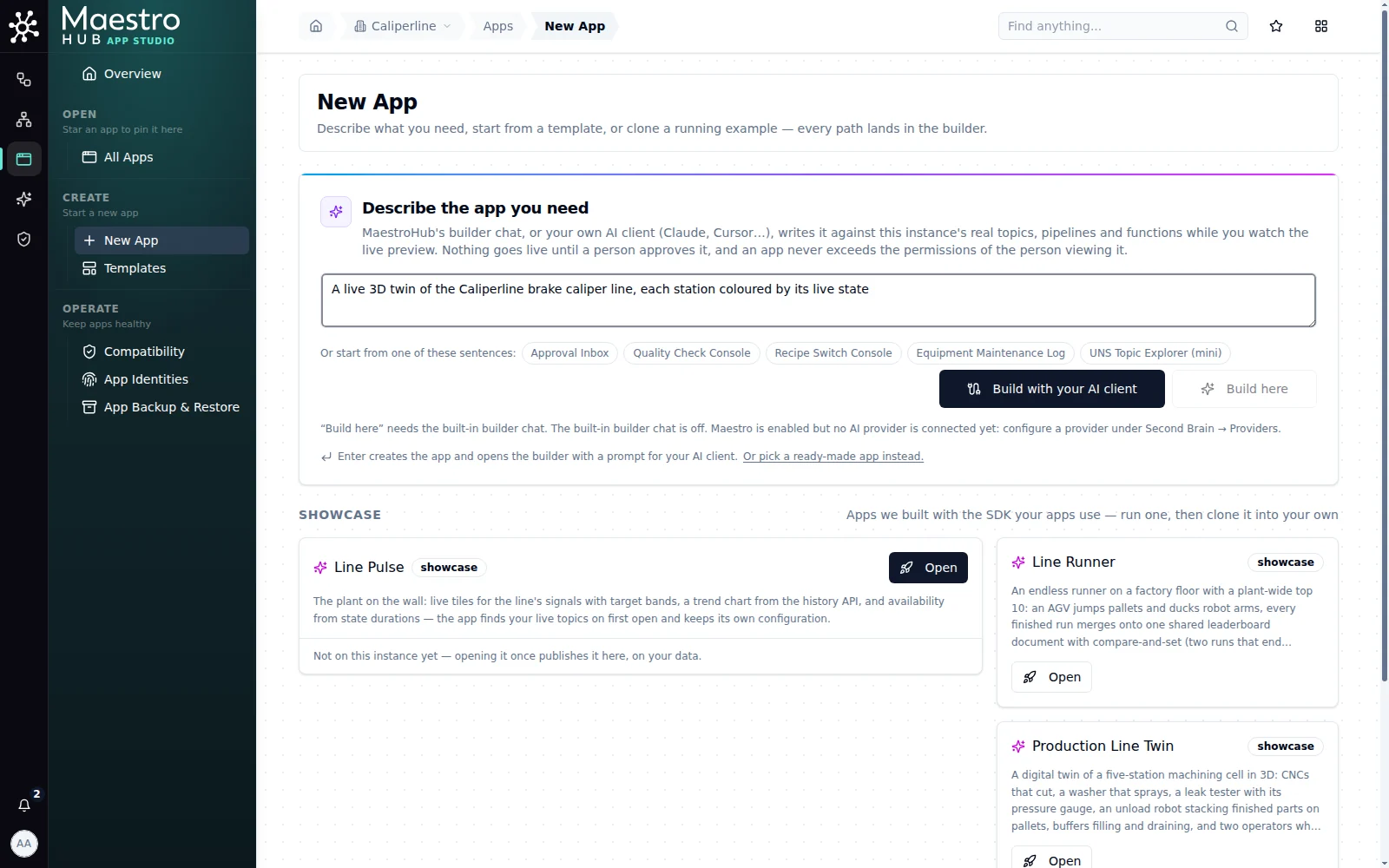
One sentence is enough to start; the rounds that follow add the detail
- Connect the client once. The builder's Connect an AI client button opens the connect page with Apps picked. Also pick Unified Namespace: its tools let the client read real values from a topic before it binds the app to it, so it builds against the data you have instead of guessing.
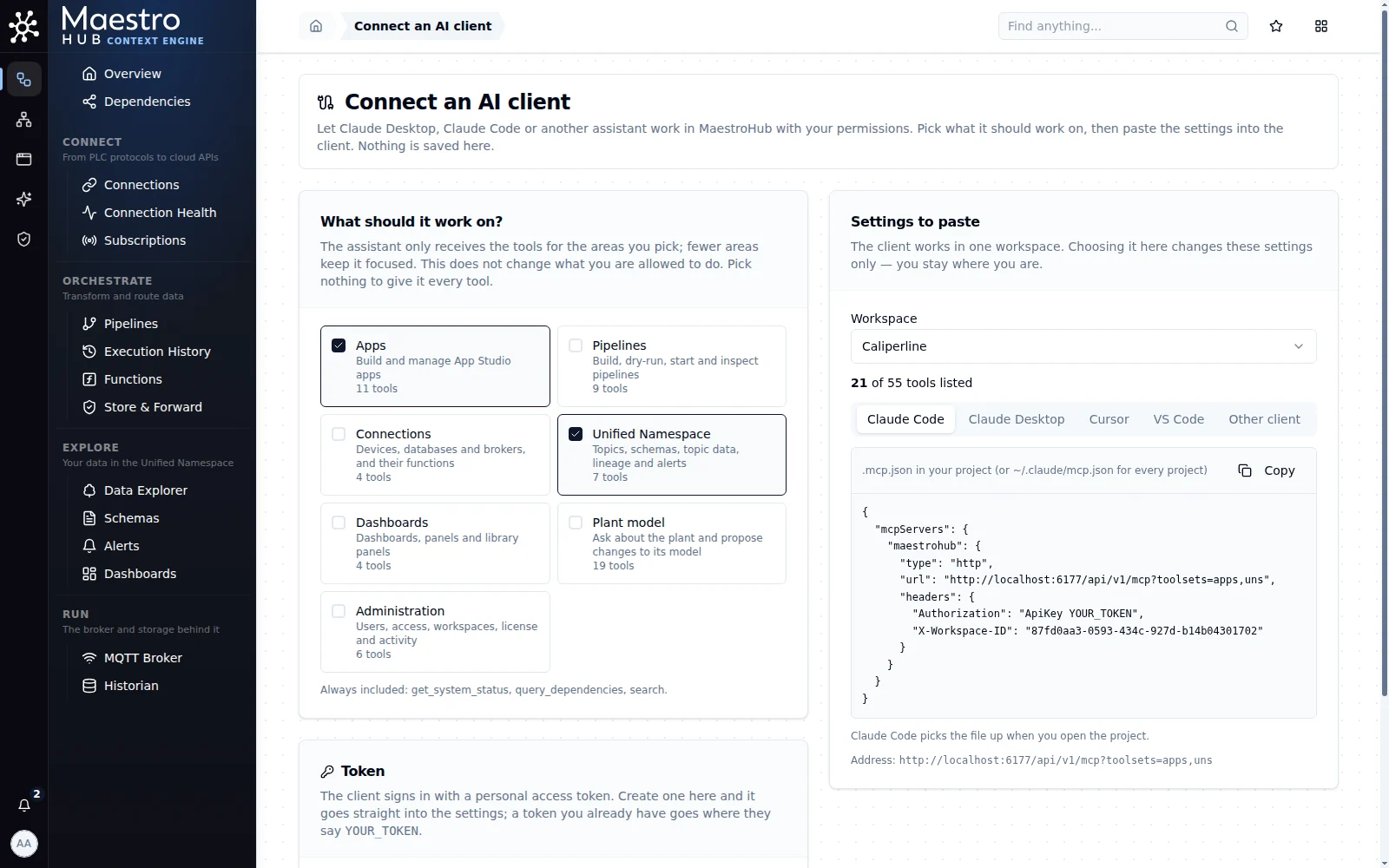
Apps plus Unified Namespace: the client can sample topics as well as write the app
Create a token with these permissions selects what those tools check. A twin only reads the line, so this session turned off UNS → Write and Publish before creating the token. The client could still read every topic, and it was never refused, because the app it built needed only uns:read.
- Claude Code
- Claude Desktop
Save the settings from the Claude Code tab as .mcp.json in an empty folder, then start the client there with its built-in tools turned off, so MaestroHub's tools are all it has:
claude --tools "" --mcp-config .mcp.json
Keep the same conversation for every round. In an open session, just type the next prompt. A headless run (claude -p) prints a session id; pass it with --resume <id> on the next prompt, or use --continue.
Copy the settings from the Claude Desktop tab into claude_desktop_config.json (see Claude Desktop) and restart the app. The address in those settings carries the toolsets you picked (/api/v1/mcp?toolsets=apps,uns).
Start a new chat for the app and send every prompt below into that one chat, so the client remembers what it already built and what it told you.
Your first sentence
The builder puts the sentence you write on New app into the prompt for your client, so it decides how many rounds follow. A sentence that answers these four questions saves most of them:
| Question | Example |
|---|---|
| Who looks at it, and where? | the line lead, on the wall screen by OP40 |
| What do they decide with it? | which station holds the line up right now |
| What does it cover? | line LINE-BC-01: its stations and the buffers between them |
| What may it not do? | it only reads data; operators may add a note, nothing else |
As a pattern to fill in:
A [kind of screen] for [who], on [where], showing [what] for [which line or area], so they can [decide what]. It only reads data[, except …].
For the twin below it would have been:
A live 3D twin of line LINE-BC-01 for the line lead, on the wall screen by OP40, showing each station's state and the buffers between them, so they can see which station holds the line up. It only reads data.
The session below starts from a deliberately short sentence, so the rounds show how detail is added. The fuller sentence would have saved round 2's layout change.
How to prompt
The session follows six habits. Each one is shown in a round below.
- Start with the builder's prompt as it is. It names the app and its id, tells the client to read
app_builder_guidefirst, and tells it to validate and save a checkpoint. Paste it; add to it in later rounds. - Say what you see, not how to code it. The client cannot see the screen; it says so itself ("I can't see the 3D render, though, so please confirm…"). Tell it what the preview shows: the cards are empty after a reload, the buffer reads 159%. It finds the cause.
- One round, one theme. Three related things in one prompt work well (round 2). Unrelated wishes are easier to check one by one.
- When it says something can't be done, point at a way. In round 1 the client left the buffers out of the 3D scene. Round 3 reminded it that the scene takes values the app computes, and it drew them.
- Test with a real event. Wait for a fault on the line, then ask the client to check what the topics send and what the preview did with it (
run_report). - Give it facts it can't know. Who covers which station, what a code means, why a value looks odd. In round 5 one sentence closed a question the client could not settle from the data.
The client works on the draft only. Nothing goes live until you ask for a release and a signed-in person approves it. If a session is cut off, start a new one and tell it to keep working on the app: the draft and its checkpoints live in MaestroHub, not in the client.
The session, round by round
Round 1: the builder's prompt
The builder's panel showed this prompt, and it was sent unchanged:
In MaestroHub, work on the App Studio app "A live 3D twin of the Caliperline brake" (app id 38055638-b2ec-4739-b02b-e9c959bc025c).
Start by calling app_builder_guide and follow it.

A live 3D twin of the Caliperline brake caliper line, each station coloured by its live state

Validate with manage_app_source validate and save a checkpoint when it builds clean. I am watching the live preview in MaestroHub.
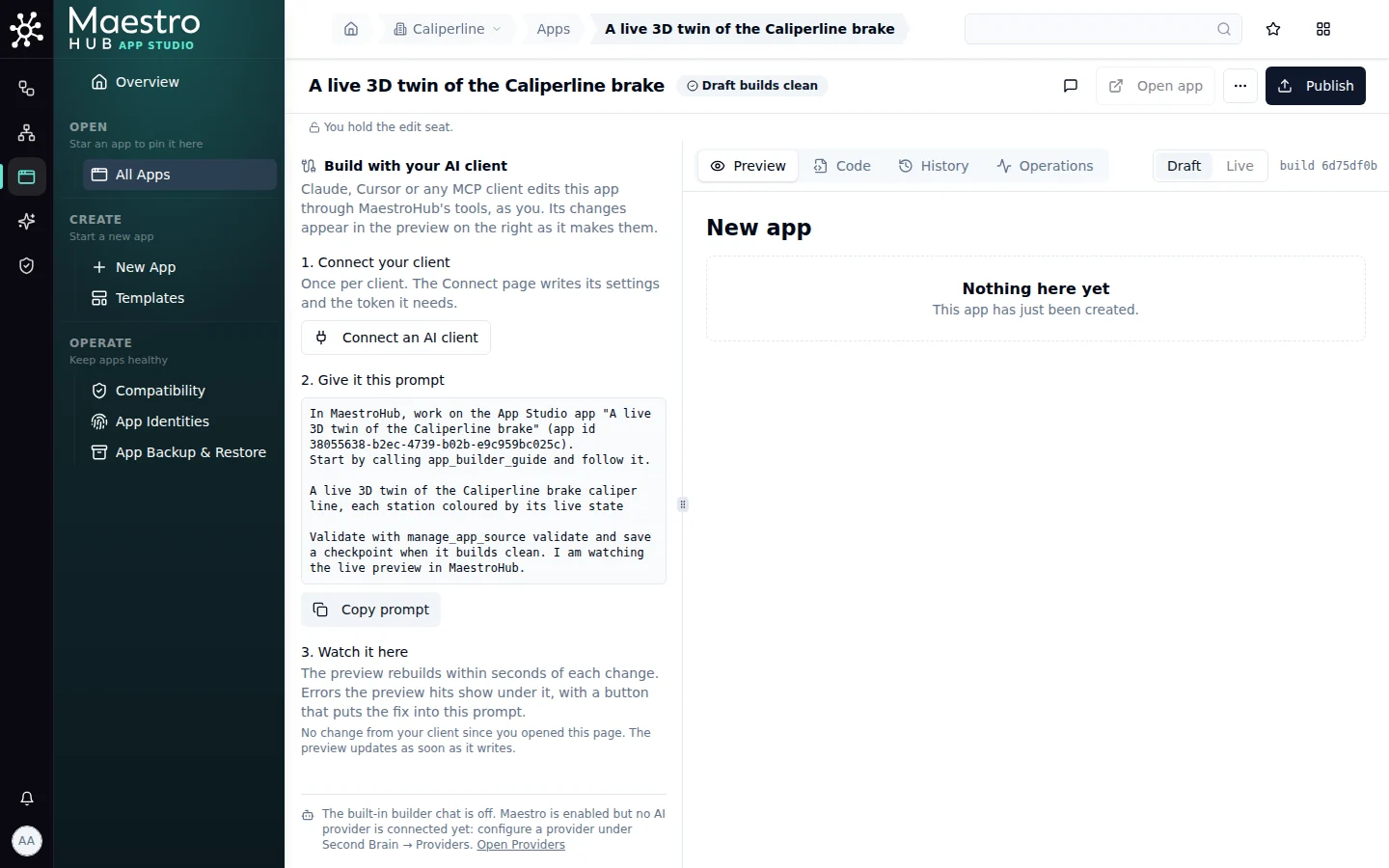
The prompt to copy, and the preview that will follow each change
What the client did (22 tool calls, 97 seconds):
- Read
app_builder_guideand the app's starter files. - Searched the topics (
find_topics) and read recent values from the station state, buffer and counter topics (query_topic_data), to see the real shapes: a state is text such asRUNNING, and all buffer levels arrive together on one topic. - Looked for the line in the plant model (
plant_walk). There was no plant model in this workspace, so it read the topics at their paths instead, and said so. - Drew the scene with
edit_scene: OP10 and OP20 as CNCs, OP30 as a washer, OP40 as a tester, each bound to its state and good and bad counters, and a pallet of finished calipers after OP40. - Built the page around it: order cards, a chip per station, a panel for the station you click, and a buffers card. It asked for
uns:readonly. - Validated clean, saved checkpoint 1, and checked
run_report: no refused calls, no errors.
It also listed what it had left out. "Buffers aren't in the 3D scene", because a scene buffer needs a topic of its own. And there is "no cycle-progress bar", because the cycle topic carries no numbers.
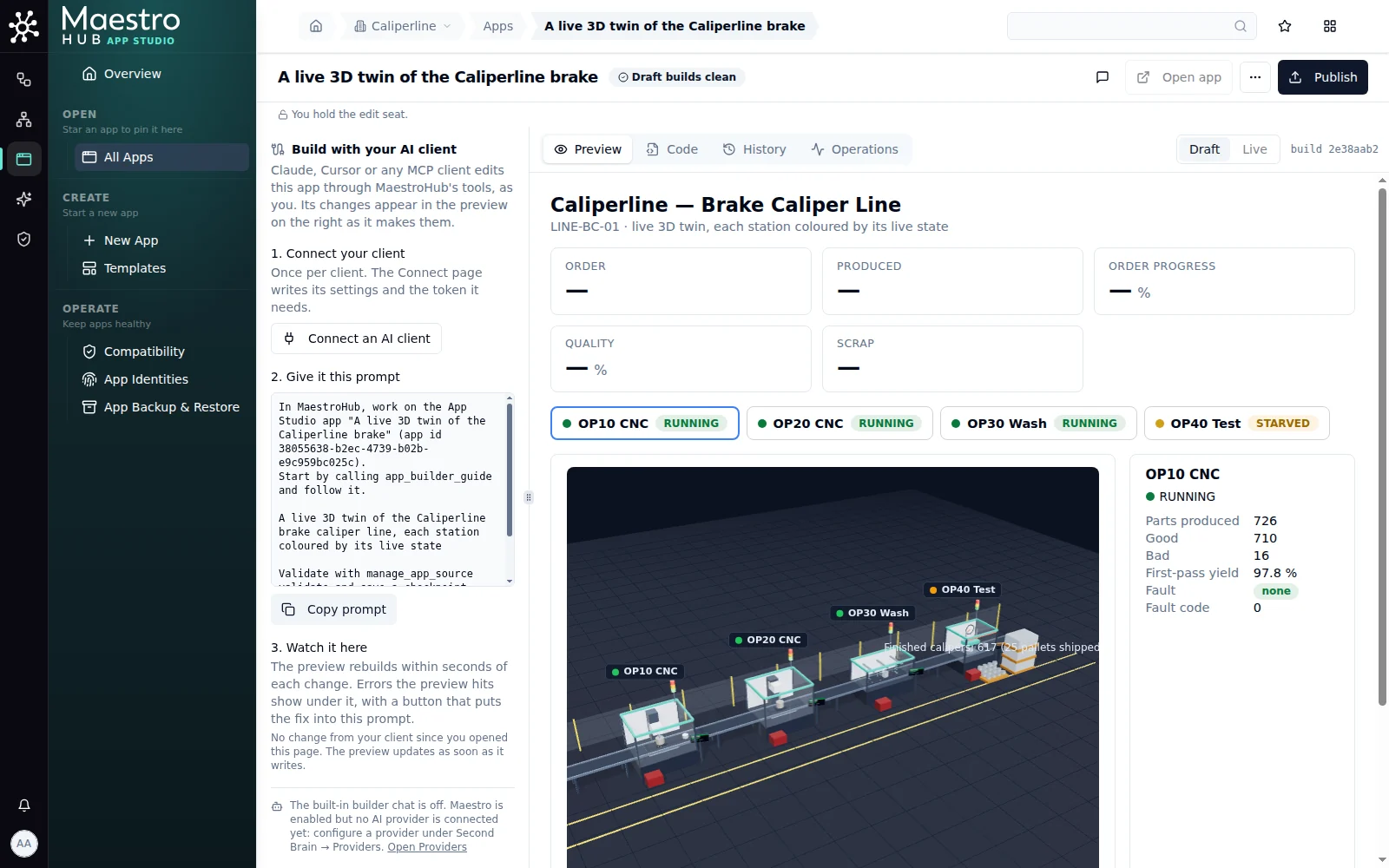
Round 1: it works, but the 3D line is below the fold and the cards are empty after a reload
Round 2: say what you see
Watching the preview showed three problems, and one prompt named all three:
Three things I see in the preview:

1. After a reload, the order cards show "—" for up to half a minute and the Buffers card says "Waiting for buffer levels…". Show the latest known values straight away.
2. The raw material buffer reads 159% when it holds 159 of 1000 parts.
3. The 3D line should be the main thing on the screen: full width under the title and about 520 px tall, with the station chips under it. The order cards and the station panel can go below.

Validate and checkpoint when it builds clean.
What the client did (6 calls, 63 seconds): it started each card from the newest stored value, one history read per topic when the page opens and then live values, with no polling. It fixed the gauge, which had printed the part count with a % sign, and moved the 3D line to the top. Checkpoint 2.
The first problem was general when this session was recorded: a live subscription delivered only new values, so a card bound to a topic that publishes every 30 seconds stayed empty for up to 30 seconds after the app opened. A live subscription now starts from the topic's last stored value, so useTopic shows a value the moment the app opens and the client no longer needs a history read beside it.
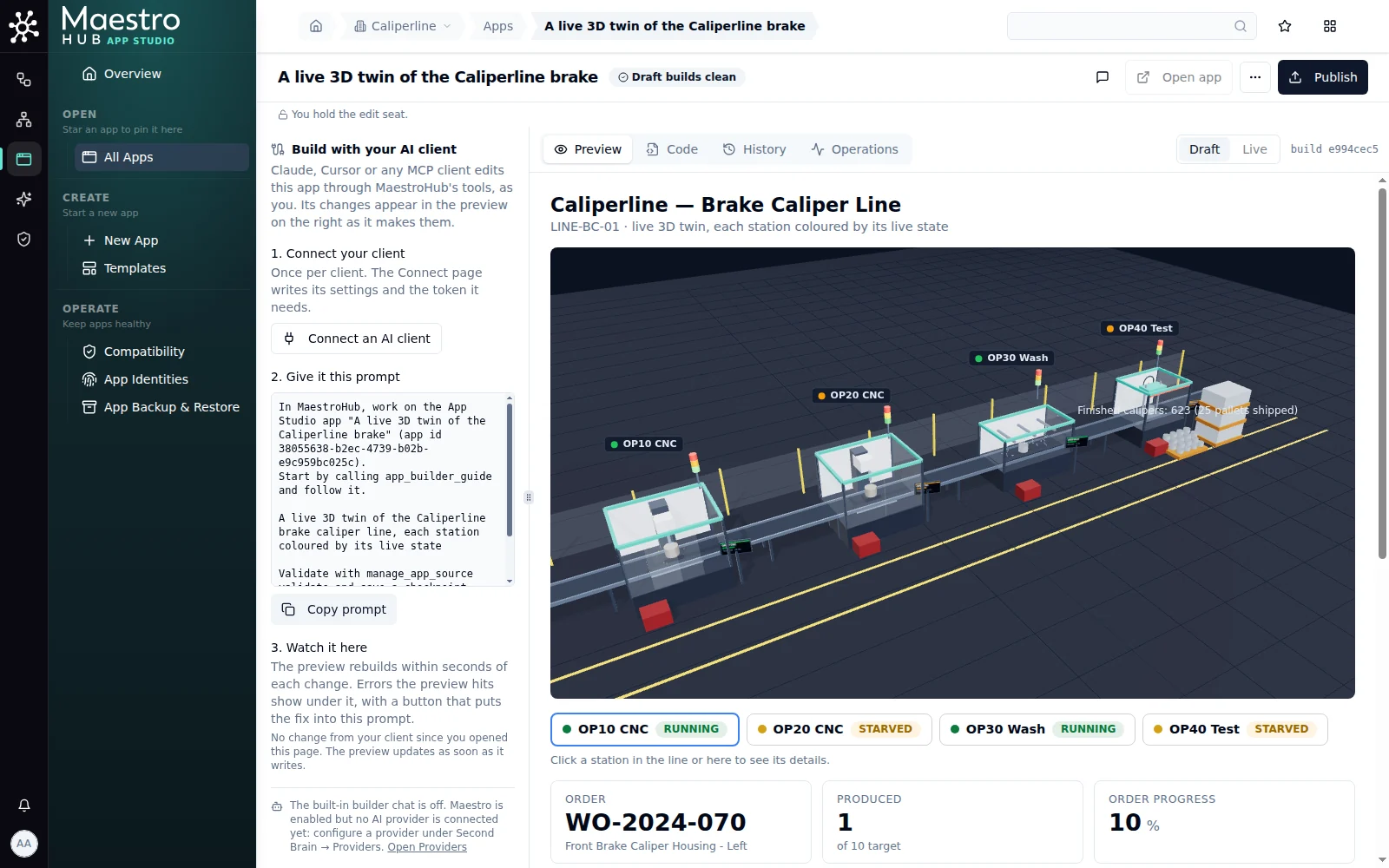
Round 2: the 3D line leads, and the cards are filled the moment the app opens
Round 3: work on the 3D model
Now the 3D model itself:

1. Draw the four buffers in the scene: raw material before OP10 and the three between the stations, each holding as many parts as its level. You said a scene buffer needs one topic per buffer; the Scene's values prop takes values the app computes, so you can split production/buffers yourself.
2. Put two operators on the line: Ayşe covers OP10 and OP20, Mert covers OP30 and OP40. When a station they cover faults, they should walk over to it.
3. The "Finished calipers" label sits on top of OP40. Move it clear of the station.

Use edit_scene for the scene. Validate, checkpoint, and check run_report while I watch.
What the client did (11 calls, 96 seconds): edit_scene refused two of its changes and wrote nothing for them, naming the field each time:
buffers[0].after: is required
buffers[0].capacity: must be a whole number from 1 to 200
ops[0].set: json: unknown field "gap". Nothing was written
The client read the refusals and changed its approach. It added the three buffers between the stations, plus the finished-goods buffer after OP40 to move the pallet down the line. It fed the buffer levels through values, so the app now passes the scene every station's state and counters too. It added Ayşe and Mert, and saved checkpoint 3. It also said plainly what it could not do then: a buffer could only follow a station, so the raw material buffer stayed in the buffers card, and labels could not be moved, so those at OP40 overlapped. Both are possible now: a buffer can stand before the first station, and any label takes a labelOffset.
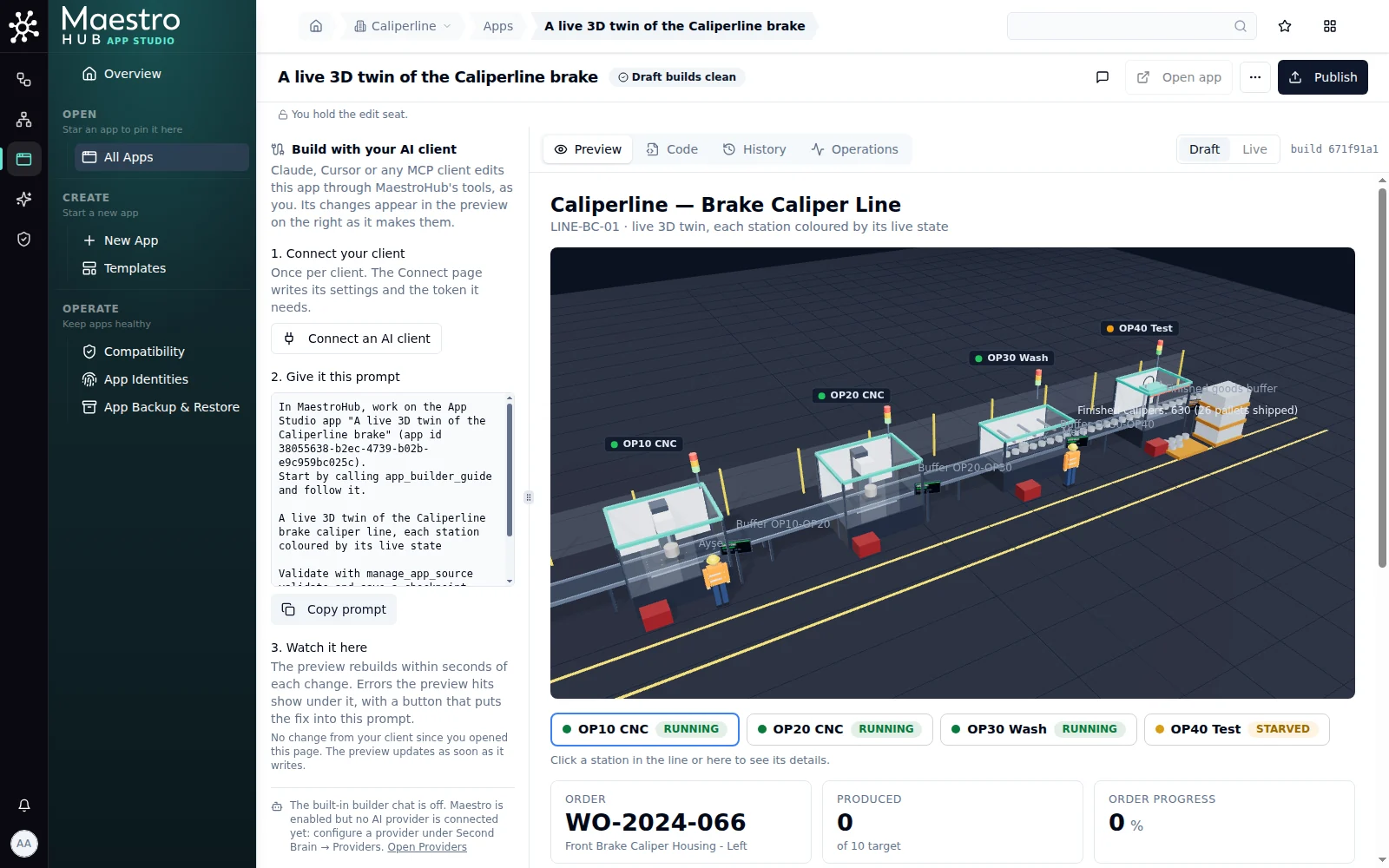
Round 3: buffers on the conveyors, two operators at their home stations
Round 4: test with a real event
Every simulation profile faults its stations now and then; the demo profile faults about once a minute. For this recording a fault was forced on OP30 so it would happen on cue, and the prompt went out while the station was down:
OP30 Wash has just faulted on the line. Look at what its state topic sends now, check run_report for what the preview did with it, and make sure the twin shows the fault: the station red, Mert walking over, and the fault code in the station panel. Fix anything that does not follow. Validate and checkpoint.
What the client did (10 calls, 51 seconds): it read the state topic (FAULTED), fault_active (true) and fault_code ("65235"), and checked run_report. All of it was as the twin expects. The one bug was in the panel, which showed the "0" sent between faults as a fault code; it now shows a real code as a red badge. It then asked for a visual check, because it cannot see the render.
It also flagged the code: "65235 is what a Modbus register holding −301 reads as when it's decoded as unsigned." It suggested checking the OP30 connection.
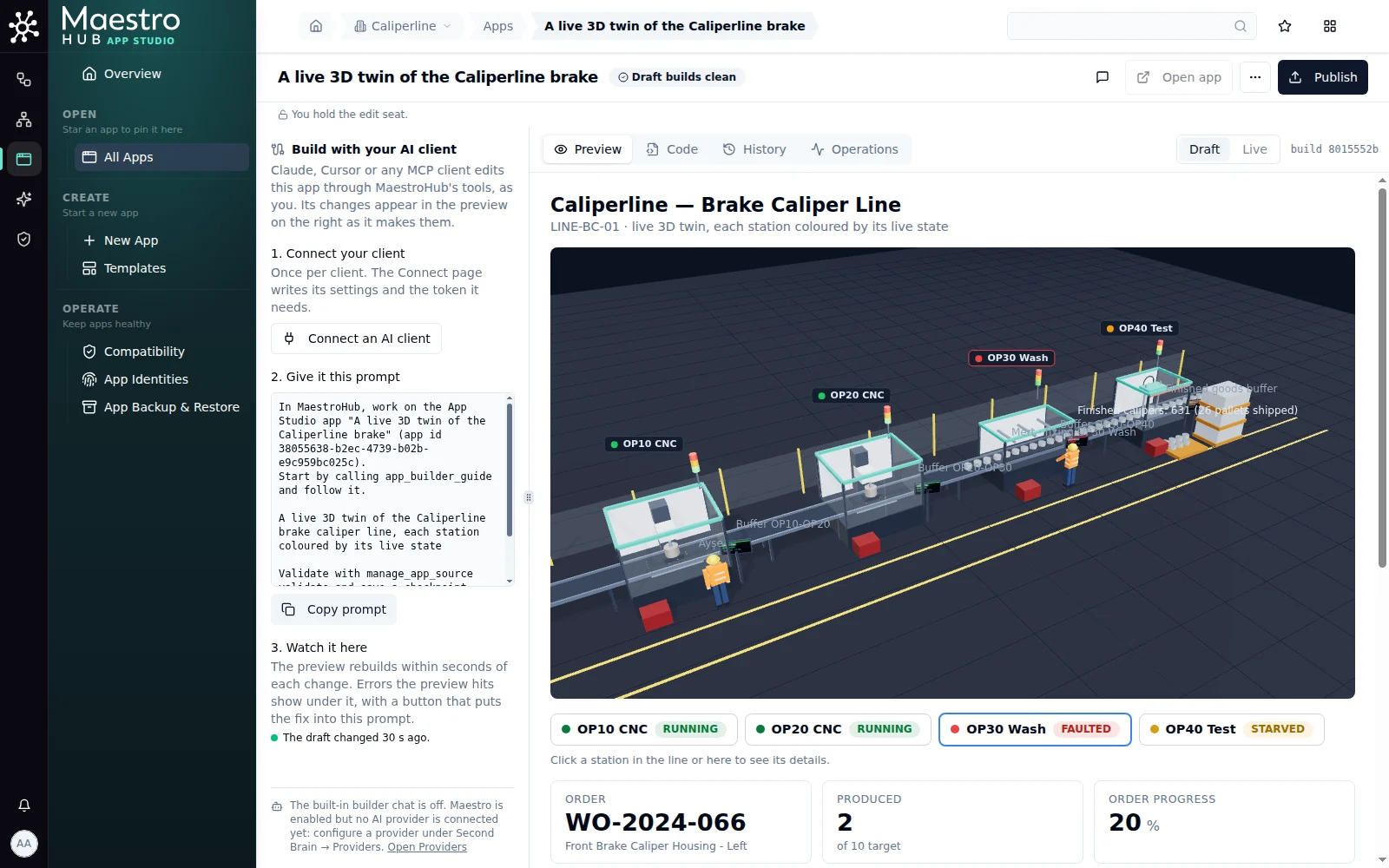
Round 4: OP30 is down, its label and chip are red, and Mert has walked over
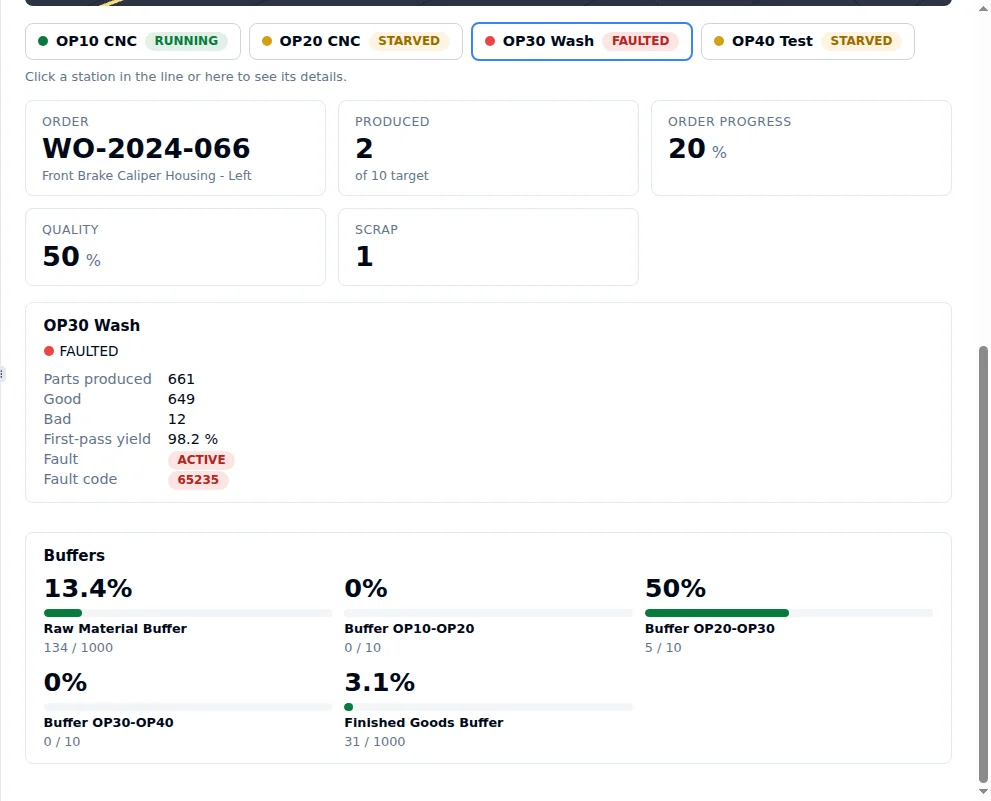
The station panel during the fault, and the buffers card as round 2 fixed it
Round 5: correct it, name it, ask for a release
The client's arithmetic was right, but the cause was not the connection. The forced fault had the code F-301, and the simulator's register takes the digits after the first character, so it held −301. The simulator's own codes look like F001. One sentence told the client so:
It works: OP30 went red, Mert walked over and the panel showed the code. The 65235 was my doing, not the connection: I injected the fault as "F-301", and the simulator writes the digits after the first character, so the register held -301. Leave the panel as it is.

Last things before it goes live: rename the app "Caliperline Twin" with a one-line description, then ask for a release.
What the client did (2 calls, 18 seconds): manage_apps → update for the name and description, then manage_apps → publish. That makes a release request: within seconds the builder showed Release v1 is waiting for approval, requested by Ada Admin from Claude Code - Caliperline twin. Review shows the client's summary, the one permission the app asks for and the three files; Approve and go live publishes it. A token or an assistant cannot approve.
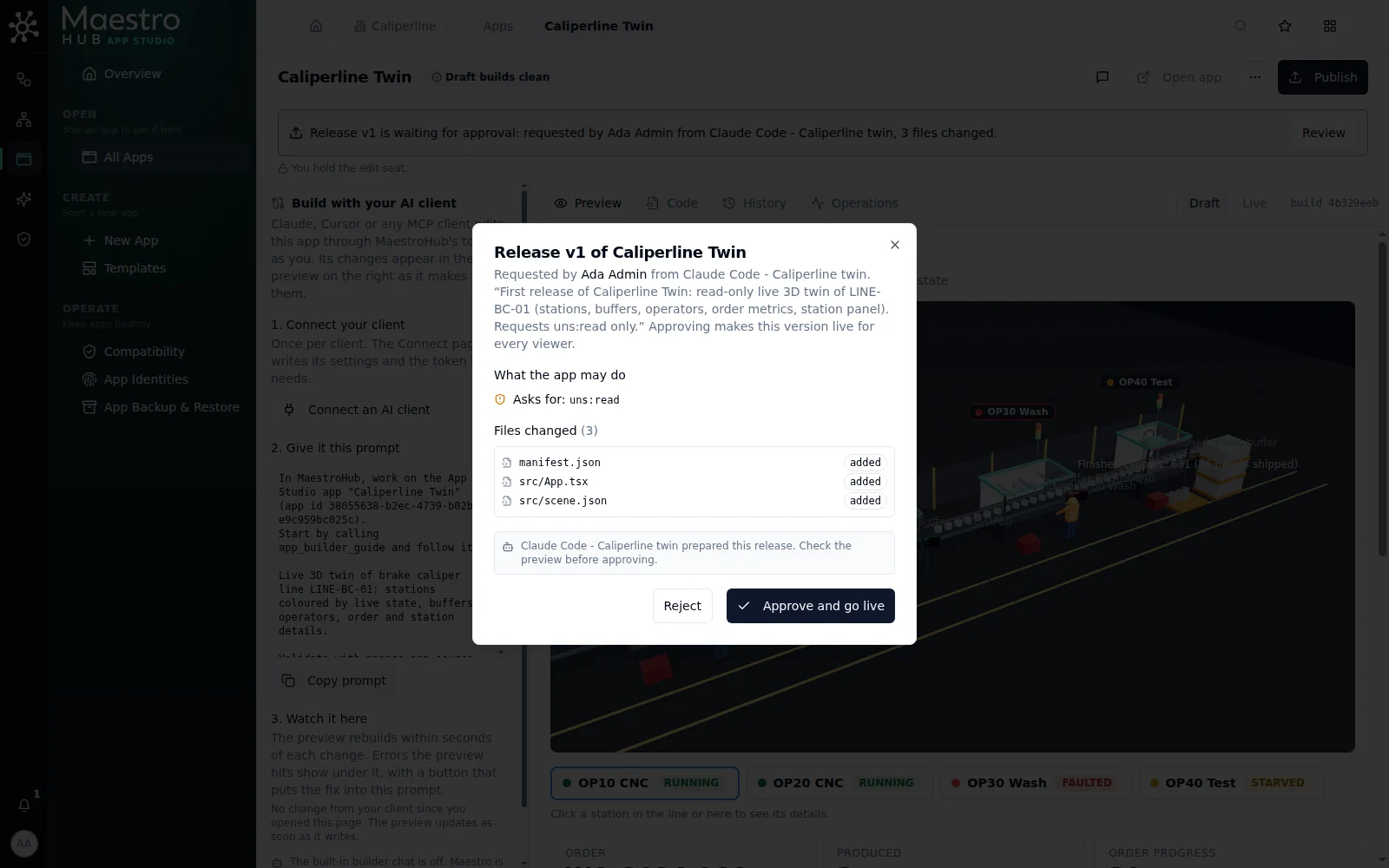
What would go live, and what it may do, before anyone sees it
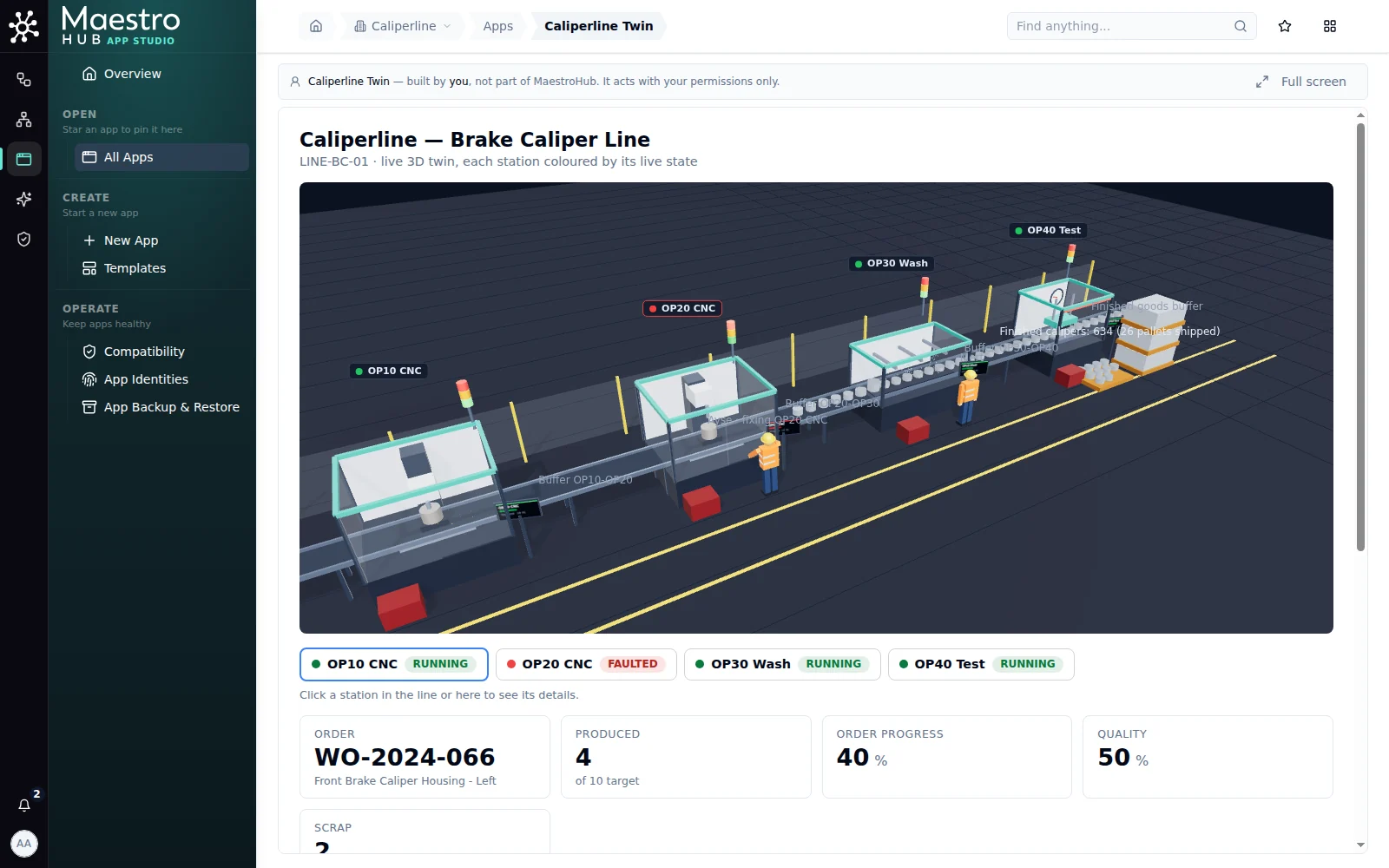
The published twin a little later: OP20 faulted, and Ayşe is fixing it
Round 6: give the app a plant model
The workspace had no plant model, so the client had read the line's topics at fixed paths. That works for this line only. With the line in the plant model, the app can find the stations, their order and their topics by name, and the same app can serve another line once that line is modelled.
Reconnect with the Plant model toolset. On the connect page add Plant model to Apps and Unified Namespace, and create a new token. The token it suggests can propose changes to the model but not decide them (Proposals → Decide is off), so only a person approves them; the page lists the decide action as left out and says why. Replace the token in the client's settings.
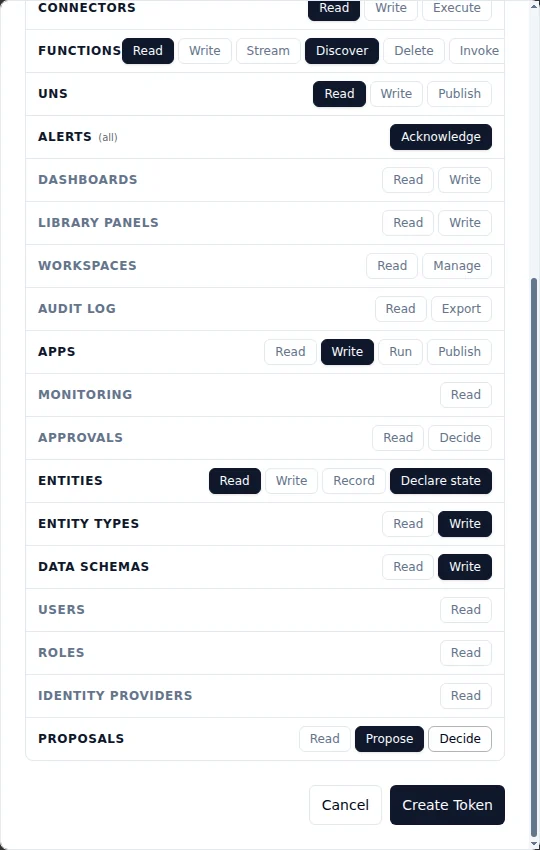
Propose, but not decide: changes to the model wait for a person
6a. Ask for a proposal, not a change.
You said the app reads fixed topic paths because this workspace has no plant model. Let's give it one.

I have reconnected you with the plant model tools. Propose a model of the line: LINE-BC-01 with its four stations and the buffers between them, in the order parts flow, each station linked to its state and counter topics. I will review and approve the change set myself. Don't change the app yet.
The client (17 calls, about 3 minutes) proposed a change set: the line, four stations and three buffers in flow order (feeds links), and twelve topic bindings. It also listed what it had left out: buffer levels (they share one topic), the line's cost per hour of stoppage (it did not know the figure), and the two outer buffers. When it tried to withdraw an earlier draft of its own, the token was refused with SCOPE_DENIED: deciding needs proposals:decide, which it did not have, exactly as intended.
Review it, and tell the client what approval says. Open Knowledge Graph → Review, read the pieces, and approve. If approval refuses, the dialog says why; paste that into the next prompt. In this session approval refused twice: the client had created the site as a thing instead of a site, and then left the site's time zone empty. Both were gaps in the proposal check, which passed what approval would refuse. The check now names both problems when the client proposes, so it can correct them before you review. The rounds that followed were short:
I tried to approve PR-1792124232407059901 and it was refused: "change 1 (create thing dfs): site "dfs": not found". I rejected it. Propose the model again so that it can be approved, and tell me what you changed.
Approval refused it again: "a site needs an id, a workspace and a time zone". I rejected it. The plant runs on Istanbul time, Europe/Istanbul. Propose it once more.
The second one gave the client a fact it had said it did not know: the plant's clock. All 36 pieces then applied.
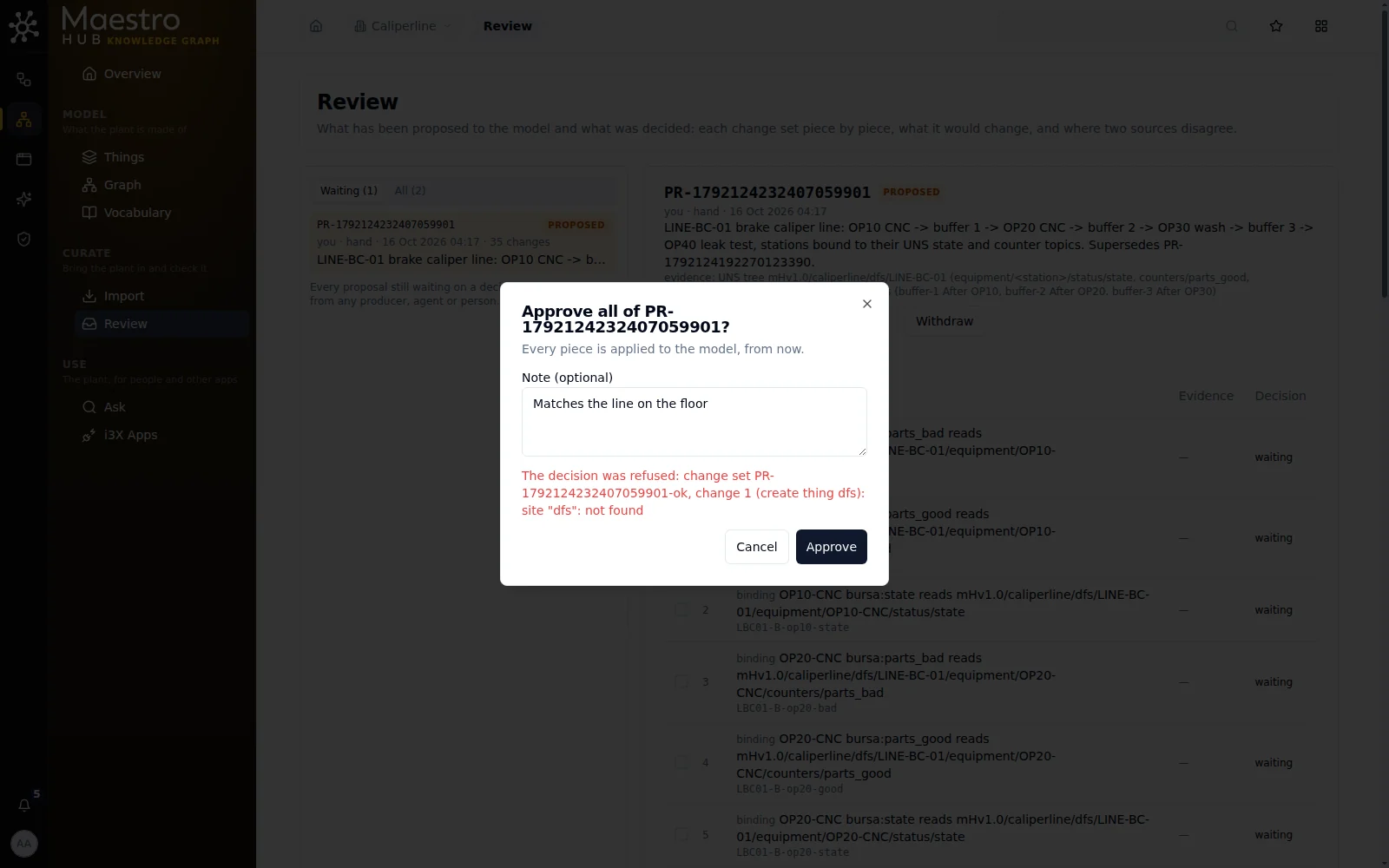
A refused approval says why, in the dialog: the sentence to give the client
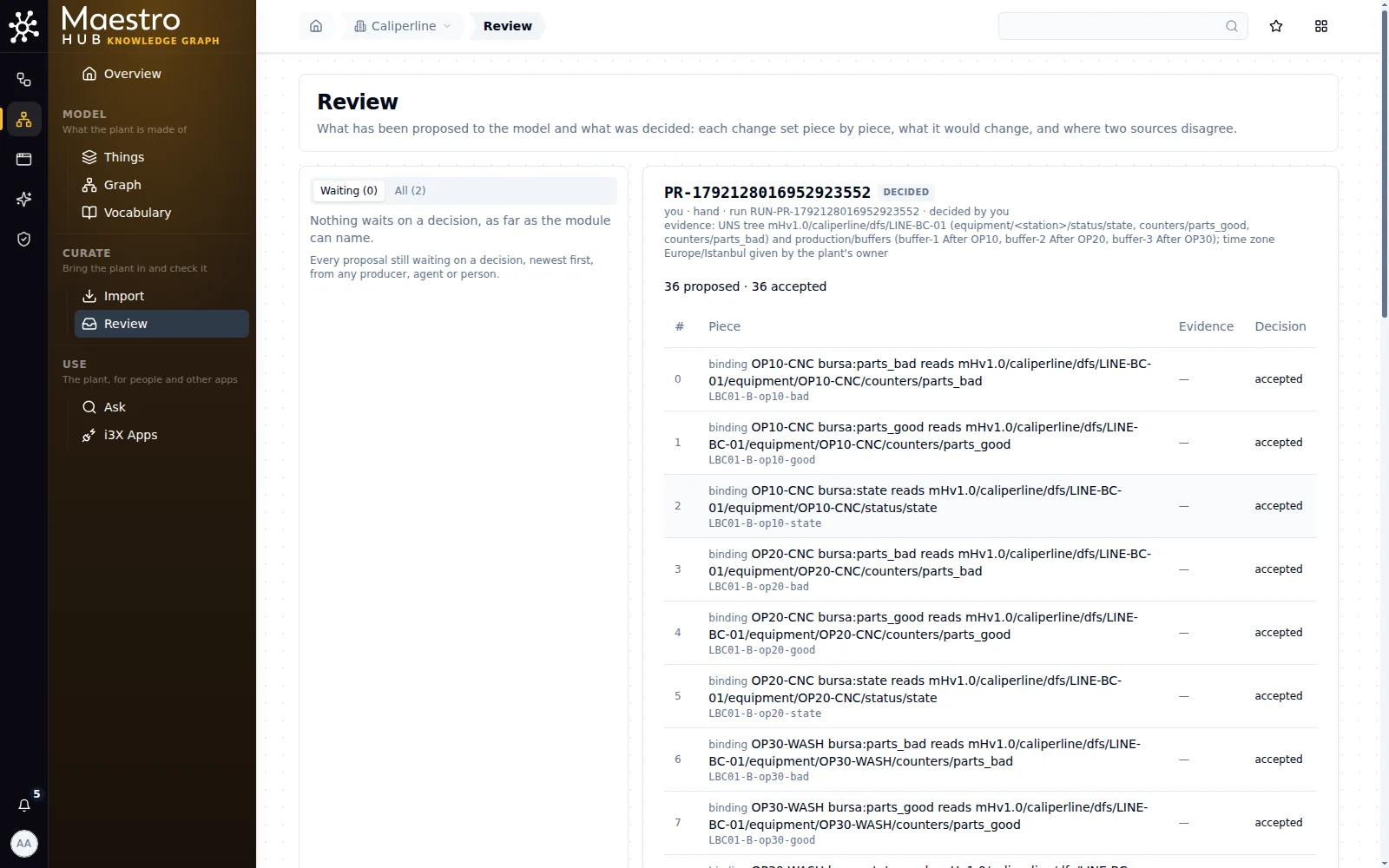
The line in the plant model: 36 pieces, each one reviewed
6b. Move the app onto the model.
I approved PR-1792128016952923552: the model of LINE-BC-01 is in. Now change the app to find the line's stations, their order and their topics from the plant model instead of fixed paths, so the same app works on another line once it is modelled. Keep everything it shows now. Validate, checkpoint and check run_report while I watch.
The client (13 calls, about 3.5 minutes) walked the model the way the app would: the things under the line, the feeds links from the first station, and each station's bindings. It then wrote src/lineModel.ts to do the same at run time. The page looks as before, with the model's names: the subtitle reads Brake caliper line LINE-BC-01 and OP40 is OP40 Leak test. It said plainly what still is not from the model: the order and buffer topics (the model does not record them), the panel's extra readings, and the 3D layout in scene.json. It also said the app now asks for one more permission, entities:read, to read the model.
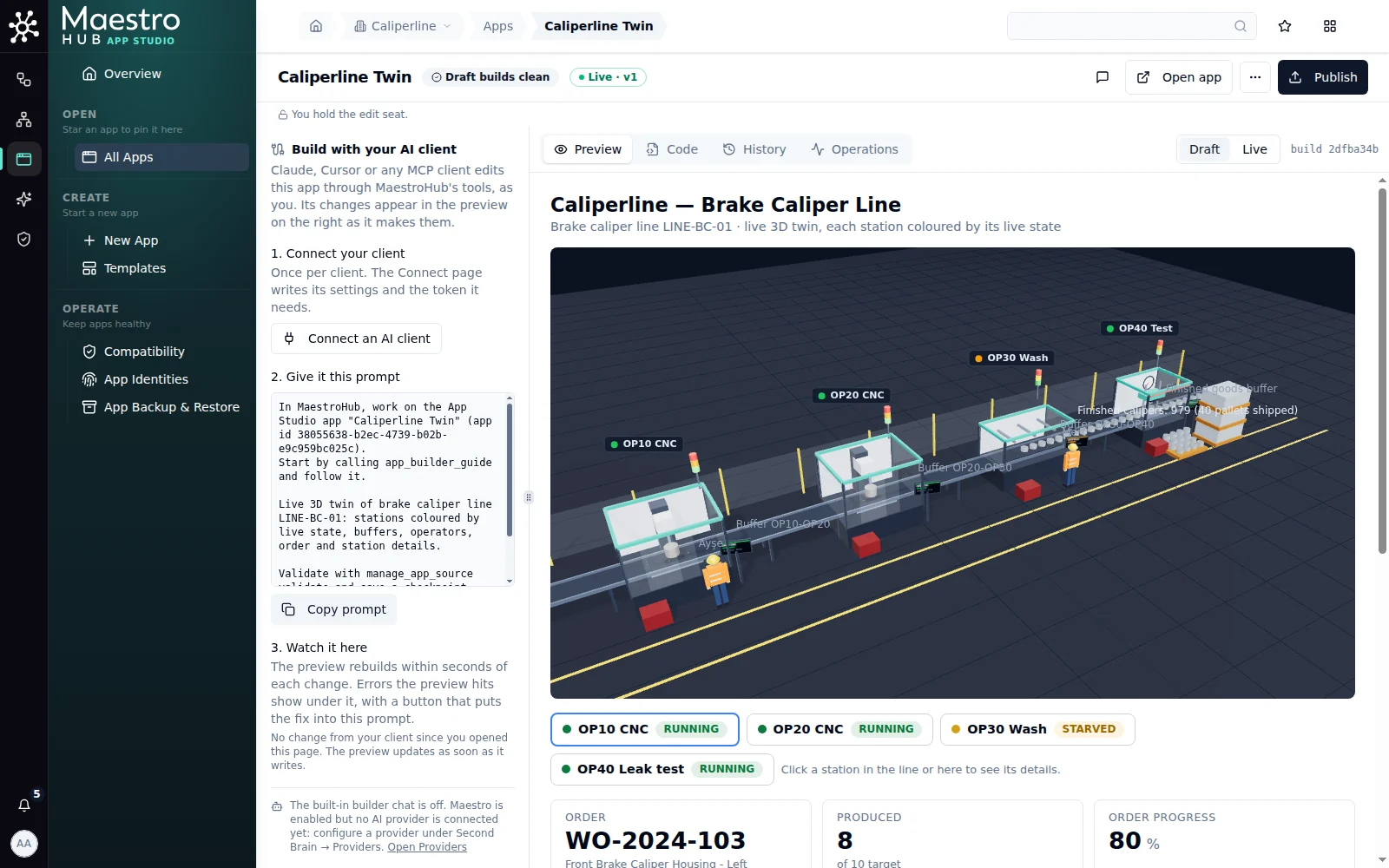
Round 6: the same twin, its stations and topics found in the plant model
6c. Release it. "It looks the same as before, with the names from the model. Ask for a release." The review shows the new permission on its own line, so whoever approves sees that the app now reads the plant model:
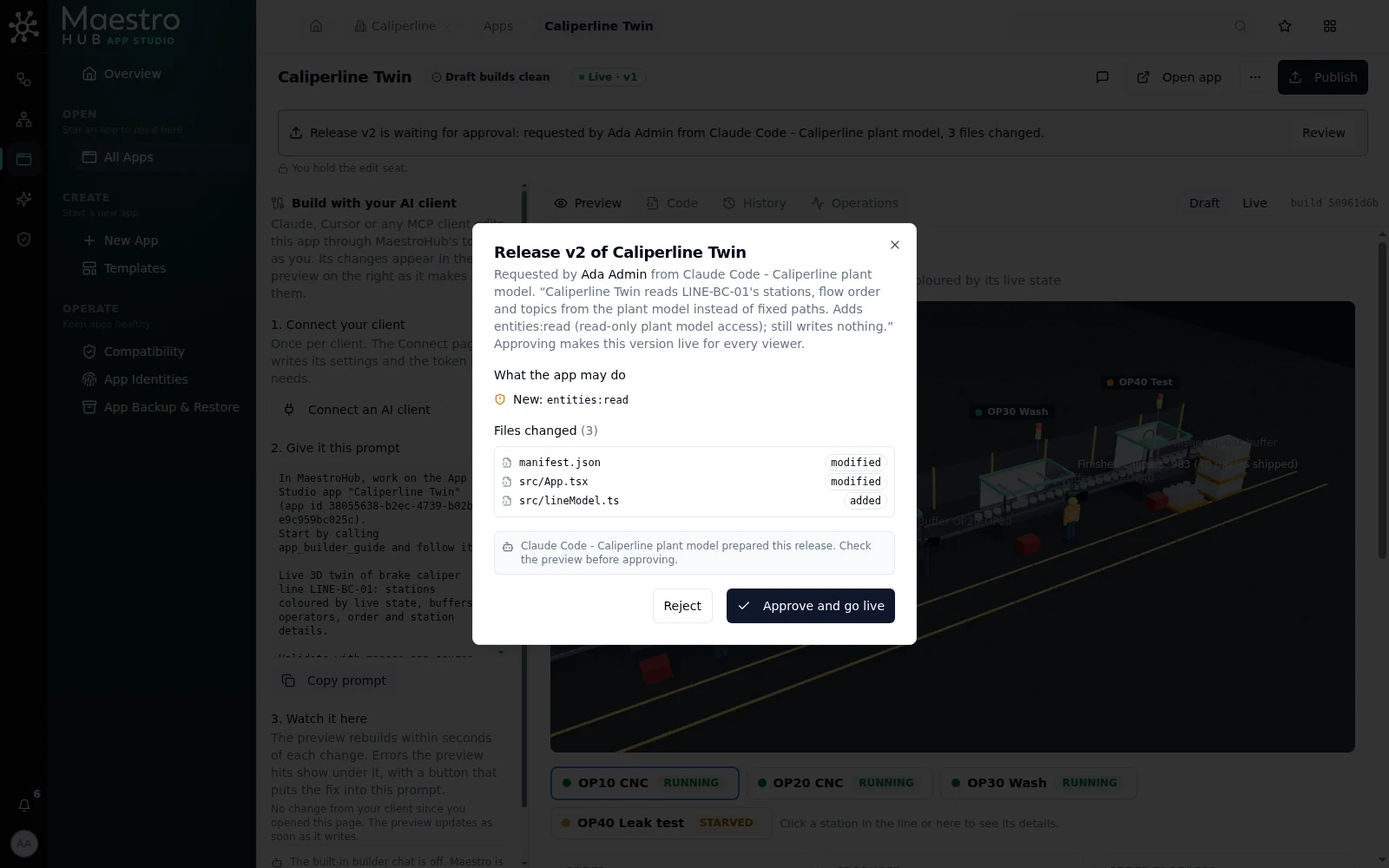
A release that asks for more than the last one says so
What it took
| Round | Prompt | Tool calls | Refused | Client time |
|---|---|---|---|---|
| 1 | The builder's prompt | 22 | 2 (a lookup with no result, an aggregate on a non-numeric topic) | 97 s |
| 2 | Three things seen in the preview | 6 | 0 | 63 s |
| 3 | Buffers, operators, label | 11 | 2 (scene edits the validator refused) | 96 s |
| 4 | A real fault | 10 | 0 | 51 s |
| 5 | A correction, a name, a release | 2 | 0 | 18 s |
| 6a | Propose a plant model | 17 | 4 (a malformed piece it then fixed, two lookups with no result, and the withdraw it may not do) | 179 s |
| 6a | Two refusals passed back from approval | 5 | 3 (a probe of the site's fields, a preview it may not run, a workspace given by name) | 162 s |
| 6b | Move the app onto the model | 13 | 0 | 204 s |
| 6c | Release | 1 | 0 | 14 s |
Nothing was edited by hand. The only permission refusals were the ones the token was made to give: the client could propose changes to the model but not decide them. Each round ended on a checkpoint that validated clean.
Undo a round
Every round the client finished is a checkpoint in the builder's History, marked agent. Restoring one never deletes anything: it adds a new checkpoint with the old content, so you can go back and forward again.
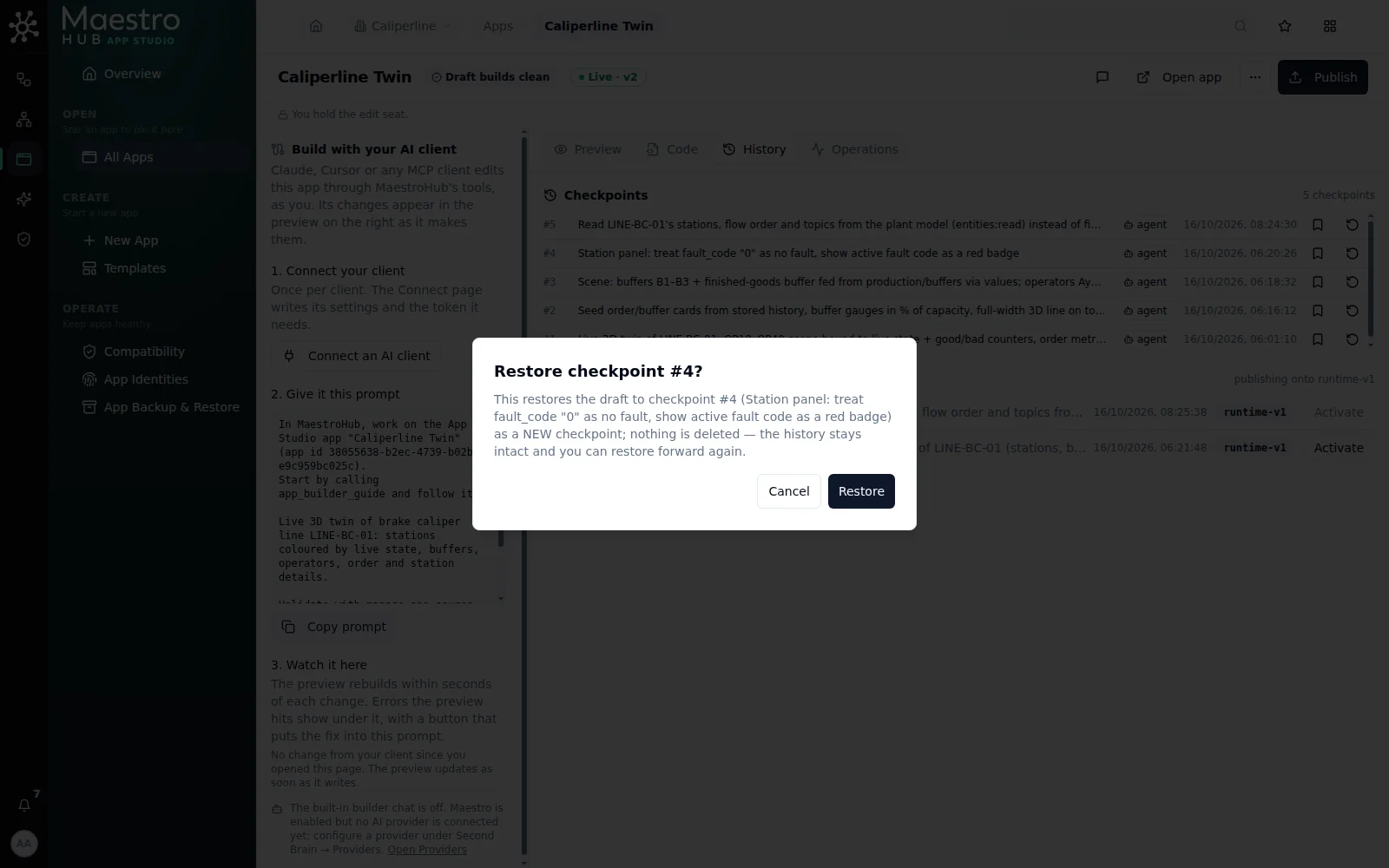
Restore adds a checkpoint; the rounds after it stay in the history
In this session checkpoint #4 (before the plant model) was restored, the preview went back to the fixed paths, and #5 was restored again. Both restores are in the history under the name of the person who made them. Below the checkpoints, Versions lists what went live. Activate on an earlier version serves it to viewers at once, after a confirmation that names the permissions it grants; the draft is not touched. Your client cannot do that: manage_apps → rollback only asks for it, and a person approves.
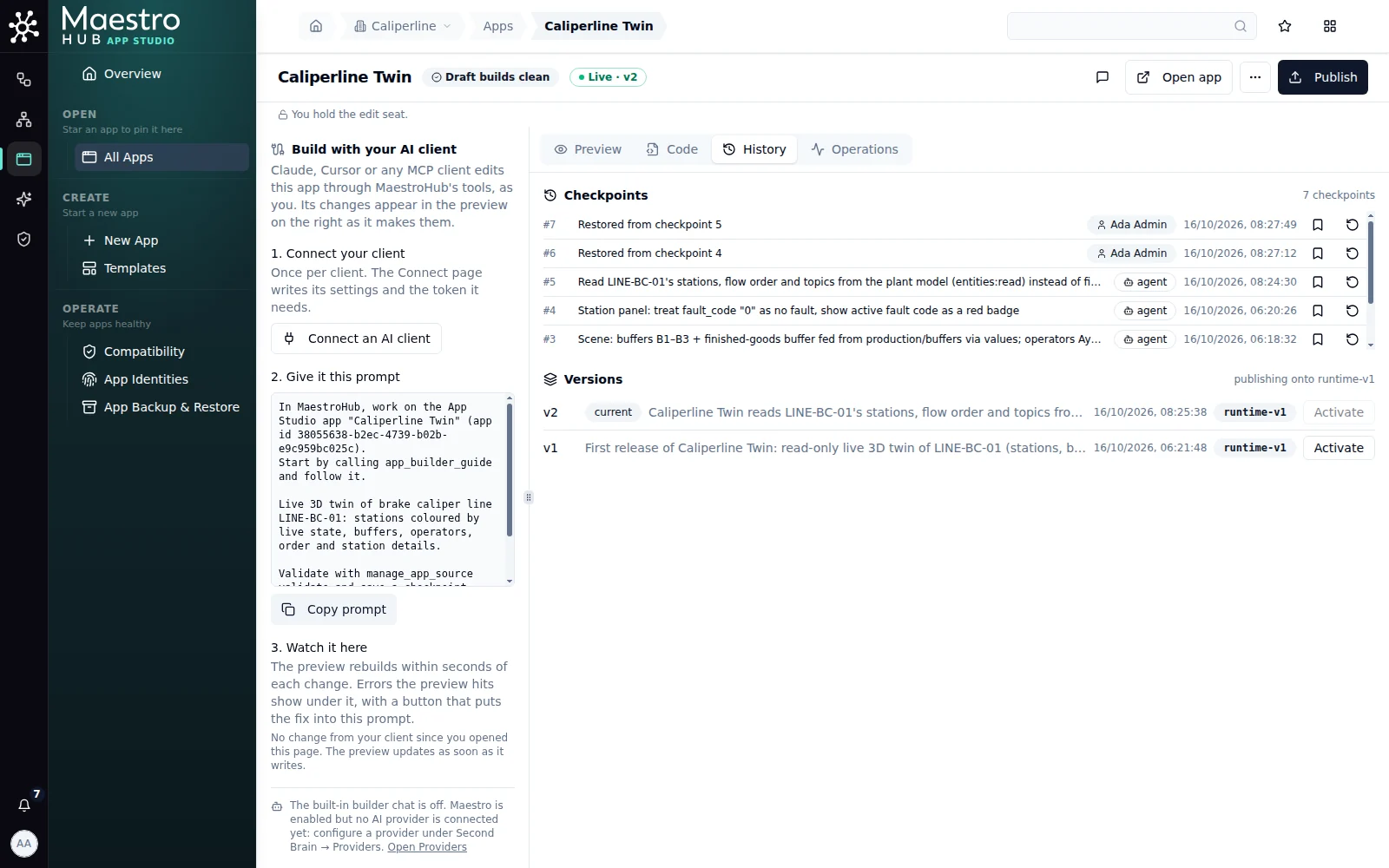
Five rounds by the client, two restores by a person, two releases
Nine more apps from a sentence each
To see how far a client gets on its own, nine more apps were built on the same line the way a customer would: a fresh Claude Code session per app, with MaestroHub's MCP server as its only tool. Each started from one plain sentence in the shape of Your first sentence, with no app id, no tool names and no topic paths. The person only looked at the preview, said what was wrong, and approved releases.
| App | The sentence asked for | Rounds | Client time |
|---|---|---|---|
| Andon board | every station's state, output and power, and the buffers between them, for the big screen at the end of the line; read-only | 3 (one a release) | 2.5 min |
| Shift OEE | availability, performance and quality per station for the current shift (06-14, 14-22, 22-06), from the ideal cycle times on record | 2 | 4 min |
| Energy cost | energy per good caliper and its cost hour by hour on a three-rate tariff the app keeps for everyone; each station's draw against its rated power | 2 | 5 min |
| Downtime | a fault Pareto for the week, MTTR and MTBF per station, and where each station's hours went | 2 | 3 min |
| Tool life | each CNC tool's wear, parts left and run-out time in plant time, and a tool-change request the maintenance person on shift marks done | 2 | 5.5 min |
| Leak test SPC | an individuals chart for OP40 with limits you can freeze, the Western Electric rules and Cpk against 0.5 cc/min | 3 (one a release) | 3.5 min |
| Operator logbook | rejects, changeovers and maintenance against a station, from a tablet whose Wi-Fi drops | 1 | 2 min |
| Orders and serials | the running order and its finish time, today's orders with first-pass yield, every caliper by serial, and its label on a Zebra printer | 1 | 2.5 min |
| Bottleneck | which station sets the pace, who waits for it, who it blocks, and what an hour of it is worth | 1 | 2.5 min |
What the session showed:
- The client finds the data itself. Every session began with
app_builder_guide, then read the plant model and a few recent values before binding anything. None needed a topic path from the person. - It says what is missing rather than inventing it. Rated power was not recorded in the plant model, so the energy app shows "not recorded" and offers to propose the values; the OEE app flagged that the recorded ideal cycle times were five times slower than the line runs.
- It tells you what only a person can set up. No connection to the label printer existed, and an MCP client cannot create one, so the orders app shipped with the Print button disabled and said exactly what to create: a TCP connection to the printer's address with a Send function.
- It keeps unsafe writes out of the offline queue. The logbook keeps rejects and changeovers while the Wi-Fi is down and sends them later, but marks a maintenance change "not sent" with a "Send again" button, since a command replayed late could move equipment.
- Your second round is what you see. When this run was recorded the client could not see the preview, so the rounds above were the person describing it: "OP20 says 2714 parts/min and runs out in 0 min, with 978 of 1200 left". From that the client found that one topic carries two tools' readings. "State history from says 10:13 for every station, yet it shows 4 hours of running" led it to a wrong read of the oldest sample.
Asked afterwards "I have the app open right now. Does it show what you expect? Check it yourself", the buffers app's client read the preview's text through run_report, compared each figure with the topic's latest value and answered without the person describing anything.
Three of the round-2 complaints came from the platform, not the clients, and are fixed: a topic that publishes rarely now shows its last value as soon as the app opens; controls only an app's editors may use are no longer greyed out for those editors in the preview; and numbers the app did not format read like numbers.
Prompts that work
| To | Say |
|---|---|
| Start | The builder's prompt, unchanged |
| Build on real data | "Read a few recent values from the topics before you bind them." |
| Fix what you see | "In the preview, X shows Y. It should show Z." |
| Shape the 3D scene | "Draw … in the scene. Use edit_scene." |
| Get past a limit | "You said X needs Y; Z can do it instead." |
| Check a real event | "OP30 has just faulted. Check what its topics send and run_report, and fix what does not follow." |
| Find runtime refusals | "Check run_report while I have the preview open." |
| Correct it | "That value is my doing: … Leave it as it is." |
| Finish | "Rename it X with a one-line description, then ask for a release." |
Limits you will meet
These are limits of the current development build that the session ran into, or that the scene kit sets. Knowing them saves a round each.
- One buffer per stretch of belt. A buffer sits after a station or before one (a raw material buffer ahead of the first station), and two buffers cannot share the belt between the same two stations.
- Labels move, pallets do not. Near the end of a long line, ask the client to move a crowded label ("move the OP40 label up a little"); it sets a
labelOffsetof up to 5 m. The pallets themselves stay in front of their station. - The scene has fixed sizes: up to 40 stations, 60 buffers, 20 operators, and 200 parts per buffer. A buffer that holds more shows full beyond 200, so keep the true count in a card.
- Values the app computes replace the scene's own subscriptions. Once the app passes
values, it must pass every station's state and counters too. The client does this, but say so if you ask for one computed value. - The client reads your preview's text, not its graphics. While you have the builder open,
run_reportgives your client the text the preview shows, so ask it to "check what the preview shows". Only your own client gets it, not another editor's. Bars, gauges and the 3D scene are not in the text; you check what they look like.
Next prompts to try
Ideas for the next rounds on the twin above. They were not part of the recorded session, so expect the client to ask a question or two:
| To add | Say |
|---|---|
| OEE for the shift | "Add the line's availability, performance and quality for the current shift above the scene." |
| What just happened | "Add a log of the last 20 state changes next to the station panel, newest first." |
| A longer fault stands out | "When a station has been faulted for more than 2 minutes, show it in the log in red and say for how long." |
| A wall screen | "Make a full-screen view for the wall: the scene and the station chips only, with larger text." |
| Your own machine | "OP10's .glb model is attached to the record op10 in the app's models collection. Draw OP10 with it instead of the standard CNC." (attach the binary glTF file, up to 25 MB, to that record first) |
When something goes wrong
- A call is refused for a permission. The refusal names the missing permission. Add it to the token, or pick the toolset on the connect page and create a new token there.
- A change is refused by validation. Nothing was written. The message names the file and the field, the line, or the SDK name; the client normally reads it and tries another way, as in round 3.
- The preview shows something the client says is fixed. Reload the preview and say what you see. The client trusts
run_reportand validation, not the picture. - The client says it cannot edit. Only one editor works on a draft at a time. While someone else holds the editing seat, the client's change is refused and nothing is written; ask it to try again once they are done.