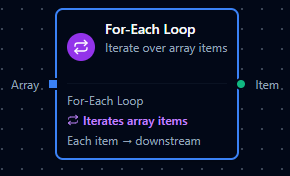
For-Each Loop node
For-Each Loop Node
Overview
The For-Each Loop Node turns a single array payload into multiple executions of downstream nodes—one run per item.
Instead of building manual loops or complex branching, you define a single array expression, and the node emits iteration metadata so the pipeline engine fans out the flow automatically.
Typical use cases include:
- Iterating over a list of work orders, sensor events, or measurements in a batch.
- Running the same sub-pipeline for each line item in an order.
- Breaking a large API response into per-item processing without writing imperative loop code.
Configuration Reference
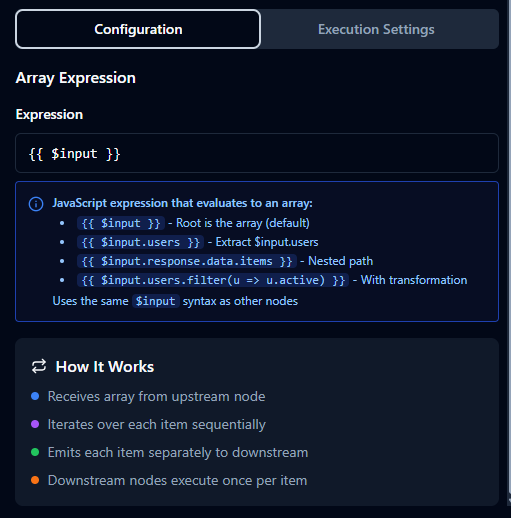
Array Expression Configuration
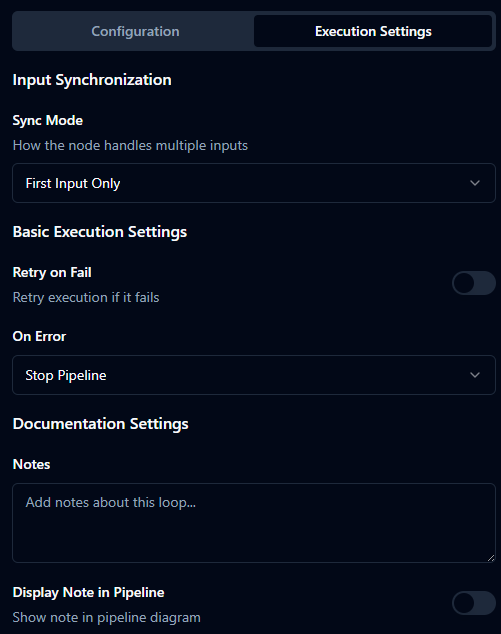
Settings Configuration
Parameters (Dynamic Data)
| Field | Type | Default | Description |
|---|---|---|---|
| Array Expression | string | {{ $input }} | JavaScript expression (inside Maestro {{ }}) that must return an array. |
Array Expression Notes
- Expression is parsed by the pipeline expression engine and executed in a JavaScript runtime.
- It has access to standard context variables such as:
$input– The inbound payload (often the root array or container object).
- If the expression returns anything other than an array, the node will fail validation or execution with a clear error.
Settings (Static Configuration)
The For-Each Loop shares the same settings concepts as other logic nodes:
| Field | Type | Default | Description |
|---|---|---|---|
| Retry on Fail | boolean | false | Retries execution when infrastructure errors occur while evaluating the array expression. |
| On Error | string | "Stop Pipeline" | Determines how the pipeline reacts when evaluation fails (stop vs continue, depending on your configuration options). |
| Notes | string | "" | Internal documentation for why iteration is used at this point. |
| Display Note in Pipeline | boolean | false | Shows the note directly on the canvas near the node. |
The configuration UI also exposes Input Settings (sync mode, timeout) which typically default to
immediatefor this node.
Usage Examples
Example 1: Iterate Over Users in a Response
Upstream REST node returns:
{
  "users": [
    { "id": "U-1", "name": "Alice" },
    { "id": "U-2", "name": "Bob" }
  ]
}
For-Each Loop configuration:
| Field | Value |
|---|---|
| Array Expression | {{ $input.users }} |
| Notes | Loop through each user for downstream enrichment. |
Each user object is emitted as an individual item, so downstream nodes (e.g., Set, Data Instance, JavaScript) execute once per user.
Example 2: Filter Active Work Orders Before Iteration
Upstream payload:
{
  "orders": [
    { "id": "WO-1", "status": "active" },
    { "id": "WO-2", "status": "closed" }
  ]
}
For-Each Loop configuration:
| Field | Value |
|---|---|
| Array Expression | {{ $input.orders.filter(o => o.status === "active") }} |
| On Error | Stop Pipeline |
Only active orders are iterated over, ensuring downstream processing focuses on live work.
Example 3: Iterate Over Raw Array Payload
Upstream node already returns an object with a data array:
{
  "data": [
    { "measurement": 10.2 },
    { "measurement": 11.5 },
    { "measurement": 9.8 }
  ]
}
For-Each Loop configuration:
| Field | Value |
|---|---|
| Array Expression | {{ $input.data }} |
| Notes | Iterate over measurement samples. |
The node treats the root payload as the array; each sample becomes an individual item flowing through the rest of the pipeline.
When to Use For-Each Loop
Use the For-Each Loop node when:
- You receive arrays from connectors or upstream transforms and want each element to drive a separate execution of downstream logic.
- You need a clear, declarative way (via Array Expression) to pick which collection to iterate—without hand-rolling loops.
- You want iteration to integrate cleanly with other nodes like Data Instance, Set, and JavaScript, using the same pipeline execution engine and observability.