 MySQL Integration Guide
Connect MaestroHub pipelines to MySQL databases for flexible, high-performance data ingestion and orchestration. This guide covers connection setup, security configuration, and query functions tailored for MySQL workloads.
Overview
The MySQL connector brings relational database capabilities to your MaestroHub pipelines:
- Read and write data using standard SQL queries with full parameter support
- Secure connections with five SSL/TLS modes including mutual TLS (mTLS)
- Broad compatibility with MySQL 5.7+, MariaDB 10.2+, and Aurora MySQL
The MySQL connector is validated with MySQL 5.7+, MariaDB 10.2+, and Amazon Aurora MySQL.
Connection Configuration
Creating a MySQL Connection
Navigate to Connections → New Connection → MySQL and configure the following:
MySQL Connection Creation Fields
1. Profile Information
| Field | Default | Description |
|---|---|---|
| Profile Name | - | A descriptive name for this connection profile (required, max 100 characters) |
| Description | - | Optional description for this MySQL connection |
2. Database Configuration
| Field | Default | Description |
|---|---|---|
| Host | localhost | MySQL server hostname or IP address (required) |
| Port | 3306 | MySQL server port (1-65535) |
| Database | - | Database name to connect to (required) |
| Connect Timeout (sec) | 30 | Maximum time to wait for connection establishment (0-600 seconds) |
Note: Compatible with MySQL 5.7+, MariaDB 10.2+, and Aurora MySQL.
3. Basic Authentication
| Field | Default | Description |
|---|---|---|
| Username | - | MySQL database user |
| Password | - | MySQL user password |
4. SSL/TLS Settings
4a. SSL Mode
| Field | Default | Description |
|---|---|---|
| SSL Mode | preferred | TLS/SSL connection mode (disabled / preferred / required / verify-ca / verify-identity) |
SSL Mode Options
disabled: No encryption — data transmitted in plain textpreferred: Use TLS if the server supports it; fall back to unencrypted otherwise (default)required: Enforce TLS encryption; fail if the server does not support itverify-ca: Enforce TLS and verify the server certificate against a trusted CAverify-identity: Enforce TLS, verify CA, and also verify the server hostname matches the certificate
4b. Certificate Configuration
(Only displayed when SSL Mode is verify-ca or verify-identity)
| Field | Default | Description |
|---|---|---|
| CA Certificate | - | Trusted CA certificate in PEM format. Only required for self-signed or private CA certificates; leave empty for public CAs |
| Client Certificate | - | Optional client certificate in PEM format for mutual TLS (mTLS) |
| Private Key | - | Private key corresponding to the client certificate in PEM format |
5. Connection Pool Settings
| Field | Default | Description |
|---|---|---|
| Max Open Connections | 100 | Maximum number of simultaneous database connections (1-1000). Higher values increase concurrency but add DB load |
| Max Idle Connections | 25 | Idle connections kept ready for reuse to reduce latency (0-1000, 0 = close idle connections immediately) |
| Connection Max Lifetime (sec) | 900 | Maximum age of a connection before it is recycled (0-86400 seconds, 0 = keep connections indefinitely). Helps avoid server-side timeouts |
| Connection Max Idle Time (sec) | 300 | How long an idle connection may remain unused before being closed (0-86400 seconds, 0 = disable idle timeout) |
Connection pool settings help optimize database performance by balancing concurrency, resource usage, and latency across workloads.
6. Retry Configuration
| Field | Default | Description |
|---|---|---|
| Retries | 3 | Number of connection retry attempts (0-10, 0 = no retry) |
| Retry Delay (ms) | 200 | Initial delay between retry attempts in milliseconds (0-3,600,000 ms) |
| Retry Backoff Multiplier | 2 | Exponential factor for retry delay growth (1.0-10.0, e.g., 2 means delay doubles each retry) |
Retry Behavior Example
- 1st retry: wait 200ms
- 2nd retry: wait 400ms (200 × 2)
- 3rd retry: wait 800ms (400 × 2)
7. Connection Labels
| Field | Default | Description |
|---|---|---|
| Labels | - | Key-value pairs to categorize and organize this MySQL connection (max 10 labels) |
Example Labels
env: prod— Environmentteam: data— Responsible teamregion: us-east— Geographical region
- Required Fields: All fields described as "required" must be filled.
- SSL/TLS: When SSL Mode is set to
disabled, no encryption is used. Usepreferredfor opportunistic encryption orrequiredand above for enforced encryption. - Certificate Fields: CA Certificate, Client Certificate, and Private Key are only shown when SSL Mode is
verify-caorverify-identity. - Connection Pooling: Manages concurrency with
Max Open Connections, reduces latency withMax Idle Connections, mitigates stale connections viaConnection Max Lifetime, and frees resources usingConnection Max Idle Time. - Retry Logic: Implements exponential backoff — initial connection attempts use the base delay and each retry multiplies the delay by the backoff factor; ideal for transient network issues or database restarts.
- Timeout Values:
Connect Timeoutapplies to initial connection establishment; all timeout values are in seconds unless noted (Retry Delay uses milliseconds). - Security Best Practices: Always use
requiredor stricter SSL modes for production. Preferverify-identityand supply CA certificates for maximum security. Use client certificates for mutual TLS when possible.
Function Builder
Creating MySQL Functions
Once you have a connection established, you can create reusable query functions:
- Navigate to Functions → New Function
- Select Query as the function type
- Choose your MySQL connection
- Write your SQL query with parameters
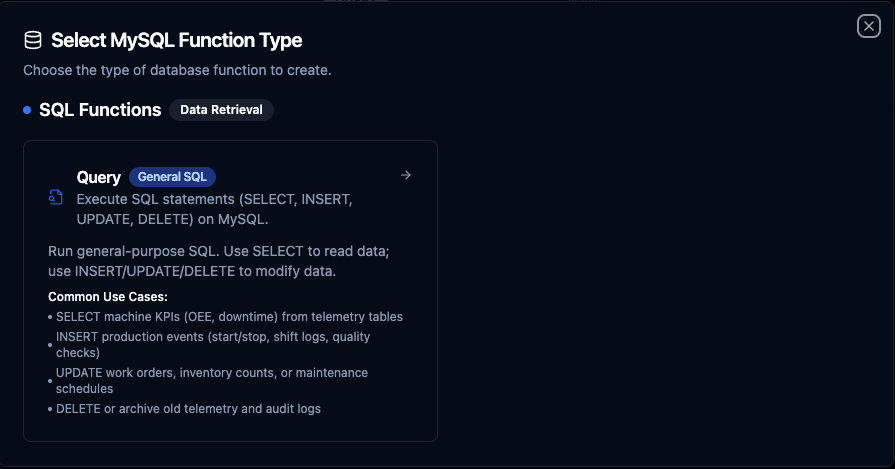
MySQL query function creation interface with SQL editor and parameter configuration
Query Function
Purpose: Execute SQL statements (SELECT, INSERT, UPDATE, DELETE) on MySQL. Run general-purpose SQL to read or modify data in your MySQL database.
Configuration Fields
| Field | Type | Required | Default | Description |
|---|---|---|---|---|
| SQL Query | String | Yes | - | SQL statement to execute (SELECT or INSERT/UPDATE/DELETE). Supports parameterized queries. |
| Timeout (seconds) | Number | No | 10 | Per-execution timeout in seconds. Sets maximum time allowed for query execution. |
Use Cases:
- SELECT machine KPIs (OEE, downtime) from telemetry tables
- INSERT production events (start/stop, shift logs, quality checks)
- UPDATE work orders, inventory counts, or maintenance schedules
- DELETE or archive old telemetry and audit logs
Using Parameters
MaestroHub detects the ((parameterName)) syntax and exposes each parameter for validation and runtime binding.
| Configuration | Description | Example |
|---|---|---|
| Type | Enforce data types for incoming values | string, number, boolean, date, array |
| Required | Mark parameters as mandatory or optional | Required / Optional |
| Default Value | Fallback value applied when callers omit a parameter | NOW(), 0, 'active' |
| Description | Add guidance for downstream users | "Start date for the report" |

Parameter configuration with validation rules and helper text
Pipeline Integration
Use the MySQL query functions you create here as nodes inside the Pipeline Designer to integrate your MySQL databases with the rest of your operations stack. Drag the query node onto the canvas, bind its parameters to upstream outputs or constants, and configure connection-level options without leaving the designer.
For end-to-end orchestration ideas, such as combining database reads with MQTT, REST, or analytics steps, explore the Connector Nodes page to see how SQL nodes complement other automation patterns.
Common Use Cases
Reading Production Metrics
Scenario: Generate hourly production reports with efficiency metrics from MySQL tables.
SELECT
    DATE_FORMAT(event_time, '%Y-%m-%d %H:00:00') AS hour_bucket,
    line_id,
    COUNT(*) AS event_count,
    ROUND(AVG(efficiency), 2) AS avg_efficiency,
    MIN(efficiency) AS min_efficiency,
    MAX(efficiency) AS max_efficiency
FROM production_events
WHERE event_time >= ((startDate)) AND event_time < ((endDate))
GROUP BY hour_bucket, line_id
ORDER BY hour_bucket DESC;
Pipeline Integration: Feed data to visualization dashboards, BI tools, or reporting nodes.
Writing Sensor Data
Scenario: Log real-time sensor readings from industrial IoT devices.
INSERT INTO sensor_readings (sensor_id, temperature, pressure, vibration, recorded_at)
VALUES (((sensorId)), ((temperature)), ((pressure)), ((vibration)), NOW())
ON DUPLICATE KEY UPDATE
    temperature = VALUES(temperature),
    pressure = VALUES(pressure),
    vibration = VALUES(vibration),
    recorded_at = NOW();
Pipeline Integration: Connect this function after data collection nodes (MQTT, OPC UA, Modbus, etc.) in your pipeline.
Updating Work Order Status
Scenario: Track manufacturing progress by updating work order status in real-time.
UPDATE work_orders
SET
    status = ((newStatus)),
    completed_units = ((completedUnits)),
    completion_percentage = ROUND(((completedUnits)) / total_units * 100, 2),
    updated_at = NOW(),
    updated_by = ((userId))
WHERE order_id = ((orderId));
Pipeline Integration: Trigger this function based on production events, barcode scans, or manual workflows.
Data Retention and Cleanup
Scenario: Maintain database performance by archiving or deleting old data.
-- Archive old sensor data before deleting
INSERT INTO sensor_readings_archive
SELECT * FROM sensor_readings
WHERE recorded_at < DATE_SUB(NOW(), INTERVAL ((retentionDays)) DAY)
LIMIT 10000;

DELETE FROM sensor_readings
WHERE recorded_at < DATE_SUB(NOW(), INTERVAL ((retentionDays)) DAY)
LIMIT 10000;
Pipeline Integration: Schedule this function to run daily or weekly via pipeline triggers (cron jobs).