API Authentication
MaestroHub provides two mechanisms for authenticating with the platform API programmatically — Personal Access Tokens (PATs) and OAuth2 Clients. Both methods issue standard JWT bearer tokens that can be used with any HTTP client or integration.
Choosing an Authentication Method
| Criteria | Personal Access Tokens | OAuth2 Clients |
|---|---|---|
| Best for | Automation scripts, external system integrations, single-user programmatic access | Third-party applications, service-to-service integrations, multi-user apps |
| Identity | Always acts as the user who created the token | Acts as the authorizing user (Authorization Code) or a designated service user (Client Credentials) |
| Setup | Create from your Profile → Security tab | Register from System Management → API Clients |
| Grant types | — | Authorization Code, Client Credentials, Refresh Token |
| User consent | Not required | Required for Authorization Code flow |
| Secret management | Token shown once at creation | Client secret shown once at creation (confidential clients) |
| Expiration | 30 days – 1 year (configurable) | Access tokens have a configurable TTL; refresh tokens extend the session |
| Revocation | Revoke individual tokens from your profile | Disable or delete the client; revoke tokens via the OAuth2 revoke endpoint |
How Tokens Are Used
Both methods produce a JWT bearer token. Include it in the Authorization header of your API requests:
Authorization: Bearer <token>
The platform validates the token signature, checks expiration, verifies revocation status, and enforces the scopes embedded in the token.
Organization Context
MaestroHub is a multi-tenant platform. Most API endpoints require an X-Organization-ID header to identify which organization the request targets. Without this header, the API will not be able to resolve the correct tenant context and the request will fail.
Include it alongside the Authorization header in every request:
Authorization: Bearer <token>
X-Organization-ID: <your-organization-id>
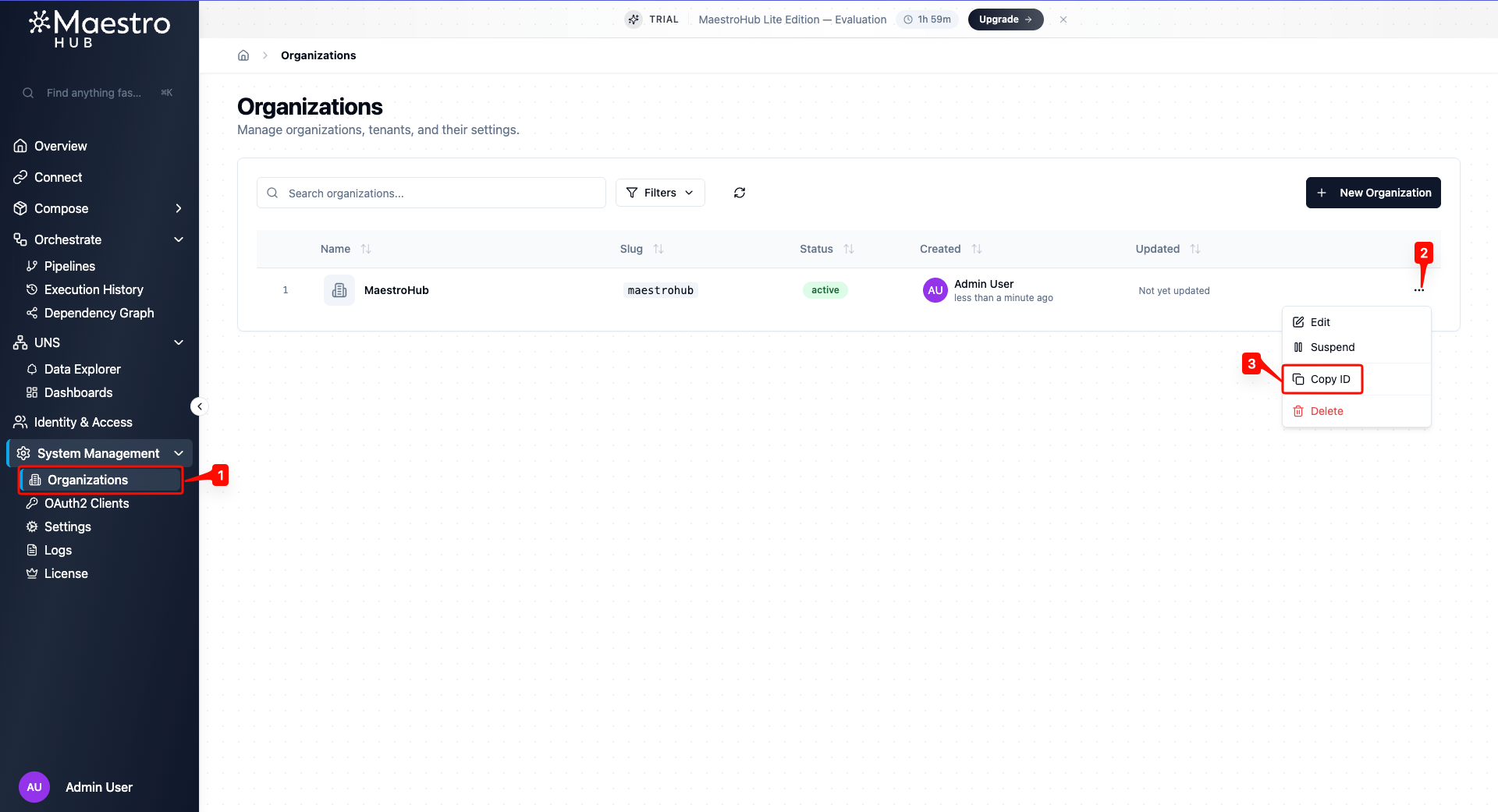
Finding Your Organization ID
Navigate to System Management → Organizations. Click the actions menu (⋯) on your organization row and select Copy ID.
Available Scopes
Both Personal Access Tokens and OAuth2 Clients use the same set of scopes to control what the bearer can do. The available scopes depend on your organization's RBAC level:
| RBAC Level | Behavior |
|---|---|
| None | RBAC is disabled. Tokens have full API access — no scope restrictions apply. |
| Basic | Scopes are enforced. Tokens can only perform actions allowed by their granted scopes. |
| Enterprise | Same as Basic with additional granular scope options. |
When RBAC is enabled, the following scopes are available:
| Group | Scope | Description |
|---|---|---|
| Pipelines | Read | View pipelines and execution history |
| Write | Create, edit, and delete pipelines | |
| Execute | Run, test, and retry pipeline executions | |
| Models | Read | View data models and field definitions |
| Write | Create, edit, and delete models | |
| Connectors | Read | View connections, functions, and configurations |
| Write | Create, edit, and delete connections | |
| Execute | Start, stop, and test connections; execute functions | |
| UNS | Read | View UNS topics and data |
| Write | Create, edit, and delete topics | |
| Publish | Publish data to topics | |
| Dashboards | Read | View dashboards and widgets |
| Write | Create, edit, and delete dashboards | |
| Organizations | Read | View organization settings |
| Manage | Update settings and manage maintenance mode |
OAuth2 Clients additionally support OIDC Scopes (openid, profile, email) for identity information and Custom Scopes for application-specific needs.