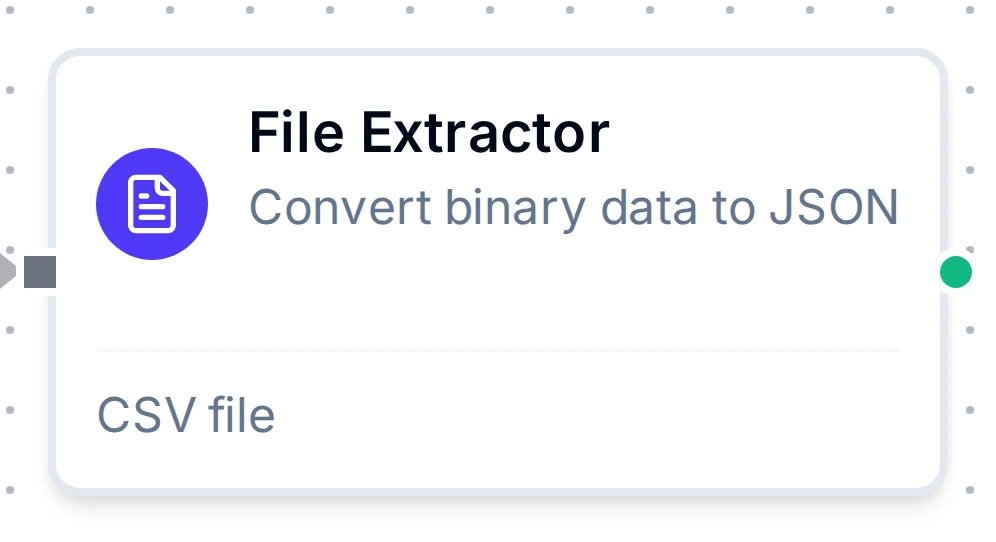
File Extractor node
File Extractor Node
Turn the file a fetch node brought in into rows: it reads the format from the file itself, delivers numbers, dates and booleans as such, and reports every decision it made.
- Formats
- Spreadsheets · CSV · HTML · Parquet · SQLite · JSON · XML · fixed-width
- Input
- The previous node's result: a file, base64 or text
- Values
- Typed, or text as the file shows it
- Limits
- 256 MB per file · 1,000,000 rows per read
Overview
- Type:
transform.extract.file - Display Name: File Extractor
- Category: transform
- I/O Handles: Input
In(left), OutputOut(right)
The node takes a file from its input, works out what kind of file it is from its content, reads its table and delivers one object per row. A .xls from a plant system is often not an Excel 97-2003 workbook at all: SAP GUI saves tab-separated text, many web portals save an HTML table, and some generators write XML Spreadsheet 2003. With File Format on Auto-detect all of them read with no settings, and the run reports what the file really was.
The form
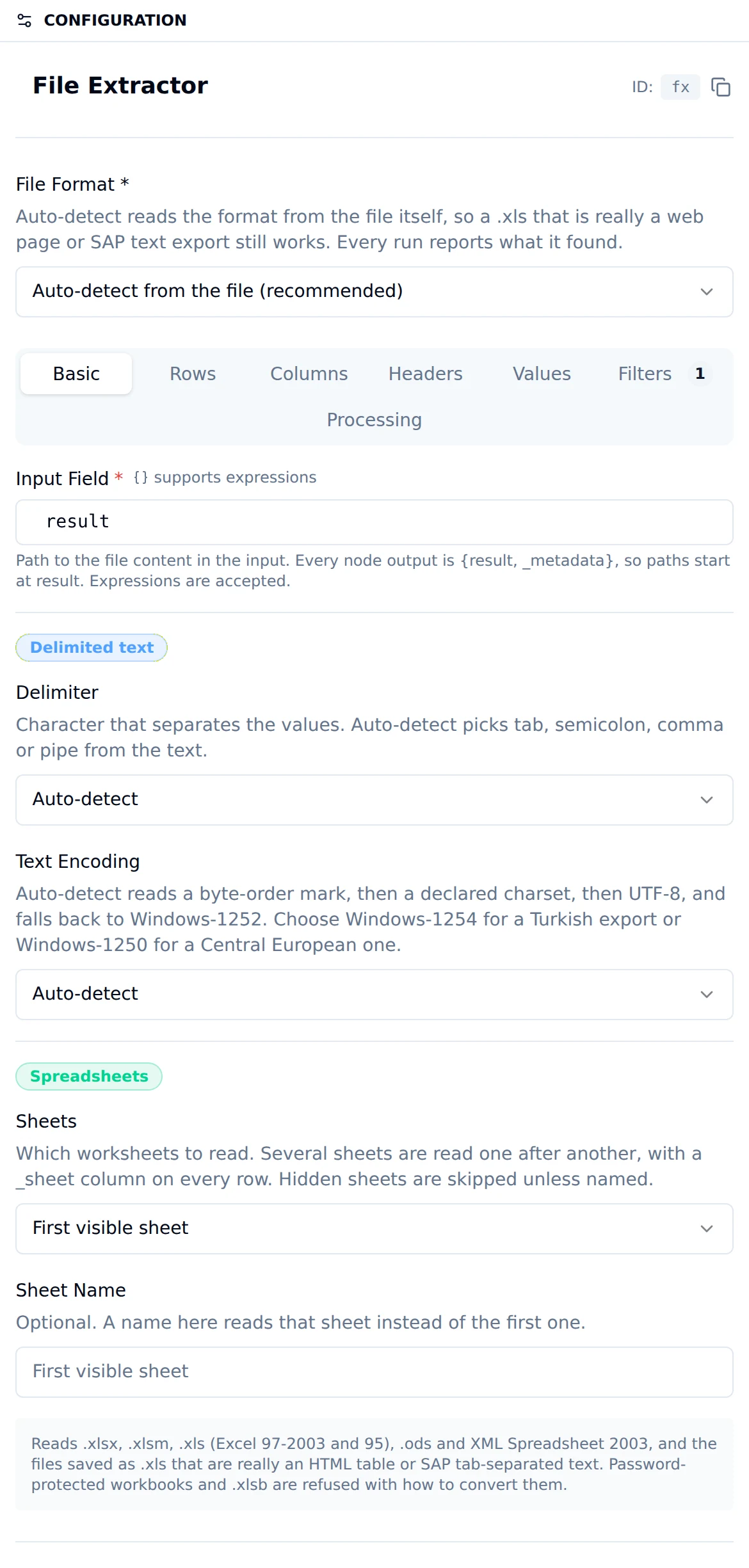
Basic
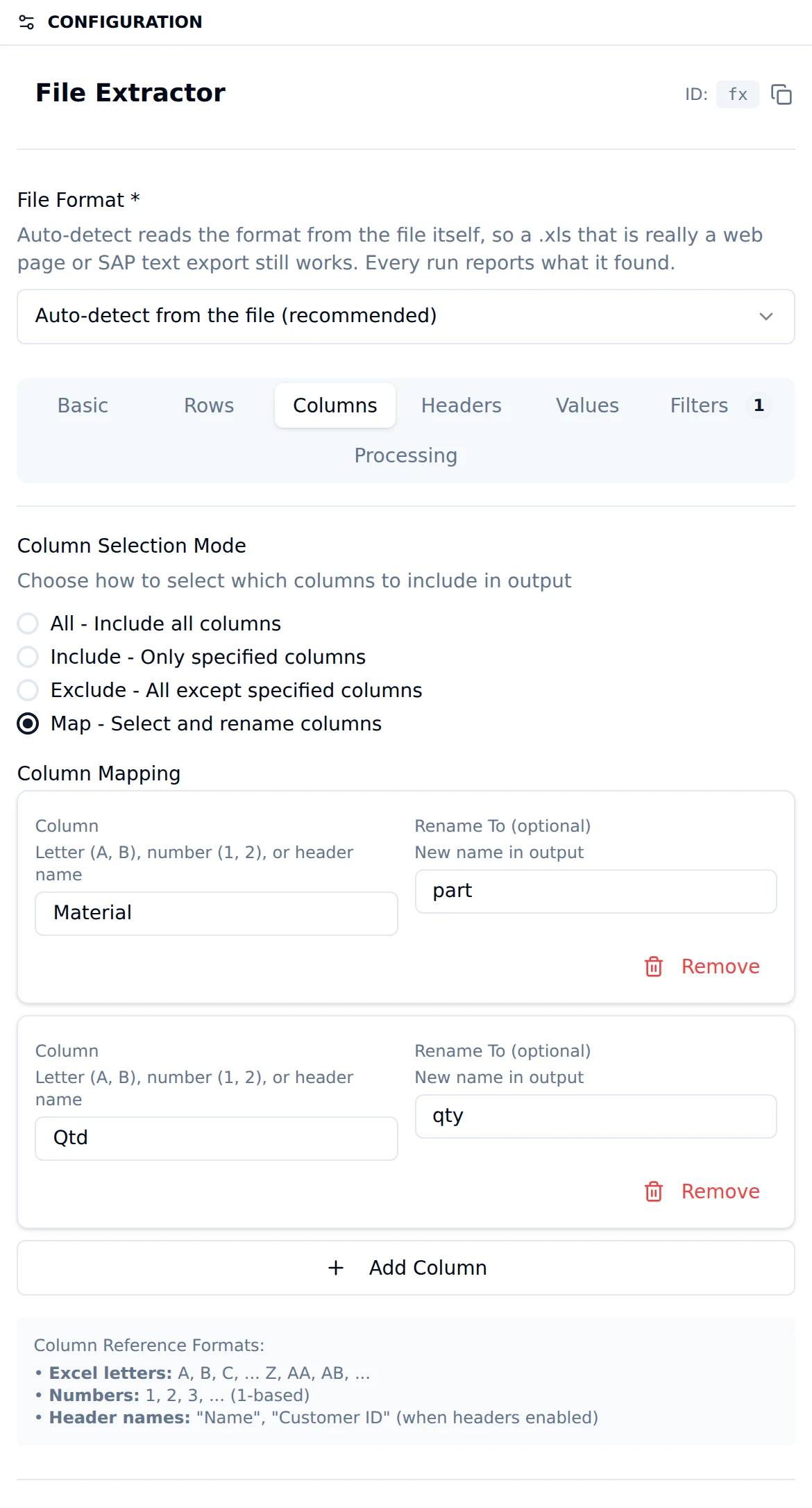
Columns
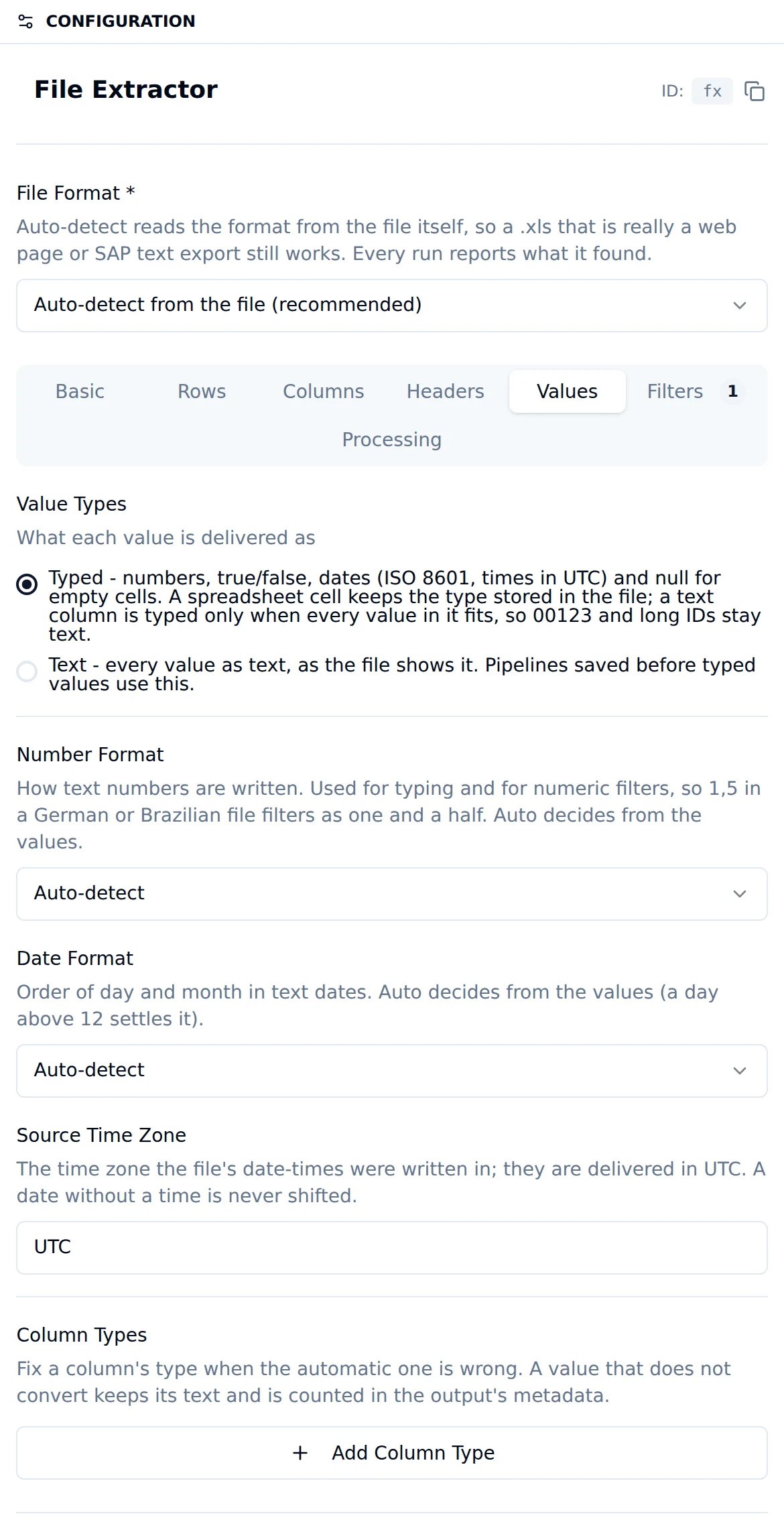
Values
What it reads
| Format | Covers |
|---|---|
| Spreadsheet | .xlsx, .xlsm, .xls (Excel 97-2003 and Excel 95), .ods, XML Spreadsheet 2003, and the files saved as .xls that are really an HTML table, an MHTML web archive or SAP tab-separated text |
| CSV / delimited text | Comma, semicolon, tab or pipe separated, in UTF-8, UTF-16 or a Windows code page; the delimiter is detected |
| HTML table | .html pages and MHTML archives; the largest table, or the one you name |
| Parquet | Any Parquet file; column names and types come from its schema |
| SQLite | A SQLite 3 database file (.db, .sqlite): one table or view, or the rows of one SELECT. See SQLite databases |
| JSON | An array of records, the one list of records inside a document ({"result": {"rows": [...]}}), or newline-delimited JSON |
| XML | Repeated elements as records; attributes and child elements become columns |
| Fixed-width text | Lines cut at the column widths you give |
Refused, with what to do instead: encrypted SQLite databases (SQLCipher, SEE: export an unencrypted copy), password-protected workbooks (remove the password and save again), .xlsb (save as .xlsx), Excel 2.x-4.x worksheets (save as .xlsx), and files that are no table at all (a PDF, an image, an archive). An explicit File Format reads every shape of its family and refuses a file of another family by naming it: a Parquet node given a CSV says the file is delimited text.
How a file is read
- Finding the file. Input Field points at the file in the node's input; the default,
result, is right after every fetch node. When the value there is a storage node's{data, metadata}, an FTP node's{content}or a REST node's{body}, that field is read, and the previous node's stated encoding is followed. Adata:URL declares its own encoding. Other text is decoded as base64 only when the result is a file or readable text, so a CSV that happens to be valid base64 is read as the CSV it is. - Detecting the format from the bytes, never from the file name.
- Decoding text (text formats only): a byte-order mark, then a declared charset, then UTF-8, then Windows-1252. A Turkish (Windows-1254) or Central European (Windows-1250) export without a byte-order mark needs Text Encoding set, because those code pages differ from Windows-1252 in only a few letters.
- Reading the table: the sheets you chose, the header row, merged cells, footer rows.
- Typing the values (see below).
- Selecting columns and filtering rows, then Max Rows.
Every automatic decision is reported in the output's _metadata.source, so a wrong guess is visible and can be fixed with a setting.
SQLite databases
HMIs, test benches and line PCs often keep their logs in a SQLite file. MaestroHub does not connect to that file where it lives. A file connector fetches a copy, and the File Extractor reads the copy:
- Fetch the file with the connector that reaches the machine: SMB for a Windows share, FTP or SFTP, S3 or another object store, or Local File for a folder on the MaestroHub host. Use the connector's fetch function with the file's exact name, for example
alarms.db. Its result goes straight into the File Extractor. - Read it with File Format set to SQLite database, or left on Auto-detect, which recognises the file by its header. Under Read, choose A table or view and name it (empty reads the database's only table), or choose A query and write one
SELECT.
How the file is read. The bytes are opened as a private, read-only snapshot in memory. SQLite reads them through a read-only file layer with no write path, in read-only and immutable mode, with PRAGMA query_only on. Nothing is written, and no lock is taken on the machine that owns the file. A query must be a single read-only SELECT, and a WITH ... SELECT is fine. INSERT, UPDATE, DELETE, PRAGMA, ATTACH and a second statement are refused. A query that never finishes, such as a recursive WITH with no end, stops when the execution is cancelled or times out.
Rows are cut by SQLite. The node's row bounds become the statement's LIMIT: End Row, and Max Rows when no filter or empty-row skipping runs after the read. Otherwise the limit is the 1,000,000-row cap. The statement that ran and its limit are in _metadata.sqlite.
Values keep their stored type. An INTEGER or REAL is a number, TEXT is text (digits stored as text stay text), NULL is empty, and a BLOB is base64. The declared type refines this: 0 and 1 in a BOOLEAN column are booleans, and ISO text in a DATE, DATETIME, TIMESTAMP or TIME column is a date, datetime or time. A datetime with no offset is read in Source Time Zone. _metadata.columnTypes lists each column's declared type.
A database in write-ahead-log (WAL) mode keeps its newest commits in a separate <name>.db-wal file until a checkpoint moves them into the main file. A copy of the .db alone does not have them. The node reads what the main file holds and says so: _metadata.sqlite.walMode is true, and _metadata.warnings reads "this database is in WAL mode; rows not yet checkpointed into the main file are not included". To read every row, have the machine run PRAGMA wal_checkpoint(TRUNCATE) before the file is fetched, or fetch a copy taken after a checkpoint.
The SQLite project warns that its file locking does not work reliably over network file systems such as SMB or NFS, and that a database written there can be corrupted. The File Extractor never opens the file on the share. It reads a fetched copy, so this risk never reaches the machine that owns the file. Keep the program that writes the database working on a local disk, and fetch copies from there.
Example pipeline. Manual or schedule trigger → SMB Fetch File (alarms.db, exact name) → File Extractor (SQLite, query SELECT line, COUNT(*) AS alarms, SUM(duration) AS minutes FROM alarms WHERE raised_at >= date('now', '-1 day') GROUP BY line) → a write node. Each run reads the latest copy of the HMI's alarm log and delivers one row per line.
Values
With Value Types on Typed (the default for new nodes):
- A spreadsheet cell keeps the type stored in the file: a number is a number, a date is a date, a text cell stays text even when it looks like a number.
- A column of text (a CSV column, or a spreadsheet column stored as text) becomes numbers, booleans or dates only when every value in it fits. A value with a leading zero (
00123) or more than 15 significant digits (a serial number) keeps the column as text, because a number would change it. - Booleans are
trueandfalse; dates areYYYY-MM-DD; date-times are RFC 3339 in UTC; times of day areHH:MM:SS; an empty cell isnull. - A spreadsheet error cell (
#N/A,#DIV/0!) isnulland is counted in_metadata.cellErrors. - A formula delivers the value Excel last calculated and saved; formulas are not recalculated.
With Value Types on Text, every value is the text the file shows, as the node always delivered. Pipelines saved before typed values existed stay on Text.
Number Format says how text numbers are written: 1,234.56, 1.234,56 or 1 234,56. On Auto-detect each column decides from its values (1,5 means a decimal comma), an undecided column follows the rest of the file, and a semicolon-separated file means a decimal comma. Numeric filters read numbers the same way, so in a Brazilian or German file 1,5 is one and a half.
Date Format says whether text dates are day-first or month-first. On Auto-detect a value with a day above 12 settles it; otherwise a decimal-comma file reads day-first. ISO dates (2026-10-01) are always read. Two-digit years are left as text rather than guessed.
Source Time Zone is the zone the file's date-times were written in (spreadsheets store no zone); they are delivered in UTC. A value with its own offset (2026-10-01T08:30:00+02:00) and a Parquet timestamp keep their instant; a date without a time is never shifted. At a clock change, a time that happens twice is its first occurrence and a time skipped by the change is read with the offset before it.
Column Types fix one column's type when the automatic one is wrong. A value that does not convert keeps its text and is counted in _metadata.unconvertedValues; nothing is dropped.
Sheets, headers and rows
Sheets: the first visible sheet (or the one named in Sheet Name), a sheet by name or position, every visible sheet matching a pattern, or every visible sheet. Several sheets are read one after another; every row gets a _sheet column, and the columns are those of all the sheets. Hidden sheets are read only when named.
Range Mode:
- Auto: the header is the first row with something in it; blank rows above it are skipped.
- Manual: Start Row and End Row are the 1-based physical rows of the table. With headers on, the start row is the header and data starts on the next row.
- Header Search: the header is the first row containing Search Text (
contains, orexactfor the whole cell), optionally in one column. Use it for reports with title rows above the table.
Header Rows reads a header of two or more rows: merged header cells are spread across, and each column's texts are joined with a space, so Temperature merged over Min and Max gives the columns Temperature Min and Temperature Max. Column names are made unique: a repeated name gets _2, _3, so no column overwrites another.
Skip Footer Rows drops rows from the end, such as a totals line. Fill Merged Cells copies a merged cell's value into every row it covers. Include Row Source adds _sourceRow, the row in the file, and _sheet for a spreadsheet.
For Parquet, JSON and XML the column names come from the file's structure. Start and end rows count records, and the header options do not apply. Nested JSON objects become dotted names (machine.temperature), and lists stay as JSON text.
Columns and filters
Column Mode keeps all columns (optionally from a start to an end column), only the listed ones, all but the listed ones, or the listed ones renamed (Map). A column is referred to by its header name (case-insensitive), its letter (A, AA) or its 1-based number. A reference that matches no column is listed in _metadata.unresolvedColumns.
Filters combine groups with AND; within a group, its operator decides. equals, contains, startsWith, endsWith and matches (a regular expression) compare text; a number is compared as plain digits and a date in ISO form. greaterThan, lessThan, greaterOrEqual and lessOrEqual compare numbers read in the column's number format; a value that is not a number is compared as text.
Skip Empty Rows drops rows whose kept columns are all empty. Trim Whitespace trims every value.
Output
The rows are the node's result; what happened is in _metadata:
{
  "result": [
    { "Material": 4711, "Qty": 1234.5, "Date": "2024-02-29" }
  ],
  "_metadata": {
    "success": true,
    "format": "auto",
    "totalRows": 1,
    "filteredRows": 1,
    "returnedRows": 1,
    "headers": ["Material", "Qty", "Date"],
    "types": { "Material": "number", "Qty": "number", "Date": "date" },
    "source": {
      "inputPath": "result.data",
      "inputEncoding": "base64",
      "encodingSource": "upstream",
      "fileName": "export.xls",
      "container": "delimited text (CSV/TSV) saved as .xls",
      "detectedFormat": "delimited",
      "detectedAs": "delimited text (CSV/TSV)",
      "textEncoding": "utf-16le",
      "textEncodingSource": "bom",
      "delimiter": "\t",
      "delimiterDetected": true,
      "numberFormat": "decimalComma",
      "dateOrder": "DMY",
      "headerRow": 1
    }
  }
}
Reported when they apply: sheetName (the sheet read), source.sheets (each sheet with its header row and row count), truncated and truncatedAtRows (the file held more than 1,000,000 rows), ignoredOptions (settings the format cannot honour, with why), cellErrors, unconvertedValues, unresolvedColumns, cellsBeyondHeader (values right of the last named column), for Parquet columnTypes (the file's own schema) and sourceRows (the rows its footer declares), and for SQLite columnTypes (each column's declared type), sqlite (the table or query, the statement that ran, its limit, walMode and the database's tables) and warnings (a WAL-mode database).
A file that cannot be read fails the node with what happened and how to fix it: the file is password-protected, of another format than the one set, larger than 256 MB, or damaged.
Pipelines saved before 3.0
Upgrading keeps every saved File Extractor's output as it was: it stays on Text values, and a node that had no format or delimiter keeps reading CSV split on commas. Two fixes can still change a saved node's rows, and the upgrade notes each node it applies to:
- Numeric filters read the file's number format. In a file with decimal commas,
1,5used to be read as 15. - Skip Empty Rows looks at the columns the node keeps, as its label always said. A row whose kept columns are all empty is now dropped even when another column has a value.
Files that were read correctly before are read the same. Files that were misread are now read correctly: a Windows-1252 export used to come through as broken accents, and text that happened to be valid base64 used to be decoded into noise.
Examples
- SAP export named
.xls: Input Fieldresult, File Format Auto-detect. The file is detected as tab-separated UTF-16 text,1.234,5becomes 1234.5 and29.02.2024becomes2024-02-29. - Brazilian CSV with semicolons: no settings. The delimiter, decimal commas and day-first dates are detected; a filter
Qtd greater than 10compares numbers. - Monthly sheets in one workbook: Sheets Sheets matching a pattern, pattern
^2026-. Every row carries_sheet. - A QC report with a two-row header: Header Rows 2, Skip Footer Rows 1 for the totals line.
- An API response: File Format JSON, Record Path
data.items(or empty when the document holds one list of records). - A test bench's SQLite results: SMB Fetch File
results.db→ File Format SQLite, Tableresults, End Row 500. SQLite stops after 500 rows.
Version History
3.0
- Reads SQLite databases as a read-only in-memory snapshot: a table or one
SELECT, the row bounds applied as itsLIMIT, and a warning for a database in WAL mode. - Reads the format from the file:
.xls(Excel 97-2003 and 95),.ods, XML Spreadsheet 2003, HTML and MHTML tables, JSON, XML and fixed-width text, beside CSV,.xlsxand Parquet. - Typed values, number and date formats, source time zone and per-column types; text encodings and delimiter detection.
- Sheet selection by name, position, pattern or all; multi-row headers, merged cells, footer rows, row source.
- Fixed: numeric filters misread decimal commas; the Tab delimiter could not be saved; a repeated header name could overwrite another column; text that happened to be valid base64 was decoded; the default input path failed after storage fetch nodes; Preserve Types and Include Headers did nothing (they are gone).
Version 1.1
- Start Row and End Row are 1-based physical row positions. With Has Headers on, Start Row is the header row.
- Added Header Search Match (
contains|exact).
Version 1.0 - Initial release: CSV, Excel and Parquet, filters, column selection and mapping, header search.
Configuration reference
The fields below are generated from the node's config contract, so they match what the pipeline validator enforces and what the designer's form offers.
transform.extract.file
| Field | Type | Required | Default | Values | Description |
|---|---|---|---|---|---|
format | string | no | auto | auto, csv, excel, parquet, html, json, xml, fixedwidth, sqlite | File format. auto reads it from the bytes, whatever the file name says. An explicit format reads every shape of its family (excel: .xlsx, .xlsm, .xls from Excel 97-2003 and 95, .ods and XML Spreadsheet 2003; csv: comma, semicolon, tab or pipe separated text in any encoding; html: HTML and MHTML tables) and refuses a file of another family, naming what the file is. json reads a JSON array of records or newline-delimited JSON; xml reads repeated elements as records; fixedwidth cuts each line at columnWidths; sqlite reads a SQLite 3 database file (sqliteTable or sqliteQuery) as a read-only in-memory snapshot. Password-protected workbooks and .xlsb are refused with how to convert them |
inputField | string | no | result | accepts an expression | Dot path to the file content inside the node input; every node output is {result, _metadata}, so paths start at result, e.g. result or result.fileData. The value may be base64, a data: URL or text; when it is a storage node's {data, metadata}, an FTP node's {content} or a REST node's {body}, that field is read. The execution fails when the path is missing |
inputEncoding | string | no | auto | auto, base64, text | How the value at inputField holds the file: auto follows a data: URL, then the upstream node's stated encoding, then decodes base64 only when the result is a file or readable text; base64 always decodes; text never does |
textEncoding | string | no | auto | auto, utf-8, utf-16le, utf-16be, windows-1250, windows-1251, windows-1252, windows-1254, iso-8859-1, iso-8859-2, iso-8859-9, iso-8859-15, shift_jis, gb18030, big5 | Character encoding of a text file (csv, html, xml, json, fixedwidth). auto reads a byte-order mark, then a declared charset, then UTF-8, and falls back to windows-1252; set it for a Turkish (windows-1254) or Central European (windows-1250) export that has none |
startRow | integer | no | 1 | at least 1 | 1-based physical row where the table starts; with hasHeaders this is the header row and data begins on the next one. Ignored when headerSearchText is set. For parquet, json and xml it counts records |
endRow | integer | no | 0 | at least 0 | 1-based physical row of the last row to include; 0 reads to the end of the file. Must not be below startRow |
maxRows | integer | no | 0 | at least 0 | Maximum number of rows to return after filtering; 0 means unlimited. A file is read up to 1,000,000 rows in any case; past that the output reports truncated |
startColumn | string | no | - | - | columnMode all only: first column to keep; a header name, an Excel letter (A, AA) or a 1-based number; empty keeps from the first column |
endColumn | string | no | - | - | columnMode all only: last column to keep; a header name, an Excel letter or a 1-based number; empty or 0 keeps to the last column |
columnMode | string | no | all | all, include, exclude, map | all keeps every column (optionally bounded by startColumn/endColumn); include keeps only the listed columns in the listed order; exclude drops the listed columns; map keeps the listed columns and renames them |
columns | object[] | no | - | - | Column references used by include, exclude and map; at least one is required in those modes. A reference that matches no column is reported in the output's unresolvedColumns |
hasHeaders | boolean | no | true | - | true reads column names from the table's first row (or headerRows rows); false names them _column_1, _column_2, … and treats the first row as data. Parquet, json and xml take names from the file's structure |
headerRows | integer | no | 1 | 1 to 10 | How many rows make the header. With 2 or more, each column is named by its header cells joined with a space, after merged header cells are spread across: Temperature over Min and Max gives Temperature Min and Temperature Max |
includeHeaders | boolean | no | true | - | Has no effect: the column names are always reported in the output's headers. Kept so saved pipelines load |
normalizeHeaders | boolean | no | true | - | Trim whitespace around column names and name blank ones _column_N; duplicates are always suffixed _2, _3, … so no row key is silently overwritten |
headerSearchText | string | no | - | - | Text that identifies the header row; when set the table starts at the first row containing it (case-insensitive) and startRow is ignored. Required when rangeMode is headerSearch |
headerSearchColumn | string | no | - | - | Limit the header search to one column; an Excel letter or a 1-based number; empty searches every cell of each row |
headerSearchMatch | string | no | contains | contains, exact | How headerSearchText is matched: contains is a case-insensitive substring match; exact requires the whole trimmed cell to equal it (use it when the text also appears inside a longer title row) |
skipFooterRows | integer | no | 0 | at least 0 | Rows to drop from the end of the table, such as a totals line |
fillMergedCells | boolean | no | false | - | Copy a merged cell's value into every row and column it covers; otherwise only its first cell holds the value. Header cells are always spread across |
filterGroups | object[] | no | - | - | Row filters; every group must match (groups combine with AND), and within a group its op decides whether all or any of its conditions must match |
trimWhitespace | boolean | no | true | - | Trim whitespace around every cell value |
skipEmptyRows | boolean | no | true | - | Drop rows whose selected columns are all empty |
delimiter | string | no | auto | - | csv: the field separator. auto detects tab, semicolon, comma or pipe from the text; otherwise exactly one character, e.g. ";" or a real tab character |
columnWidths | string | no | - | - | fixedwidth only, required there: the width of each column in characters, comma-separated, e.g. 10,8,12. Text past the last width becomes one more column when it holds more than spaces |
recordPath | string | no | - | - | json: dot path to the array of records (data.items); empty takes a top-level array or the one list of records in the document. xml: the element that is one record (row, rows/row, or /export/rows/row from the root); empty takes the most repeated element |
sqliteTable | string | no | - | - | sqlite: the table or view to read; empty reads the database's only table. Not with sqliteQuery |
sqliteQuery | string | no | - | - | sqlite: one read-only SELECT (WITH ... SELECT is fine) to read instead of a table; anything that writes, PRAGMA, ATTACH or a second statement is refused. The node's row bounds become its LIMIT. Not with sqliteTable |
tableIndex | integer | no | 0 | at least 0 | html: which table to read, 1-based in document order; 0 reads the largest table |
sheetSelection | string | no | first | first, name, index, pattern, all | Workbook sheets to read: first is the first visible sheet, or sheetName when set; name reads sheetName; index reads sheetIndex; pattern reads every visible sheet whose name matches sheetPattern; all reads every visible sheet. Several sheets are concatenated, with _sheet on every row and the columns of all of them |
sheetName | string | no | - | - | Worksheet to read by name (exact, else ignoring case); a hidden sheet is read when named. Required when sheetSelection is name |
sheetIndex | integer | no | 1 | at least 1 | sheetSelection index: 1-based position of the sheet, hidden sheets counted |
sheetPattern | string | no | - | - | sheetSelection pattern: a regular expression matched against sheet names, e.g. ^2026-; required in that mode |
rangeMode | string | no | auto | auto, manual, headerSearch | auto takes the first non-empty row as the header unless startRow or headerSearchText is set; manual takes startRow as given; headerSearch locates the table by headerSearchText (required in that mode) |
valueTypes | string | no | auto | text, auto | auto delivers numbers, booleans, dates (ISO 8601, datetimes in UTC) and null for empty cells: a workbook cell keeps the type stored in the file, and a text column is typed only when every value in it parses (00123 and 16-digit IDs stay text). text delivers every value as text. Pipelines saved before this option read text |
columnTypes | object[] | no | - | - | Per-column types that override the automatic ones, in either valueTypes mode. A value that does not convert keeps its text and is counted in the output's unconvertedValues |
numberFormat | string | no | auto | auto, decimalPoint, decimalComma, spaceGrouped | How text numbers are written: decimalPoint is 1,234.56; decimalComma is 1.234,56; spaceGrouped is 1 234,56 (a space, no-break space or narrow no-break space between thousands, decimal comma). auto decides per column from its values (1,5 is a decimal comma; 1.234,5 too), an undecided column following the file, and a semicolon-separated file meaning decimal comma. Used for typing and by numeric filters |
dateFormat | string | no | auto | auto, DD/MM/YYYY, MM/DD/YYYY, YYYY-MM-DD, DD.MM.YYYY | Order of text dates (a time may follow; any of / . - separates). auto decides per column: a first part above 12 means day first, a second part above 12 month first, otherwise a decimal-comma file means day first. ISO dates are always read |
sourceTimeZone | string | no | UTC | - | IANA time zone (Europe/Istanbul, America/Sao_Paulo) the file's datetimes were written in; they are delivered in UTC. A value that states its own offset, and a Parquet timestamp, keeps its instant; a date with no time is never shifted |
includeRowSource | boolean | no | false | - | Add _sourceRow (the 1-based row in the file) and, for a workbook, _sheet to every row |
preserveTypes | boolean | no | true | - | Has no effect; valueTypes decides whether values are typed. Kept so saved pipelines load |