API Authentication
Call the MaestroHub API from scripts and other systems with a personal access token or an OAuth2 client. Both give you a JWT bearer token.
- Methods
- Personal access tokens · OAuth2 clients
- Header
- Authorization: Bearer <token>
- Checked on every call
- Signature · expiry · revocation · scopes
MaestroHub provides two mechanisms for authenticating with the platform API programmatically: Personal Access Tokens (PATs) and OAuth2 Clients. Both methods issue standard JWT bearer tokens that can be used with any HTTP client or integration.
Which credential should I use?
| You want to… | Use | Who sets it up |
|---|---|---|
| Use an AI assistant (Claude Desktop, Cursor and others) yourself | Sign in, or a personal access token through Connect an AI client in the profile menu | You |
| Run your own script against the API | A personal access token | You, from Profile → Security |
| Connect a shared system that must keep running when people change roles or leave (ERP, historian, CI pipeline, SIEM) | An API client with the Client Credentials grant, given a role | An administrator who can register API clients |
| Run an autonomous agent with an identity of its own | An agent account | An administrator |
A personal access token always acts as you and can never do more than you can. An API client is a separate service identity: it does not depend on, or inherit, the access of the person who created it.
An agent account's token is capped twice: by the roles the agent holds, and by the scopes the token carries. A token is issued only with scopes, each one the agent has been granted (POST /api/v1/auth/agents/{agent_id}/scopes, then scopes on POST /api/v1/auth/agents/{agent_id}/tokens). An agent with no granted scopes can do nothing with a token, whatever its roles. A token issued before 3.0 without scopes is held to the scopes its agent has been granted.
Choosing an Authentication Method
| Criteria | Personal Access Tokens | OAuth2 Clients |
|---|---|---|
| Best for | Automation scripts, external system integrations, single-user programmatic access | Third-party applications, service-to-service integrations, multi-user apps |
| Identity | Always acts as the user who created the token | Acts as the person who signed in (Authorization Code), or as the client itself (Client Credentials). A Client Credentials client has no access until it is given a role, and never inherits its creator's access |
| Setup | Create from your Profile → Security tab | Register from Admin → Identity & Access → API Clients (Identity, Security or System Administrators) |
| Grant types | - | Authorization Code, Client Credentials, Refresh Token |
| User consent | Not required | Required for Authorization Code flow |
| Secret management | Token shown once at creation | Client secret shown once at creation (confidential clients) |
| Expiration | 30 days to 1 year (configurable) | Access tokens have a configurable TTL; refresh tokens extend the session |
| Revocation | Revoke individual tokens from your profile | Disable or delete the client; revoke tokens via the OAuth2 revoke endpoint |
How Tokens Are Used
Both methods produce a JWT bearer token. Include it in the Authorization header of your API requests:
Authorization: Bearer <token>
The platform validates the token signature, checks expiration, verifies revocation status, and enforces the scopes embedded in the token.
Scopes cap what a token does
A token does at most what its scopes allow, whatever the roles of the person or client it belongs to. A token created by an administrator is still refused anything its scopes do not grant, with 403 INSUFFICIENT_SCOPE over the REST API and SCOPE_DENIED over MCP. A signed-in session has no scopes and is not capped. This holds on every endpoint, including the ones that decide access inside the request:
| What the token asks | What it needs |
|---|---|
Check another person's access (POST /api/v1/authz/check, MCP manage_access check) | roles:read. Checking its own access needs no scope. |
Explain another person's access (POST /api/v1/authz/explain) | No scope grants it: only a signed-in session explains someone else's access. A token can explain its own. |
Plan a share (POST /api/v1/dependencies/share-plan) | No scope grants sharing, so a token is refused. |
Remove people from a workspace (DELETE /api/v1/authz/workspaces/:id/members) | workspaces:manage, and the token goes through the workspace administrator's rules even when its owner is a platform administrator: it cannot remove someone who holds a platform role. The members list marks who the token could remove. |
List the people reaching a workspace through a platform role (in GET /api/v1/authz/workspaces/:id/members) | users:read for their names. Without it the list gives only how many. |
Accessible topics, stewarded branches (GET /api/v1/uns/topics/accessible, GET /api/v1/authz/stewarded-resources) | uns:read, or the scope for the verb asked |
Resolve an app by its slug (GET /api/v1/appstudio/apps/by-slug/:slug) | apps:read |
Workspace Context
Everything in MaestroHub lives in a workspace, and an instance can hold several. Most API endpoints require an X-Workspace-ID header carrying the ID of the workspace the request targets. Without this header, the API cannot tell which workspace you mean and the request will fail.
Include it alongside the Authorization header in every request:
Authorization: Bearer <token>
X-Workspace-ID: <your-workspace-id>
Nothing is created outside a workspace. A request that would create a pipeline, a connection, a dashboard, a library panel or an app with no workspace, or a blank one, is refused with 400 WORKSPACE_REQUIRED, and the answer's remediation says what to send: send the workspace the resource belongs to in the X-Workspace-ID header (a person's session carries one; an agent or API-client token must name its workspace). An OAuth2 client is always registered in a workspace too: there is no platform-wide client.
Finding Your Workspace ID
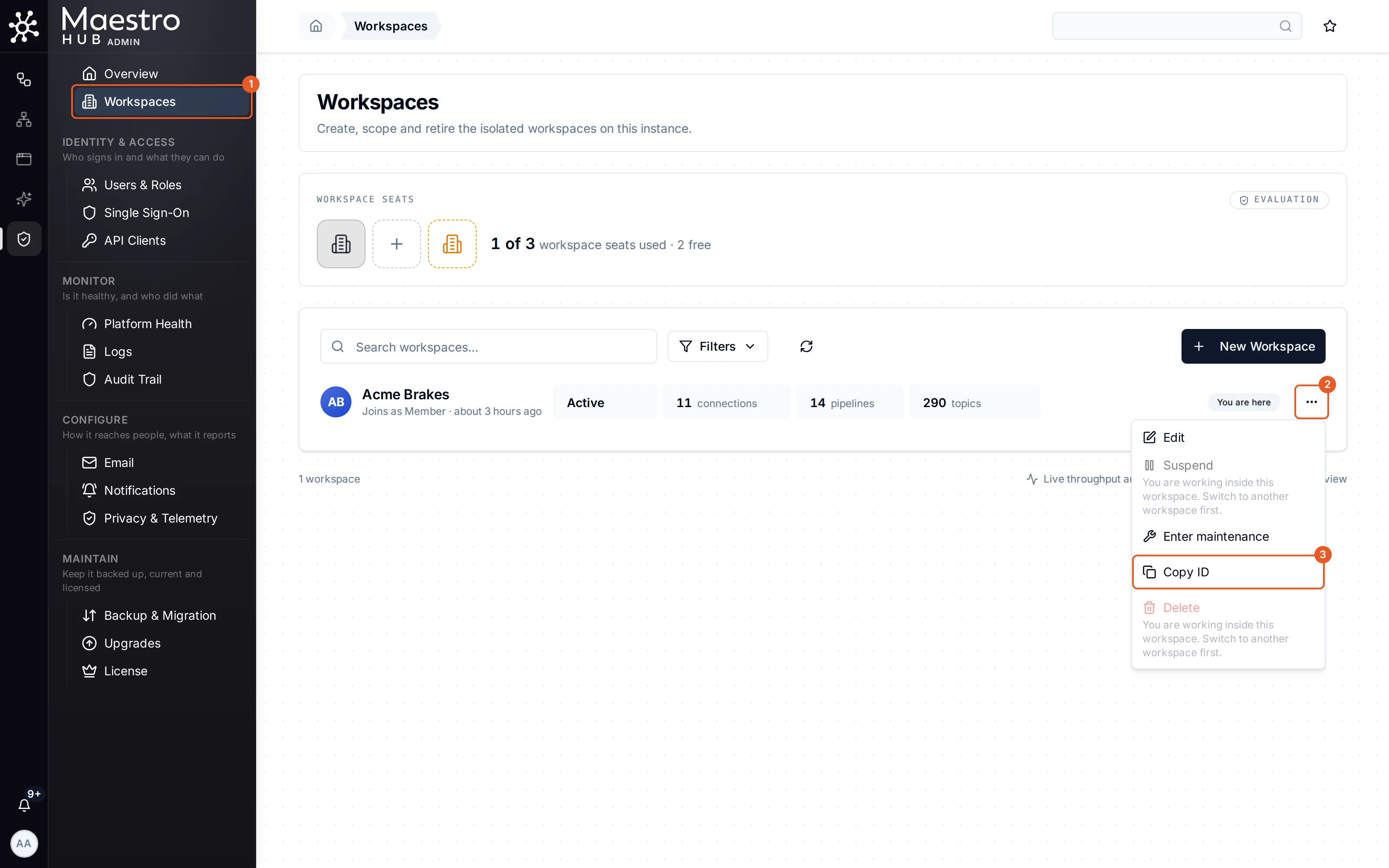
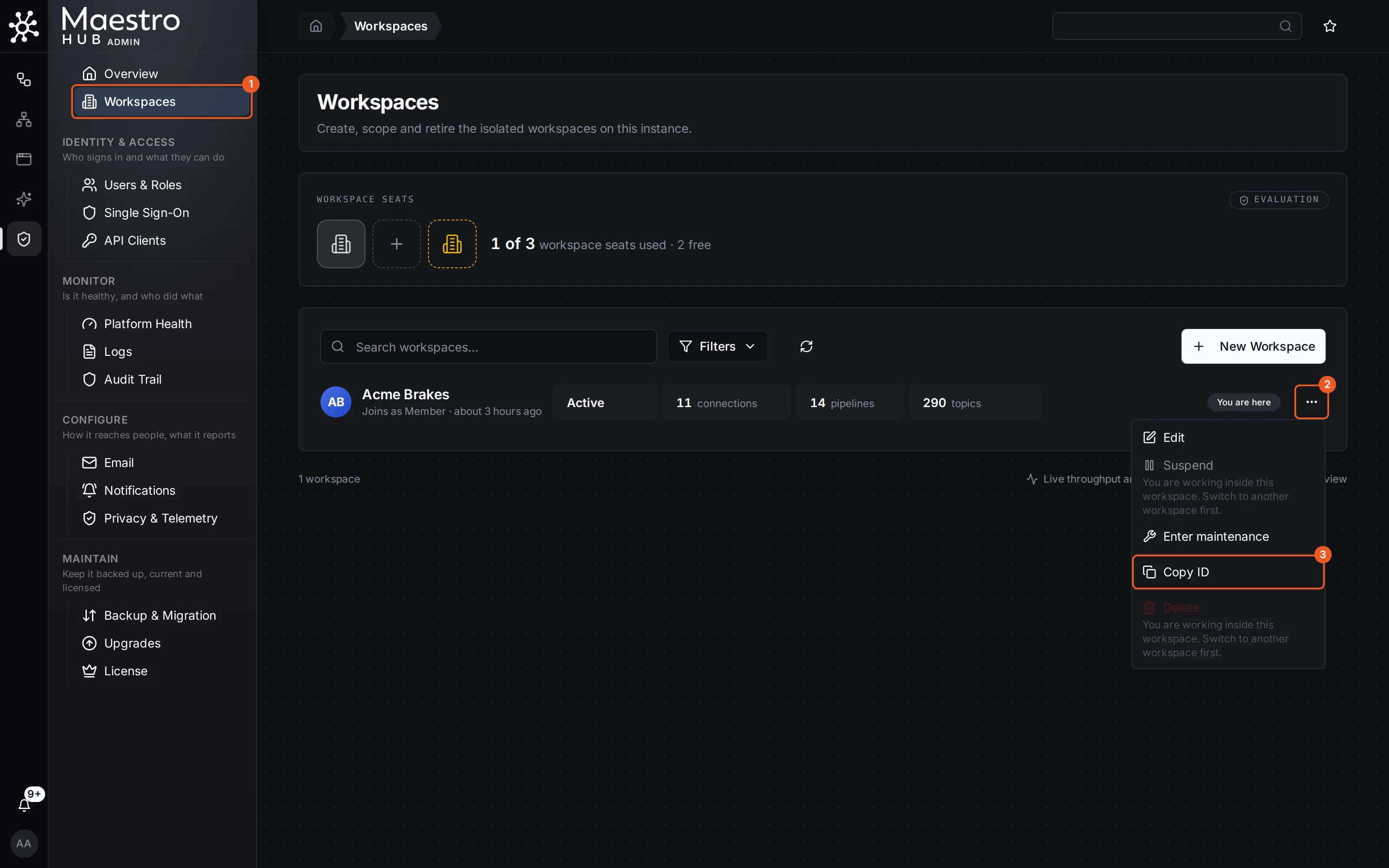
Navigate to Admin → Workspaces. Click the actions menu (⋯) on your workspace row and select Copy ID.
The Workspaces page is in the menu when your licence allows more than one workspace. Either way, the workspace Overview shows the start of the ID under the workspace's name; click it to copy the whole ID.
Available Scopes
Both Personal Access Tokens and OAuth2 Clients use the same set of scopes to control what the bearer can do. The available scopes depend on your workspace's RBAC level:
| RBAC Level | Behavior |
|---|---|
| None | RBAC is off. Tokens carry no scopes and have the full access of the account that owns them. |
| Basic and Advanced | Scopes are enforced: a token can do only what its scopes grant. You can grant a scope only when your role holds every action it covers, in each workspace the token is for. |
When RBAC is enabled, the following scopes exist. The token dialog offers only the scopes your own role allows in the workspace, so you may see fewer.
| Group | Permission | Scope | Grants |
|---|---|---|---|
| Pipelines | Read | pipelines:read | View pipelines, execution history, and node configurations |
| Write | pipelines:write | Create, edit, clone, and delete pipelines | |
| Execute | pipelines:execute | Run, test, retry, and cancel pipeline executions | |
| Connectors | Read | connectors:read | View connections, functions, and their configurations |
| Write | connectors:write | Create, edit, and delete connections and functions | |
| Execute | connectors:execute | Start, stop, and test connections | |
| Functions | Read | functions:read | Execute read-effect functions (query telemetry, read tags, list data); no writes, no deletes |
| Write | functions:write | Execute write-effect functions (send commands, publish, write tags) | |
| Stream | functions:stream | Execute stream-effect functions (subscribe, tail, watch) | |
| Discover | functions:discover | Execute discover-effect functions (browse namespaces, enumerate operations, list capabilities) | |
| Delete | functions:delete | Execute delete-effect functions (destructive: DROP, DELETE, retained-clear) | |
| Invoke | functions:invoke | Execute invoke-effect functions (fail-closed ceiling for unclassified function types) | |
| UNS | Read | uns:read | View UNS topics and their data, including live values |
| Write | uns:write | Create, edit, and delete UNS topics | |
| Publish | uns:publish | Publish and subscribe to UNS topics | |
| Alerts | Acknowledge | alerts:ack | Silence alerts on topics the caller can already see |
| Dashboards | Read | dashboards:read | View UNS dashboards and widgets |
| Write | dashboards:write | Create, edit, and delete dashboards | |
| Library Panels | Read | library_panels:read | View reusable library panel definitions |
| Write | library_panels:write | Create, edit, and delete reusable library panel definitions | |
| Workspaces | Read | workspaces:read | View workspace settings and details |
| Manage | workspaces:manage | Update workspace settings and manage role assignments | |
| Audit Log | Read | audit_log:read | View the audit trail, run queries, and stream integrity verification status |
| Export | audit_log:export | Bulk-export audit records in SIEM formats (NDJSON, CSV, CEF, ECS); the machine-to-machine surface a SIEM collector consumes | |
| Apps (App Studio, in release 3.0 as Beta, a paid add-on) | Read | apps:read | View App Studio apps and their versions |
| Write | apps:write | Create, edit, and delete App Studio apps | |
| Run | apps:run | Open and run published App Studio apps | |
| Publish | apps:publish | Activate app versions for the workspace's viewers | |
| Monitoring | Read | monitoring:read | Query platform metrics and metric names |
| Approvals | Read | approvals:read | View pending and decided pipeline approvals |
| Decide | approvals:decide | Approve or reject pending pipeline approvals; the pipeline then continues or stops | |
| Entities (Knowledge Graph, coming soon, not part of release 3.0) | Read | entities:read | View entities, their relationships, bindings and computed status |
| Write | entities:write | Create, edit, relate, archive and restore entities; record what happens to them and declare their state | |
| Record | entities:record | Record what happened to things in the plant's log: rejects, lab results, fills, changeovers | |
| Declare state | entities:declare | Declare what a thing is doing (maintenance, changeover, stopped); it and everything under it stop alarming | |
| Entity Types (Knowledge Graph, coming soon, not part of release 3.0) | Read | entity_types:read | View entity types, their properties, allowances and version history |
| Write | entity_types:write | Create, edit and delete entity types; bump versions; archive and restore | |
| Semantics | Read | semantics:read | View semantic libraries and their properties, the meanings bound to topics and the validation rules of the topic tree |
| Write | semantics:write | Create, edit and retire semantic libraries and properties; draft, edit and retire the meanings bound to topics (a person applies them) | |
| Read (replaced by semantics:read) | data_schemas:read | Replaced in 3.0 by semantics:read, which it grants: data schemas became the semantic layer | |
| Write (replaced by semantics:write) | data_schemas:write | Replaced in 3.0 by semantics:write, which it grants: data schemas became the semantic layer | |
| Users | Read | users:read | List and view users, with their email and status, and user statistics |
| Roles | Read | roles:read | View roles, who holds them and the roles a user holds |
| Assign | roles:assign | Give and take roles in the workspace, within the permissions you hold yourself | |
| Identity Providers | Read | identity_providers:read | View the configured sign-in providers (OIDC, LDAP, SAML) |
| Proposals (Knowledge Graph, coming soon, not part of release 3.0) | Read | proposals:read | View the proposal queue and its batches |
| Propose | proposals:write | Submit proposals into the queue (a producer, an agent) | |
| Decide | proposals:decide | Approve or reject proposals; approving also needs the review scope of what is created | |
| Logs | Read | logs:read | Read the application logs: search lines by time, level, text and trace |
OAuth2 Clients additionally support OIDC Scopes (openid, profile, email, offline_access) for identity information. Scopes outside this catalogue are refused, apart from two special-purpose ones; see Scopes.