OpenSearch
Search OpenSearch with Query DSL, and index, get or delete documents by ID from your pipelines, on a self-hosted cluster or Amazon OpenSearch Service.
- Status
- Beta
- Default port
- 9200 · 443 on AWS
- Authentication
- None · Basic · AWS IAM (SigV4)
- Operations
- Search · Index · Get · Delete
- Deployments
- Self-hosted · Amazon OpenSearch Service
Connect to OpenSearch to search, index, retrieve, and delete documents in your pipelines. This guide covers connection setup for a self-hosted cluster and for an Amazon OpenSearch Service domain, function configuration, and pipeline integration.
Overview
The OpenSearch connector is tested against OpenSearch 2.11, 2.19.1 and 3.0.0, and signs requests for Amazon OpenSearch Service domains. It provides:
- Full-text search with OpenSearch Query DSL, including pagination
- Document indexing with an ID you choose or one OpenSearch generates
- Document retrieval and deletion by ID
- Three sign-in methods: none, a username and password (the security plugin's users), or AWS IAM (SigV4) for Amazon OpenSearch Service
- TLS with your own CA certificate, such as the security plugin's demo certificate
- Template parameters for dynamic queries, index names, and document bodies
The operations, their parameters and their results are the same as the Elasticsearch connector's: a pipeline moves from one to the other by changing its node.
What stands behind the connector today:
- Every operation, the sign-in methods and an index-scoped user were tested against real OpenSearch 2.19.1 and 3.0.0, with the security plugin on and off, and against Elasticsearch 8.15.
- AWS IAM (SigV4) was run against an OpenSearch 2.11 domain in LocalStack, and every signature was checked by re-deriving it with the AWS SDK's own signer, including a wrong region and a body changed in transit.
What is not proven yet:
- It has not been run against a real Amazon OpenSearch Service domain. LocalStack accepts any keys, so only the re-derived signatures say the signing is right (#8516).
The Elasticsearch connector works only with Elasticsearch. It asks the node what it is on connect, and checks the X-Elastic-Product: Elasticsearch header on every answer, which OpenSearch does not send. Pointed at OpenSearch, it refuses with a message that names this connector. Use this connector for OpenSearch and Amazon OpenSearch Service.
Connection Configuration
Creating an OpenSearch Connection
Navigate to Connections → New Connection → OpenSearch and configure the following:
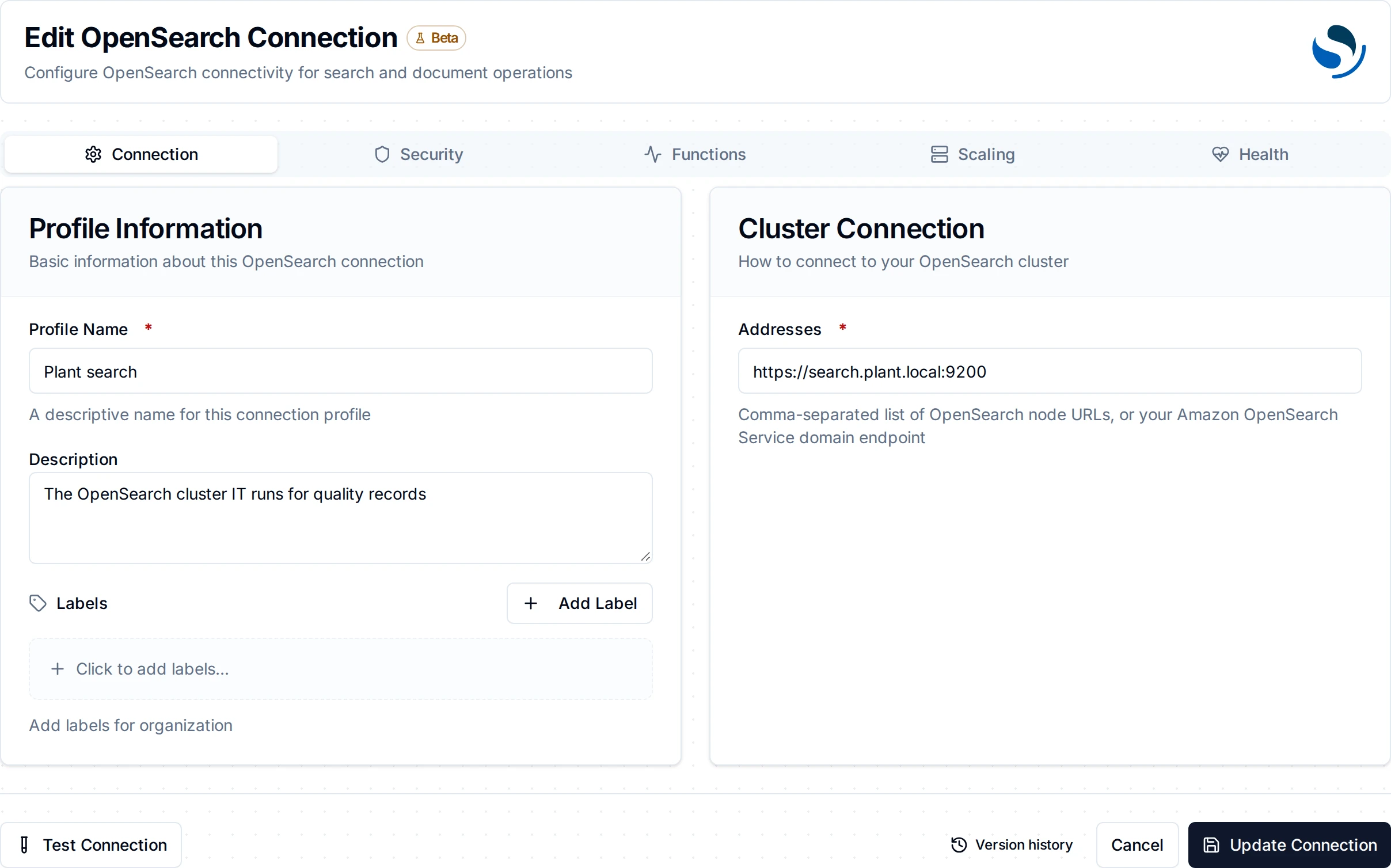
The Connection tab: profile and the node addresses
1. Profile Information
| Field | Default | Description |
|---|---|---|
| Profile Name | - | A descriptive name for this connection profile (required, max 100 characters) |
| Description | - | Optional description for this OpenSearch connection |
2. Cluster Connection
| Field | Default | Description |
|---|---|---|
| Addresses | http://localhost:9200 | Comma-separated list of node URLs (e.g., https://node1:9200,https://node2:9200). For Amazon OpenSearch Service, the domain endpoint, e.g. https://search-plant-a-abc123.eu-central-1.es.amazonaws.com |
Calls are spread across the nodes. A call that never reached a node (the connection could not be opened) is sent to the next node, whatever it is. A search, a get, a delete, or an index that names its document ID is also sent again when the node answers 502, 503 or 504 or the connection breaks mid-call, up to three more times in all; these are safe to repeat. An index without a document ID is not, because OpenSearch may already have stored it under a new ID: once it reached a node it is never sent again in the call. A write the pipeline buffers (store and forward) goes out once per attempt; the platform retries it. A node answering 429 (too many requests) is not retried in the call: the call fails, and the platform waits as long as the node's Retry-After asks before trying again.
3. Authentication
| Method | Fields | Use for |
|---|---|---|
Username and password (basic, default) | Username, Password | The security plugin's internal users, users from LDAP or Active Directory behind it, and the master user of an Amazon OpenSearch Service domain with fine-grained access control |
AWS IAM (SigV4) (sigv4) | AWS Region, and optionally Access Key ID, Secret Access Key, Session Token | Amazon OpenSearch Service domains. Leave the keys empty to use the AWS SDK default credential chain: environment variables, shared config, an IAM role, or IRSA on EKS |
None (none) | - | A cluster with the security plugin disabled. Development only |
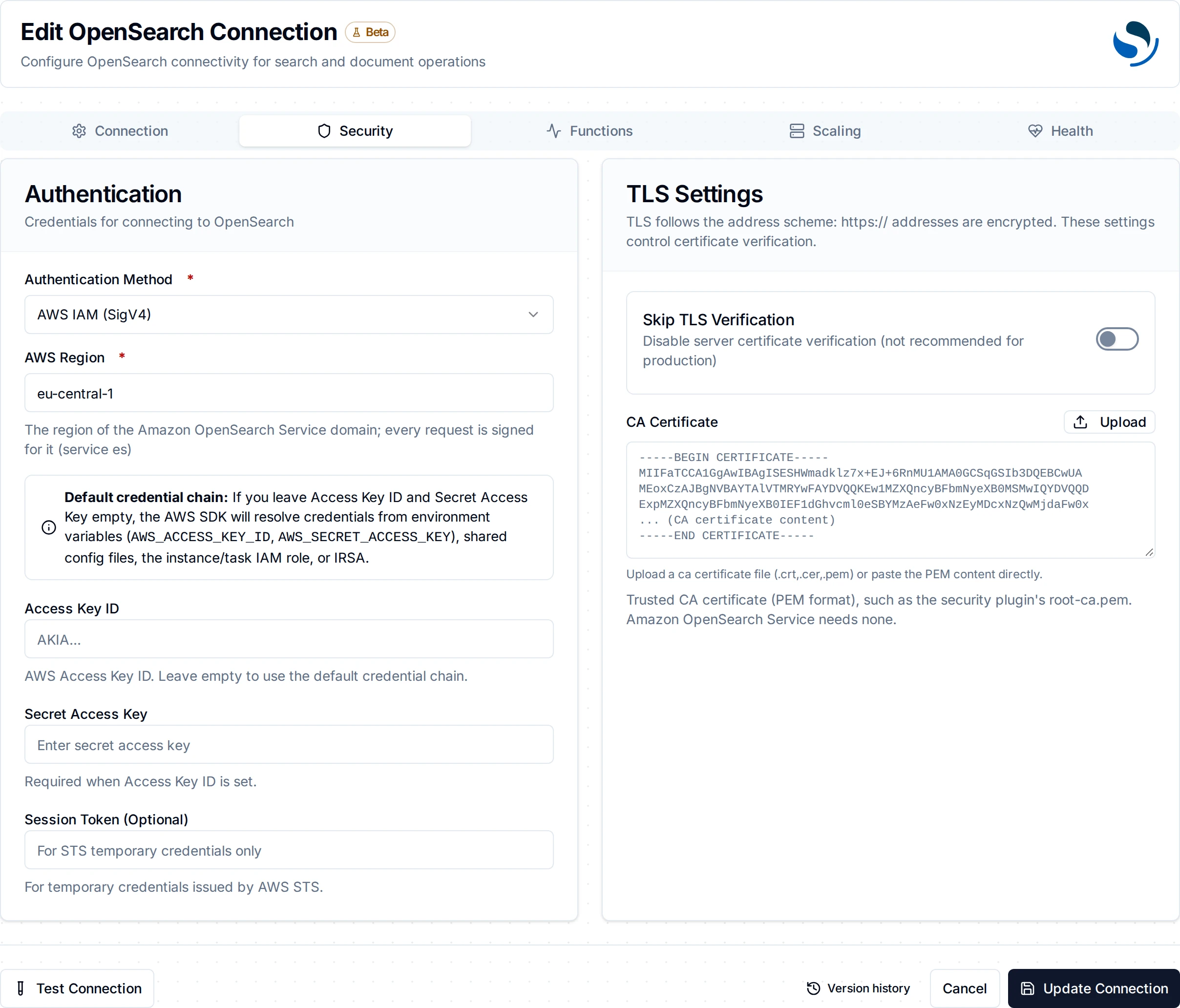
The Security tab with AWS IAM (SigV4): the domain's region, and keys that may stay empty to use the default credential chain
For AWS IAM, every request is signed for the domain's region under the service name es. The identity needs es:ESHttpGet, es:ESHttpPost, es:ESHttpPut and es:ESHttpDelete on the indices it works on (or es:ESHttp*). With fine-grained access control, also map the IAM role or user to an OpenSearch role that may read and write the indices.
Reading the root is optional. On connect, and on every health check, the connector asks the node what it is (GET /). That needs cluster:monitor/main in OpenSearch (on Amazon OpenSearch Service, es:ESHttpGet on the domain root). An identity limited to a few indices gets a 403 there, and that 403 is accepted only when it proves the request was signed in: the cluster's own security_exception, or an AWS denial that names your IAM role or user. Then the connection connects and works on its indices, and the log says once which of the two it was. Any other 403 fails the connection, as does a 401: a proxy's or firewall's page, an empty answer, an Elastic Cloud traffic filter, AWS refusing the token or signature, or AWS answering User: anonymous is not authorized (the request was not signed: choose AWS IAM).
{
  "Effect": "Allow",
  "Action": ["es:ESHttp*"],
  "Resource": "arn:aws:es:eu-central-1:123456789012:domain/plant-a/*"
}
OpenSearch Serverless collections (service aoss) are not supported yet (#8524).
4. TLS/Security Settings
TLS follows the address scheme: https:// addresses are encrypted, http:// addresses are not. These settings control how the server certificate is verified.
| Field | Default | Description |
|---|---|---|
| Skip Certificate Verification | false | Skip TLS certificate verification (not recommended for production) |
| CA Certificate | - | PEM-encoded CA certificate to verify the nodes against. A self-hosted cluster with the security plugin's demo configuration uses a self-signed root: paste root-ca.pem from the node's config directory. Amazon OpenSearch Service presents a public certificate and needs nothing here |
- Each address must include
http://orhttps://. Put credentials in their own fields, never in the URL. - A username is refused with
noneandsigv4; AWS keys are refused with anything butsigv4, so a connection never carries credentials it does not use.
Function Builder
Open the connection, go to its Functions tab → New Function, and choose Search, Index, Get or Delete.
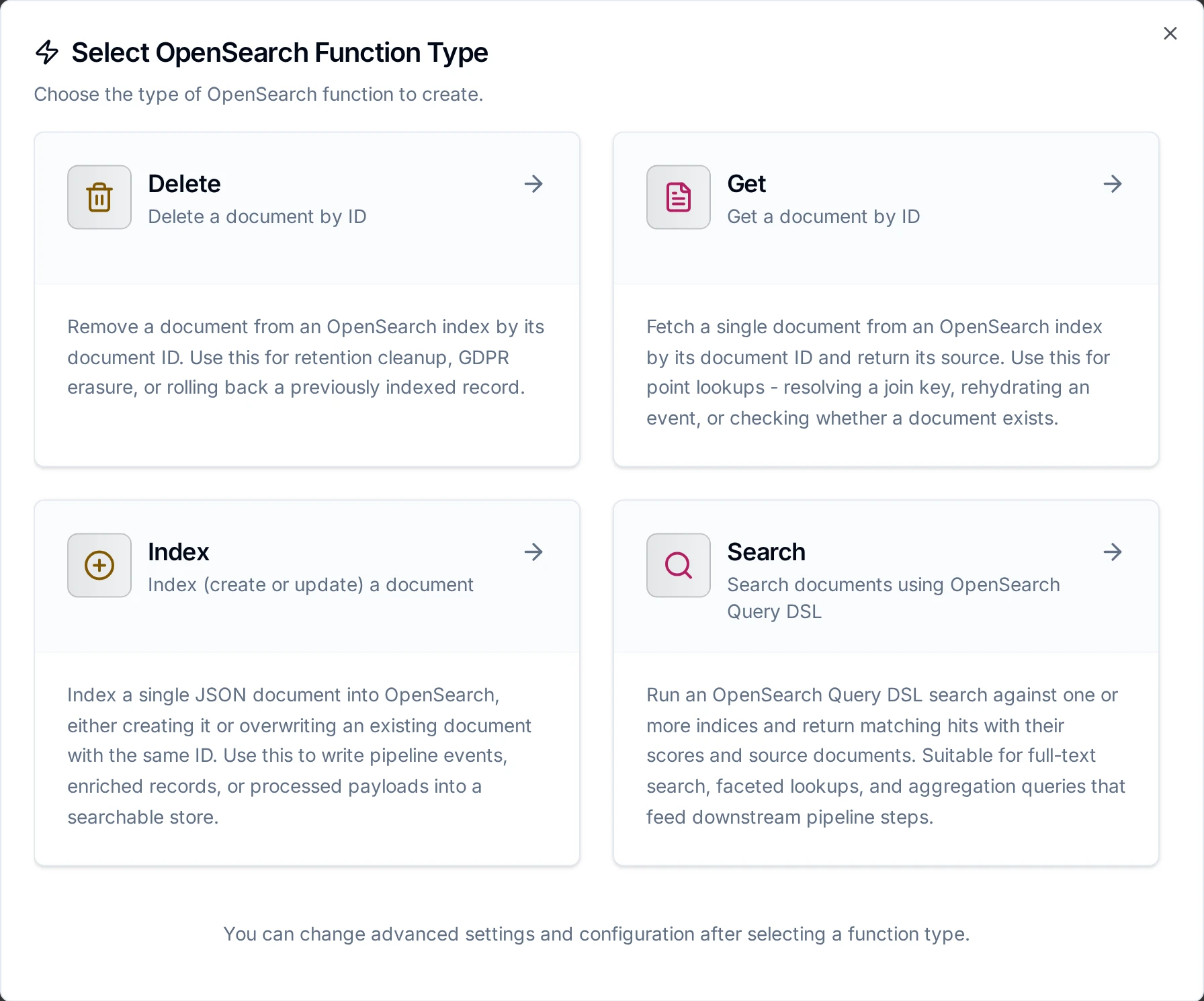
The function picker: Search, Index, Get and Delete
An index or document ID goes into the request path exactly as you write it, and the server decodes % sequences in it. So a%2Fb is the one ID a/b, and the connector never escapes anything for you. Write # as %23, ? as %3F and % as %25 (an ID PO#1234 is PO%231234). An ID or index with an unescaped #, ? or % is refused until it is escaped that way. Some IDs cannot be sent at all, escaped or not, because the server or a proxy reads them as a step in the path: . and .., and any ID with a . or .. segment, written or only once decoded. That covers a/../b, %2e%2e, %252e%252e (decoded twice), an escaped slash in front of dots (a%2F.. is a/..), and a Windows path, where \ separates segments (C:\data\..\x). Use another ID for those. Both kinds are refused at save when written in the function, and before anything is sent when they come from a parameter. A templated ID that may contain #, ? or % must be escaped before it reaches the function.
Search Function
Purpose: Run an OpenSearch Query DSL search against an index or pattern.
| Field | Type | Required | Default | Description |
|---|---|---|---|---|
| Index | String | Yes | - | The index name or pattern to search (e.g., logs-*). Supports wildcards |
| Query | JSON | Yes | - | Query DSL. A full request body, or just the query clause ({"match_all": {}} is wrapped in {"query": …}) |
| Size | Number | No | 10 | Maximum number of hits to return. 0 returns the count (totalHits) without hits; a negative value is refused |
| From | Number | No | 0 | Offset for pagination; a negative value is refused |
Index Function
Purpose: Create a document, or overwrite the one with the same ID.
| Field | Type | Required | Default | Description |
|---|---|---|---|---|
| Index | String | Yes | - | The target index |
| Body | JSON | Yes | - | The document. Supports template parameters |
| Document ID | String | No | - | The document's ID. Without one, OpenSearch generates it |
When the pipeline buffers writes (store and forward) and the function sets no Document ID, the write's key becomes the document ID and the document is created with op_type=create. A resend after an outage then finds its document already there (result: already_exists) instead of writing a second copy.
Get Function
Purpose: Retrieve one document by its ID.
| Field | Type | Required | Default | Description |
|---|---|---|---|---|
| Index | String | Yes | - | The index containing the document |
| Document ID | String | Yes | - | The ID of the document |
A document that does not exist is not an error: found is false and the function succeeds. A missing index fails with index_not_found_exception.
Delete Function
Purpose: Remove one document by its ID.
| Field | Type | Required | Default | Description |
|---|---|---|---|---|
| Index | String | Yes | - | The index containing the document |
| Document ID | String | Yes | - | The ID of the document to delete |
Deleting a document that is already gone succeeds with result: not_found, so the operation is safe to replay. A missing index fails.
Using Parameters
The ((parameterName)) syntax creates dynamic, reusable functions. Parameters are detected from your configuration fields and can be given a type, a default and a description.
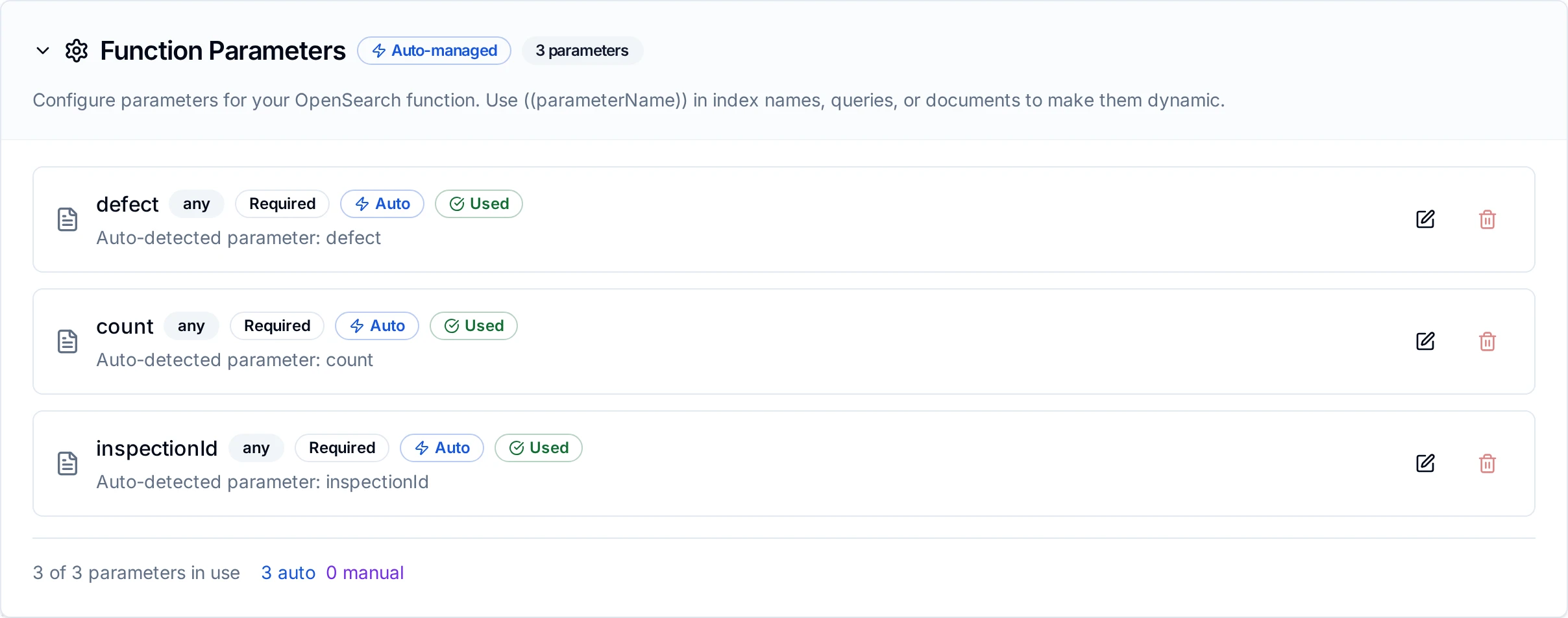
An Index function whose body and document id take ((parameters)); the Function Parameters panel picks them up on its own
Pipeline Integration
Each function appears in the pipeline editor as its own node: OpenSearch Search, OpenSearch Index, OpenSearch Get and OpenSearch Delete. See OpenSearch Nodes for their outputs.
Common Use Cases
- Quality events into the plant's search store: index each inspection result, alarm or batch record into the OpenSearch cluster IT already runs, and let OpenSearch Dashboards show it
- Look a record up from a pipeline: get a device's registry document by ID, or search recent events before deciding what to do
- Retention: delete processed or expired documents by ID
Troubleshooting
| Symptom | Cause | Fix |
|---|---|---|
OpenSearch ping failed (status 401 Unauthorized) | Wrong username or password | Check the user in the security plugin, or the domain's master user |
OpenSearch ping failed (status 403 Forbidden) with The security token included in the request is invalid | The AWS credentials are wrong or expired | Check the keys, or the role the default chain resolves |
403 with no permissions for [...] | The IAM identity or user is not mapped to an OpenSearch role that allows the action | Map it under Security → Roles in OpenSearch Dashboards |
x509: certificate signed by unknown authority | The cluster uses a certificate your host does not trust | Paste the cluster's root CA into CA Certificate |
index_not_found_exception | The function names an index that does not exist | Fix the index name, or create the index |
Log: connected without identifying the server: the cluster answered GET / with security_exception (or AWS denied GET / to <role>) | The identity may use its indices but not read the root (cluster:monitor/main, or es:ESHttpGet on the domain root) | Nothing to fix for index work. Grant cluster:monitor/main if you want the server named in the log |
OpenSearch ping failed (status 403 Forbidden) with User: anonymous is not authorized | The request reached an IAM-protected domain unsigned | Choose AWS IAM (SigV4) as the sign-in method |
OpenSearch ping failed (status 403 Forbidden) with an HTML page, an empty answer or traffic filtering | Something in front of the cluster (a proxy, a firewall, a traffic filter) refused the request | Allow this host through it, or point the address past it |
the address answered GET / without version.number or a product header | The address is a web server or another service, not an OpenSearch node | Check the address and port |
… contains # or ?, has a % that does not start an escape, or has a "." or ".." path segment | An index or document ID would change the request instead of naming a target. The connector does not escape it for you, so an ID already written escaped (a%2Fb) keeps its meaning | Write # as %23, ? as %3F and % as %25 (an ID PO#1234 is PO%231234); rename a . or .. segment |
The security token included in the request is expired | The AWS session token expired | Keys from the default chain (a role, IRSA) are refreshed, and the call is retried. A session token typed into the connection never refreshes, so the call fails for good and the connection fails at once instead of retrying: replace all three keys, or leave them empty to use the default chain |
a node address takes no query (?…) or fragment (#…) | A node URL carries ?… or #…, which requests would drop | Remove it; a path prefix (https://proxy/opensearch) is kept |
a password is used only by basic authentication, region is used only by sigv4, AWS keys are used only by sigv4 | The connection carries a credential its sign-in method ignores | Clear it, or choose the method that uses it. The form does this when you switch method |
address … is an OpenSearch Serverless collection | The address is an aoss endpoint | OpenSearch Serverless is not supported yet (#8524); use a domain endpoint |
AWS refused the signature's time: this host's clock is off by about … (behind / ahead of AWS's); fix the host clock (NTP), or, when AWS's answer shows less than a minute, AWS refused the signature's time: check this host's clock (NTP) | This host's clock is further from AWS's than AWS allows: AWS answers Signature expired for a slow clock and Signature not yet current for a fast one | Fix the host clock (NTP). The connector corrects nothing itself; the message says by how much and which way the clock is off, and calls work again as soon as it is right |
sessionToken is used only with accessKeyId and secretAccessKey | A session token was saved without the key pair it was issued with, so it would never be sent | Set the key pair, or clear the token to use the default credential chain |
Calls fail with 429 or rejected_execution_exception | The cluster is shedding load | The platform waits and retries; reduce the pipeline's concurrency if it persists |