Run Maestro on your own model
Beta, limited early access: connect a model that runs on your own hardware, and nothing Maestro reads or writes leaves your network.
- Works with
- Any OpenAI-compatible server
- Tested on
- One NVIDIA Quadro RTX 8000, 48 GB
- Measured
- November 2026, 83 tasks
Maestro is Beta and is not turned on by default. To use it, request early access: you get a licence that carries Maestro. The results on this page come from a development build in November 2026.
With a cloud provider, every question Maestro answers sends your prompt, the tool results and the plant values in them to that provider. With a model you run yourself, that traffic stays between MaestroHub and a server on your own network. No key is needed and no question has a price.
It works, and the model you pick decides how well. In November 2026 an open model with 27 billion parameters, on one graphics card, passed 85% of the tasks Maestro was never tuned on. The recommended cloud model reached 80% in October. Other open models on the same card passed between 55% and 80%.
What you need
- A model server that speaks the OpenAI chat API, with tool calling. llama.cpp's server, vLLM, Ollama, LM Studio and LiteLLM all do. MaestroHub must be able to reach it over your network.
- A model that calls tools reliably. Maestro works by calling tools, 43 of them. A model that answers in text when it should call a tool can't run Maestro. The Test button checks this for you.
- Room for a long prompt. Every request carries Maestro's instructions and its tool descriptions, about 30,000 tokens before the conversation starts. Run the server with a context of 64,000 tokens or more. Our runs used 131,072.
- A graphics card that holds the model and that context together. The table below shows what four models needed.
Results
Each model ran the same 83 graded tasks through Maestro, on a workspace with about 2,000 plant topics, on the machine described under Test setup.
| Model | Tasks Maestro was tuned on | Unseen tasks | Median time per task | Memory on the card | Licence |
|---|---|---|---|---|---|
| Qwen 3.8 27B (Q8) | 95% (60 of 63) | 85% (17 of 20) | 88 s | 35 GB | Apache 2.0 |
| Qwen 3.6 27B (Q8) | 95% (60 of 63) | 80% (16 of 20) | 44 s | 35 GB | Apache 2.0 |
| Gemma 4 31B (Q8) | 90% (57 of 63) | 70% (14 of 20) | 85 s | 43 GB | Apache 2.0 |
| gpt-oss 20B | 48% (30 of 63) | 55% (11 of 20) | 37 s | 14 GB | Apache 2.0 |
- Unseen tasks are the better guide to your own requests: 20 tasks written from this documentation by a separate author and never used to tune Maestro.
- Qwen 3.8 27B scored highest and was slow. Every task it failed ran out of time; none ended in a wrong answer. It writes a long chain of reasoning before acting, so a hard task can take more than the six minutes allowed. Run alone, two of its six timed-out tasks finished in time; four did not.
- Qwen 3.6 27B built apps and pipelines. It built 9 of 10 App Studio apps inside the time limit. Its failures were wrong answers, not loops.
- Gemma 4 31B sits between them. It built 7 of 10 apps. It leaves the least room on a 48 GB card.
- gpt-oss 20B answers questions and makes small changes, and can't build. It built none of the 10 apps. In 17 of its 42 failed tasks it repeated a failing tool call until Maestro stopped the turn.
- Speed. Qwen writes about 19 tokens a second on this card and gpt-oss 20B about 125. Qwen still finished the whole run in the same two hours, because it needs far fewer steps. In a chat, expect about a minute for a simple answer from Qwen on this hardware, and several minutes for an app.
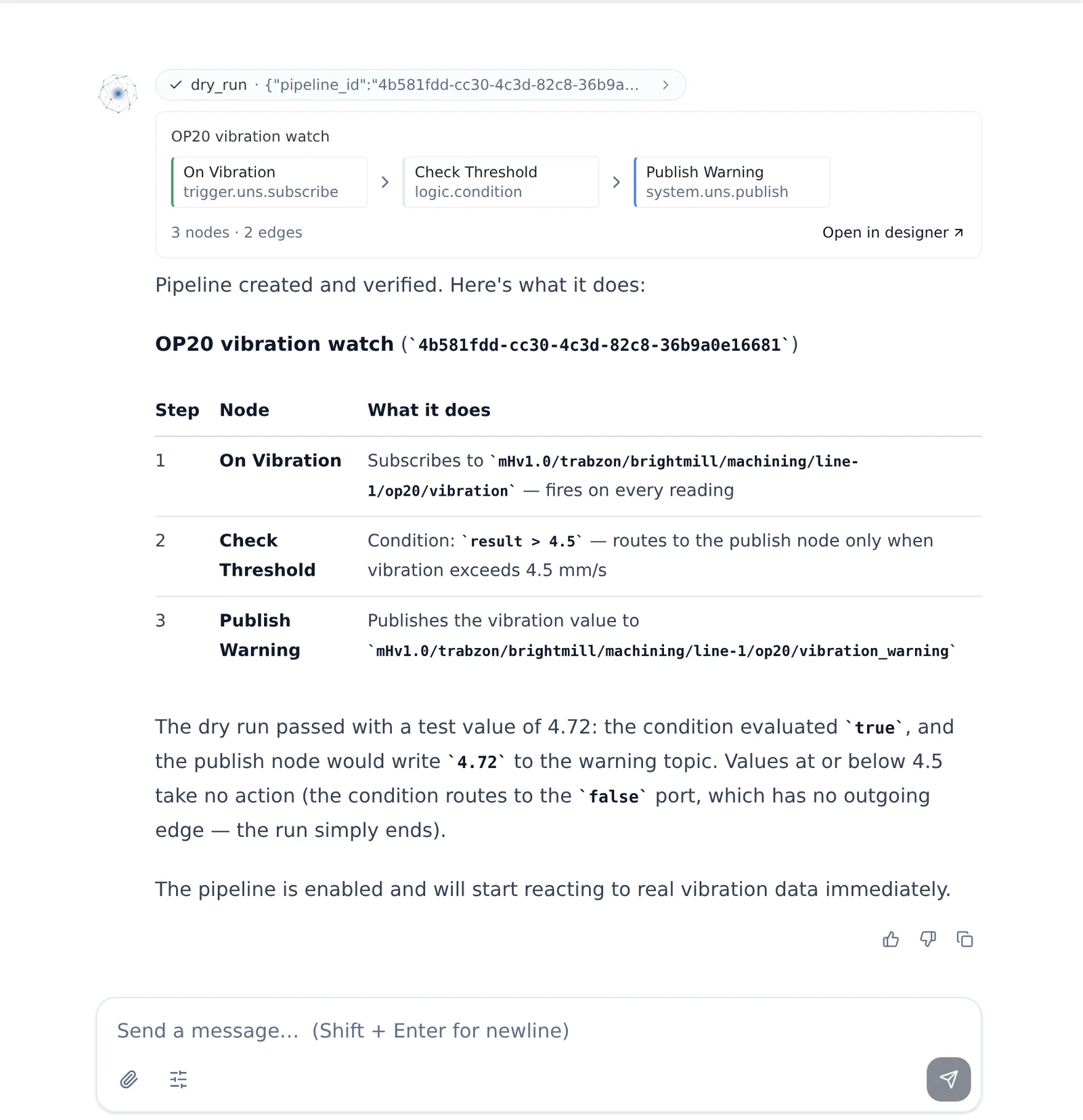
One sentence in, a pipeline out: Qwen 3.6 27B on our own card, on the built-in demo plant, after the person confirmed
For the cloud models' scores on the same kind of tasks, see Choosing a model.
Connect your model
A system administrator does this once, under Second Brain → Providers.
-
Start your model server and note its address. It must end in
/v1, for examplehttp://llm.plant.example:8080/v1. -
Select Connect a provider, then Custom / self-hosted.
-
Fill in the form:
- Connection name: a name you'll recognise, such as
plant-gpu. Models bind to this name and it can't be changed later. - API key: leave it empty if your server has none.
- Endpoint URL: the address from step 1.
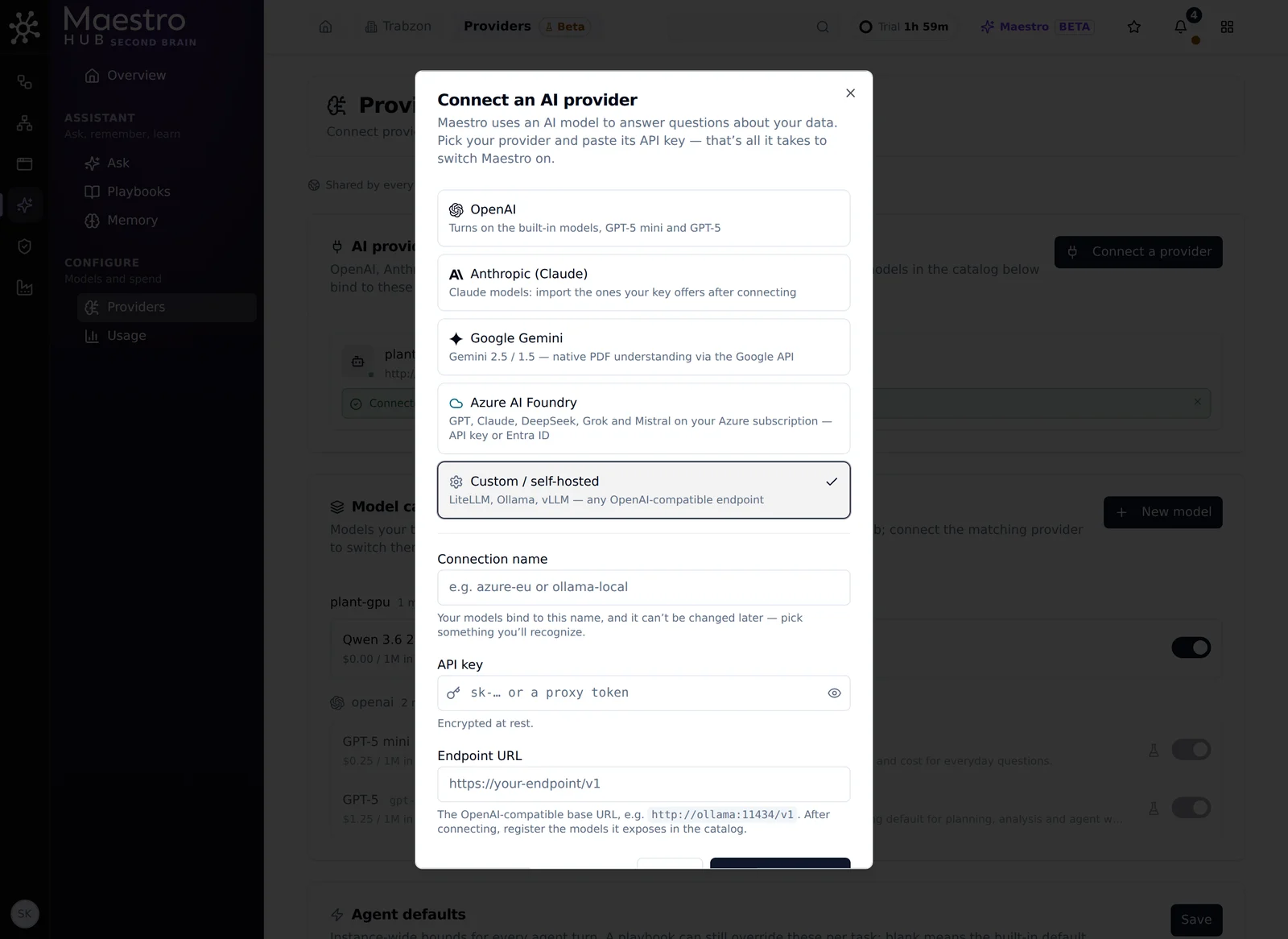
Custom / self-hosted: a name, an optional key and the server's address
- Connection name: a name you'll recognise, such as
-
Select Test & connect. MaestroHub sends one request to the server and saves the connection when it answers.
-
Select New model and register the model the server runs:
- Provider account: the connection you just made.
- Model id (vendor): the name your server knows the model by.
- Context tokens: the context your server runs with, for example
131072. Don't leave this empty. See Set the context size. - Input price and Output price:
0and0, which Maestro shows as free. - Capabilities: keep chat and tools.
-
Select Add to catalog, then Test on the new row. The test sends one message and then asks the model to call one tool. A model that passes both can run Maestro.
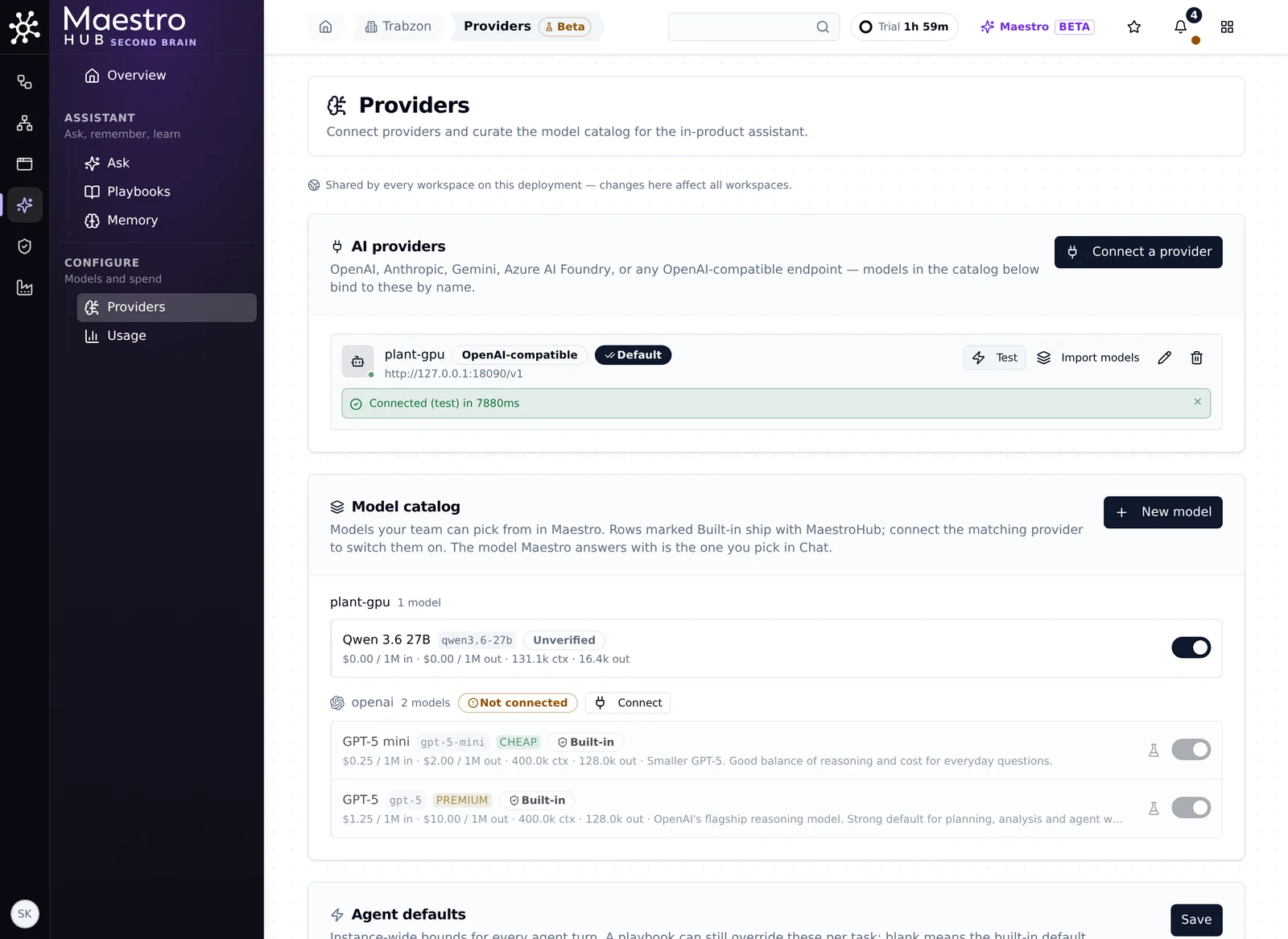
Connected: the local server as a provider, and its model in the catalog
People then pick the model from the menu under the chat box, or an administrator makes it the default.
Set the context size
Maestro decides how many tools to show a model from the Context tokens on its catalog row. When the tool descriptions take more than half of that number, Maestro shows the model only two tools and a short index, and the model must ask for the others. Models do worse in that mode. In October, gpt-5-mini passed 18 of 32 tasks that way, against 27 with every tool in view.
A model with no Context tokens is treated as holding 32,000, which puts it in that mode. So set the number to what your server really runs with, and run the server with at least 64,000.
Things to know
- One request at a time. A model server with one slot answers one person at a time, and the others wait. Size the server for how many people will ask at once.
- Memory and the document library need an embedding model. Maestro's memory search and document search ask the same provider for embeddings. A server that runs only a chat model leaves those two features off. Chat, Explain & fix, Draft it for me and the builders don't need them.
- Ollama and the reply cap. MaestroHub sends the cap on a reply's length as
max_completion_tokens. Ollama 0.40.16 ignored that field when we measured it in November 2026, so replies were not capped. llama.cpp's server honours it. - The nightly model check calls your server too. MaestroHub sends each enabled model one small request every night to confirm it still answers.
Safety does not depend on the model
No model, cloud or local, strong or weak, writes or deletes anything without the person's approval. MaestroHub holds every change on a confirmation card until the person says yes, and every tool call runs with that person's own permissions. A weaker model proposes worse changes. It can't make one on its own.
Test setup
Every result on this page comes from one machine:
| Part | What we used |
|---|---|
| Graphics card | One NVIDIA Quadro RTX 8000, 48 GB (a 2018 workstation card, Turing generation) |
| Driver | NVIDIA 535.288.01, CUDA 12.2 |
| Processor | Intel Xeon Gold 6242, 2.8 GHz, 32 threads |
| Memory | 125 GB |
| Model server | llama.cpp server, build b12679, the official CUDA container image, one request at a time |
| Model files | GGUF, 8-bit (Q8_0) |
| Context | 131,072 tokens |
| MaestroHub | A development build of 24 to 25 November 2026, on the same machine |
A newer card answers faster. The scores are about the model, and should hold on any card that fits the model and its context; the times on this page are this card's.
How this was measured
- Setup: each model ran Maestro on the same build, in a fresh workspace seeded with about 2,000 plant topics. The model server was llama.cpp with one slot and a context of 131,072 tokens.
- Grading: each task was graded on what it left in the instance (topic values, saved pipelines, app drafts) and on the figures in the answer.
- Time limit: a task that took more than 6 minutes counts as failed, as in the cloud runs. Qwen 3.6 27B passed two more tasks between 6 and 12 minutes.
- Runs: each model ran every task once. Gemma's unseen tasks were run a second time, because the first run outlasted the evaluation licence's two-hour session and pipelines were paused; only the second run counts. Treat differences under about 10 points as noise.
- Not the same build as the cloud results: the cloud models on Choosing a model were measured in October 2026, on an earlier build and 85 tasks. The two sets of numbers are close enough to compare models by, not to rank them by a few points.